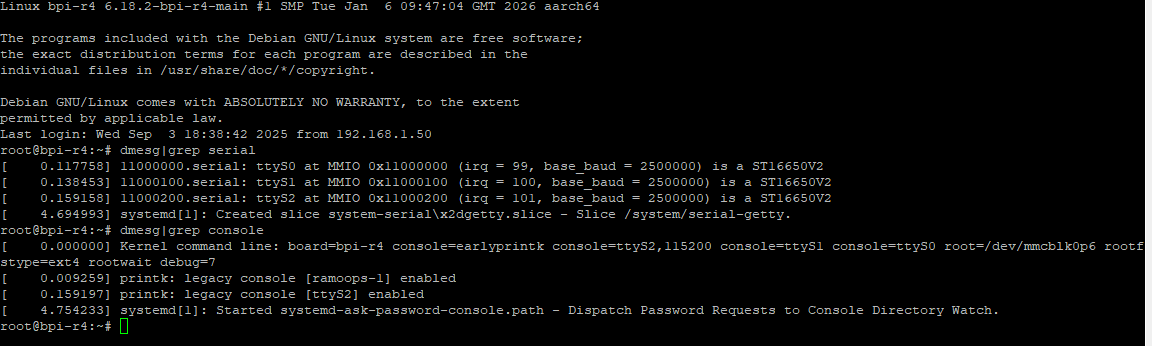
I changed the u-boot + kernel to use uart1/serial1 by changing the dts
added uart1 pins and updated the serial1 adding these (mt7998a.dtsi) and on the bpi-r4 dtsi changed the stdout to serial1 and added status okay for serial1
created the bl2 + fip, compiled kernel and buildimg but nothing shows on the console after these changes
i checked both uart1 + uart2 have current so they are live but no traffic
.
What am I missing ? if for some reason serial0 is blown isn’t there any way to have another console?
Afaik the early bootstage is only printed on debug-uart. I did some tests on R3 adding second uart for a logger-circuit with only partial success…one issue i faced was the speed cannot be set via cmdline,only at userspace.
Have you tried with reduced speed of 9600 baud on your client? At least the output have to be mapped to the other uart which may work for uboot and linux but not bootrom.
i did with no luck … I measured the uart2 voltage and there is about 3.3v and on rx/tx if I do an echo to /dev/ttyS2 is see the traffic counters incrementing
Remember speed-setting was not working on my tests trying same on R3…uart1/2 were always at 9600 baud till i changed in userspace.(cmdlije was not enough to set speed).
Uart2 is 58/59 based on schematic,but i see no such lite definition in pinctrl…2_3 adds gpio 60+61,maybe these pins are blocked,but this should result in probe fail
Maybe define 2_3_lite like this
static const int mt7988_uart2_3_lite_pins[] = { 58, 59 };
static int mt7988_uart2_3_lite_funcs[] = { 3, 3 };

PINCTRL_PIN_GROUP("uart2_3_lite", mt7988_uart2_3_lite),
I tried to short UART2_TX & RX while doing a cat on /dev/ttyS2 and nothing showed up! … the only way I can get the RX counters to increment is by forcing a local echo on Putty
it may be perhaps a problem with my board … are you able to test with yours ?
Afaik for cat you have to set the speed too…maybe system have not completely set speed aettings…try to set speed like i did in wiki above before sending receive…and if you send you should see it in console too,when running cat in background
so, I finally was able to get u-boot + linux console on uart2 … ongoing investigation on why I can’t get type in … here are my findings so far
pinctrl has a group definition for rops_uart0_1 and uart1_1 but with no pins definition however there’s are tops definitions. This issue is on all distros … amended to tops_ see patch below
a second issue i found with TX and RX is that UART shares PINS with live PWMs namely for UART1 pwm2 and pwm3 that are assigned on the dts to pwm … only by removing pwm2 - 5 i was able to get the uart2 console to work … weird that there is no message when there are pins funcs clashes