Nope, i have three so i can compare voltages, but i think that cpu died.
1 Like
i didn’t expect this board will fail all of a sudden, barely 3 weeks since ive used it…I still have my alix 2d13 board working and kicking no hiccups at all…g
1 Like
Same here wrap 2e3 working perfectly fine for a good 10 years, i’ve only replaced capacitors from time to time and upgraded wlan to n cards. For garden absolutly devil.
1 Like
disconnect all the cards (fm350 , mt7916 , rt2800-pci usb) , still no output on serial console.same issue even if I toogle to boot on nand ( factory openwrt img) and emmc . I use 12v 5A power and tried on pd too but same… I will return this board and maybe get a new version
1 Like
Yep, this isn’t a good sign for us… I’ll do the same.
1 Like
Similar cases here:
@sinovoip and @simon respond like this:
- You can contact our sales or [email protected] and ask for support.
4 dead boards already damn, hoping the board I ordered doesn’t end up dying
1 Like

I think it’s faulty DC adapter. Always use USB-PD when possible, it’s much more safe for the board.
Nope, all voltages are ok, cpu died i belive. I’ve used dell original psu usb-c.

got a reply from banana pi customer service. I told them the cards (FM350 , Asiarf 7916) and sfp I’m using which are 1.25G Huawei SFP module since my switch was capable of SFP only.Does it means we need to use 10G modules only in our R4 ?
Nope, sfp slots works with 1gig, 10gig and 2.5gig i’ve persolanly tested. Problem with dying is more complicated.
deleted because of wrong content!
Mainline openwrt is different, openwrt mainline is the master branch and is non stable and the other builds are stable like 23.05 but both are official
Every day, I learn more.
It is a bit off topic but I can not call the openwrt version from firmware-selector mainline?
And I have to call the version from bananapi “official”.
This feels wrong …


Banana pi is basically official openwrt with MTK sdk in it, in reality all OpenWRTs are pretty muc official, only RooterOS etc are forks with heavy modifications
So, second try,
I just read your comment, not the whole chat.
There are differend versions of openwrt. BananaPI has there own special version.
I’m not up-to-date about the drivers of any version! But history shows that at the beginning of the hardware release, the Banana Pi OpenWrt version could be seen as an attractive option. This is because it has the driver (for their specially recommended hardware) implemented.
With the “natural evolution” of this OpenWrt version → (https://firmware-selector.openwrt.org/), the game changes because it supports more hardware (like your huawei SFP). This is already happened with R3 → I didn’t think someone is still using the Banana Pi version for the BPI-R3 for any advantages.
So, with this information, you shouldn’t be surprised about the answer. The documentation (Getting Started BPI-R4 | BananaPi Docs) shows only 10G for R4 SFP:

If I were Banana Pi support, I would ask you, “Are you using our software and our recommended hardware? If not, you might encounter compatibility issues.”
For debugging with bananapi, I would may use there Version!
Hello, The Banana Pi BPI-R4 has never booted since first unboxing.
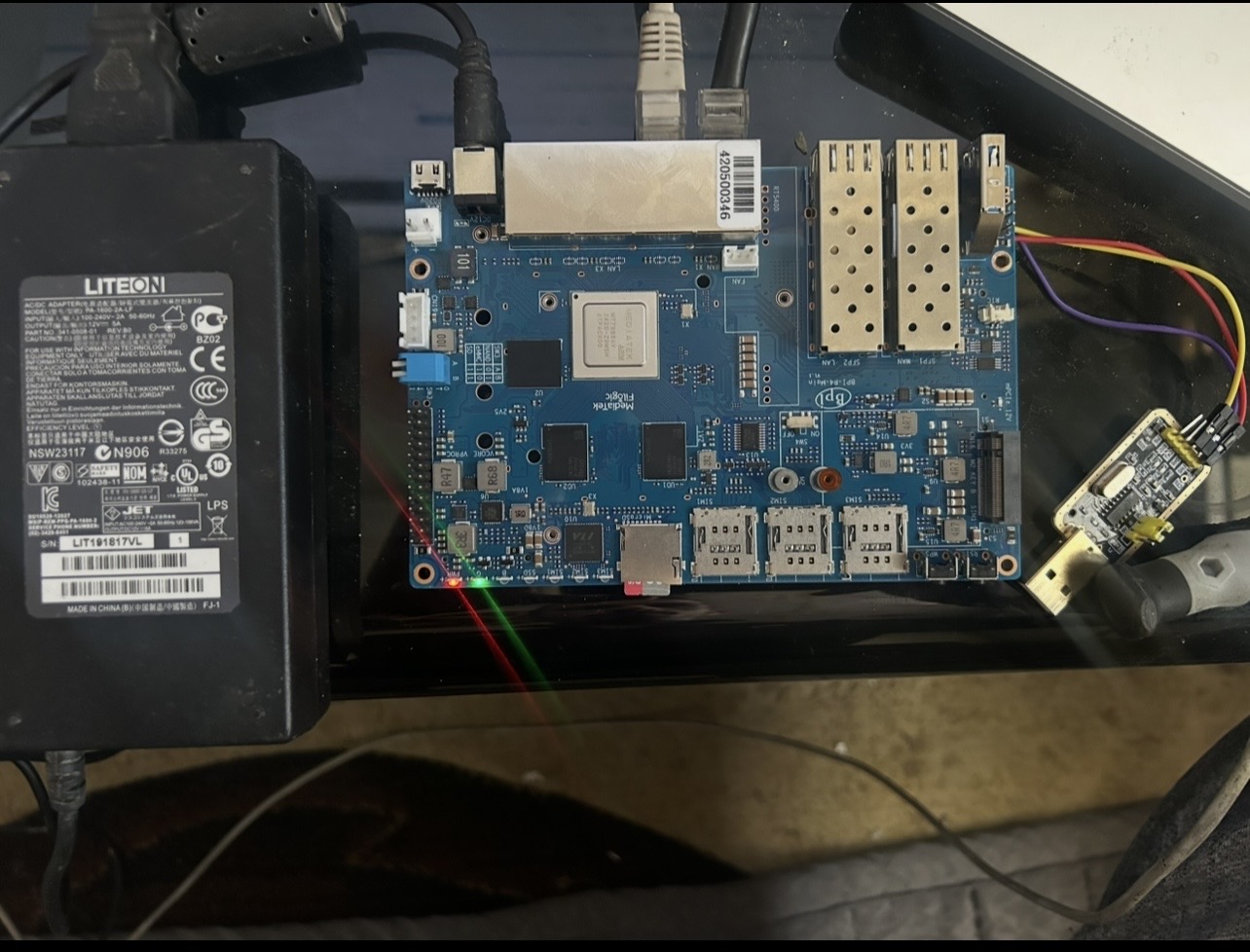
Current state:
- Power LED red solid
- Green LED solid
- All LAN LEDs off
- No Ethernet link
- No serial output at all (completely silent)
- Board appears powered but does not boot
Tested:
- Multiple power supplies
- Correct UART wiring (115200 8N1)
- Boot with and without SD card
- Multiple SD cards
- Different OS images: Debian, OpenWrt, Ubuntu, Armbian
Result is always the same: no boot and no UART output.
How exactly have you connected uart? On photo it is not connected. Rx/tx need to be crossed,3.3v and gnd are necessary.
Afaik green led is only lighting when system booted to some state (based on image used).
HI @frank-w UART wiring is confirmed: TX/RX crossed, GND connected, 3.3V USB-TTL adapter. Terminal: 115200 8N1, no flow control.
Tested again with NO SD card inserted. Still absolutely no UART output (not a single character).
LAN LEDs remain off. Green LED stays solid regardless of image or no SD.
This suggests the board never reaches BootROM stage.