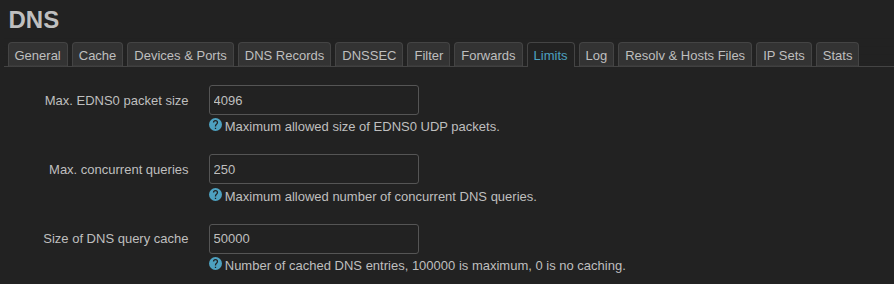
I’ve got a busy network. I often see 2000 or more entries in a single hour to the dnsmasq cache in my DNS stats.
I want a high cache hit rate with no cache evictions, so I got to wondering how I could increase the cache size.
You can’t edit /etc/dnsmasq.conf and add cache-size=50000… dnsmasq will throw this error:
daemon.crit: dnsmasq[1]: illegal repeated keyword at line 23 of /var/etc/dnsmasq.conf.cfg01411c
daemon.crit: dnsmasq[1]: FAILED to start up
… and the LuCI interface will show the Size of DNS query cache entry as red.
You can’t use the -c or --cache-size= startup flag for dnsmasq… it’ll trim it back to 10000.
There is a way, and it’s incredibly easy.
Issue:
vi /www/luci-static/resources/view/network/dns.js
… press i to enter editing mode, and change this:
o=s.taboption('limits',form.Value,'cachesize',_('Size of DNS query cache'),_('Number of cached DNS entries, 10000 is maximum, 0 is no caching.'));o.optional=true;o.datatype='range(0,10000)';o.placeholder=150;
… to this:
o=s.taboption('limits',form.Value,'cachesize',_('Size of DNS query cache'),_('Number of cached DNS entries, 100000 is maximum, 0 is no caching.'));o.optional=true;o.datatype='range(0,100000)';o.placeholder=150;
… press Esc to exit editing mode, then :wq to save and exit.
Now issue:
uci set dhcp.@dnsmasq[0].cachesize='50000'
uci commit dhcp
/etc/init.d/dnsmasq restart
You can ascertain that the setting took by issuing:
logread | grep "started, version"
… which should return:
daemon.info dnsmasq[1]: started, version 2.93 cachesize 50000
Note the change from stock:
daemon.info dnsmasq[1]: started, version 2.93 cachesize 10000
Make it immune to being reset upon firmware updates by placing:
/www/luci-static/resources/view/network/dns.js
… in System >> Backup / Flash firmware >> Configuration tab, and click the Save button.