We have external instruments connected to the Banana Pi via USB Type-A. Occasionally, we must manually unplug and re-plug them to power-cycle and reboot the instruments.
For the sake of remote troubleshooting or as a temporary workaround, is it possible to cut the power to the USB Type-A port via command line or code?
Troubleshooting Actions Taken: I consulted an AI and attempted the following commands, but the USB power was not disconnected:
echo '0' | sudo tee /sys/bus/usb/devices/1-1.4/authorized
echo 'auto' | sudo tee /sys/bus/usb/devices/1-1.4/power/control and autosuspend_delay_ms
echo '1-1.4' | sudo tee /sys/bus/usb/drivers/usb/unbind
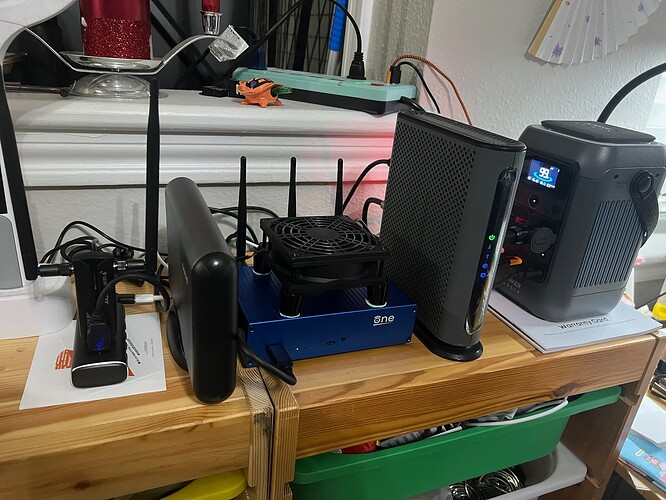
I use the Rosonway RSH-A104 USB hub, which can have power to its ports programatically turned on and off. Each of the 4 ports is individually controllable.
That’ll save you wear and tear on the USB-A plugs.
I got rid of the wall-warts, and I’m powering everything from an Anker Solix C300 DC… it provides 5 V (for the USB hub (and everything plugged into the USB hub), 12 V (for the modem and the external hard drive enclosure) and 15 V (for the OpenWRT One router via USB-PD). I charge the Anker Solix C300 DC via a 140 W wall-wart. That also smooths out power line fluctuations (I’ve blown out 3 wall-warts from voltage fluctuations due to windmills switching onto and off the grid).
BTW, if anyone wants that Motorola MB8611 modem (gratis, you pay shipping), let me know. I’m getting a Netgear Nighthawk CM3000. The Motorola cable modem division fell flat, so there aren’t DOCSIS updates, so the modem isn’t playing nice with Comcast’s network upgrades (lots of dropped packets, wide latency swings). It’ll still work for other cable providers, though… Comcast isn’t upgrading to standard DOCSIS 4.0, they’re doing something else. For cable providers upgrading to standard DOCSIS 4.0, it should work.