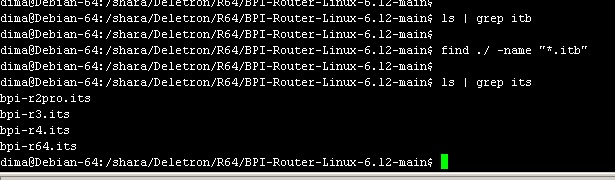
When you build kernel yourself the itb is in root of git clone. Same dir as the bpi-r64 its (source for the itb).
You have to boot your self build kernel and not the one from the image/my pipeline.
When you build kernel yourself the itb is in root of git clone. Same dir as the bpi-r64 its (source for the itb).
You have to boot your self build kernel and not the one from the image/my pipeline.
i don’t have the created file “bpi-r64.itb”
how do i create this “itb” file ?
How does build.conf looks like? It was created in my test in 6.18. By default (not sure if in 6.12 too) a ramdisk is created as …/build to speed up compile process…maybe the itb is created there and not copied to the source root.
BPI-Router-Linux-6.12-main# cat  build.conf
uploaduser=$USER
uploadserver=r2
uploaddir=/var/lib/tftp
#uploaduser=root
#uploadserver=192.168.0.11
#uploaddir=/boot/bananapi/bpi-r2/linux

builddir=../build
ramdisksize=4G
#numproc=8

#board=bpi-r2
board=bpi-r64
#board=bpi-r2pro
#board=bpi-r3
#board=bpi-r4

#r64 with rtl8367
#boardversion=v0.1
#r2pro with rtl8367
#boardversion=v00

#mainline uboot for r64 (old ATF) needs 64bit uImage
#uimagearch=arm64

#grep whitelist filter for adding modules to initramfs
ownmodules='mt76\|bluetooth'
there is no ‘*itb’ ./BPI-Router-Linux-6.12-main, …/SD, …/build
Was your build successful? Have you got the choice where you can pack,install and upload the kernel? So you see a larger block with the fit sections (configurations,fdt,…)? Also look in build.log…maybe build was not successful
hi
nothing
i don’t have creaated bpi-r64.itb
i have done:
$ git clone --single-branch --branch 6.18-rc https://github.com/frank-w/BPI-Router-Linux
$ cd BPI-Router-Linux
$ nano build.conf
$ ./build.sh importconfig
$ ./build.sh config
$ ./build.sh
$ cd ../
$ find ./ -name "*.itb"
$
nothing
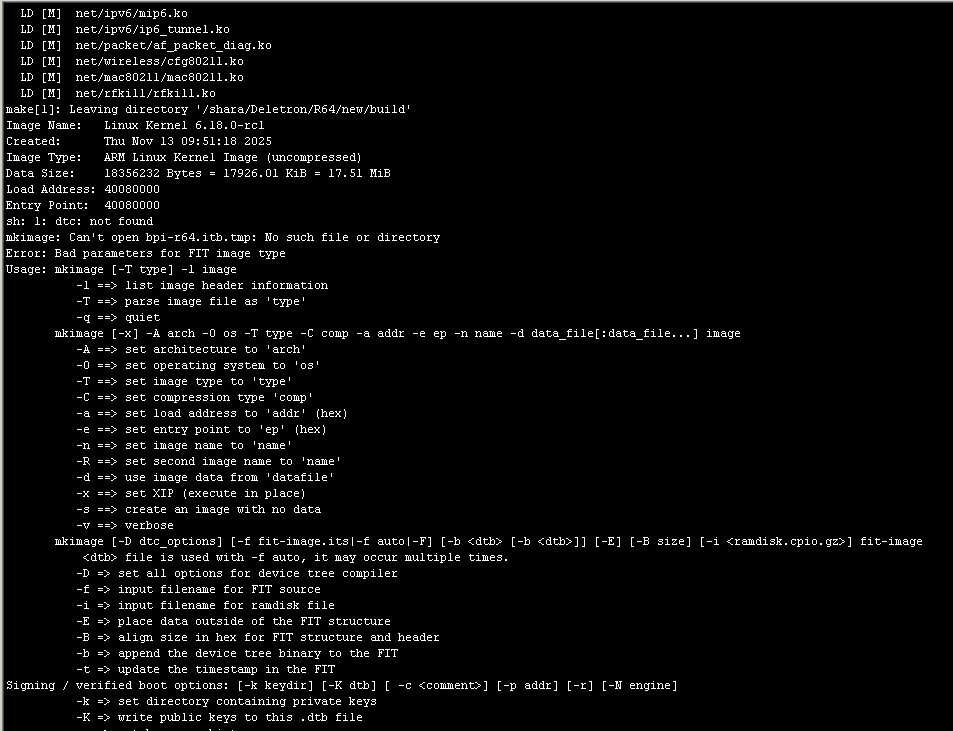
cat build.log
/shara/Deletron/R64/new/BPI-Router-Linux/arch/arm64/boot/dts/mediatek/mt7987a-bananapi-bpi-r4-lite-mikrobus.dtsi:24.3-10: Warning (ranges_format): /mikro-bus:ranges: empty "ranges" property but its #address-cells (0) differs from / (2)
/shara/Deletron/R64/new/BPI-Router-Linux/arch/arm64/boot/dts/mediatek/mt7987a-bananapi-bpi-r4-lite-mikrobus.dtsi:24.3-10: Warning (ranges_format): /mikro-bus:ranges: empty "ranges" property but its #size-cells (0) differs from / (2)
In file included from /shara/Deletron/R64/new/BPI-Router-Linux/drivers/net/ethernet/mediatek/mtk_eth_soc.c:25:
/shara/Deletron/R64/new/BPI-Router-Linux/include/linux/pcs/pcs.h:90:1: warning: 'fwnode_phylink_pcs_get_from_fwnode' defined but not used [-Wunused-function]
   90 | fwnode_phylink_pcs_get_from_fwnode(struct fwnode_handle *fwnode,
      | ^~~~~~~~~~~~~~~~~~~~~~~~~~~~~~~~~~
/shara/Deletron/R64/new/BPI-Router-Linux/include/linux/pcs/pcs.h:78:12: warning: 'register_fwnode_pcs_notifier' defined but not used [-Wunused-function]
   78 | static int register_fwnode_pcs_notifier(struct notifier_block *nb)
      |            ^~~~~~~~~~~~~~~~~~~~~~~~~~~~
i don`t see “block with the fit sections”, where i can see it ?
strange…have you u-boot-tools installed for mkimage (can you call this command)? possibly an error there is not added to build.log. but build.sh should check for u-boot-tools too and exit when it is not there before building.
this is how it should look like after build:
  OBJCOPY arch/arm64/boot/Image
  LD [M]  drivers/net/wireless/mediatek/mt76/mt7615/mt7615-common.ko
  GZIP    arch/arm64/boot/Image.gz
  LD [M]  drivers/net/wireless/mediatek/mt76/mt7615/mt7615e.ko
  LD [M]  drivers/bluetooth/hci_vhci.ko
  LD [M]  drivers/bluetooth/btmtk.ko
  LD [M]  drivers/hwmon/pwm-fan.ko
  LD [M]  net/bluetooth/bluetooth.ko
  LD [M]  drivers/bluetooth/btmtkuart.ko
  LD [M]  net/rfkill/rfkill.ko
make[1]: Leaving directory '/media/data_ext/git/kernel/build'
Image Name:   Linux Kernel 6.12.55-main
Created:      Thu Nov 13 08:36:40 2025
Image Type:   ARM Linux Kernel Image (uncompressed)
Data Size:    17088520 Bytes = 16688.01 KiB = 16.30 MiB
Load Address: 40080000
Entry Point:  40080000
FIT description: U-Boot fitImage for bpi-r64 aarch64 kernel
Created:         Thu Nov 13 08:36:41 2025
 Image 0 (kernel-1)
  Description:  Linux Kernel 6.12.55-main
  Created:      Thu Nov 13 08:36:41 2025
  Type:         Kernel Image
  Compression:  gzip compressed
  Data Size:    6221483 Bytes = 6075.67 KiB = 5.93 MiB
  Architecture: AArch64
  OS:           Linux
  Load Address: 0x40080000
  Entry Point:  0x40080000
  Hash algo:    sha1
  Hash value:   c6a9558f8f3645ff4aa618dd6e36e9ee1dc86155
 Image 1 (fdt-1)
  Description:  Flattened Device Tree blob
  Created:      Thu Nov 13 08:36:41 2025
  Type:         Flat Device Tree
  Compression:  uncompressed
  Data Size:    32088 Bytes = 31.34 KiB = 0.03 MiB
  Architecture: AArch64
  Hash algo:    sha1
  Hash value:   5e3b59809560cb2fd29fb4c440bb0bebe1ca84d2
 Default Configuration: 'conf-1'
 Configuration 0 (conf-1)
  Description:  Boot Linux kernel with FDT blob
  Kernel:       kernel-1
  FDT:          fdt-1
  Hash algo:    sha1
  Hash value:   unavailable

real	6m55.254s
user	70m19.536s
sys	7m18.703s
===========================================
1) pack
2) install to SD-Card
3) deb-package
4) upload
choice [1234]:
$ ls -lh bpi-r64*.itb
-rw-rw-r-- 1 frank frank 6,0M Nov 13 08:36 bpi-r64-6.12.55-main.itb
-rw-rw-r-- 1 frank frank 6,3M Nov 11 21:20 bpi-r64-6.18.0-rc1.itb
-rw-rw-r-- 1 frank frank 6,0M Nov 13 08:36 bpi-r64.itb
only this
dpkg -l | grep u-boot-tools
ii  u-boot-tools                         2023.01+dfsg-2+deb12u1              amd64        companion tools for Das U-Boot bootloader
sh: 1: dtc: not found
something is missing in my system…
mb device-tree-compiler ?
YES
apt install device-tree-compiler
 )
)
Thanks, friends!
i managed to build the kernel with policy routing )
my last two questions:
(i do ./build.sh clean & sudo unmount ../build)
What should i write into /boot/bananapi/bpi-r64/linux/uEnv.txt?
Normally you do not have to use clean or umount
You can install directly to sdcard and after this is done it displays what you have to add to uenv.txt (using filename you’ve choosen).
fit=filename.itb
But be aware about directory tried by my uboot for r64…first uEnv.txt in bananapi/bpi-r64/linux is tried and if it does not exist the root of boot partition is used (default on later boards).
Thank you Frank!
===========================================
1) pack
2) install to SD-Card
3) deb-package
4) upload
choice [1234]:2
Install Kernel to SD Card
generate branch vars...
getting git branch:
* 6.12-main
kernbranch:6.12-main,gitbranch:-main
using arch/arm64/boot/dts/mediatek/mt7622-bananapi-bpi-r64.dtb...
Image-filename: 6.12.55-main
Name: 6.12.55-main
Press [enter] to copy data to SD-Card...
SD-Card not found!
my sd card named /dev/sdb
Is my image flashed on this card before? It should automaticly mount BPI-BOOT and BPI-ROOT to /media/$USER (default on ubuntu)
There is afair also “./build.sh mount” i needed on R2Pro,but R64 should work without this. Have not tested this for long time.
I tried, I just got this:
[root@bpir64 ~]# uname -a
Linux bpir64 6.17.8-bpi #32 SMP PREEMPT Fri Nov 14 04:02:23 UTC 2025 aarch64 GNU/Linux
[root@bpir64 ~]# dmesg | grep scp
[   24.230136] mtk-scpsys 10006000.power-controller: sync_state() pending due to serial0-0
i guess you have mt7915e module loaded because kernel and modules installed to sdcard (i only booted kernel from tftp so the mt7915e module cannot be loaded).
I guess because:
CONFIG_MT7622_WMAC=y
i have this set too, but above this option there is CONFIG_MT7915E=m 
My guess I do not have this because
  │ Symbol: MT7622_WMAC [=y]                                                                                                                                           │
  │ Type  : bool                                                                                                                                                       │
  │ Defined at drivers/net/wireless/mediatek/mt76/mt7615/Kconfig:21                                                                                                    │
  │   Prompt: MT7622 (SoC) WMAC support                                                                                                                                │
  │   Depends on: NETDEVICES [=y] && WLAN [=y] && WLAN_VENDOR_MEDIATEK [=y] && MT7615E [=m] && (ARCH_MEDIATEK [=y] || COMPILE_TEST [=n])                               │
  │   Location:                                                                                                                                                        │
  │     -> Device Drivers                                                                                                                                              │
  │       -> Network device support (NETDEVICES [=y])                                                                                                                  │
  │         -> Wireless LAN (WLAN [=y])                                                                                                                                │
  │           -> MediaTek devices (WLAN_VENDOR_MEDIATEK [=y])                                                                                                          │
  │             -> MediaTek MT7615E and MT7663E (PCIe) support (MT7615E [=m])                                                                                          │
  │ (3)           -> MT7622 (SoC) WMAC support (MT7622_WMAC [=y])                                                                                                      │
  │ Selects: REGMAP [=y]                                                                                                                                               │
MT7622_WMAC [=y] is suboption of MT7615E [=m]
and this MT7615E module is not loaded in my test because not available on tftp boot
Yup
I got
CONFIG_MT7615E=m