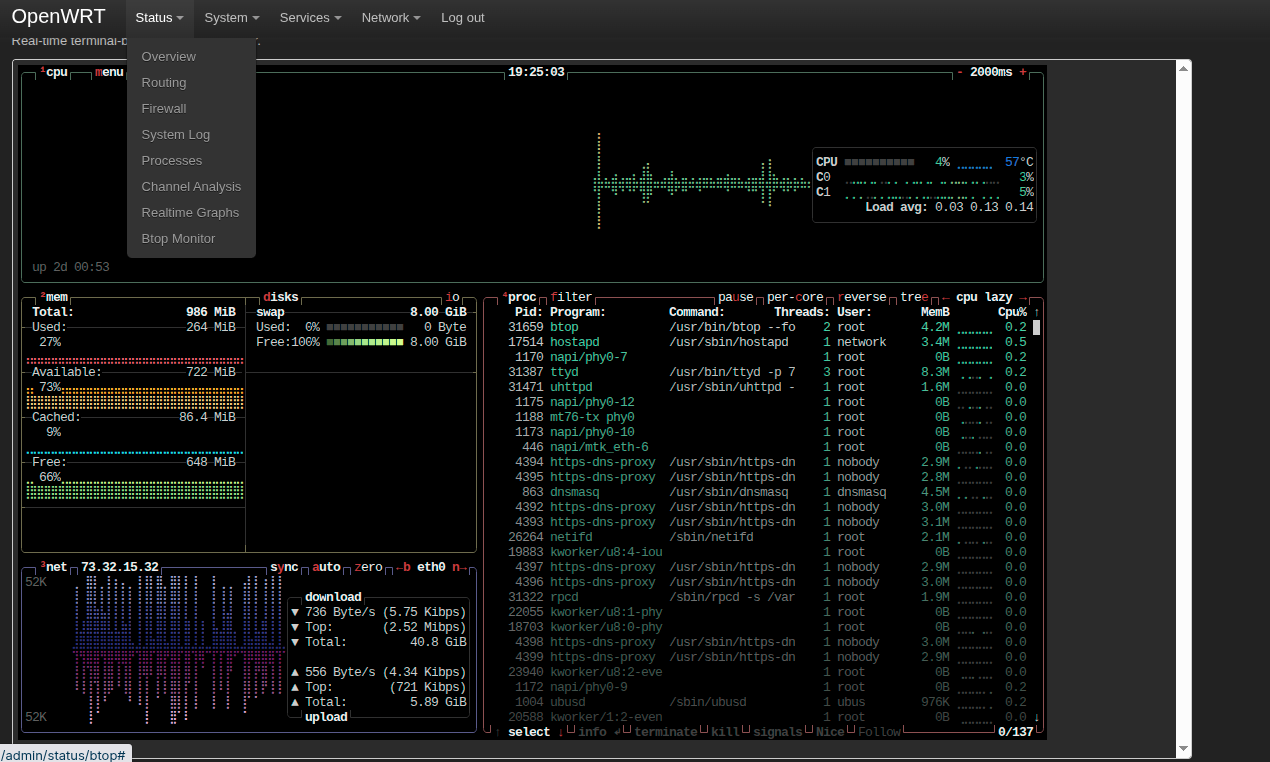
Sure, you’ve downloaded the btop resource monitor, and you can run it from the command line in ssh, but then you’ve got to connect via ssh (ssh [email protected], input password)… how about we set it up as a menu item in the LuCI menu?
You’ll need the luci-app-ttyd and btop packages.
Go to System >> Software, click the green Update lists... button. Wait for the packages lists to update.
In the Filter box, type luci-app-ttyd, then install it.
In the Filter box, type btop, then install it.
In an ssh terminal window (ssh [email protected], input password), enter:
vi /etc/config/ttyd
… press i to enter editing mode, then paste the following at the bottom of that file:
config ttyd 'btop'
	option port '7682'
	option interface '192.168.1.1'
	option command '/usr/bin/btop --force-utf'
	option ssl '1'
	option ssl_cert '/etc/ssl/luci.crt'
	option ssl_key '/etc/ssl/luci.key'
… press Esc to exit editing mode, then :wq to save and exit.
The last two entries you’ll have to ensure are correct. I’ve changed the location of my .crt and .key files. https://forum.banana-pi.org/t/router-https-done-right/28153
The defaults are /etc/uhttpd.crt and /etc/uhttpd.key.
The --force-utf flag is mandatory because OpenWRT lacks native desktop locale generation profiles. btop will throw an error and ask you to use --force-utf if it’s not included.
Create the javascript file:
touch /www/luci-static/resources/view/status/btop.js
Edit the javascript file:
vi /www/luci-static/resources/view/status/btop.js
… press i to enter editing mode, then paste in the following:
'use strict';
return L.view.extend({
    render: function() {
        var host = window.location.hostname;

        var iframe = E('iframe', {
            src: window.location.protocol + '//' + host + ':7682',
            width: '100%',
            height: '700px',
            style: 'border: 1px solid #ccc; border-radius: 4px; background: #222;'
        });

        return E('div', { 'class': 'cbi-map' }, [
            E('h2', {}, _('System Activity (btop)')),
            E('div', { 'class': 'cbi-map-descr' }, _('Real-time terminal-based resource monitor.')),
            iframe
        ]);
    }
});
… press Esc to exit editing mode, then :wq to save and exit.
Create the menu item:
touch /usr/share/luci/menu.d/luci-mod-ttyd-btop.json
Edit the menu item:
vi /usr/share/luci/menu.d/luci-mod-ttyd-btop.json
… press i to enter editing mode, then paste in the following:
{
    "admin/status/btop": {
        "title": "Btop Monitor",
        "action": {
            "type": "view",
            "path": "status/btop"
        },
        "order": 60
    }
}
… press Esc to exit editing mode, then :wq to save and exit.
Create the ACL security rule:
touch /usr/share/rpcd/acl.d/luci-mod-ttyd-btop.json
Edit the ACL security rule:
vi /usr/share/rpcd/acl.d/luci-mod-ttyd-btop.json
… press i to enter editing mode, then paste in the following:
{
    "luci-mod-ttyd-btop": {
        "description": "Grant access to the embedded btop ttyd monitor",
        "read": {
            "cgi": [
                "admin/status/btop"
            ]
        }
    }
}
… press Esc to exit editing mode, then :wq to save and exit.
Set permissions:
chmod 644 /www/luci-static/resources/view/status/btop.js
chmod 644 /usr/share/luci/menu.d/luci-mod-ttyd-btop.json
chmod 644 /usr/share/rpcd/acl.d/luci-mod-ttyd-btop.json
Restart the relevant services:
/etc/init.d/rpcd restart
/etc/init.d/ttyd restart
/etc/init.d/uhttpd restart
Now click the Status >> Btop Monitor menu item to load the ttyd window which hosts btop. It should work.
If you see “192.168.1.1 refused to connect”, open a separate browser tab to https://192.168.1.1:7682 and manually Accept the Self-signed Certificate. Once authorized by the browser, the ttyd window which hosts btop should load properly.
As a final step, ensure the changes survive a firmware update. Under System >> Backup / Flash firmware >> Configuration, enter the following lines:
/www/luci-static/resources/view/status/btop.js
/usr/share/luci/menu.d/luci-mod-ttyd-btop.json
/usr/share/rpcd/acl.d/luci-mod-ttyd-btop.json
You can also load the window outside of the LuCI interface. With my setup:
https://forum.banana-pi.org/t/services-terminal-guest-account-and-auto-login-set-up-sudo/27759
… if I go to https://192.168.1.1:7681, it shows the guest account with the CPU / radio0 / radio1 temperature and CPU load display.
… if I go to https://192.168.1.1:7682, it shows btop.
A final note: If you make changes to btop’s layout, it’ll save those changes and load them the next time you fire up ttyd to host btop. In order for it to do that, you have to hit Esc, then tell btop to Exit. Then you can hit Enter to reload it with the new layout.