BpiRouter v1.6.0
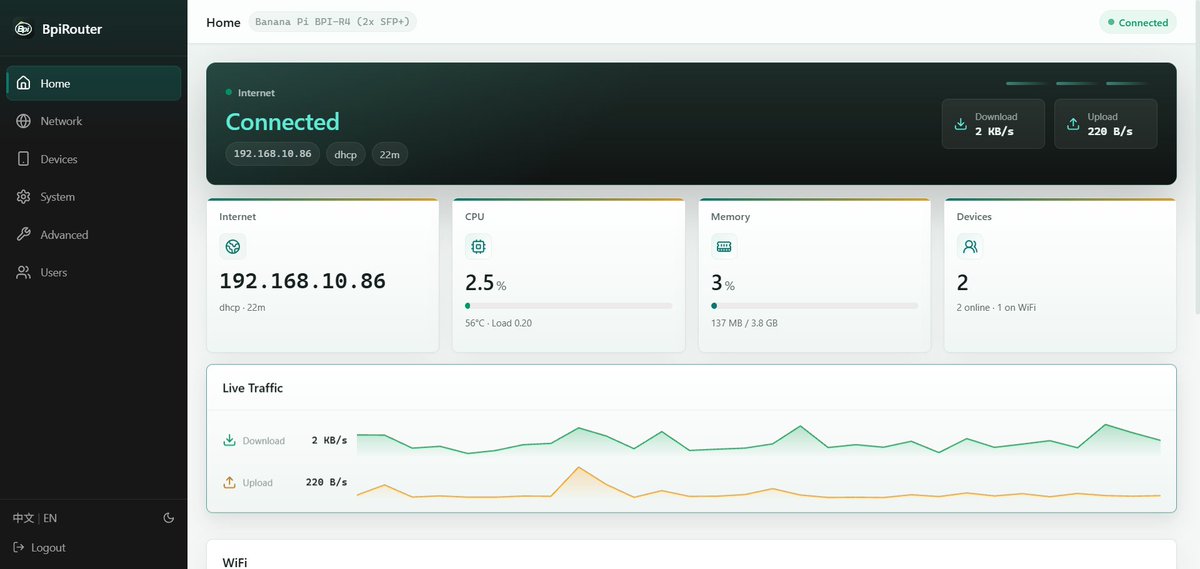
BpiRouter v1.6.0 is available for BPI-R3, BPI-R3-Mini, BPI-R4, BPI-R4-Lite, BPI-R4-Pro 8X, BPI-R4-Pro 4E and OpenWrt One , based on OpenWrt 25.12.5. Download only the files for your exact model. R4-Pro 8X and 4E use different images.
What is new
- Remote networking with Tailscale. Join BpiRouter to your own Tailscale network using Tailscale’s coordination service (Tailscale 1.98.3). Devices behind two BpiRouters can reach each other, and a phone or computer running the Tailscale client can reach devices behind a BpiRouter while away. Devices behind the routers need no Tailscale app. Remote networking, network sharing and remote web management are all off by default; each shared network must be selected explicitly. Available on all seven models, including OpenWrt One.
- Your existing home network stays private. Only networks behind BpiRouter that you select are shared. Devices and management pages on the network above BpiRouter (for example, your main router’s LAN) are never exposed through remote networking.
- The router shows a warning when a WAN connection’s firewall zone membership differs from its configuration.
- A device given its own DNS server now gets that setting without a static address reservation, and can no longer bypass it by querying the router’s IPv6 DNS.
- TCP MSS and PPPoE MTU handling corrections on WAN connections.
- OpenWrt One uses a new storage layout with larger firmware slots, keeping A/B recovery (see Upgrading from v1.5 below).
See the feature guide (Chinese) for how to set up remote networking and for the supported configurations and limitations.
Upgrading from v1.5
- OpenWrt One: an in-place update is not possible, with or without keeping settings. Back up settings, then reinstall completely with the v1.6 One flashkit and its serial (UART) loader , as described in the installation guide. The old firmware’s reset-button USB restore cannot perform this migration. The v1.5 firmware page does not show these steps; it may report only a generic invalid-firmware error for the v1.6 One image. After the reinstall, v1.6 updates keep A/B recovery but cannot roll back to v1.5; returning to v1.5 requires its full installation procedure.
- The other six models: upload the exact model’s
…-squashfs-sysupgrade.itbin System → Firmware . Back up first. The router starts the new firmware as a trial; confirm it only after checking access and connectivity. If you do not confirm it, the router returns to the previous firmware and its settings. - Multi-WAN limit, all seven models: v1.6 supports at most eight Multi-WAN interfaces, and disabled entries count. Keeping settings during the upgrade, or restoring a v1.5 backup (including on OpenWrt One after the reinstall), can bring in more entries and prevent Multi-WAN from starting. When the page reports this, an administrator can use Reset Multi-WAN and reboot from the local network: it deletes Multi-WAN members, policies and health checks, keeps WAN addresses, connection credentials and other settings, and restarts the router. Recreate the required Multi-WAN policy afterwards.
- During a firmware trial the reset is unavailable. Returning to the previous firmware also returns to its settings, without guaranteeing immediate connectivity. Keeping the new firmware ends that trial’s automatic rollback protection but does not fix Multi-WAN: the reset still requires a separate confirmation and restart, and the trial’s rollback option is no longer available.
- A settings backup does not include the remote-networking identity; sign in again after moving to another router.
New installation and downloads
For a new installation, or a device not running BpiRouter, use the matching installation media. Installation erases the destination storage.
| Model | First-installation download |
|---|---|
| BPI-R3 | openwrt-mediatek-filogic-bananapi_bpi-r3-sdcard.img.gz |
| BPI-R3-Mini | openwrt-mediatek-filogic-bananapi_bpi-r3-mini-flashkit.tar.gz |
| BPI-R4 | openwrt-mediatek-filogic-bananapi_bpi-r4-sdcard.img.gz |
| BPI-R4-Lite | openwrt-mediatek-filogic-bananapi_bpi-r4-lite-sdcard.img.gz |
| BPI-R4-Pro 8X | openwrt-mediatek-filogic-bananapi_bpi-r4-pro-8x-sdcard.img.gz |
| BPI-R4-Pro 4E | openwrt-mediatek-filogic-bananapi_bpi-r4-pro-4e-sdcard.img.gz |
| OpenWrt One | openwrt-mediatek-filogic-openwrt_one-flashkit.tar.gz |
Read the installation guide (Chinese) before starting.
The sysupgrade.itb downloads are upgrade images, not first-installation media. Verify downloads against SHA256SUMS before flashing.
Allow several minutes for startup and any automatic restart after an update. Keep power connected during this process. After installation, connect to a LAN port, open https://192.168.100.1 and complete setup. Find the installed product version in Home → System or at the top of System .
Known issues and limitations
- Package feed error:
apk updatereports an error for thebpirouterfeed, because the firmware lists a package feed that is not published. As a result, installing extra packages withapkcan fail. This will be fixed in a later release. Until then, comment out the line containing/bpirouter/in/etc/apk/repositories.d/distfeeds.list; no installed package depends on that feed. - Remote networking shares IPv4 local networks only. It does not configure remote DNS or MagicDNS and offers no exit-node option. Routes approved for other nodes in your Tailscale network may still take effect; IPv6 subnet sharing and extra public-address routes are outside this release’s support.
- Overlapping networks are not renumbered or blocked automatically. A network shared by one site must not overlap any LAN, Guest or IoT network at the other site; the feature guide describes recovery on both sides.
- If the router restarts after its node key has expired, the page may show only that sign-in is required, without the expiry error. Signing in again with a new sign-in link remains available.
- Windows and macOS Tailscale clients have not been verified with this release. Connections may be direct or relayed; performance depends on the path.
- “Unlink this router” does not erase every stored identity copy or the cloud device record. Before handing over or retiring a router, restore factory settings and delete the device in the Tailscale console.
- Multi-WAN switching applies to IPv4 only. IPv6 stays enabled as in v1.5 and does not follow Multi-WAN failover. Multi-WAN load balancing does not combine line speeds for a single download. WAN bandwidth shaping cannot be used with load balancing.
- R4-Pro combo copper and SFP connections are alternatives selected at startup, not automatically switched connections; copper is the default. On 8X, enabling SFP requires a full installation; an OTA-only upgrade retains copper operation. Read the feature guide before using SFP. For the 8X LAN combo copper port, restart the router when changing from a 10G peer to a slower peer. The 8X LAN SFP+ cage does not accept 2.5G modules.
- Mobile support is limited to compatible Quectel QMI/NCM modules and supported EC200A-family ECM dongles; it does not cover every USB modem or MBIM. SIM hot-swapping is not supported. On R4-Pro 8X/4E, use the USB 3.2 port for tethering or dongles; USB 2.0 is not available in this release.
Source and help
The public source and build instructions are in this repository. See its README for the build procedure and the proprietary UI package’s licensing terms. Third-party software in the UI package and its licences are listed in THIRD_PARTY_NOTICES.md.
For product support, use the Banana Pi forum or contact Banana Pi. Include your exact model, product version and a description of the problem; never post passwords, tokens, private keys or SIM identifiers.