Yes, noise level look much much better than mine with old card.
2 Likes
On BE14 V2.1:
Upgraded to brand-new, high-performance filtering components, featuring fine-tuned bandpass filters and matching networks tailored for both 2/5G and 6G RF pathways, alongside an optimized PCB stack-up utilizing an 8-layer, 2-stage HDI (blind and buried via) process. This integration significantly suppresses out-of-band spurious emissions and substantially enhances cross-channel isolation.
Looks like in addition to the obvious shielding can, other two improvements: better components used as well as optimisation of traces altogether yield lower noise floor and better S/N ratio. This may have also explained why people who added a shield can to the original BE14 did not achieve the same level of improvement we see in V2.1 so far.
I believe this info is provided to sellers and reviewers by BPI. So at least we get to hear a glimpse into changes from the “official source”.
So I ordered the V2.1 because my Noise level was so bad I could not get reliable connection on 2.4ghz for a 45m2/450ft flat.
V2.1 has the same bad -79 dBm noise… I even replace the bad antenna pigtails with the better ones recommended.
The BPI-R4 is by far the worst wifi device I have ever bought, even worse then those 30$ 32M wifi repeaters back from the old days.
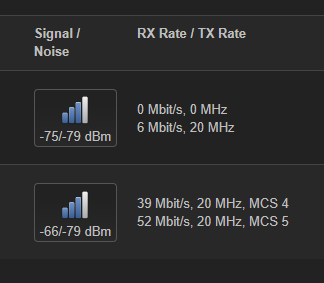
What firmware are you running on R4?
Conditions (like distance, barriers etc ) in your test?
It’s OpenWrt 25.12.3 at the moment.
Distance is a 2x room flat with 45m2, so at max 1x brick wall in between, most clients have direct sight contact, everything is below 8m direct distance.
I see. Your environment doesn’t sound like a difficult place for modern WiFi.
I don’t have any version of BE14 (still an onlooker) nor any WiFI on my R4. So I don’t know what version will practically bring you some difference.
But give 25.12.6 a try and see if it makes some difference. Also V2.1 comes with EEPROM hence the DTS hack aka “empty EEPROM workaround” is no longer required if you had it in place.
There is also a community build known as WoziWrt. It combines OpenWrt with MediaTek’s WiFi driver from its MTK Feed. This driver should perform better and more feature rich than the “open source” mt76 in vanilla OpenWrt. I can’t quickly find a link to the image download but you can look around when you have time.
got link from here:
Hi,
I am an owner of the original BPI-R4-NIC-BE14, which I purchased for my BPI-R4.
Unfortunately, the Wi-Fi range of my card has been very poor since the beginning, despite trying different OpenWrt versions and configurations.
I have now discovered that Banana Pi has released a new BE14 V2.1 hardware revision with changes to the RF design and shielding.
As an early customer of the original BE14, I would therefore like to ask whether Banana Pi can provide a replacement or exchange to the V2.1 version for customers experiencing these performance issues.
I am quite disappointed that the first version performs so poorly, and purchasing the entire Wi-Fi card again at full price does not seem like a reasonable solution if the V2.1 revision was introduced to improve limitations of the original hardware.
Could someone from Banana Pi please advise whether my card could be replaced or upgraded to V2.1?
I can provide my order details, proof of purchase and information about the card if needed.
Thank you.
@sinovoip @sinovoip1 I am in the same situation and would appreciate BPI to offer some kind of solution to buyers of the poorly working original BE14 wifi card, instead of forcing us to discard the old card and buy a new one at full retail price.
Maybe it would be a good idea to start a new chat about this topic!
But I can tell you this: This was discussed earlier, and it’s a valid concern. The same issue came up with the BPI-R4 V1.1; the newer revision is V1.3.
Good luck … 
This is my current setup with the station one floor up from the router on an old thick house.
A few things I found is to have the antennas on 45/35 degrees angle, second get on the latest kernel,drivers,hostapd, mt76/mt7996 drivers … maybe i have been lucky with the be14 (I have two) i got but overall i am very happy. Also I am free to do whatever instead of being locked in the openwrt world … well at least for this board.
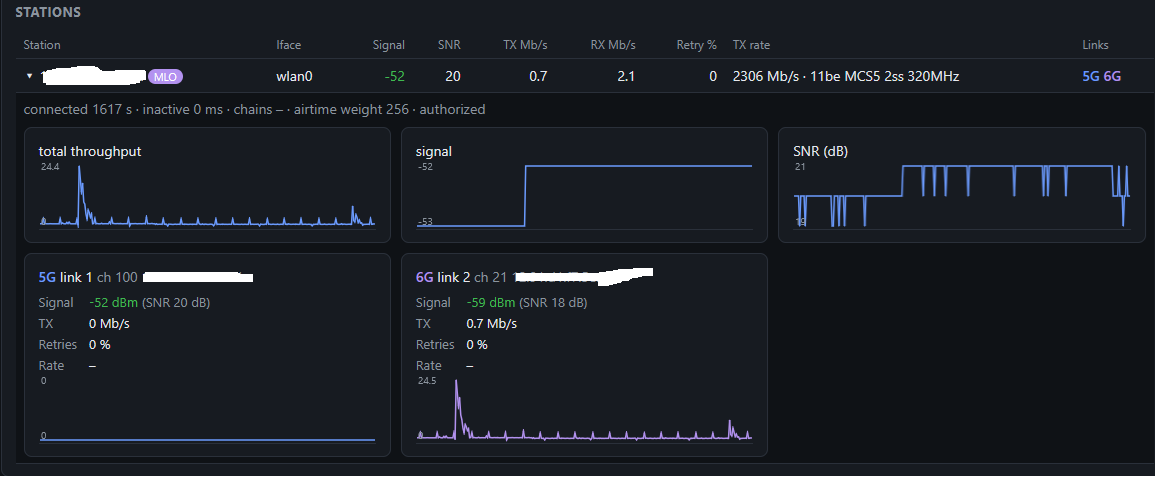
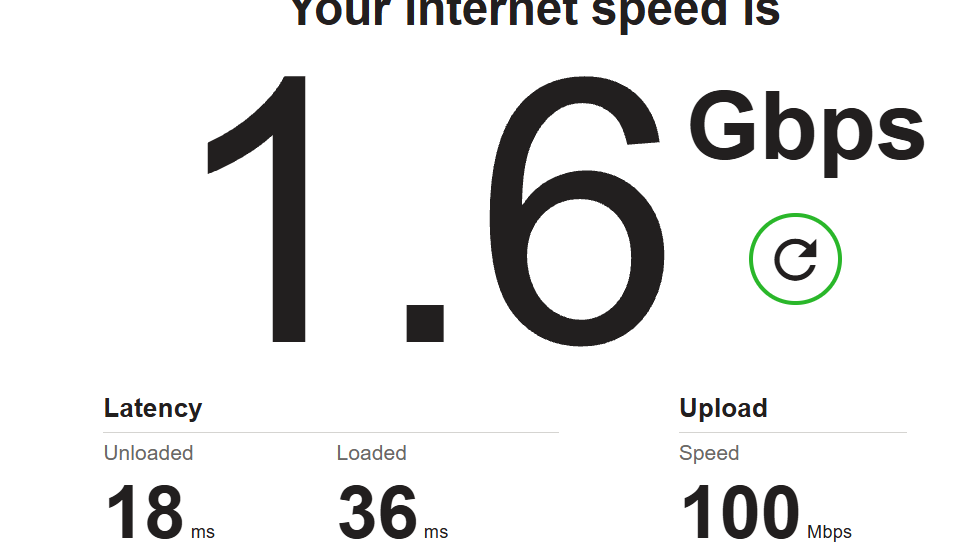
the point is that i never considered it as an end-user board but for development and to develop my skills. So, if the intention is to have it an end-user router i would discourage anyone to buy it.
In my opinion MTK wi-fi drivers do not provide anything better than what open-source mt76 drivers already provide. Granted, i only tested the MTK drivers on MT7981 and MT7986 SoC’s, but wireless performance was the same between the two packages. What MTK drivers do better in my opinion, they already set-up the WED on first boot, so you don’t have to set it up yourself, and the hardware offloading was already set-up as well. But it’s just preferences 
