Yes, i enabled firewall and it work. Sorry.
So all is working now with @frank-w branch? If so, great!!!
That is good news, frank-w, at least it works for someone else.
I just walked around the house and tested the Wi-Fi reception level, it was a little better (and in some places much better) than my current Xiaomi Redmi Router AX6000. Considering that it is located lower and in a further corner from the test point. But I bought high-quality pigtails with a thick conductor (SMA-female - U.FL (IPX), 30, on an RG-178 cable, but I also needed an S-A321 adapter with RP-SMA-female and SMA-male connectors) and spaced the antennas at a more or less optimal distance along the body of the BPI p4 pro.
I ran speed tests, but it doesn’t seem to be very stable yet (generally ok, but sometimes there were drops of up to 10 Mb/s. Usually 70-90 Mb/s). I tested the Internet, it is not very fast for me (100 Mb/s). Maybe due to the extremely low position of the router and the presence in the same room of a second router at 5G frequency on the same channels. Maybe the Ts on the chip will still grow? I haven’t been able to configure the fans on the router yet. How will it be which package is missing?
Yes. It works good. But MAY BE not very stable but need more tests. Maybe I’ll try to temporarily replace the main router with it for testing. It’s very annoying that if you need to install something, you have to assemble the firmware manually. I would like at least official snapshots.
I’m not behind a PC right now but you don’t really have to recompile the firmware, what you need to do is something like the below if the package isn’t in the OpenWrt repository:
- Modify
.configto include the package you want. - Run
make defconfig. - Do something like (I cannot remember the exact command)
make package/docker/compile.
After that the package can be found in the bin directory. Copy that over to the router, then run apk add --allow-untrusted <file>.
If anyone knows a better way, please do share that and the exact commands to run.
Yes. I know it. example nano
select in make menuconfig like a Module.
make package/feeds/packages/nano/download #need also
make package/feeds/packages/nano/compile -j$(nproc) V=s
find bin/packages/ -name "nano*"
It’s very inconvenient.
Isn’t there an option to build all packages in .config? I am sure I saw it.
make defconfig download clean world
Build all in .config
Manual for make you can find there: https://openwrt.org/docs/guide-developer/toolchain/use-buildsystem
Who can tell me when they will send our board to the official OpenWrt? I expect 1-2 weeks, but I can’t understand whether all the problems have been resolved?
The R4Pro PR is open for a long time already…i hope too that it is merged soon,but i did not expect that…it is currently only for 8x without the phy support which we added recently in my fork so atm it will be very basic support. You are here in the be14 thread,so it is a kind of offtopic
I finally had time to play around with the new BE14 v2 which received a few weeks ago. A couple of (not that good) pictures of the board I got:
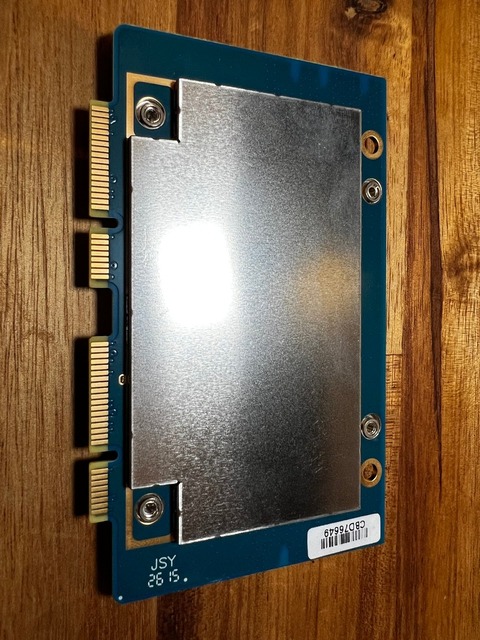
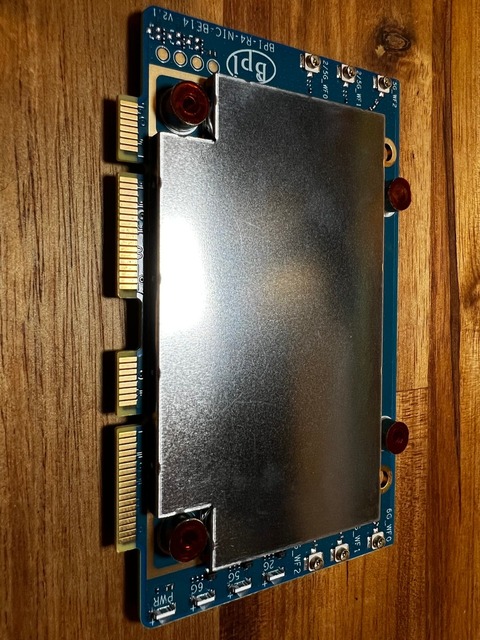
Due to some time constraints I decided to start with the upstream OpenWrt version 25.12.5 r33051-f5dae5ece4. I believe most people will also want to get the upstream version and not build their own
I been running this build in my lab, as a second router, for more than a week and been using it as my main Macbook and Iphone access point the whole time the experience has been very good, specially without any tweaks. I know the internet speed is not exactly the best test although, I been running a few tests here and there and comparing with the main router since that’s what people would usually care about.
A sample while using 5Ghz 2 rooms away.
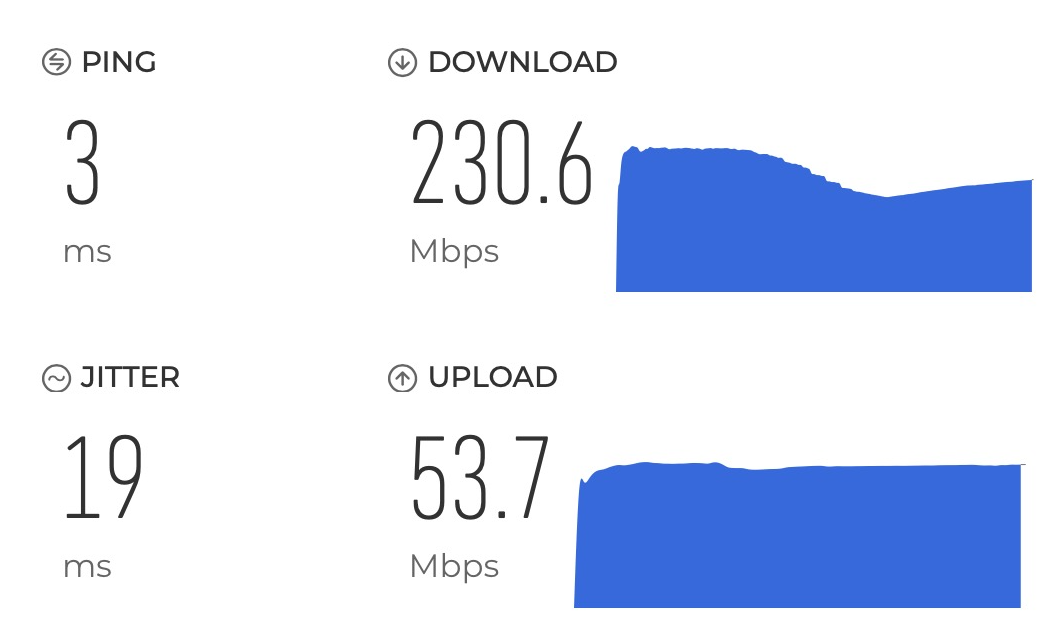
I also run a lot of simple tests with iperf3 and you can find them bellow. A week with a “normal user” utilisation has been great so far but will try to run more tests and experiment other builds, including MLO support by @wozi
Let me known if there are any tests you would like to see or any specific settings I should try.
iperf3 tests
Setup
Server is running in the background
iperf3 -s -D --logfile /root/iperf3.log
Client runs the default command
$ iperf3 -c 192.168.10.1
My Wifi settings
uci show wireless
NOTE: Some output was redacted
wireless.radio0=wifi-device
wireless.radio0.type='mac80211'
wireless.radio0.radio='0'
wireless.radio0.band='2g'
wireless.radio0.channel='auto'
wireless.radio0.htmode='HE20'
wireless.radio0.country='**'
wireless.radio0.cell_density='0'
wireless.default_radio0=wifi-iface
wireless.default_radio0.device='radio0'
wireless.default_radio0.network='lan'
wireless.default_radio0.mode='ap'
wireless.default_radio0.ssid='OpenWrt 2.4Ghz'
wireless.default_radio0.encryption='sae'
wireless.default_radio0.ocv='0'
wireless.radio1=wifi-device
wireless.radio1.type='mac80211'
wireless.radio1.radio='1'
wireless.radio1.band='5g'
wireless.radio1.channel='auto'
wireless.radio1.htmode='EHT80'
wireless.radio1.country='**'
wireless.radio1.cell_density='0'
wireless.default_radio1=wifi-iface
wireless.default_radio1.device='radio1'
wireless.default_radio1.network='lan'
wireless.default_radio1.mode='ap'
wireless.default_radio1.ssid='OpenWrt 5Ghz'
wireless.default_radio1.encryption='sae'
wireless.default_radio1.ocv='0'
wireless.radio2=wifi-device
wireless.radio2.type='mac80211'
wireless.radio2.radio='2'
wireless.radio2.band='6g'
wireless.radio2.channel='auto'
wireless.radio2.htmode='EHT160'
wireless.radio2.country='**'
wireless.radio2.cell_density='0'
wireless.default_radio2=wifi-iface
wireless.default_radio2.device='radio2'
wireless.default_radio2.network='lan'
wireless.default_radio2.mode='ap'
wireless.default_radio2.ssid='OpenWrt 6Ghz'
wireless.default_radio2.encryption='sae'
wireless.default_radio2.ocv='0'
Results
2.4 GHz
Near by +/- 1m
Client Wifi reporting:
RSSI: -48 dBm
Noise: -91 dBm
Tx Rate: 229 Mbps
PHY Mode: 802.11ax
iperf results
Connecting to host 192.168.10.1, port 5201
[  5] local 192.168.10.121 port 63317 connected to 192.168.10.1 port 5201
[ ID] Interval           Transfer     Bitrate         Retr  Cwnd
[  5]   0.00-1.00   sec  19.0 MBytes   159 Mbits/sec    0   1.93 MBytes
[  5]   1.00-2.01   sec  17.0 MBytes   142 Mbits/sec    0   2.70 MBytes
[  5]   2.01-3.00   sec  11.6 MBytes  97.6 Mbits/sec    8   1.72 MBytes
[  5]   3.00-4.00   sec  16.1 MBytes   136 Mbits/sec    0   1.81 MBytes
[  5]   4.00-5.01   sec  18.5 MBytes   154 Mbits/sec    0   1.90 MBytes
[  5]   5.01-6.01   sec  18.0 MBytes   151 Mbits/sec    0   1.94 MBytes
[  5]   6.01-7.00   sec  17.4 MBytes   146 Mbits/sec    0   1.93 MBytes
[  5]   7.00-8.00   sec  16.4 MBytes   137 Mbits/sec    0   1.93 MBytes
[  5]   8.00-9.01   sec  16.0 MBytes   134 Mbits/sec    0   1.92 MBytes
[  5]   9.01-10.00  sec  13.2 MBytes   112 Mbits/sec    0   1.73 MBytes
- - - - - - - - - - - - - - - - - - - - - - - - -
[ ID] Interval           Transfer     Bitrate         Retr
[  5]   0.00-10.00  sec   163 MBytes   137 Mbits/sec    8            sender
[  5]   0.00-10.07  sec   163 MBytes   136 Mbits/sec                  receiver
Next room +/- 5m with wall and door in between
Client Wifi reporting:
RSSI: -69 dBm
Noise: -97 dBm
Tx Rate: 34 Mbps
PHY Mode: 802.11ax
iperf results
Connecting to host 192.168.10.1, port 5201
[  5] local 192.168.10.121 port 63700 connected to 192.168.10.1 port 5201
[ ID] Interval           Transfer     Bitrate         Retr  Cwnd
[  5]   0.00-1.01   sec  5.12 MBytes  42.8 Mbits/sec    0   1.75 MBytes
[  5]   1.01-2.01   sec   512 KBytes  4.19 Mbits/sec    0   1.51 MBytes
[  5]   2.01-3.00   sec  0.00 Bytes  0.00 bits/sec    0   1.14 MBytes
[  5]   3.00-4.00   sec  2.62 MBytes  22.0 Mbits/sec    0   1.39 MBytes
[  5]   4.00-5.00   sec  2.38 MBytes  19.9 Mbits/sec    0   1.50 MBytes
[  5]   5.00-6.00   sec  2.25 MBytes  18.9 Mbits/sec    0   1.07 MBytes
[  5]   6.00-7.00   sec  2.38 MBytes  19.9 Mbits/sec    0   1.45 MBytes
[  5]   7.00-8.01   sec  2.12 MBytes  17.8 Mbits/sec    0   1.07 MBytes
[  5]   8.01-9.00   sec  0.00 Bytes  0.00 bits/sec    0   1.41 MBytes
[  5]   9.00-10.00  sec  4.12 MBytes  34.6 Mbits/sec    0   1.07 MBytes
- - - - - - - - - - - - - - - - - - - - - - - - -
[ ID] Interval           Transfer     Bitrate         Retr
[  5]   0.00-10.00  sec  21.5 MBytes  18.0 Mbits/sec    0            sender
[  5]   0.00-10.70  sec  19.9 MBytes  15.6 Mbits/sec                  receiver
5 GHz
Near by +/- 1m
Client Wifi reporting:
RSSI: -47 dBm
Noise: -92 dBm
Tx Rate: 1,080 Mbps
PHY Mode: 802.11ax
Next room +/- 5m with wall and door in between
Connecting to host 192.168.10.1, port 5201
[  5] local 192.168.10.153 port 63260 connected to 192.168.10.1 port 5201
[ ID] Interval           Transfer     Bitrate         Retr  Cwnd
[  5]   0.00-1.00   sec  89.9 MBytes   750 Mbits/sec    0   7.97 MBytes
[  5]   1.00-2.00   sec  88.4 MBytes   743 Mbits/sec    0   2.90 MBytes
[  5]   2.00-3.00   sec  80.9 MBytes   678 Mbits/sec    0   3.03 MBytes
[  5]   3.00-4.00   sec  75.5 MBytes   633 Mbits/sec    0   3.14 MBytes
[  5]   4.00-5.00   sec  75.2 MBytes   631 Mbits/sec    0   3.23 MBytes
[  5]   5.00-6.00   sec  79.9 MBytes   671 Mbits/sec    0   3.29 MBytes
[  5]   6.00-7.01   sec  73.5 MBytes   615 Mbits/sec    0   3.33 MBytes
[  5]   7.01-8.00   sec  72.0 MBytes   606 Mbits/sec    0   3.36 MBytes
[  5]   8.00-9.01   sec  88.6 MBytes   741 Mbits/sec    0   3.36 MBytes
[  5]   9.01-10.01  sec  85.9 MBytes   720 Mbits/sec    0   3.37 MBytes
- - - - - - - - - - - - - - - - - - - - - - - - -
[ ID] Interval           Transfer     Bitrate         Retr
[  5]   0.00-10.01  sec   810 MBytes   679 Mbits/sec    0            sender
[  5]   0.00-10.02  sec   808 MBytes   676 Mbits/sec                  receiver
Next room +/- 5m with wall and door in between
Client Wifi reporting:
RSSI: -75 dBm
Noise: -93 dBm
Tx Rate: 68 Mbps
PHY Mode: 802.11ax
iperf results
Connecting to host 192.168.10.1, port 5201
[  5] local 192.168.10.153 port 63529 connected to 192.168.10.1 port 5201
[ ID] Interval           Transfer     Bitrate         Retr  Cwnd
[  5]   0.00-1.00   sec  4.25 MBytes  35.6 Mbits/sec    0   1.41 MBytes
[  5]   1.00-2.01   sec  1.25 MBytes  10.5 Mbits/sec    0   1.65 MBytes
[  5]   2.01-3.00   sec  3.00 MBytes  25.2 Mbits/sec    0   1.47 MBytes
[  5]   3.00-4.00   sec  2.00 MBytes  16.8 Mbits/sec    0   1.39 MBytes
[  5]   4.00-5.00   sec  1.12 MBytes  9.46 Mbits/sec    0   1.24 MBytes
[  5]   5.00-6.01   sec  5.50 MBytes  46.0 Mbits/sec    0   1.43 MBytes
[  5]   6.01-7.00   sec  2.62 MBytes  22.1 Mbits/sec    0   1.45 MBytes
[  5]   7.00-8.00   sec  2.62 MBytes  22.0 Mbits/sec    0   1.46 MBytes
[  5]   8.00-9.00   sec  3.75 MBytes  31.5 Mbits/sec    0   1.48 MBytes
[  5]   9.00-10.00  sec  1.50 MBytes  12.6 Mbits/sec    0   1.32 MBytes
- - - - - - - - - - - - - - - - - - - - - - - - -
[ ID] Interval           Transfer     Bitrate         Retr
[  5]   0.00-10.00  sec  27.6 MBytes  23.2 Mbits/sec    0            sender
[  5]   0.00-10.61  sec  27.5 MBytes  21.7 Mbits/sec                  receiver
6 GHz
Near by +/- 1m
Client Wifi reporting:
RSSI: -78 dBm
Noise: -92 dBm
Tx Rate: 72 Mbps
PHY Mode: 802.11ax
iperf results
Connecting to host 192.168.10.1, port 5201
[  5] local 192.168.10.147 port 63402 connected to 192.168.10.1 port 5201
[ ID] Interval           Transfer     Bitrate         Retr  Cwnd
[  5]   0.00-1.00   sec  39.0 MBytes   327 Mbits/sec  132   1.98 MBytes
[  5]   1.00-2.00   sec  49.4 MBytes   414 Mbits/sec    0   2.11 MBytes
[  5]   2.00-3.01   sec   108 MBytes   908 Mbits/sec    0   2.21 MBytes
[  5]   3.01-4.00   sec   117 MBytes   987 Mbits/sec    0   2.28 MBytes
[  5]   4.00-5.01   sec   120 MBytes  1.01 Gbits/sec    0   2.33 MBytes
[  5]   5.01-6.01   sec   129 MBytes  1.09 Gbits/sec    0   2.37 MBytes
[  5]   6.01-7.01   sec   131 MBytes  1.10 Gbits/sec    0   2.39 MBytes
[  5]   7.01-8.00   sec   125 MBytes  1.05 Gbits/sec    0   2.40 MBytes
[  5]   8.00-9.00   sec   120 MBytes  1.00 Gbits/sec    0   2.41 MBytes
[  5]   9.00-10.01  sec   116 MBytes   975 Mbits/sec    0   2.41 MBytes
- - - - - - - - - - - - - - - - - - - - - - - - -
[ ID] Interval           Transfer     Bitrate         Retr
[  5]   0.00-10.01  sec  1.03 GBytes   885 Mbits/sec  132            sender
[  5]   0.00-10.01  sec  1.03 GBytes   883 Mbits/sec                  receiver
Next room +/- 5m with wall and door in between
Client Wifi reporting
RSSI: -46 dBm
Noise: -91 dBm
Tx Rate: 1,921 Mbps
PHY Mode: 802.11ax
iperf results
Connecting to host 192.168.10.1, port 5201
[  5] local 192.168.10.147 port 63475 connected to 192.168.10.1 port 5201
[ ID] Interval           Transfer     Bitrate         Retr  Cwnd
[  5]   0.00-1.01   sec  2.38 MBytes  19.8 Mbits/sec    2    345 KBytes
[  5]   1.01-2.00   sec  3.62 MBytes  30.4 Mbits/sec    0    378 KBytes
[  5]   2.00-3.00   sec  5.50 MBytes  46.3 Mbits/sec    0    398 KBytes
[  5]   3.00-4.00   sec  5.12 MBytes  43.1 Mbits/sec    0    408 KBytes
[  5]   4.00-5.00   sec  5.62 MBytes  47.1 Mbits/sec    0    412 KBytes
[  5]   5.00-6.00   sec  5.25 MBytes  44.0 Mbits/sec    0    412 KBytes
[  5]   6.00-7.01   sec  5.50 MBytes  46.1 Mbits/sec    0    418 KBytes
[  5]   7.01-8.01   sec  4.50 MBytes  37.7 Mbits/sec    0    433 KBytes
[  5]   8.01-9.01   sec  2.25 MBytes  18.9 Mbits/sec    0    442 KBytes
[  5]   9.01-10.00  sec   768 KBytes  6.31 Mbits/sec    2   1.41 KBytes
- - - - - - - - - - - - - - - - - - - - - - - - -
[ ID] Interval           Transfer     Bitrate         Retr
[  5]   0.00-10.00  sec  40.5 MBytes  34.0 Mbits/sec    4            sender
[  5]   0.00-10.01  sec  39.5 MBytes  33.1 Mbits/sec                  receiver
2 Likes
Noise seen by the client is below -92 dBm in all cases. What are your channel bandwidth settings for 5GHz and 6GHz ?
I shared “My Wifi settings” in the post, is this what you are asking?
5Ghz
6Ghz
1 Like
My fault. I overlooked the fact that you shared your wifi config.
Hello everyone! Now i test it in snapshot openwrt (today we can get it in official chanels openwrt like firmware selector) on bpi r4 pro 4e. I can see that default config in snapshot not correct. Where need send correct /etc/config/wireless?