{ NOTE: This procedure is still very much a work-in-progress. I’m recording it here so I’ve got an external record. As it matures, the procedure below will likely change. }
The Anker Solix C300 DC is the battery bank I chose to power my modem, router, etc. Mainly because it directly provides DC voltages, making it more efficient than inverting battery voltage to 120 VAC. then having to use wall-warts for each device.
What I don’t like about it is that Anker requires that you install an app and set up an account simply to connect to the Solix’s bluetooth. First, my phone has only open-source software… I’m certainly not installing the Anker app. Second, that’s dirty pool. One should be able to fully use their own property without having to register or set up an account.
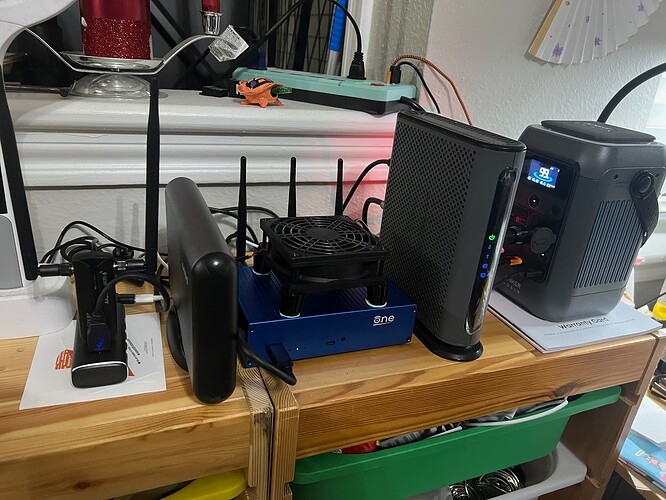 On the right is the Anker Solix C300 DC LFP-battery backup providing power (5V, 12V, 15V) to the other components. That gives it about 20 hours of run-time. If things get really dire and power is out for longer than that, it has a male XT60 plug which can take as input solar panels (11 to 28 V input voltage) or 12 V from a vehicle’s cigarette lighter.
The router provides:
-
5 V to the USB hub (and thus to the cooling fan and USB WiFi adapter).
-
12 V to the cable modem and external hard drive enclosure.
-
15 V to the OpenWRT One router (via USB-PD… USB Power Delivery, the auto-negotiation of delivered voltage).
Behind the Anker is a 140 W USB wall wart, charging the Anker via the yellow plug at bottom-center.
Next to that is the Motorola MB8611 Cable Modem.
Next to that is the OpenWRT One router, with 92mm axial USB cooling fan on top. The router’s got a 512 GB Samsung NVMe drive installed. /dev/nvme0n1p1 is 4 GiB Linux Swap, nvme0n1p2 is 25 GiB ext4 as /overlay. The rest is unpartitioned, for over-provisioning purposes… it allows the drive to reallocate bad sectors to those unused sectors.
Next to that is the external hard drive enclosure with a 512 GB drive. /dev/sda1 is 4 GiB Linux Swap, the remainder of the drive (/dev/sda2) is ext4, shared via Samba.
Next to that is the Rosonway RSH-A104 USB hub, into which plugs the external hard drive enclosure, the cooling fan and the EDUP WiFi 6e AX3000M USB WiFi adapter, running as radio2, set up to connect to a cellphone hotspot (when it’s available), in case Comcast goes down.
The cooling fan’s power is programmatically controlled by the router turning on and off the USB port (on the Rosonway RSH-A104) it’s plugged into, dependent upon temperature. The green stuff under the fan’s feet is the leftover Aairhut Thermal Pad 20 W/mK 2.0mm material I had, acting as anti-slip pads. The fan blows down onto the top of the router, then that air washes over the sides to cool the modem and external hard drive enclosure, as well.
I want to capture the data which the Anker Solix C300 DC transmits via Bluetooth Low-Energy (BLE), then use that to trigger the router to do a graceful shutdown when the battery level is low, so the NVMe drive doesn’t increment its “Unsafe Shutdowns” counter.
The below procedure assumes a Linux computer. Windows and Mac users will have to translate to their machinery.
On your computer, create a virtual environment named “solix-env”
python3 -m venv solix-env
On your computer, activate the environment (your terminal prompt will change)
source solix-env/bin/activate
On your computer, install bleak inside the solix-env isolated environment
pip install bleak
Turn on Bluetooth on your computer.
Press the IoT Bluetooth button on the upper-left of the Anker Solix C300 DC front panel.
Run GET_MAC.py from your computer (usually via: python3 /{path}/GET_MAC.py)
import asyncio
from bleak import BleakScanner

async def run():
    print("Scanning for Bluetooth devices... (Looking for Anker/Solix)")
    devices = await BleakScanner.discover(timeout=10.0)
    for d in devices:
        # Check if the device name contains Anker, Solix, or the model string
        name = d.name if d.name else "Unknown"
        print(f"[{d.address}] Name: {name}")

asyncio.run(run())
You’ll see something like this:
Scanning for Bluetooth devices... (Looking for Anker/Solix)
[42:B0:2C:62:14:3F] Name: Unknown
[88:92:CC:9A:64:5F] Name: TCL S55H LE AUDIO
[D1:C7:C0:C6:03:47] Name: Govee_H6125_0347
[52:74:94:51:F5:C2] Name: Unknown
[6C:70:CB:F0:5E:6D] Name: Unknown
[18:04:ED:24:6A:27] Name: S101ff9ab55672486C
[7B:79:2E:0F:FE:A4] Name: Unknown
[6C:4A:85:4C:FE:8C] Name: Unknown
[45:AB:6A:62:99:80] Name: Unknown
[80:0D:3F:4E:59:DF] Name: 75" Neo QLED
[61:33:2C:40:1A:D9] Name: Unknown
[76:05:F8:EF:FB:6F] Name: Unknown
[C6:38:35:39:5B:3A] Name: Govee_H6056_5B3A
[6F:D5:72:C1:80:70] Name: Unknown
[7C:E9:13:61:73:06] Name: Anker SOLIX C300 DC
[55:20:1C:60:A3:37] Name: Unknown
[52:95:3F:D4:12:05] Name: Unknown
[64:A1:FA:DB:83:3D] Name: Unknown
[45:3A:77:4C:F4:F6] Name: Unknown
[6D:02:4F:6B:F6:E8] Name: Unknown
[CD:32:37:36:5C:53] Name: Govee_H6056_5C53
[7E:F4:33:68:DD:2E] Name: Unknown
[BA:03:C6:04:81:0D] Name: ihoment_H6052_810D
[76:9A:64:71:F1:AA] Name: Unknown
[B0:CB:D8:BA:66:B6] Name: LAP-C302S-WUSB
[D4:0F:41:C6:42:12] Name: Govee_H612F_4212
[66:16:AB:31:0F:33] Name: Unknown
[41:C1:C1:79:32:0B] Name: Unknown
[72:B8:FA:ED:01:D1] Name: Unknown
[FB:BC:C5:C2:A1:0D] Name: Unknown
[F7:92:CC:BB:95:3D] Name: tcl_B14S55H0_E44C
[C4:64:E3:59:8C:07] Name: LUNA 3
[4D:59:7E:B8:A2:91] Name: Unknown
[42:B1:67:7C:7C:C3] Name: Unknown
[E7:05:61:66:25:D9] Name: Unknown
[F1:B2:8F:C7:ED:45] Name: Unknown
[D3:8F:D5:4F:C4:4B] Name: Unknown
[E7:01:03:F8:9C:07] Name: Unknown
[C0:21:1D:9B:9E:DA] Name: Unknown
[FE:D4:54:C9:CA:D5] Name: Unknown
[E3:6A:4B:16:81:5F] Name: Unknown
[6B:8C:DF:1B:17:F1] Name: Unknown
[80:8A:BD:1F:EB:B1] Name: Venat
From that list, find the Anker Solix MAC address:
[7C:E9:13:61:73:06] Name: Anker SOLIX C300 DC
… record that for later use.
Now we have to get the Notify Character UUID. Run this code using the MAC address you just discovered:
import asyncio
from bleak import BleakClient

DEVICE_MAC = "7C:E9:13:61:73:06"

async def explore_solix():
    print(f"Connecting to Solix at {DEVICE_MAC}...")
    async with BleakClient(DEVICE_MAC) as client:
        if client.is_connected:
            print("Successfully connected! Querying hardware map...")

            # Loop through and print every available data/control handle
            for service in client.services:
                print(f"\n[Service] {service.uuid} ({service.description})")
                for char in service.characteristics:
                    print(f"  └── [Char] {char.uuid} | Properties: {', '.join(char.properties)}")
        else:
            print("Failed to connect.")

asyncio.run(explore_solix())
You’ll see output like this:
Connecting to Solix at 7C:E9:13:61:73:06...
Successfully connected! Querying hardware map...

[Service] 00001801-0000-1000-8000-00805f9b34fb (Generic Attribute Profile)
  └── [Char] 00002a05-0000-1000-8000-00805f9b34fb | Properties: indicate
  └── [Char] 00002b29-0000-1000-8000-00805f9b34fb | Properties: read, write
  └── [Char] 00002b3a-0000-1000-8000-00805f9b34fb | Properties: read

[Service] 8c850001-0302-41c5-b46e-cf057c562025 (Unknown)
  └── [Char] 8c850003-0302-41c5-b46e-cf057c562025 | Properties: read, notify
  └── [Char] 8c850002-0302-41c5-b46e-cf057c562025 | Properties: write-without-response, write
This is the one we want:
[Service] 8c850001-0302-41c5-b46e-cf057c562025 (Unknown)
Put the MAC address and the Notify Character UUID for your Anker Solix C300 DC in the code below… we’re going to pull the plaintext data the Anker Solix C300 DC transmits.
import asyncio
from bleak import BleakClient

DEVICE_MAC = "7C:E9:13:61:73:06"
# The Notify Characteristic
NOTIFY_CHAR_UUID = "8c850003-0302-41c5-b46e-cf057c562025"

def notification_handler(sender, data):
    # This triggers whenever the Solix sends a packet
    print(f"Received from {sender}: {data.hex().upper()}")

async def monitor_solix():
    print(f"Connecting to Solix...")
    async with BleakClient(DEVICE_MAC) as client:
        if client.is_connected:
            print("Connected! Activating notifications on data channel...")

            # Subscribe to the stream
            await client.start_notify(NOTIFY_CHAR_UUID, notification_handler)

            print("Listening for packets. Press Ctrl+C to stop...")
            while True:
                await asyncio.sleep(1)

try:
    asyncio.run(monitor_solix())
except KeyboardInterrupt:
    print("\nStopping listener.")
… which should return something like this:
Connecting to Solix...
Connected! Activating notifications on data channel...
Listening for packets. Press Ctrl+C to stop...
Received from 8c850003-0302-41c5-b46e-cf057c562025 (Handle: 17):
Unknown: FF09FC0003010F0402A10131A2050300000000A30302A809A403020000A503021200A603020500A703020000A803020000A903020000AA03020700AB03020000AC03021200AD03020C00AE03020000AF0302F339B003028000B103026500B203027500B303028000B403028000B5020121B6020101B7020163B8020164B9020100BA020102BB020101BC020100BD020100BE020100BF020101C0020100C1020100C2020100C31100415A5655573030463435313030353036C403027800C503021E00C603020000C7020102C8020100C9020101CA020100CB03020000CC020100CD020100F815040200000000000000000000000000000000000000D3
From that data, we can decode the Serial Number:
Look at the segment C31100415A5655573030463435313030353036.
C3 is the tag for the hardware Serial Number string.
• 1100 indicates a length of 17 bytes.
• Converting the remaining hex bytes to ASCII gives my unit’s serial number (printed on the bottom of the unit): AZVUW00F45100506.
We can also decode the Estimated Time To Fully Recharge and the Estimated Time For Battery To Deplete. These both max out at 99.9 Hours on the front panel display.
(B7020163 or B8020164)
Look at the single-byte value tags (B5 through C2 with length 0201).
• 63 in hex translates to 99 Hours To Fully Recharge.
• 64 in hex translates to 100 Hours For Battery To Deplete.
• My battery bank is currently sitting fully charged at 99% - 100%. The way I use it (simultaneous charging and discharging) means it floats at about 99%.
We can also decode the input and output wattages: The tags starting with A2, A3, A4 etc., followed by 0302 (2 bytes of data), hold the real-time wattages and temperatures. For example, A809 inside the packet translates to 2568 in decimal, which when scaled represents internal system metrics (like cell voltages or temperature variants). 0000 values represent inactive ports drawing 0W.
There’s more to decode, but I only want the battery SOC, which will be used to trigger the router to automatically shut down when the battery is low, so the NVMe drive doesn’t increment its “Unsafe Shutdowns” counter.
You can run this python code:
import asyncio
from bleak import BleakClient

DEVICE_MAC = "7C:E9:13:61:73:06"
NOTIFY_CHAR_UUID = "8c850003-0302-41c5-b46e-cf057c562025"

def decode_tlv_packet(raw_data: bytes):
    print("\n" + "="*50)
    print("      ANKER SOLIX C300 DC LIVE TELEMETRY MAP      ")
    print("="*50)

    if not raw_data.startswith(b'\xFF\x09\xFC') and not raw_data.startswith(b'\xFF'):
        return

    idx = 0
    if raw_data[0:3] == b'\xFF\x09\xFC':
        idx = 3

    while idx < len(raw_data) - 1:
        tag = raw_data[idx]

        if tag in [0xD3, 0x00] and idx >= len(raw_data) - 2:
            break

        if idx + 3 > len(raw_data):
            break

        length_indicator = raw_data[idx+1:idx+3]

        # String data (Serial Number)
        if tag == 0xC3:
            str_len = raw_data[idx+1]
            val_start = idx + 3
            val_end = val_start + str_len
            if val_end <= len(raw_data):
                sn_bytes = raw_data[val_start:val_end]
                print(f"[Tag C3] Hardware Serial Number : {sn_bytes.decode('ascii', errors='ignore')}")
                idx = val_end
                continue

        # --- 2-BYTE SECTION (Wattages, settings) ---
        if length_indicator == b'\x03\x02':
            val_bytes = raw_data[idx+3:idx+5]
            if len(val_bytes) == 2:
                val = int.from_bytes(val_bytes, byteorder='little')

                two_byte_tags = {
                    0xA3: f"Total Power Input       : {val} W",
                    0xA5: f"Total Power Output (A)  : {val} W",
                    0xAC: f"Total Power Output (B)  : {val} W",
                    0xC5: f"Screen Timeout Setting  : {val} seconds",
                    0xA4: f"USB-PD Input Hint   : {val} (0 at 5V input?)",
                    0xA6: f"System State Bitmask     : {val} (Binary: {val:08b})",
                    0xAA: f"Time Remaining Metric   : {val} hours",
                    0xAD: f"Car Socket Voltage : {val} V",
                    0xB0: f"Port State 1       : {val}",
                    0xB3: f"Port State 2       : {val}",
                    0xB4: f"Port State 3       : {val}",
                }

                if tag == 0xAF:
                    print(f"[Tag AF] Battery voltage        : {val/1000:.3f} Volts")
                elif tag in two_byte_tags:
                    print(f"[Tag {tag:02X}] {two_byte_tags[tag]}")
                else:
                    print(f"[Tag {tag:02X}] Unknown 2-Byte Metric   : {val} (Hex: {val_bytes.hex().upper()})")
            idx += 5

        # --- 1-BYTE SECTION (Switches, States, Percentages) ---
        elif length_indicator == b'\x02\x01':
            val = raw_data[idx+3]

            one_byte_tags = {
                0xB5: f"Internal Temp           : {val} Celsius",
                0xB7: f"State of Charge (Var A) : {val} %",
                0xB8: f"State of Charge (Var B) : {val} %",
                0xBB: f"Charging Input Flag     : {val} (1=Active, 0=Idle)",
            }

            if tag in one_byte_tags:
                print(f"[Tag {tag:02X}] {one_byte_tags[tag]}")
            else:
                print(f"[Tag {tag:02X}] Unknown 1-Byte Metric   : {val} (Hex: {val:02X})")
            idx += 4

        else:
            # The critical window advancement that prevents the lockup
            idx += 1

async def monitor_solix():
    print(f"Connecting to Solix at {DEVICE_MAC}...")
    async with BleakClient(DEVICE_MAC) as client:
        if client.is_connected:
            print("Connected! Streaming telemetry details...")

            await client.start_notify(NOTIFY_CHAR_UUID, lambda sender, data: decode_tlv_packet(data))

            print("Listening for changes. Plug devices in or toggle ports now...")
            while True:
                await asyncio.sleep(1)

if __name__ == "__main__":
    try:
        asyncio.run(monitor_solix())
    except KeyboardInterrupt:
        print("\nExiting tracker.")
… to see what I’ve thus far decoded. It should return something like this:
Connecting to Solix at 7C:E9:13:61:73:06...
Connected! Streaming telemetry details...
Listening for changes. Plug devices in or toggle ports now...

==================================================
      ANKER SOLIX C300 DC LIVE TELEMETRY MAP
==================================================
[Tag A3] Total Power Input       : 4 W
[Tag A4] USB-PD Input Hint   : 0 (0 at 5V input?)
[Tag A5] Total Power Output (A)  : 18 W
[Tag A6] System State Bitmask     : 5 (Binary: 00000101)
[Tag A7] Unknown 2-Byte Metric   : 0 (Hex: 0000)
[Tag A8] Unknown 2-Byte Metric   : 0 (Hex: 0000)
[Tag A9] Unknown 2-Byte Metric   : 0 (Hex: 0000)
[Tag AA] Time Remaining Metric   : 7 hours
[Tag AB] Unknown 2-Byte Metric   : 0 (Hex: 0000)
[Tag AC] Total Power Output (B)  : 18 W
[Tag AD] Car Socket Voltage : 12 V
[Tag AE] Unknown 2-Byte Metric   : 0 (Hex: 0000)
[Tag AF] Battery voltage        : 14.835 Volts
[Tag B0] Port State 1       : 128
[Tag B1] Unknown 2-Byte Metric   : 101 (Hex: 6500)
[Tag B2] Unknown 2-Byte Metric   : 117 (Hex: 7500)
[Tag B3] Port State 2       : 128
[Tag B4] Port State 3       : 128
[Tag B5] Internal Temp           : 33 Celsius
[Tag B6] Unknown 1-Byte Metric   : 2 (Hex: 02)
[Tag B7] State of Charge (Var A) : 99 %
[Tag B8] State of Charge (Var B) : 100 %
[Tag B9] Unknown 1-Byte Metric   : 0 (Hex: 00)
[Tag BA] Unknown 1-Byte Metric   : 2 (Hex: 02)
[Tag BB] Charging Input Flag     : 1 (1=Active, 0=Idle)
[Tag BC] Unknown 1-Byte Metric   : 0 (Hex: 00)
[Tag BD] Unknown 1-Byte Metric   : 0 (Hex: 00)
[Tag BE] Unknown 1-Byte Metric   : 0 (Hex: 00)
[Tag BF] Unknown 1-Byte Metric   : 1 (Hex: 01)
[Tag C0] Unknown 1-Byte Metric   : 0 (Hex: 00)
[Tag C1] Unknown 1-Byte Metric   : 0 (Hex: 00)
[Tag C2] Unknown 1-Byte Metric   : 0 (Hex: 00)
[Tag C3] Hardware Serial Number : AZVUW00F45100506
[Tag C5] Screen Timeout Setting  : 30 seconds
[Tag C6] Unknown 2-Byte Metric   : 0 (Hex: 0000)
[Tag C7] Unknown 1-Byte Metric   : 2 (Hex: 02)
[Tag C8] Unknown 1-Byte Metric   : 0 (Hex: 00)
[Tag C9] Unknown 1-Byte Metric   : 1 (Hex: 01)
[Tag CA] Unknown 1-Byte Metric   : 0 (Hex: 00)
[Tag CB] Unknown 2-Byte Metric   : 0 (Hex: 0000)
[Tag CC] Unknown 1-Byte Metric   : 0 (Hex: 00)
[Tag CD] Unknown 1-Byte Metric   : 0 (Hex: 00)
Anyway, now that we can capture the data, we can use the data in the router.
Install the bluez-utils and kmod-bluetooth packages.
Plug a bluetooth USB adapter into the router. I’ll be using the TP-Link UB500 USB Bluetooth dongle.
cat << 'EOF' > /etc/solix_monitor.sh
#!/bin/sh

# Configuration Variables
DEVICE_MAC="7C:E9:13:61:73:06"
NOTIFY_CHAR_UUID="8c850002-0302-41c5-b46e-cf057c562025" # Match your bleak profile channel
LOW_BATTERY_THRESHOLD=15
SHUTDOWN_SCRIPT="poweroff"

logger -t solix_monitor "Starting battery monitor..."

while true; do
    logger -t solix_monitor "Initiating connection handshake to [${DEVICE_MAC}] via bluetoothctl..."

    # 1. Connect to the battery bank and register for GATT attribute tracking
    # 2. Pipe the continuous stream into a bash subshell loop
    (
        echo "connect $DEVICE_MAC"
        sleep 2
        echo "select-attribute $NOTIFY_CHAR_UUID"
        sleep 1
        echo "notify on"
        # Keep the session pipe open indefinitely
        while true; do sleep 5; echo "keepalive"; done
    ) | bluetoothctl 2>&1 | while read -r line; do

        # Inspect the incoming string for notification payloads
        # bluetoothctl profiles format them as: [CHG] Attribute /org/bluez/... Value 0xff 0x09...
        if echo "$line" | grep -q "Value"; then
            # Clean and compress the data into a single continuous uppercase hex line
            hex_payload=$(echo "$line" | sed 's/.*Value //g' | tr -d ' ' | tr -d '0x' | tr 'a-f' 'A-F')

            # Target the unencrypted State of Charge segment signature (B70201)
            if echo "$hex_payload" | grep -q "B70201"; then
                # Isolate the 2 hex digits immediately trailing the marker frame
                battery_hex=$(echo "$hex_payload" | sed 's/.*B70201//' | cut -c1-2)
                battery_pct=$(printf "%d" "0x$battery_hex")

                logger -t solix_monitor "Anker Solix C300 DC battery status: ${battery_pct}%"

                # Check current value against the threshold
                if [ "$battery_pct" -le "$LOW_BATTERY_THRESHOLD" ]; then
                    logger -t solix_monitor "CRITICAL: Anker Solic C300 DC at ${battery_pct}%. Shutting router down..."
                    /bin/sh "$SHUTDOWN_SCRIPT"
                    exit 0
                fi
            fi
        fi
    done

    # Reconnection handling logic if the target link flags a drop out
    logger -t solix_monitor "Bluetooth line disconnected. Re-establishing link in 60 seconds..."
    sleep 60
done
EOF
Make that executable:
chmod +x /etc/solix_monitor.sh
Add that path to System >> Backup / Flash firmware >> Configuration tab: /etc/solix_monitor.sh
Set up a service to run the script on router boot:
cat << 'EOF' > /etc/init.d/solix_monitor
#!/bin/sh /etc/rc.common

START=99
USE_PROCD=1

start_service() {
    procd_open_instance
    procd_set_param command /bin/sh /etc/solix_monitor.sh
    procd_set_param respawn 3600 5 5
    procd_close_instance
}
EOF
Make that executable:
chmod +x /etc/init.d/solix_monitor
Add that path to System >> Backup / Flash firmware >> Configuration tab: /etc/init.d/solix_monitor
Enable the service:
/etc/init.d/solix_monitor enable
Start the service:
/etc/init.d/solix_monitor start
Monitor it via:
logread | grep solix_monitor
The above script assumes the Graceful Router Power Down procedure has been implemented.