[ EDIT: updated /etc/fan_control.sh script to get rid of an unintended loop condition if the USB hub is unplugged while the router continues operating. ]
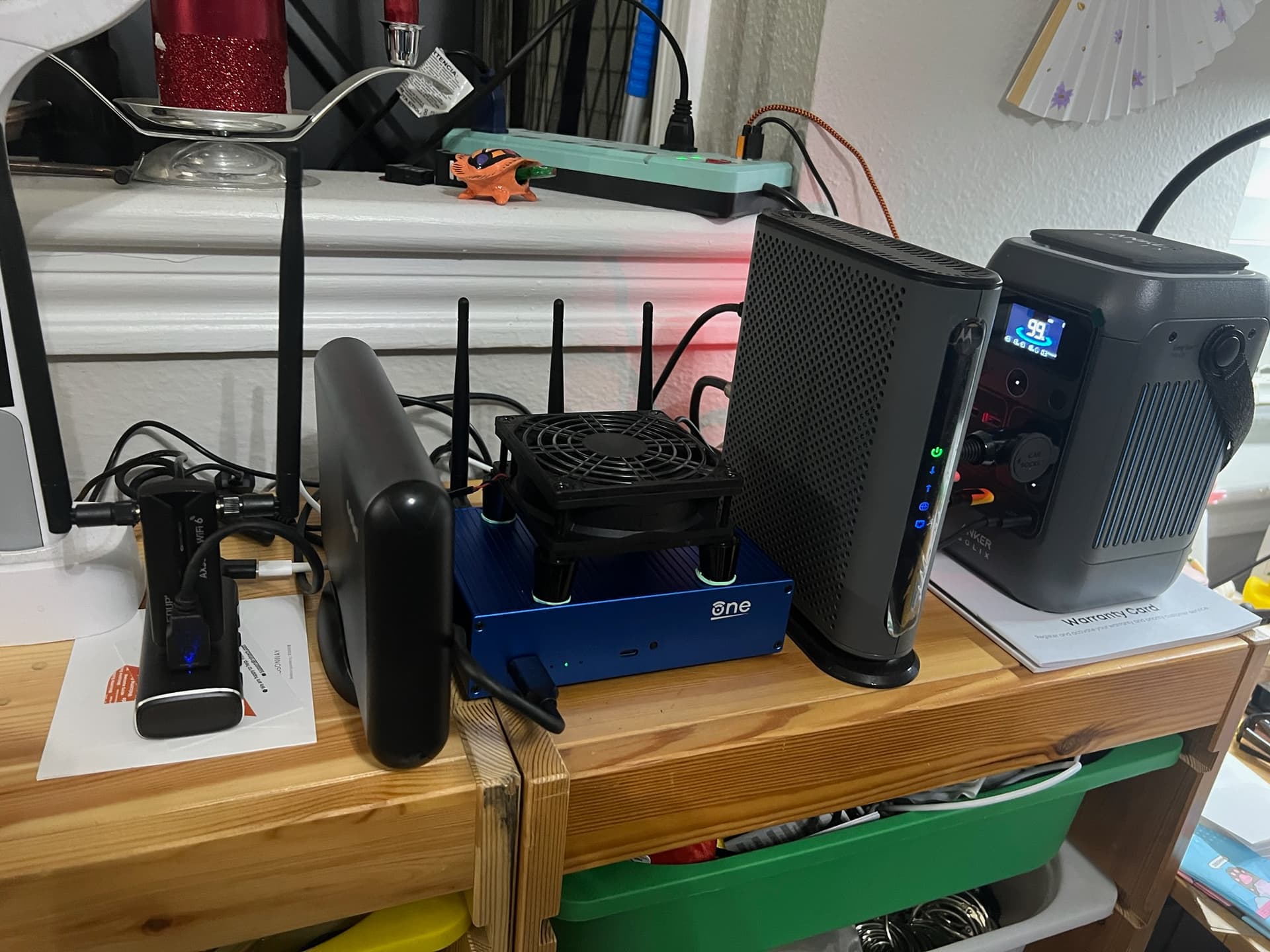
I bought a Rosonway RSH-A104 USB hub to plug into the router, so I can plug in the external USB hard drive and external USB AX3000M WiFi adapter, and so I can programmatically control power to the 92mm USB cooling fan sitting on top of the router.
The fan is plugged into Port 1 (the port nearest the USB cable end of the hub). The AX3000M is plugged into Port 3, the hard drive is plugged into Port 4.
This requires the uhubctl package be installed.
Run uhubctl to enumerate your hubs, then put the correct HUB_ID and PORT numbers in the script below. Change the temperature range to your liking. This doesn’t just measure CPU temperature, it also measures the WiFi chip temperatures, and triggers on the highest reading.
Paste this into a Terminal window logged into the OpenWRT One router via ssh, then press Enter:
cat << 'EOF' > /etc/fan_control.sh
#!/bin/sh

# CONFIGURATION
HUB_ID="1-1"
PORT="1"
TEMP_HIGH=55		# Turn fan ON if ANY sensor reaches 55°C
TEMP_LOW=50		# Turn fan OFF only when ALL sensors drop below 50°C
CHECK_INTERVAL=30	# Check every 30 seconds
LOGGING=1		# Options: 0=off | 1=concise | 2=all

# Helper function to locate hwmon paths
get_wifi_temp_path() {
    for path in /sys/class/ieee80211/$1/hwmon*/temp1_input; do
        if [ -f "${path}" ]; then
            echo "${path}"
            return
        fi
    done
}

# Resolve Wi-Fi paths once at startup
PHY0_PATH=$(get_wifi_temp_path "phy0")
PHY1_PATH=$(get_wifi_temp_path "phy1")

CURRENT_STATE=-1
HARDWARE_BACKOFF=${CHECK_INTERVAL}

while true; do
    # 1. Check for USB hub hardware
    if uhubctl -l "${HUB_ID}" >/dev/null 2>&1; then
        # Hardware found! Reset backoff interval
        HARDWARE_BACKOFF=${CHECK_INTERVAL}
        [ "${LOGGING}" -eq 2 ] && logger -t usb_fan "USB hub ${HUB_ID} connected."
    else
        # Hardware missing! Log it, sleep, and restart loop iteration
        [ "${LOGGING}" -ne 0 ] && logger -t usb_fan "USB hub ${HUB_ID} not detected. Retrying in ${HARDWARE_BACKOFF} seconds..."
        sleep "${HARDWARE_BACKOFF}"

        HARDWARE_BACKOFF=$((HARDWARE_BACKOFF + 1))
        if [ "${HARDWARE_BACKOFF}" -gt 3600 ]; then
            HARDWARE_BACKOFF=3600
        fi
        continue # Skip temperature checking since hardware is missing
    fi

    # 2. Read CPU
    if [ -f /sys/class/thermal/thermal_zone0/temp ]; then
        RAW_CPU=$(cat /sys/class/thermal/thermal_zone0/temp 2>/dev/null)
        MAX_TEMP=$((RAW_CPU / 1000))
    else
        MAX_TEMP=0
    fi

    # 3. Read 2.4GHz WiFi (if path exists)
    if [ -n "${PHY0_PATH}" ] && [ -f "${PHY0_PATH}" ]; then
        RAW_WIFI0=$(timeout 2 cat "${PHY0_PATH}" 2>/dev/null)
        if [ -n "${RAW_WIFI0}" ]; then
            WIFI0_C=$((RAW_WIFI0 / 1000))
            [ "${WIFI0_C}" -gt "${MAX_TEMP}" ] && MAX_TEMP=${WIFI0_C}
        fi
    fi

    # 4. Read 5GHz WiFi (if path exists)
    if [ -n "${PHY1_PATH}" ] && [ -f "${PHY1_PATH}" ]; then
        RAW_WIFI1=$(timeout 2 cat "${PHY1_PATH}" 2>/dev/null)
        if [ -n "${RAW_WIFI1}" ]; then
            WIFI1_C=$((RAW_WIFI1 / 1000))
            [ "${WIFI1_C}" -gt "${MAX_TEMP}" ] && MAX_TEMP=${WIFI1_C}
        fi
    fi

    # 5. Evaluate against the peak observed temperature
    if [ "${MAX_TEMP}" -ge "${TEMP_HIGH}" ] && [ "${CURRENT_STATE}" -ne 1 ]; then
        timeout 3 uhubctl -l "${HUB_ID}" -p "${PORT}" -a 1 > /dev/null 2>&1
        if [ $? -eq 124 ]; then
            [ "${LOGGING}" -ne 0 ] && logger -t usb_fan "uhubctl timed out turning ON. Retrying next cycle."
            CURRENT_STATE=-1
        else
            CURRENT_STATE=1
            [ "${LOGGING}" -ne 0 ] && logger -t usb_fan "Peak temp ${MAX_TEMP}°C. Fan ON."
        fi

    elif [ "${MAX_TEMP}" -le "${TEMP_LOW}" ] && [ "${CURRENT_STATE}" -ne 0 ] && [ "${MAX_TEMP}" -gt 0 ]; then
        timeout 3 uhubctl -l "${HUB_ID}" -p "${PORT}" -a 0 > /dev/null 2>&1
        if [ $? -eq 124 ]; then
            [ "${LOGGING}" -ne 0 ] && logger -t usb_fan "uhubctl timed out turning OFF. Retrying next cycle."
            CURRENT_STATE=-1
        else
            CURRENT_STATE=0
            [ "${LOGGING}" -ne 0 ] && logger -t usb_fan "Peak temp ${MAX_TEMP}°C. Fan OFF."
        fi
    fi

    sleep "${CHECK_INTERVAL}"
done
EOF
Make it executable:
chmod +x /etc/fan_control.sh
Create a service:
vi /etc/init.d/usb_fan
Press i to enter editing mode, then enter the following code:
#!/bin/sh /etc/rc.common

START=99
STOP=10

USE_PROCD=1

start_service() {
    procd_open_instance
    procd_set_param command /etc/fan_control.sh
    # If it crashes, restart after 60 seconds.
    # If it crashes more than 10 times over 3600 seconds, give up.
    procd_set_param respawn 3600 60 10
    procd_close_instance
}
… then press Esc to exit editing mode, and press :wq to save and exit.
Issue the commands:
chmod +x /etc/init.d/usb_fan
/etc/init.d/usb_fan enable
/etc/init.d/usb_fan start
Make it all impervious to firmware updates: In the LuCI interface: System >> Backup / Flash Firmware >> Configuration (ie: /etc/sysupgrade.conf), paste:
/etc/init.d/usb_fan
/etc/fan_control.sh
… into the list, then click the “Save” button.