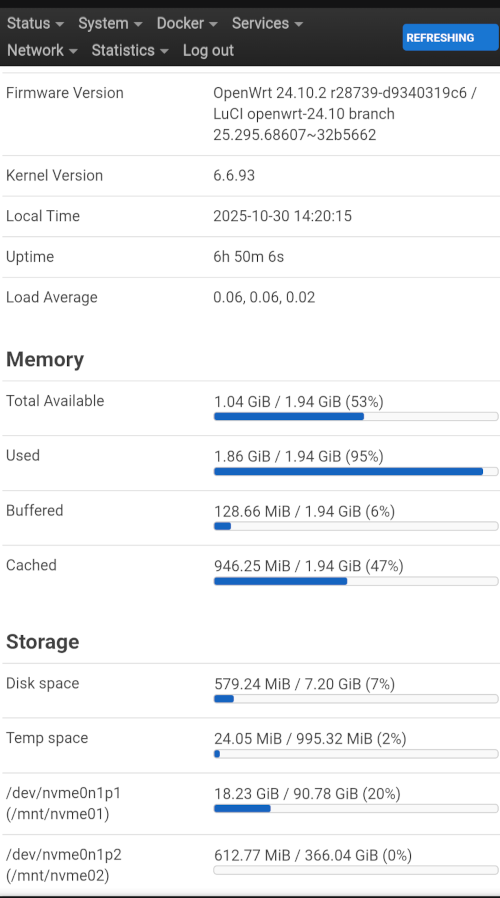
The first time I tried, the same thing happened to me on BPI-R3. And it was because participation /dev/mmcblk0p5 must be increased before openwrt has ever started on Emmc.
So should I make fresh install of openwrt from SD card? Flash to - nand and then to emmc and then resize partition on emmc from NAND?
And then finally boot from emmc ?
Hello,
I try it all possible working scenario. I even try delete the partition “5” and create it again with cfdisk at NAND mode. After switch to eMMC I was and with “initramfs” recovery mode. I think resize openwrt over full flash eMMC is currently impossible.
I found many question on openwrt forum withou solution. Maybe something will change when they release opnwrt 25…
Thank you all for helping me.
This shot is from a BPI-R3 with OpenWrt 24.10 and a 7,2 GiB emmc partition, extended with cfcdik.
Unfortunatey, I don’t know what might happen with BPI-R4.
connect a serial adapter, far easier than manually setting default boot options with fw_setenv commands, and you see the boot process. Also my BPI-R4 came with a serial adapter that’s pretty good.
in the boot menu chose “9. Install bootloader, recovery and production to NAND.” (@Miles28 calls this step Flash NAND).
boot to NAND (SW3 pins to 0,1) (remove power cable and then change pins)
in the boot menu chose “9. Install bootloader, recovery and production to EMMC.” (@Miles28 calls this step Flash EMMC).
then continue to boot in NAND
install cfdisk and cfdisk /dev/mmcblk0 → Resize /dev/mmcblk0p5 to something like 7.2G. This can be done with gdisk, parted, fdisk, yet cfdisk is easiest.
I couldn’t make use of resize.f2fs - mmcblk0p5 is not an F2FS partition, but something that becomes /dev/fit0 and /dev/fitrw, the second is an F2FS partition. But the process eludes me, so i don’t know how to resize fitrw. My second idea is to hope the first boot on EMMC will resize fitrw automatically.
boot to EMMC (SW3 pins to 1,0) (remove power cable and then change pins)
I expected fitrw to be 7.2G, yet it was 428MB. So the auto resizing fails.
What fixed it for me was to boot in EMMC and then umount /dev/fitrw and firstboot -y. If you don’t umount first, fitrw survives, see logs below.
Relevant logs:
unsuccessful attempt
root@OpenWrt:~# firstboot -y
/dev/fitrw is mounted as /overlay, only erasing files
See how it only erases the files. That is not enough - fitrw survives with the old size.
successful attempt:
root@OpenWrt:~# umount /dev/fitrw
root@OpenWrt:~# firstboot -y
/dev/fitrw is not mounted
/dev/fitrw will be erased on next mount
See how fitrw will be erased “on next mount”? This is what makes the resizing work. Note: Of course in all cases you lose all your rw data, but that is expected.
dmesg logs:
[   10.333417] mount_root: overlay filesystem in /dev/fitrw has not been formatted yet
[   11.268669] F2FS-fs (fitrw): Found nat_bits in checkpoint
[   11.302163] F2FS-fs (fitrw): Mounted with checkpoint version = d70cacb
[   11.309183] mount_root: overlay filesystem has not been fully initialized yet
[   11.316582] mount_root: switching to f2fs overlay
[   11.322343] overlayfs: null uuid detected in lower fs '/', falling back to xino=off,index=off,nfs_export=off.