Thanks for sharing these measurements! This is a useful reference, especially since power consumption seems to vary quite significantly depending on the hardware configuration and software setup.
I’d like to add some preliminary figures from my own BPI-R4 Pro 8X, running Debian 13 (Trixie), and share a few findings and pitfalls from my power optimization experiments.
My measurements are not laboratory-grade yet, so please treat them as an additional practical reference rather than a directly comparable benchmark.
My hardware and software configuration
- Board: BPI-R4 Pro 8X (MT7988)
- OS: Debian 13 (Trixie)
- Kernel: Custom 7.3.0-rc1-based build
- Storage: 2 × NVMe SSDs
- Wi-Fi: Wi-Fi 7 (MT7996)
- Cellular: LTE module installed
- WAN: Active PPPoE connection via SFP+ ONT
- Services: DNS, DHCP, firewall, WireGuard, monitoring, and additional management services
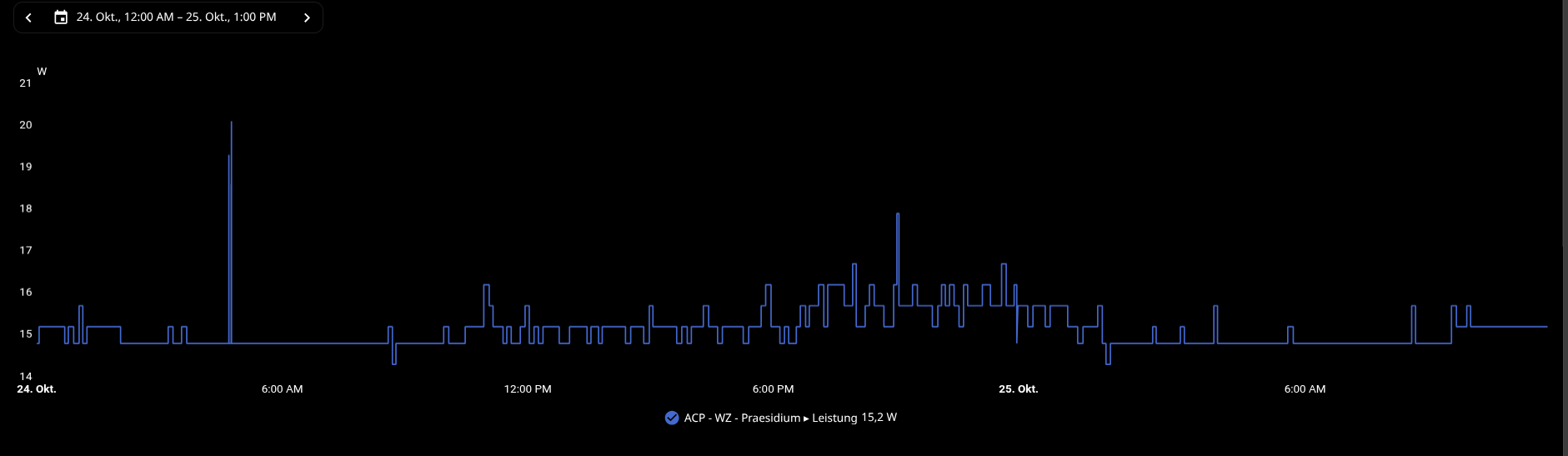
Power consumption: approximately 14.8–15.7 W, with readings frequently around 15.2 W during normal operation.
I’m measuring at the AC outlet using an Aqara smart plug integrated into Home Assistant via ZHA.
Unlike your measurements taken directly from a 12 V power supply, mine include power supply losses. Therefore, the absolute numbers are not directly comparable.
Power-saving measures implemented so far
I’ve been experimenting with several approaches:
- Moving frequently written logs and temporary data into RAM to reduce unnecessary storage activity.
- Using a custom ECO-oriented CPU frequency profile with
schedutil, currently limited to 800–1100 MHz.
- Using PCIe ASPM
powersave rather than the more aggressive powersupersave policy.
- Reviewing systemd timers, monitoring scripts, and background services to eliminate unnecessary periodic wakeups.
- Replacing polling-based SSH security monitoring with event-driven Fail2ban notifications.
- Reviewing NVMe power management and runtime power-saving behavior.
I don’t have reliable before/after watt measurements for every optimization, so I cannot attribute a specific saving to each individual change.
Interesting finding: CPU frequency scaling and voltage regulation
One thing I noticed was the relatively high number of CPU frequency transitions, even when the system was mostly idle.
The CPU frequency scaling appears closely coupled to I²C communication with the Richtek RT5190A voltage regulator.
I experimented with increasing the schedutil parameter rate_limit_us from 1,000 to 10,000.
In a nine-minute A/B/A test:
| Configuration |
CPU transitions/s |
I²C interrupts/s |
Measured power |
| 1,000 µs (baseline) |
40.32 |
40.32 |
15.2 W |
| 10,000 µs |
26.24 |
26.24 |
15.2 W |
| 1,000 µs (restored) |
40.99 |
40.99 |
15.2 W |
That’s approximately 35% fewer frequency transitions and corresponding I²C interrupts.
However, the CPU also spent substantially more time at 1.1 GHz instead of 800 MHz.
No power reduction was detectable with my current measurement setup, so I reverted to the original 1,000 µs setting.
This raises an interesting question: Does reducing CPU frequency transitions actually save energy on the MT7988, or does the longer time spent at higher frequencies offset the benefit?
Two pitfalls worth mentioning
1. CPU frequency scaling isn’t necessarily as straightforward as expected.
With my current ECO profile, the CPU is restricted to 800–1100 MHz, despite the driver advertising additional 1.5 and 1.8 GHz operating points.
Setting a minimum of 800 MHz doesn’t mean the CPU will remain there. Under schedutil, it may switch frequently between the available frequencies.
I’ve also noticed that sampling the current frequency can be misleading compared with examining time_in_state statistics over a longer interval.
2. Be extremely careful with PCIe ASPM L1.2!
This was a much more serious issue in my setup.
While experimenting with PCIe power management, I changed the global ASPM policy from:
powersave → powersupersave
This enabled deeper PCIe L1 substate handling, including L1.2 on an NVMe-related PCIe path.
The result was not a minor performance issue. I encountered PCIe AER errors, NVMe timeouts, an ARM64 SError, and ultimately a kernel panic.
After recovery, I returned to the less aggressive powersave policy.
My takeaway: Do not assume that enabling deeper PCIe power-saving states is safe on every BPI-R4 Pro hardware/kernel combination. In particular, I’d avoid enabling L1.2 globally on a production router without thoroughly validating every affected PCIe device.
This is not the same as NVMe’s internal APST power states, which need to be assessed separately.
Another question: CPU idle states
My current custom kernel has:
CONFIG_CPU_IDLE=n
I’m investigating whether appropriate CPUIdle support exists for the MT7988 platform and whether enabling it could provide additional power savings.
I haven’t validated this yet, and I don’t want to experiment with potentially unsafe idle-state configurations on a production router.
Would anyone be interested in collecting comparable results?
I think it could be useful to build a small community reference covering power consumption across different operating systems, kernels, and hardware configurations.
For example:
| OS / kernel |
Hardware configuration |
CPU policy |
Idle power |
Notes |
| Ubuntu 24.04 / vendor image |
R4 Pro 8X + BE14 + 2 SFP modules |
Not specified |
12.36 W |
Original post; 12 V measurement |
| Debian 13 / custom 7.3.0-rc1 |
R4 Pro 8X + BE14 + 2 NVMe + LTE + ONT |
ECO / schedutil |
~15.2 W |
Live router; AC smart plug |
| OpenWrt / … |
… |
… |
… |
Community input |
| Other distributions |
… |
… |
… |
Community input |
For useful comparisons, it would help to include the PSU, measurement method, Wi-Fi module, number of NVMe drives, SFP modules, connected interfaces, and whether the system was truly idle or actively routing traffic.
Questions for the community
- Has anyone observed similarly frequent CPUFreq transitions or RT5190A I²C activity?
- Has anyone encountered stability issues or kernel panics when enabling PCIe ASPM L1.2 on the R4 Pro?
- Have you found a reliable and energy-efficient CPU governor/frequency configuration for the MT7988?
- Has anyone tested CPUIdle support on this platform?
- Which power-saving measures have produced measurable reductions in watts, rather than just fewer interrupts or lower CPU usage?
- What are your best practices for minimizing power consumption without sacrificing routing performance or stability?
- Have I made any obvious mistakes or overlooked something important in my experiments? I’m not a professional in this field, and my knowledge of MediaTek hardware, kernel internals, and power management is still fairly limited. So if you spot any flawed assumptions, questionable settings, or better approaches, I’d genuinely appreciate your feedback.
I’d be particularly interested in comparisons between Debian, OpenWrt, Ubuntu, and other Linux distributions on otherwise similar hardware.
My goal isn’t necessarily to achieve the lowest possible wattage at any cost, but to find a sensible balance between power efficiency, performance, and stability. After all, this router runs 24/7, and even small amounts of wasted energy add up over time.
Perhaps we can collect enough measurements to give future BPI-R4 Pro users a useful reference when choosing an OS, kernel, or hardware configuration.
Power consumption over approximately 36 hours (Home Assistant / Aqara smart plug).
The router typically operates around 15 W, with occasional short spikes during normal use. These are AC-side measurements, including PSU losses. The graph represents real-world operation rather than a controlled idle benchmark.