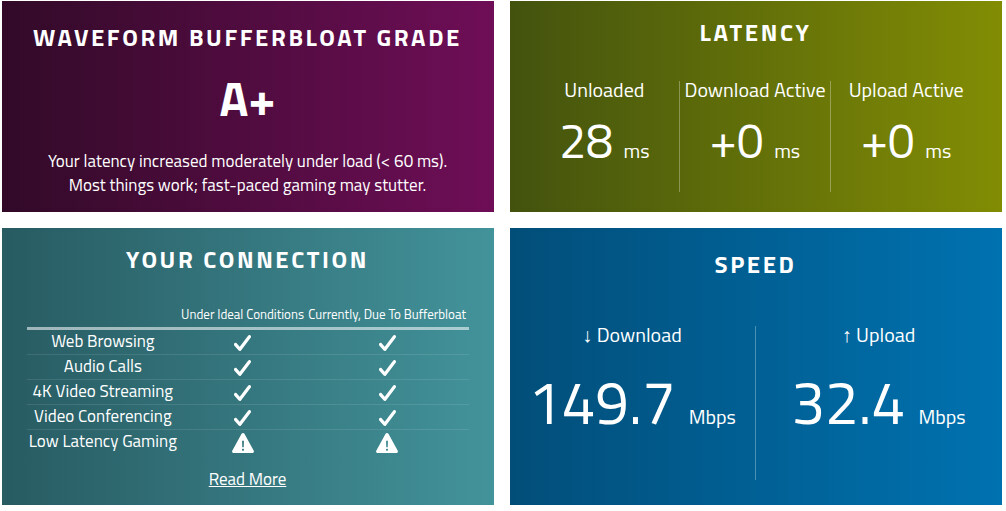
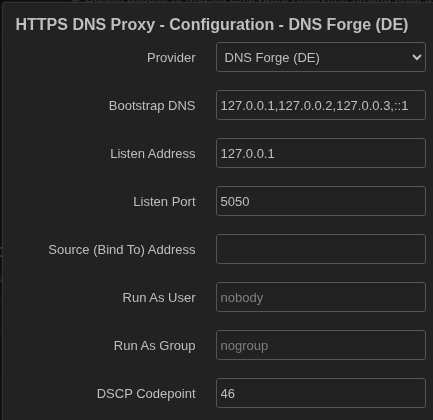
[ EDIT: Whew! Getting the firewall to mark packets is labrinthine! Working now. ]
Now the fun part… you can tune ECN to start marking packets as soon as the first hint of congestion occurs. Out-of-the-box, FQ-CoDel lets 5 msec worth of bufferbloat build up. The code below drops that baseline down to 2500 usec (2.5 msec), and clamps down as far as 500 usec (0.5 msec) on high load.
The code below shapes both upload and download. It varies ecn ce_threshold as the datarate varies, to make the traffic shaping smoother.
I’ve updated the code below to give higher priority to https-dns-proxy traffic. If you don’t have https-dns-proxy installed, you can comment those lines out, or remove them. The firewall marks the DoH packets, then wan_throttle uses that mark to chuck those packets into their own, higher-priority data stream.
NOTE: The code below works perfectly even with Software Flow Offloading enabled. We steal the inbound packets for shaping before SFO even sees them. We shape at Layer 2 and offload at Layer 3. Once they’re shaped, they go up the stack to Layer 3. Hence we get inbound traffic shaping and low CPU utilization.
Use:
ip link show
… to enumerate your interfaces. Find the interface which your router uses to connect to the modem… for the OpenWRT One router, it’s usually eth0.
We can adapt the original wan_throttle from my prior posts to enable ECN and L4S… copy and paste this into the terminal window, then press Enter:
cat << 'EOF' > /etc/init.d/wan_throttle
#!/bin/sh /etc/rc.common
START=95
# Register 'status' as a custom command
EXTRA_COMMANDS="status"
EXTRA_HELP=" status Show traffic control statistics"
# === === === === === === ===
# USER SETTINGS - DO NOT CHANGE ANYTHING ELSE!
LOGGING=1 # Options: 0 - disabled | 1 - enabled
# QUANTUM SHOULD BE A MULTIPLE OF MTU + ETHERNET HEADER SIZE
# DEFAULT: 1500 + 14 = 1514
QUANTUM=3028
WAN_INTERFACE="eth0"
# THROTTLED SPEEDS (wan_throttle started)
THROTTLE_UP_SPEED="33mbit"
THROTTLE_DOWN_SPEED="200mbit"
# LINE SPEEDS (wan_throttle stopped)
FULL_UP_SPEED="45mbit" # ISP upload speed
FULL_DOWN_SPEED="1000mbit" # ISP download speed
# === === === === === === ===
# Account for protocol overhead
THROTTLE_UP="$(( (u = ${THROTTLE_UP_SPEED%mbit}) + (u / 10) ))mbit"
THROTTLE_DOWN="$(( (u = ${THROTTLE_DOWN_SPEED%mbit}) + (u / 10) ))mbit"
BASE_CE_THRESH=2500
MIN_UPLOAD_CE=500
MIN_DOWNLOAD_CE=500
UP_PID_FILE="/tmp/wan_throttle_up.pid"
DOWN_PID_FILE="/tmp/wan_throttle_down.pid"
setup_structure_if_missing() {
insmod sch_htb >/dev/null 2>/dev/null
insmod act_mirred >/dev/null 2>/dev/null
insmod cls_u32 >/dev/null 2>/dev/null
if lsmod | grep -q "^ifb" && ! ip link show dev ifb0 >/dev/null 2>&1; then
rmmod ifb 2>/dev/null
fi
modprobe ifb numifbs=1 >/dev/null 2>&1
ip link set dev ifb0 up >/dev/null 2>&1
# Provision TX queue
if ! tc qdisc show dev ${WAN_INTERFACE} | grep -q "root htb"; then
tc qdisc del dev ${WAN_INTERFACE} root 2>/dev/null
# Set up root HTB
tc qdisc add dev ${WAN_INTERFACE} root handle 10: htb default 11
# Fast-track lane (class 10:10) for DoH queries
tc class add dev ${WAN_INTERFACE} parent 10: classid 10:10 htb rate 5mbit ceil ${FULL_UP_SPEED} prio 0
# General traffic (class 10:11)
tc class add dev ${WAN_INTERFACE} parent 10: classid 10:11 htb rate ${THROTTLE_UP} ceil ${THROTTLE_UP} quantum ${QUANTUM} prio 1
# Attach fq_codel leaf to class 10:11
tc qdisc add dev ${WAN_INTERFACE} parent 10:11 handle 110: fq_codel quantum ${QUANTUM} target 5ms interval 100ms ecn ce_threshold "${BASE_CE_THRESH}us" ce_threshold_selector 0x01/0x01 memory_limit 32Mb drop_batch 0
# ====================
# https-dns-proxy higher-priority bypass via Firewall Mark (fwmark)
# Matches any packet internally stamped with mark '4' and fast-tracks it
tc filter add dev ${WAN_INTERFACE} parent 10: protocol ip prio 1 handle 4 fw flowid 10:10
# ====================
# Catch-all: All remaining traffic to the standard fq_codel leaf queue
tc filter add dev ${WAN_INTERFACE} parent 10: protocol all prio 2 u32 match u32 0 0 flowid 10:11
fi
# Provision RX queue
if ! tc qdisc show dev ${WAN_INTERFACE} | grep -q "clsact" || ! tc qdisc show dev ifb0 | grep -q "htb"; then
tc qdisc del dev ${WAN_INTERFACE} clsact 2>/dev/null
tc qdisc del dev ifb0 root 2>/dev/null
tc qdisc add dev ${WAN_INTERFACE} clsact
tc filter add dev ${WAN_INTERFACE} ingress protocol all u32 match u32 0 0 action mirred egress redirect dev ifb0
tc qdisc add dev ifb0 root handle 1: htb default 11
tc class add dev ifb0 parent 1: classid 1:11 htb rate ${THROTTLE_DOWN} ceil ${THROTTLE_DOWN} quantum ${QUANTUM}
tc qdisc add dev ifb0 parent 1:11 handle 110: fq_codel quantum ${QUANTUM} target 5ms interval 100ms ecn ce_threshold "${BASE_CE_THRESH}us" ce_threshold_selector 0x01/0x01 memory_limit 32Mb drop_batch 0
fi
}
run_upload_monitor() {
local UP_MODIFIED=0
while true; do
local SYN_COUNT=$(ss -H -t state syn-sent | wc -l)
if [ "${SYN_COUNT}" -gt 0 ]; then
local NEW_CE=$(( BASE_CE_THRESH - (SYN_COUNT * 250) ))
[ "${NEW_CE}" -lt "${MIN_UPLOAD_CE}" ] && NEW_CE=${MIN_UPLOAD_CE}
tc qdisc change dev "${WAN_INTERFACE}" parent 10:11 handle 110: fq_codel quantum ${QUANTUM} target 5ms interval 100ms ecn ce_threshold "${NEW_CE}us" ce_threshold_selector 0x01/0x01 memory_limit 32Mb drop_batch 0
[ "${LOGGING}" -eq 1 ] && logger -t wan_throttle "CONGESTION++: ${SYN_COUNT} SYN-SENTs. Upload ECN set to ${NEW_CE}us."
UP_MODIFIED=1
else
if [ "${UP_MODIFIED}" -eq 1 ]; then
tc qdisc change dev "${WAN_INTERFACE}" parent 10:11 handle 110: fq_codel quantum ${QUANTUM} target 5ms interval 100ms ecn ce_threshold "${BASE_CE_THRESH}us" ce_threshold_selector 0x01/0x01 memory_limit 32Mb drop_batch 0
[ "${LOGGING}" -eq 1 ] && logger -t wan_throttle "CONGESTION--. ${SYN_COUNT} SYN-SENTs. Upload ECN set to ${BASE_CE_THRESH}us."
UP_MODIFIED=0
fi
fi
sleep 2
done
}
run_download_monitor() {
local OLD_BYTES
OLD_BYTES=$(cat /sys/class/net/ifb0/statistics/rx_bytes 2>/dev/null)
local DOWN_MODIFIED=0
while true; do
sleep 1
local NEW_BYTES
NEW_BYTES=$(cat /sys/class/net/ifb0/statistics/rx_bytes 2>/dev/null)
[ -z "${NEW_BYTES}" ] || [ -z "${OLD_BYTES}" ] && continue
local BYTES_DIFF=$((NEW_BYTES - OLD_BYTES))
OLD_BYTES=${NEW_BYTES}
local LIVE_MBPS=$(( (BYTES_DIFF * 8) / 1048576 ))
if [ -n "${DOWN_RAW}" ] && [ "${DOWN_RAW}" -gt 0 ]; then
local UTILIZATION=$(( (LIVE_MBPS * 100) / DOWN_RAW ))
else
local UTILIZATION=0
fi
if [ "${UTILIZATION}" -gt 80 ]; then
local LOAD_OVER_80=$((UTILIZATION - 80))
local NEW_CE=$(( BASE_CE_THRESH - (LOAD_OVER_80 * 50) ))
[ "${NEW_CE}" -lt "${MIN_DOWNLOAD_CE}" ] && NEW_CE=${MIN_DOWNLOAD_CE}
tc qdisc change dev ifb0 parent 1:11 handle 110: fq_codel quantum ${QUANTUM} target 5ms interval 100ms ecn ce_threshold "${NEW_CE}us" ce_threshold_selector 0x01/0x01 memory_limit 32Mb drop_batch 0
[ "${LOGGING}" -eq 1 ] && logger -t wan_throttle "HIGH LOAD: ${UTILIZATION}% (${LIVE_MBPS} Mbps). Download ECN set to ${NEW_CE}us."
DOWN_MODIFIED=1
else
if [ "${DOWN_MODIFIED}" -eq 1 ]; then
tc qdisc change dev ifb0 parent 1:11 handle 110: fq_codel quantum ${QUANTUM} target 5ms interval 100ms ecn ce_threshold "${BASE_CE_THRESH}us" ce_threshold_selector 0x01/0x01 memory_limit 32Mb drop_batch 0
[ "${LOGGING}" -eq 1 ] && logger -t wan_throttle "LOW LOAD: ${UTILIZATION}% (${LIVE_MBPS} Mbps). Download ECN set to ${BASE_CE_THRESH}us."
DOWN_MODIFIED=0
fi
fi
done
}
start() {
setup_structure_if_missing
tc qdisc del dev ifb0 root 2>/dev/null
tc qdisc add dev ifb0 root handle 1: htb default 11
tc class add dev ifb0 parent 1: classid 1:11 htb rate ${THROTTLE_DOWN} ceil ${THROTTLE_DOWN} quantum ${QUANTUM}
tc qdisc add dev ifb0 parent 1:11 handle 110: fq_codel quantum ${QUANTUM} target 5ms interval 100ms ecn ce_threshold "${BASE_CE_THRESH}us" ce_threshold_selector 0x01/0x01 memory_limit 32Mb drop_batch 0
[ -f "${UP_PID_FILE}" ] && kill -9 "$(cat "${UP_PID_FILE}")" 2>/dev/null
[ -f "${DOWN_PID_FILE}" ] && kill -9 "$(cat "${DOWN_PID_FILE}")" 2>/dev/null
run_upload_monitor & echo $! > "${UP_PID_FILE}"
run_download_monitor & echo $! > "${DOWN_PID_FILE}"
logger -t wan_throttle "wan_throttle started. Up: ${THROTTLE_UP_SPEED}, Down: ${THROTTLE_DOWN_SPEED}"
}
stop() {
# Terminate monitor subroutines via PID files
if [ -f "${UP_PID_FILE}" ]; then
kill -9 "$(cat "${UP_PID_FILE}")" 2>/dev/null
rm -f "${UP_PID_FILE}"
fi
if [ -f "${DOWN_PID_FILE}" ]; then
kill -9 "$(cat "${DOWN_PID_FILE}")" 2>/dev/null
rm -f "${DOWN_PID_FILE}"
fi
# Remove traffic shaping structures (WAN and IFB)
# This removes class 10:10 & 10:11, filters, and fq_codel leaves.
tc qdisc del dev ${WAN_INTERFACE} root 2>/dev/null
tc qdisc del dev ${WAN_INTERFACE} clsact 2>/dev/null
tc qdisc del dev ifb0 root 2>/dev/null
# Set IFB loopback device in down state.
ip link set dev ifb0 down 2>/dev/null
logger -t wan_throttle "wan_throttle stopped."
}
status() {
echo "=== === === === === ===" | tee >(logger -t wan_throttle)
echo "=== === UL STATUS === ===" | tee >(logger -t wan_throttle)
echo "=== === === === === ===" | tee >(logger -t wan_throttle)
WAN_STAT=$( tc -s qdisc show dev ${WAN_INTERFACE} ) && echo "${WAN_STAT}" | tee >(logger -t wan_throttle)
echo "=== === === === === ===" | tee >(logger -t wan_throttle)
echo "=== === DL STATUS === ===" | tee >(logger -t wan_throttle)
echo "=== === === === === ===" | tee >(logger -t wan_throttle)
WAN_STAT=$( tc -s qdisc show dev ifb0 ) && echo "${WAN_STAT}" | tee >(logger -t wan_throttle)
}
EOF
Make it executable
chmod +x /etc/init.d/wan_throttle
Enable the service:
/etc/init.d/wan_throttle enable
Start the service:
/etc/init.d/wan_throttle start
Create the file that marks https-dns-proxy packets:
vi /usr/share/nftables.d/ruleset-post/90-doh-tc-bypass.nft
… press i to enter editing mode, then paste the following in:
table inet fw4 {
chain mangle_postrouting {
meta skuid nobody th dport 443 meta mark set 4 comment "Stamp both TCP and UDP HTTP/3 local DoH with mark 4"
}
}
… press Esc to exit editing mode, then :wq to save and exit, then reload the firewall:
fw4 reload
… and restart wan_throttle:
/etc/init.d/wan_throttle stop
/etc/init.d/wan_throttle start
Note the code above:
meta skuid nobody
^^^^^^
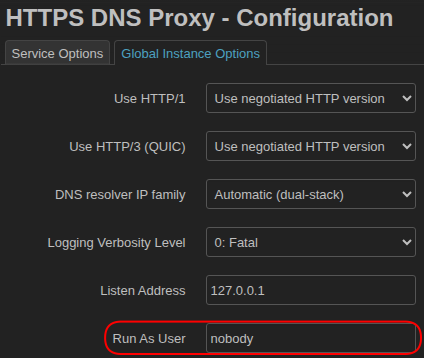
… it marks only those packets coming from https-dns-proxy, so wan_throttle can give those packets their own fast-lane.
Make sure the files survive firmware updates. Put:
/etc/init.d/wan_throttle
/usr/share/nftables.d/ruleset-post/90-doh-tc-bypass.nft
… into the list at System >> Backup / Flash Firmware >> Configuration.
Look at the tc stats for class 10:10 (the higher-priority bypass for https-dns-proxy traffic):
tc -s class show dev eth0
… you should see something like this:
class htb 10:11 root leaf 110: prio 0 rate 36Mbit ceil 36Mbit burst 1600b cburst 1600b
Sent 25995848 bytes 66956 pkt (dropped 0, overlimits 6950 requeues 0)
backlog 0b 0p requeues 0
lended: 56471 borrowed: 0 giants: 0
tokens: 5226 ctokens: 5226
class htb 10:10 root prio 0 rate 5Mbit ceil 45Mbit burst 1600b cburst 1600b
Sent 194306 bytes 1485 pkt (dropped 0, overlimits 0 requeues 0)
backlog 0b 0p requeues 0
lended: 1485 borrowed: 0 giants: 0
tokens: 38350 ctokens: 4261
class fq_codel 110:7a parent 110:
(dropped 0, overlimits 0 requeues 0)
backlog 0b 0p requeues 0
deficit 286 count 0 lastcount 0 ldelay 754us
class fq_codel 110:1c7 parent 110:
(dropped 0, overlimits 0 requeues 0)
backlog 0b 0p requeues 0
deficit 2933 count 0 lastcount 0 ldelay 4us
… 1485 packets through the class 10:10 higher-priority bypass lane.
That last class (110:7a) is dynamic, set up by FQ_CoDel, one for each data stream… you’ll see it creating and removing classes as the traffic rate varies. It uses those to attempt to give fair bandwidth to each stream.
You can ascertain that the packet mangling is working by issuing:
nft list chain inet fw4 mangle_postrouting
… which will output something like:
table inet fw4 {
chain mangle_postrouting {
type filter hook postrouting priority mangle; policy accept;
oifname "eth0" tcp flags & (fin | syn | rst) == syn tcp option maxseg size set rt mtu comment "!fw4: Zone wan IPv4/IPv6 egress MTU fixing"
oifname "phy2-sta0" tcp flags & (fin | syn | rst) == syn tcp option maxseg size set rt mtu comment "!fw4: Zone hotspot IPv4/IPv6 egress MTU fixing"
meta skuid 65534 th dport 443 meta mark set 0x00000004 comment "Stamp both TCP and UDP HTTP/3 local DoH with mark 4"
}
}
Now, your https-dns-proxy DoH will work, even when you’re pushing bandwidth to the limits you’ve set in the wan_throttle script, because it’s at a higher priority.
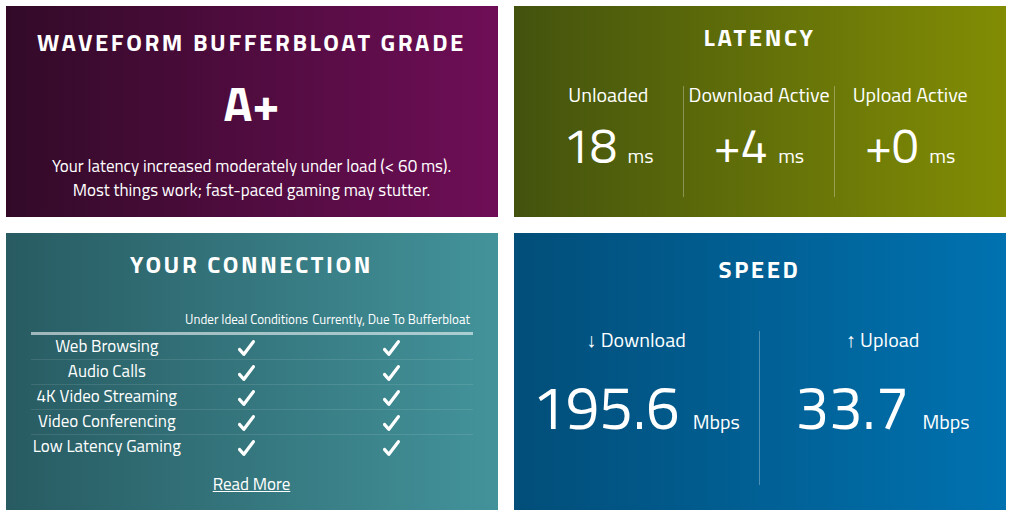
You’ll have to experiment with it to get the right bandwidth settings for THROTTLE_UP_SPEED and THROTTLE_DOWN_SPEED… it should be the slowest-speed interface. For me, that’s WiFi for THROTTLE_DOWN_SPEED, and the ISP’s upload bandwidth limit for THROTTLE_UP_SPEED. If I set it to 200 Mbps download speed, I get +4 ms latency on high download rate, that bufferbloat occurring at the phy0-ap0 and phy1-ap0 interfaces (or at br-lan, given that this is a WiFi-only network).
If you’ve got logging enabled, during high-bandwidth periods, you’ll see logs something like:
wan_throttle: HIGH LOAD: 100% (201 Mbps). Download ECN set to 1500us.
wan_throttle: HIGH LOAD: 107% (215 Mbps). Download ECN set to 1150us.
wan_throttle: HIGH LOAD: 107% (214 Mbps). Download ECN set to 1150us.
wan_throttle: LOW LOAD: 63% (126 Mbps). Download ECN set to 2500us.
wan_throttle: HIGH LOAD: 103% (206 Mbps). Download ECN set to 1350us.
wan_throttle: HIGH LOAD: 107% (215 Mbps). Download ECN set to 1150us.
wan_throttle: HIGH LOAD: 109% (218 Mbps). Download ECN set to 1050us.
wan_throttle: HIGH LOAD: 103% (207 Mbps). Download ECN set to 1350us.
wan_throttle: LOW LOAD: 15% (30 Mbps). Download ECN set to 2500us.
wan_throttle: HIGH LOAD: 88% (177 Mbps). Download ECN set to 2100us.
wan_throttle: HIGH LOAD: 104% (209 Mbps). Download ECN set to 1300us.
wan_throttle: HIGH LOAD: 105% (211 Mbps). Download ECN set to 1250us.
wan_throttle: HIGH LOAD: 107% (214 Mbps). Download ECN set to 1150us.
wan_throttle: HIGH LOAD: 85% (170 Mbps). Download ECN set to 2250us.
wan_throttle: LOW LOAD: 0% (0 Mbps). Download ECN set to 2500us.
Take a look at the download stats:
=== === === === === ===
=== === DL STATUS === ===
=== === === === === ===
qdisc htb 1: root refcnt 2 r2q 10 default 0x11 direct_packets_stat 0 direct_qlen 32
Sent 400692714 bytes 307245 pkt (dropped 1, overlimits 130172 requeues 18)
backlog 0b 0p requeues 18
qdisc fq_codel 110: parent 1:11 limit 10240p flows 1024 quantum 3028 target 5ms ce_threshold 2.5ms ce_threshold_selector 0x1/0x1 interval 100ms memory_limit 32Mb ecn drop_batch 64
Sent 400692714 bytes 307245 pkt (dropped 1, overlimits 0 requeues 0)
backlog 0b 0p requeues 0
maxpacket 60576 drop_overlimit 0 new_flow_count 24678 ecn_mark 1497 ce_mark 1497
new_flows_len 0 old_flows_len 4
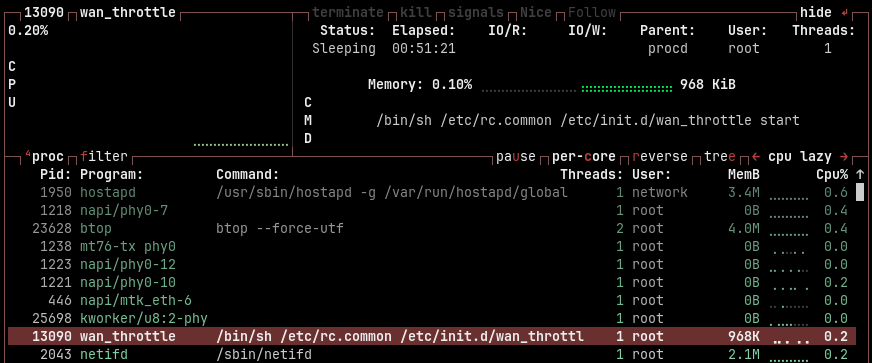
1 packet dropped, and 1497 ecn_mark’d.
Here’s a screenshot from btop:
An enhancement:
Install the kmod-tcp-bbr package, and issue:
vi /etc/sysctl.conf
… press i to enter editing mode, then paste this in:
# Enable Explicit Congestion Notification and BBR Congestion Control for wan_throttle use
net.ipv4.tcp_ecn = 1
net.ipv4.tcp_ecn_fallback = 1
net.ipv4.tcp_congestion_control = bbr
… press Esc to exit editing mode, then :wq to save and exit. Then issue:
sysctl -p
… to load the new setting.
This caused my bufferbloat test jitter to reduce to single-digit values, which finally got all the checkmarks in the lower-left panel (results with THROTTLE_UP_SPEED="33mbit", and THROTTLE_DOWN_SPEED="200mbit"):
If you use BBR instead of CUBIC on all of the configurable lan devices, as well, the traffic shaping is that much smoother.
For instance, for Linux:
sudo modprobe tcp_bbr
sudo sysctl -w net.ipv4.tcp_congestion_control=bbr
sudo sysctl -w net.core.default_qdisc = fq_codel
sudo sysctl -p
And for Windows:
Run this first and record the results, so you can reset it to defaults if you want:
Get-NetTCPSetting | Select SettingName, CongestionProvider
Then switch to BBR:
netsh int tcp set supplemental Template=Internet CongestionProvider=bbr2
netsh int tcp set supplemental Template=Datacenter CongestionProvider=bbr2
netsh int tcp set supplemental Template=Compat CongestionProvider=bbr2
netsh int tcp set supplemental Template=DatacenterCustom CongestionProvider=bbr2
netsh int tcp set supplemental Template=InternetCustom CongestionProvider=bbr2

Get-NetTCPSetting | Select SettingName, CongestionProvider
… which should return:
SettingName        CongestionProvider
-----------        ------------------
Automatic
InternetCustom     BBR2
DatacenterCustom   BBR2
Compat             BBR2
Datacenter         BBR2
Internet           BBR2
Another enhancement… for the router and all the lan devices you can configure, set these in sysctl.conf (in the router, it’s at /etc/sysctl.conf):
net.ipv4.tcp_pacing_ca_ratio = 105
net.ipv4.tcp_pacing_ss_ratio = 105
The first one allows the device to seek for 5% more bandwidth if it’s available, but at a lower rate of increase than default, which slows down the bandwidth surges and dips.
The second one slows down the ramp-up of slow-start to +5% of current bandwidth… it still ramps pretty quickly, but it’s not slamming wide open like it does by default. It allows wan_throttle to settle into a narrow ECN range that keeps maximum bandwidth pretty stable.
Be sure to reload the settings via:
sysctl -p
Another enhancement:
I was reading here about how CloudFlare set their servers up for high throughput and low latency. While I can’t do a lot of what CloudFlare did (which would require recompiling the kernel), we can limit the size of the unsent bytes in the write queue. CloudFlare sets their net.ipv4.tcp_notsent_lowat = 131072 (128 KB), but that spikes CPU utilization (increases sendmsg() calls when using non-blocking sockets, and increases number of context switches for blocking sockets). CloudFlare can afford that, we can’t. I’ve set net.ipv4.tcp_notsent_lowat = 524288 (512 KB). I’m still testing to find the best value.
vi /etc/sysctl.conf
… press i to enter editing mode, then paste:
# Reduce net.ipv4.tcp_notsent_lowat from 4294967295 to 524288
# Cloudflare sets theirs to 131072 to limit the size of unsent bytes in the write queue.
net.ipv4.tcp_notsent_lowat = 524288
… press Esc to exit editing mode, then :wq to save and exit, then issue:
sysctl -p
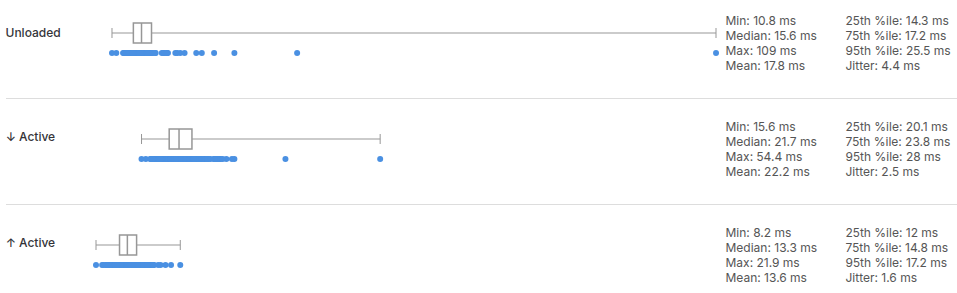
… which got me:

… for the first time on the bufferspeed.com bufferbloat test (with THROTTLE_UP_SPEED="33mbit" and THROTTLE_DOWN_SPEED="200mbit").
Final note:
You’ll notice in your logs:
daemon.notice: ttyd[3664]: [2026/10/12 19:13:39:0701] N: rops_handle_POLLIN_netlink: DELADDR
… when you stop /etc/init.d/wan_throttle.
When ttyd (the terminal daemon) starts up, it opens a Netlink routing socket (NETLINK_ROUTE). In Linux, Netlink is a kernel-to-user-space messaging system used to broadcast networking events (like an interface going up/down, or an IP address being assigned/removed).
By default, a program listening to NETLINK_ROUTE receives a stream of network change messages for all interfaces on the router, not just the interface the program is bound to.
When wan_throttle puts ifb0 into a down state, the Linux kernel removes any IP/address properties associated with that interface. The kernel broadcasts an RTM_DELADDR (Delete Address) message over Netlink to notify the system.
Because ttyd is listening globally, its Netlink polling loop captures the kernel’s broadcast event and spits out rops_handle_POLLIN_netlink: DELADDR into the system logs