By default, uhttpd listens on:
HTTP -
0.0.0.0:80
[::]:80

HTTPS:
0.0.0.0:443
[::]:443
… which means uhttpd (which serves the web pages for the LuCI interface) relies upon a properly-functioning firewall… if an attacker can cause the firewall daemon to crash, they’ve immediately got access to the http server for the router’s settings.
Let’s fix that.
Install:
luci-app-httpd uHTTPd Webserver Configuration
Under Services >> uHTTPd >> General Settings, you’ll see the addresses uhttpd listens on.
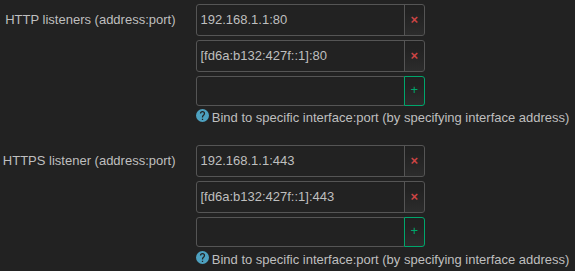
The IPv4 listen address is easy… it should be 192.168.1.1, unless you’ve set it to something else.
Look under Network >> Interfaces >> Global network options >> IPv6 ULA-Prefix to find your local IPv6. It’ll have a /48 suffix. Strip that off and add a 1 to get the router’s Unique Local Address.

… and use that in Services >> uHTTPd >> General Settings as the HTTP and HTTPS IPv6 listen address.
Click Save & Apply.
Now you should be able to access your router on 192.168.1.1, on your router’s IPv6 Unique Local Address, and on openwrt.lan… but on no other addresses.