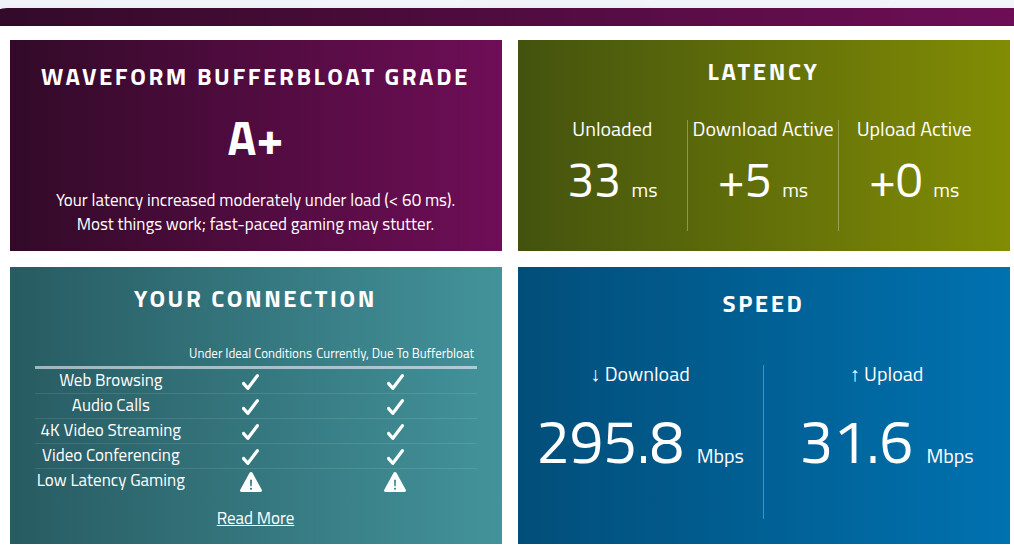
Low CPU Utilization Bufferbloat Mitigation with Hardware Offloading Enabled

NOTE: SEE NEXT POST BELOW. THERE IS A MUCH BETTER SETUP.

Target Use Case:

You want to mitigate bufferbloat by capping upload speed to just below the ISP’s limit, but for whatever reason, you need to limit CPU utilization.

Standard solutions like SQM (Smart Queue Management) add too much CPU overhead, and standard Firewall4 (fw4 / nftables) rules get completely bypassed (for already-established connections) if Software or Hardware Flow Offloading is enabled.

But there is a way to mitigate bufferbloat, while using hardware and/or software offloading, while minimizing CPU utilization.

The Solution:

This method hooks directly into the network interface queue using Linux Traffic Control (tc) via a Token Bucket Filter (tbf) script. Because it configures the physical card’s egress queue, it works cooperatively alongside Hardware / Software Flow Offloading, keeps CPU usage near 0%, and perfectly caps upload speed to just below the ISP’s limit.

Step-by-Step Implementation:

Configure the Custom Startup Script

Create /etc/firewall.user:

touch /etc/firewall.user

Write the /etc/firewall.user script which defines the Traffic Control queue on the WAN interface (replace eth0 with your actual WAN interface name if it differs). You can choose between fq_codel and cake. fq_codel worked better for me.

FOR FQ_CODEL:

cat << 'EOF' > /etc/firewall.user
# 1. Clear any legacy queue configurations
tc qdisc del dev eth0 root 2>/dev/null

# 2. Add an HTB (Hierarchical Token Bucket) shaper capped at 33Mbit
# Explicitly setting quantum to 1500 prevents kernel scheduler warnings on lower speeds
tc qdisc add dev eth0 root handle 1: htb default 11
tc class add dev eth0 parent 1: classid 1:11 htb rate 33mbit ceil 33mbit quantum 3000

# 3. Attach FQ-CoDel directly inside that class to destroy upload bufferbloat
tc qdisc add dev eth0 parent 1:11 handle 11: fq_codel
EOF

You should keep the quantum at a multiple of 1500 (ie: 1500, 3000, 4500, 6000, etc.), unless you’ve set your MTU to a different size (in which case, use the multiple of your MTU size). As you increase the quantum, your jitter will increase. When it reaches a point where you no longer have an A+ Bufferbloat grade, back off a bit.

Remember, if you’re experimenting, after everything is set up, all you should have to do is make changes to the /etc/firewall.user script above (make your changes, then copy the entire script from cat to EOF into a terminal, then press Enter), then you have to restart the firewall each time you make changes, via:

/etc/init.d/firewall restart

FOR CAKE:

cat << 'EOF' > /etc/firewall.user
# 1. Clear any legacy queue configurations safely
tc qdisc del dev eth0 root 2>/dev/null

# 2. Apply Cake directly with exact Docsis framing overhead rules
# 'triple-isolate' ensures per-host fairness to protect gaming/VoIP devices
# 'docsis' handles the packet framing overhead calculations automatically
# 'wash' safely cleans up incoming diffserv marks
tc qdisc add dev eth0 root cake bandwidth 33mbit docsis triple-isolate wash
EOF

If you want to use cake, you’ll have to install two packages:

apk update
apk add kmod-sched-cake tc-full

We only target upload speed, because on fast connections, download is not often saturated. But when upload speed is saturated, that affects downloads, so we want the slower upload speed to be as stable as possible.

Setting the raw rate slightly higher (~10% higher) than your target rate yields a true payload throughput at your target rate after accounting for Ethernet, IP, and TCP header encapsulation overhead.

Register the Script in Firewall4 (fw4):

To ensure the script runs automatically every time the firewall reloads or the router reboots, register it as a script-type include block in /etc/config/firewall:

uci add firewall include
uci set firewall.@include[-1].name='Bufferbloat mitigation (USER SET)'
uci set firewall.@include[-1].type='script'
uci set firewall.@include[-1].path='/etc/firewall.user'
uci set firewall.@include[-1].fw4_compatible='1'

Save changes and restart the firewall:

uci commit firewall
/etc/init.d/firewall restart

Add:

/etc/firewall.user

… to the list at System >> Backup / Flash Firmware >> Configuration, to be sure it survives a firmware update.

And that is it.

--------------------

Monitoring dropped packets and stats:

Because this operates within the tc subsystem rather than netfilter, you monitor it directly from the network queue. You can check statistics and bufferbloat drops by running:

tc -s qdisc show dev eth0

To monitor your stats dynamically in real-time during an active speed test, use this terminal loop:

while true; do clear; tc -s qdisc show dev eth0; sleep 1; done

Hit Ctrl-C to exit the loop in the code above when you’re done testing.

To run the BufferBloat test:

https://www.waveform.com/tools/bufferbloat

Let’s update the procedure above to do away with the legacy iptables and user-space handling used above.

We’ll initialize this as a service, instead.

First, for those who’ve already implemented the setup above, let’s strip that all out.

Issue the command:

uci show firewall

Which should show:

firewall.wan_throttle_include=include
firewall.wan_throttle_include.type='script'
firewall.wan_throttle_include.path='/etc/firewall.user'
firewall.wan_throttle_include.fw4_compatible='1'

Delete the /etc/config/firewall include settings:

uci delete firewall.wan_throttle_include
uci commit firewall
fw4 reload

Issue the command again:

uci show firewall

The wan_throttle_include entries should all be gone.

Delete the old file:

rm /etc/firewall.user

Remove the old file from the /etc/sysupgrade.conf firmware update protection list:

sed -i '\#/etc/firewall.user#d' /etc/sysupgrade.conf

--------------------

Create the traffic-shaping file:

touch /etc/init.d/wan_throttle

Populate the traffic-shaping file:

FOR FQ_CODEL:

cat << 'EOF' > /etc/init.d/wan_throttle
#!/bin/sh /etc/rc.common

# Boots late in the system sequence to ensure the eth0 interface is fully active
START=95

# Explicitly register 'status' as an authorized custom command
EXTRA_COMMANDS="status"
EXTRA_HELP="	status          Show active kernel traffic control statistics"

# USER SETTINGS - DO NOT CHANGE ANYTHING ELSE EXCEPT THESE 3 SETTINGS!
# QUANTUM SHOULD BE A MULTIPLE OF MTU + ETHERNET HEADER SIZE
# DEFAULT: 1500 + 14 = 1514
QUANTUM=3028
UPLIMIT_MB="33"
INTERFACE='eth0'

start() {
    # Clear any legacy queue configurations on $INTERFACE
    tc qdisc del dev $INTERFACE root 2>/dev/null

    # Calculate optimum burst
    BURST_KB=$(( ((UPLIMIT_MB * 9 * 15) + 50) / 100 ))
    [ "$BURST_KB" -lt 15 ] && BURST_KB=15

    # Add HTB shaper
    tc qdisc add dev $INTERFACE root handle 1: htb default 11
    tc class add dev $INTERFACE parent 1: classid 1:11 htb rate "${UPLIMIT_MB}mbit" ceil "${UPLIMIT_MB}mbit" burst "${BURST_KB}k" quantum $QUANTUM

    # Attach FQ-CoDel inside the HTB class and explicitly bind its leaf quantum
    tc qdisc add dev $INTERFACE parent 1:11 handle 11: fq_codel quantum 512 target 15ms interval 100ms
    tc filter add dev $INTERFACE parent 1: protocol ip prio 1 u32 match ip dst 0.0.0.0/0 flowid 1:11
}

stop() {
    # Fail-safe cleanup if the service is stopped or manually restarted
    tc qdisc del dev $INTERFACE root 2>/dev/null
}

status() {
    # Automatically output active kernel traffic control statistics
    tc -s qdisc show dev $INTERFACE
}
EOF

You should keep the quantum at a multiple of 1514 (ie: 1514, 3028, 4542, 6056, etc.), unless you’ve set your MTU to a different size (in which case, use the multiple of your MTU size + Ethernet header size). As you increase the quantum , your jitter will increase. When it reaches a point where you no longer have an A+ Bufferbloat grade, back off a bit.

FOR CAKE:

cat << 'EOF' > /etc/init.d/wan_throttle
#!/bin/sh /etc/rc.common

# Boots late in the system sequence to ensure the eth0 interface is fully active
START=95

# Explicitly tell OpenWRT that 'status' is an authorized custom command
EXTRA_COMMANDS="status"
EXTRA_HELP="	status          Show active kernel traffic control statistics"

# USER SETTINGS - DO NOT CHANGE ANYTHING ELSE EXCEPT THESE 2 SETTINGS!
UPLIMIT_MB="33"
INTERFACE='eth0'

start() {
    # 1. Clear any legacy queue configurations safely
    tc qdisc del dev $INTERFACE root 2>/dev/null

    # 2. Apply CAKE directly with DOCSIS overhead and fairness rules
    tc qdisc add dev $INTERFACE root cake bandwidth "${UPLIMIT_MB}mbit" docsis triple-isolate wash
}

stop() {
    # Fail-safe cleanup if the service is stopped or manually restarted
    tc qdisc del dev $INTERFACE root 2>/dev/null
}

status() {
    # Automatically output active kernel traffic control statistics
    tc -s qdisc show dev $INTERFACE
}
EOF

Make the traffic-shaping file executable:

chmod +x /etc/init.d/wan_throttle

Enable and start the wan_throttle service:

/etc/init.d/wan_throttle enable
/etc/init.d/wan_throttle start

Ensure the wan_throttle script is working properly:

tc -s qdisc show dev eth0

If you see “active with no instances”, something has gone wrong. You should see the connection stats.

Enforce firmware update persistence:

echo "/etc/init.d/wan_throttle" >> /etc/sysupgrade.conf

Now test for bufferbloat: https://www.waveform.com/tools/bufferbloat

--------------------

Add an alias (so you don’t have to type the /etc/init.d/ path when calling wan_throttle):

echo "alias wan_throttle='/etc/init.d/wan_throttle'" >> /etc/profile

Reload the profile:

source /etc/profile

Make it survive firmware updates:

echo "/etc/profile" >> /etc/sysupgrade.conf

When experimenting:

  1. Change the settings in the /etc/init.d/wan_throttle file above (whichever of the 2 scripts you chose to use), then copy the entire thing from ‘cat’ to ‘EOF’ and paste it into a Terminal window, then press Enter.

  2. To initialize the changes, you have to do:

wan_throttle restart
  1. Test for bufferbloat again: https://www.waveform.com/tools/bufferbloat

You can now monitor the status of the wan_throttle service via:

wan_throttle status

Can this be applied when wan is a switch port (e.g. wan@eth0)? or a bridge (e.g., br-wan)?

The above works well if you have a single, fixed-bandwidth connection… but if you’re on a dynamic-bandwidth connection, it won’t work.

Further, if you’re multi-WAN’d (to get a backup data path if your main ISP goes down) and the different WANs have different bandwidths, your bufferbloat will return on the slower connection… so let’s make the setting of the upload limit dynamic.

In a terminal window logged into the OpenWRT One router via ssh (issue: ssh [email protected] then enter the root password), copy and paste the below all-in-one-go, then press Enter.

cat << 'EOF' > /etc/init.d/wan_throttle_autorate
#!/bin/sh /etc/rc.common

START=96

EXTRA_COMMANDS="status"
EXTRA_HELP="	status          Show traffic shaping statistics"

# ===v===v=== USER SETTINGS===v===v===
INTERFACE='eth0'
SCHEDULER="FQ_CODEL"       # Options: FQ_CODEL or CAKE

# Make this a multiple of MTU size (usually 1500) + Ethernet header size
QUANTUM=3028

# Set MAX_KBPS to your target maximum+10%, to account for protocol overhead.
MAX_KBPS=33000             # Maximum upload ceiling (kbps)
MIN_KBPS=100               # Minimum upload floor (kbps)

DECAY_RATE_PERCENT=10       # Percent to decay during idle periods (1-25%)
DECAY_TRIGGER=50          # Data rate below which decay starts (kbps)

ENABLE_LOGGING=0          # Options: 1 or 0
# ===^===^=== USER SETTINGS===^===^===

PID_FILE="/tmp/wan_throttle_autorate.pid"
STATE_FILE="/tmp/wan_throttle_autorate.state"

get_tx_bytes() {
    grep "$INTERFACE:" /proc/net/dev | awk '{print $10}'
}

run_daemon() {
    LAST_SET_SHAPER=0
    POLL_INTERVAL=5

    # Initialize at full speed
    CURRENT_PEAK_KBPS=$MAX_KBPS

        # Write state to file in RAM
        echo "Interval: 5s | Instant: 1000kbps | Tracked Peak: 1000kbps | Burst: 15k | Shaper injected: ${SHAPER_TARGET_KBPS}kbit" > "$STATE_FILE"

    TX_PREV=$(get_tx_bytes)

    while true; do
        sleep $POLL_INTERVAL

        TX_CURR=$(get_tx_bytes)
        if [ "$TX_CURR" -lt "$TX_PREV" ]; then
            TX_PREV=$TX_CURR
            continue
        fi

        BYTES_DELTA=$((TX_CURR - TX_PREV))
        INSTANT_BYTES_PER_SEC=$((BYTES_DELTA / POLL_INTERVAL))
        TX_PREV=$TX_CURR

        # Calculate instant throughput in kbps
        INSTANT_KBPS=$(( (INSTANT_BYTES_PER_SEC * 8) / 1000 ))

        # --- AUTO-SCALE LOGIC ---
        if [ "$LAST_SET_SHAPER" -gt 0 ]; then
            UP_THRESHOLD_KBPS=$(( (LAST_SET_SHAPER * 3) / 4 ))
        else
            UP_THRESHOLD_KBPS=$(( (MAX_KBPS * 3) / 4 ))
        fi

        if [ "$INSTANT_KBPS" -ge "$UP_THRESHOLD_KBPS" ]; then
            CURRENT_PEAK_KBPS=$(( (INSTANT_KBPS * 3) / 2 ))
            [ "$CURRENT_PEAK_KBPS" -gt "$MAX_KBPS" ] && CURRENT_PEAK_KBPS=$MAX_KBPS
            POLL_INTERVAL=1

        elif [ "$INSTANT_KBPS" -ge "$DECAY_TRIGGER" ]; then
            POLL_INTERVAL=1

        else
            DECAY_AMOUNT=$(( (CURRENT_PEAK_KBPS * DECAY_RATE_PERCENT) / 100 ))
            [ "$DECAY_AMOUNT" -lt 1 ] && DECAY_AMOUNT=1

            CURRENT_PEAK_KBPS=$(( CURRENT_PEAK_KBPS - DECAY_AMOUNT ))
            POLL_INTERVAL=5
        fi

        # Enforce minimum data rate
        if [ "$CURRENT_PEAK_KBPS" -lt "$MIN_KBPS" ]; then
            CURRENT_PEAK_KBPS=$MIN_KBPS
        fi

        # Set shaper to 90% of tracked peak for protocol overhead margin
        SHAPER_TARGET_KBPS=$(( (CURRENT_PEAK_KBPS * 90) / 100 ))
        [ "$SHAPER_TARGET_KBPS" -lt "$MIN_KBPS" ] && SHAPER_TARGET_KBPS=$MIN_KBPS

        # Set new limit only upon actual change
        if [ "$LAST_SET_SHAPER" != "$SHAPER_TARGET_KBPS" ]; then
            if [ "$SCHEDULER" = "CAKE" ]; then
                tc qdisc change dev "$INTERFACE" root cake bandwidth "${SHAPER_TARGET_KBPS}kbit" docsis triple-isolate wash 2>/dev/null

            elif [ "$SCHEDULER" = "FQ_CODEL" ]; then
                BURST_KB=$(( ((SHAPER_TARGET_KBPS * 9 * 15) + 50000) / 100000 ))
                [ "$BURST_KB" -lt 15 ] && BURST_KB=15

               tc class change dev "$INTERFACE" parent 1: classid 1:11 htb rate "${SHAPER_TARGET_KBPS}kbit" ceil "${SHAPER_TARGET_KBPS}kbit" burst "${BURST_KB}k" quantum "$QUANTUM"  2>/dev/null

            fi

        # Write state to file in RAM
        echo "Interval: ${POLL_INTERVAL}s | Instant: ${INSTANT_KBPS}kbps | Tracked Peak: ${CURRENT_PEAK_KBPS}kbps | Burst: ${BURST_KB}k | Shaper injected: ${SHAPER_TARGET_KBPS}kbit" > "$STATE_FILE"

            [ "$ENABLE_LOGGING" -eq 1 ] && logger -t wan_throttle_autorate "Scheduler: ${SCHEDULER} | Interval: ${POLL_INTERVAL}s | Instant: ${INSTANT_KBPS}k | Tracked Peak: ${CURRENT_PEAK_KBPS}k | Shaper: ${SHAPER_TARGET_KBPS}kbit | Burst: "${BURST_KB}k" | QUANTUM: ${QUANTUM}"
            LAST_SET_SHAPER=$SHAPER_TARGET_KBPS
        fi
    done
}

start() {
    # Prevent duplicate daemon instances from spawning
    if [ -f "$PID_FILE" ] && kill -0 $(cat "$PID_FILE") 2>/dev/null; then
        echo "wan_throttle_autorate is already running."
        exit 0
    fi

    # Clear any legacy queue configurations on $INTERFACE
    tc qdisc del dev "$INTERFACE" root 2>/dev/null

    # Create the queue architecture based on user selection
    if [ "$SCHEDULER" = "CAKE" ]; then
        # CAKE attaches directly to the root interface. Seed it at the max set speed.
        tc qdisc add dev "$INTERFACE" root cake bandwidth "${MAX_KBPS}kbit" docsis triple-isolate wash 2>/dev/null

    elif [ "$SCHEDULER" = "FQ_CODEL" ]; then
        # Calculate an initial burst limit for the maximum ceiling speed
        BURST_KB=$(( ((MAX_KBPS * 9 * 15) + 50000) / 100000 ))
        [ "$BURST_KB" -lt 15 ] && BURST_KB=15

        # Add HTB shaper
        tc qdisc add dev "$INTERFACE" root handle 1: htb default 11 2>/dev/null
        tc class add dev "$INTERFACE" parent 1: classid 1:11 htb rate "${MAX_KBPS}kbit" ceil "${MAX_KBPS}kbit" burst "${BURST_KB}k" quantum "$QUANTUM"  2>/dev/null

        # Attach FQ-CoDel inside the HTB class and explicitly bind its leaf quantum
        tc qdisc add dev "$INTERFACE" parent 1:11 handle 11: fq_codel quantum 512 target 15ms interval 100ms  2>/dev/null
        tc filter add dev "$INTERFACE" parent 1: protocol ip prio 1 u32 match ip dst 0.0.0.0/0 flowid 1:11

    else
        logger -t wan_throttle_autorate "SCHEDULER: $SCHEDULER should be either CAKE or FQ-CODEL"
        exit 1
    fi

    # Launch the background autorate daemon
    run_daemon &
    echo $! > "$PID_FILE"
    logger -t wan_throttle_autorate "wan_throttle_autorate started."
}

stop() {
    if [ -f "$PID_FILE" ] && kill -0 $(cat "$PID_FILE") 2>/dev/null; then
        kill $(cat "$PID_FILE") 2>/dev/null
        rm -f "$PID_FILE"
        rm -f "$STATE_FILE"
    fi
    logger -t wan_throttle_autorate "wan_throttle_autorate stopped."

    if [ "$SCHEDULER" = "CAKE" ]; then
        # Cake attaches directly to the root. Delete the root qdisc structure.
        tc qdisc del dev "$INTERFACE" root 2>/dev/null
    elif [ "$SCHEDULER" = "FQ_CODEL" ]; then
        # HTB creates a parent structure at 1:. Deleting it completely un-throttles the connection.
        tc qdisc del dev "$INTERFACE" root handle 1: 2>/dev/null
        # Fallback flush just in case the handles are nested differently
        tc qdisc del dev "$INTERFACE" root 2>/dev/null
    fi
}

status() {
    if [ -f "$PID_FILE" ] && kill -0 $(cat "$PID_FILE") 2>/dev/null; then
        echo "wan_throttle_autorate status: RUNNING (PID: $(cat "$PID_FILE")) [Mode: "$SCHEDULER"]"

        if [ -f "$STATE_FILE" ]; then
            printf "\n%s\n\n" "$(cat "$STATE_FILE")"

            logger -t wan_throttle_autorate "Status: RUNNING | $(cat "$STATE_FILE" | tr '\n' ' ')"
        fi
    else
        echo "wan_throttle_autorate stopped."
        logger -t wan_throttle_autorate "wan_throttle_autorate stopped."
    fi
}
EOF

Make it executable:

chmod +x /etc/init.d/wan_throttle_autorate

In a terminal window connected to the router via ssh, set up a log monitor:

logread -f | grep wan_throttle_autorate

Leave that running.

In another terminal window connected to the router via ssh:

Start it manually to test it:

/etc/init.d/wan_throttle_autorate start

In the log monitor window, you should see log messages for the service.

Check the status:

/etc/init.d/wan_throttle_autorate status

Stop it:

/etc/init.d/wan_throttle_autorate stop

In the LuCI interface, go to System >> Startup, scroll down the list until you find wan_throttle_autorate. It should have a red button that says “Disabled”. Click that to enable it, then click the “Start” button.

Or you can issue:

/etc/init.d/wan_throttle_autorate enable
/etc/init.d/wan_throttle_autorate start

wan_throttle_autorate DOES NOT require wan_throttle (in prior post above). It replaces it. Both can be run… wan_throttle will start up first, wan_throttle_autorate will start up next, there should be no conflicts between the two.

Add an alias (so you don’t have to type the /etc/init.d/ path when calling wan_throttle_autorate):

echo "alias wan_throttle_autorate='/etc/init.d/wan_throttle_autorate'" >> /etc/profile

Reload the profile:

source /etc/profile

Make it survive firmware updates: Go to System >> Backup / Flash Firmware >> Configuration tab. Ensure that:

/etc/init.d/wan_throttle_autorate
/etc/profile

… are in that list.

Commands:

Start it:

wan_throttle_autorate start

Stop it:

wan_throttle_autorate stop

Restart it:

wan_throttle_autorate restart

Display status:

wan_throttle_autorate status

The script logs when ‘status’ is explicitly called… even if you’ve got logging disabled, you can get it to log by issuing:

while true; do wan_throttle_autorate status && sleep 5; done

Here’s a version that uses Linux Traffic Control ‘drop’ and ‘overlimit’ metrics as the gauge for congestion, and scales the upload bandwidth accordingly. This works pretty well if you get the settings right.

cat << 'EOF' > /etc/init.d/wan_throttle_autorate
#!/bin/sh /etc/rc.common

START=96

EXTRA_COMMANDS="status"
EXTRA_HELP="	status          Show traffic shaping statistics"

# ===v===v=== USER SETTINGS===v===v===
INTERFACE='eth0'
SCHEDULER="FQ_CODEL"       # Options: FQ_CODEL or CAKE

# Make this a multiple of MTU size (usually 1500) + Ethernet header size
QUANTUM=3028

# Set TARGET minimum and maximum (ms) for FQ_CODEL
TARGET_MAX=20
TARGET_MIN=5

# Set MAX_KBPS to your target maximum+10%, to account for protocol overhead.
MAX_KBPS=35000              # Maximum upload ceiling (kbps)
MIN_KBPS=1000               # Minimum upload floor (kbps)

DROPS_THRESH=1             # Drops per second threshold to start ramping down
OVERLIMITS_THRESH=4        # Overlimits per second threshold to start ramping down

DECEL_STEP_KBPS=1000       # How much to cut speed when congested (kbps)
ACCEL_STEP_KBPS=250        # How much to increase speed when clear (kbps)

ENABLE_LOGGING=0           # Options: 1 or 0
# ===^===^=== USER SETTINGS===^===^===

PID_FILE="/tmp/wan_throttle_autorate.pid"
STATE_FILE="/tmp/wan_throttle_autorate.state"

INITIAL_TARGET=5
TARGET_MS=${TARGET_MS:-$INITIAL_TARGET}

get_dropped_counts() {
    # Isolates parent class 1:11 to only look at upload shaper drops
    tc -s qdisc show dev "$INTERFACE" | grep -A 2 "fq_codel 11:" | grep "dropped" | awk '{
        for(i=1; i<=NF; i++) {
            if ($i ~ /dropped/) {
                val = $(i+1)
                gsub(/[^0-9]/, "", val)
                print val
                exit
            }
        }
    }'
}

get_overlimits_counts() {
    # Isolates root class 1: to look at upload aggregate shaper overlimits
    tc -s qdisc show dev "$INTERFACE" | grep -A 1 "htb 1:" | grep "overlimits" | awk '{
        for(i=1; i<=NF; i++) {
            if ($i ~ /overlimits/) {
                val = $(i+1)
                gsub(/[^0-9]/, "", val)
                print val
                exit
            }
        }
    }'
}

run_daemon() {
    LAST_SET_SHAPER=0
    POLL_INTERVAL=1  # Start at 1s for a responsive startup

    # Start the daemon at $MAX_KBPS
    CURRENT_LIMIT_KBPS=$MAX_KBPS

    DROP_PREV=$(get_dropped_counts)
    OVER_PREV=$(get_overlimits_counts)

    # Fallbacks to prevent uninitialized blank states
    [ -z "$DROP_PREV" ] && DROP_PREV=0
    [ -z "$OVER_PREV" ] && OVER_PREV=0

    SECONDS_ELAPSED=0

    while true; do
        sleep $POLL_INTERVAL

        DROP_CURR=$(get_dropped_counts)
        OVER_CURR=$(get_overlimits_counts)

        # Fallbacks to prevent uninitialized blank states
        [ -z "$DROP_CURR" ] && DROP_CURR=$DROP_PREV
        [ -z "$OVER_CURR" ] && OVER_CURR=$OVER_PREV

        # Handle edge cases where statistics reset/wrap around
        if [ "$DROP_CURR" -lt "$DROP_PREV" ] || [ "$OVER_CURR" -lt "$OVER_PREV" ]; then
            DROP_PREV=$DROP_CURR
            OVER_PREV=$OVER_CURR
            continue
        fi

        DROP_DELTA=$((DROP_CURR - DROP_PREV))
        OVER_DELTA=$((OVER_CURR - OVER_PREV))

        SAFE_POLL=$POLL_INTERVAL
        [ -z "$SAFE_POLL" ] || [ "$SAFE_POLL" -le 0 ] && SAFE_POLL=1

        # Calculate localized rates per second
        NEW_DROPS=$((DROP_DELTA / SAFE_POLL))
        NEW_OVERLIMITS=$((OVER_DELTA / SAFE_POLL))

        DROP_PREV=$DROP_CURR
        OVER_PREV=$OVER_CURR

        # 1. NO CONGESTION: If no new drops and no new overlimits occurred
        if [ "$NEW_DROPS" -lt "${DROPS_THRESH}" ] && [ "$NEW_OVERLIMITS" -lt "${OVERLIMITS_THRESH}" ]; then
            if [ "$CURRENT_LIMIT_KBPS" -ge "$MAX_KBPS" ]; then
                POLL_INTERVAL=5
                ACTION="HYSTERESIS (MAX CEILING - IDLE)"
            else
                POLL_INTERVAL=1
                CURRENT_LIMIT_KBPS=$((CURRENT_LIMIT_KBPS + ACCEL_STEP_KBPS))
                ACTION="ACCELERATING (LINK CLEAN)"
            fi

        # 2. CONGESTION: Packet loss is happening
        elif [ "$NEW_DROPS" -gt "$DROPS_THRESH" ]; then
            POLL_INTERVAL=1
            CURRENT_LIMIT_KBPS=$((CURRENT_LIMIT_KBPS - DECEL_STEP_KBPS))
            ACTION="DECELERATING (LOSS DETECTED)"

        # 3. SATURATION: No drops yet, but overlimits are spiking
        elif [ "$NEW_OVERLIMITS" -gt "${OVERLIMITS_THRESH}" ]; then
            POLL_INTERVAL=1
            CURRENT_LIMIT_KBPS=$((CURRENT_LIMIT_KBPS - DECEL_STEP_KBPS))
            ACTION="DECELERATING (SHAPER SATURATED)"

        # 4. ACCELERATION: Shaper is within set limits
        elif [ "$NEW_OVERLIMITS" -le "$OVERLIMITS_THRESH" ]; then
            if [ "$CURRENT_LIMIT_KBPS" -ge "$MAX_KBPS" ]; then
                POLL_INTERVAL=5
                ACTION="HYSTERESIS (MAX CEILING)"
            else
                POLL_INTERVAL=1
                CURRENT_LIMIT_KBPS=$((CURRENT_LIMIT_KBPS + ACCEL_STEP_KBPS))
                ACTION="ACCELERATING"
            fi

        # 5. SHAPING CONTROL: No drops, overlimits are below limits
        else
            POLL_INTERVAL=5
            ACTION="HYSTERESIS (SHAPING ACTIVE)"
        fi

        # Enforce datarate minimum and maximum
        if [ "$CURRENT_LIMIT_KBPS" -gt "$MAX_KBPS" ]; then
            CURRENT_LIMIT_KBPS=$MAX_KBPS
        fi
        if [ "$CURRENT_LIMIT_KBPS" -lt "$MIN_KBPS" ]; then
            CURRENT_LIMIT_KBPS=$MIN_KBPS
        fi

        # Commit rate changes to the shaper
        if [ "$LAST_SET_SHAPER" != "$CURRENT_LIMIT_KBPS" ]; then
            if [ "$SCHEDULER" = "CAKE" ]; then
                tc qdisc change dev "${INTERFACE}" root cake bandwidth "${CURRENT_LIMIT_KBPS}kbit" docsis triple-isolate wash 2>/dev/null

            elif [ "$SCHEDULER" = "FQ_CODEL" ]; then
                # Calculate optimum burst
                BURST_KB=$(( ((CURRENT_LIMIT_KBPS * 9 * 15) + 50000) / 100000 ))
                [ "$BURST_KB" -lt 15 ] && BURST_KB=15

                # Update the qdisc target
                tc class change dev "${INTERFACE}" parent 1: classid 1:11 htb rate "${CURRENT_LIMIT_KBPS}kbit" ceil "${CURRENT_LIMIT_KBPS}kbit" burst "${BURST_KB}k" quantum "${QUANTUM}" 2>/dev/null
            fi
            LAST_SET_SHAPER=${CURRENT_LIMIT_KBPS}
        fi

        # --- TARGET SCALING ---
        if [ "$SCHEDULER" = "FQ_CODEL" ]; then

            # 1. SCALE TARGET UP: Only if $CURRENT_LIMIT_KBPS is at minimum AND still seeing active packet loss
            if [ "$CURRENT_LIMIT_KBPS" -eq "$MIN_KBPS" ] && [ "$NEW_DROPS" -gt "$DROPS_THRESH" ]; then
                if [ "$TARGET_MS" -lt "$TARGET_MAX" ]; then
                    TARGET_MS=$((TARGET_MS + 1))
                    tc qdisc change dev "${INTERFACE}" parent 1:11 handle 11: fq_codel quantum 512 target "${TARGET_MS}ms" interval 100ms 2>/dev/null
                    logger -t wan_throttle_autorate "Minimum bandwidth reached with packet loss. Increasing target to ${TARGET_MS}ms"
                fi
            fi

            # 2. SCALE TARGET DOWN: Only if $MAX_KBPS AND drops and overlimites are below thresholds
            if [ "$CURRENT_LIMIT_KBPS" -eq "$MAX_KBPS" ] && [ "$NEW_DROPS" -eq 0 ] && [ "$NEW_OVERLIMITS" -le "$OVERLIMITS_THRESH" ]; then
                if [ "$TARGET_MS" -gt "$TARGET_MIN" ]; then
                    TARGET_MS=$((TARGET_MS - 1))
                    tc qdisc change dev "${INTERFACE}" parent 1:11 handle 11: fq_codel quantum 512 target "${TARGET_MS}ms" interval 100ms 2>/dev/null
                    logger -t wan_throttle_autorate "Maximum bandwidth reached. Decreasing target to ${TARGET_MS}ms"
                fi
            fi
        fi

        # Write stats to file in RAM
        echo "Interval: ${POLL_INTERVAL}s | DROPs: ${NEW_DROPS} | OVERLIMITs: ${NEW_OVERLIMITS} | Action: ${ACTION} | Shaper Applied: ${CURRENT_LIMIT_KBPS}kbps" > "$STATE_FILE"

        # LOGGING
        if [ "$ENABLE_LOGGING" -eq 1 ]; then
            # Verbose Logging Mode
            logger -t wan_throttle_autorate "Interval: ${POLL_INTERVAL}s | DROPs: ${NEW_DROPS} | OVERLIMITs: ${NEW_OVERLIMITS} | Action: ${ACTION} | Shaper: ${CURRENT_LIMIT_KBPS}kbps | TARGET: ${TARGET_MS}"
            SECONDS_ELAPSED=0 # Reset so logging modes don't cross-fire
        else
            # Heartbeat Logging Mode
            SECONDS_ELAPSED=$((SECONDS_ELAPSED + POLL_INTERVAL))

            if [ "$SECONDS_ELAPSED" -ge 300 ]; then
                logger -t wan_throttle_autorate "[HEARTBEAT] Mode: ${SCHEDULER} | Shaper: ${CURRENT_LIMIT_KBPS}kbps | Target: ${TARGET_MS}ms | Action: ${ACTION}"
                SECONDS_ELAPSED=0 # Reset the timer for the next 5 minutes
            fi
        fi

    done
}

start() {
    if [ -f "$PID_FILE" ] && kill -0 $(cat "$PID_FILE") 2>/dev/null; then
        echo "wan_throttle_autorate is already running."
        exit 0
    fi

    # Delete extraneous qdiscs on startup
    if [ "$SCHEDULER" = "CAKE" ]; then
        tc qdisc del dev "${INTERFACE}" root 2>/dev/null
    elif [ "$SCHEDULER" = "FQ_CODEL" ]; then
        tc qdisc del dev "${INTERFACE}" root handle 1: 2>/dev/null
        tc qdisc del dev "${INTERFACE}" root 2>/dev/null
    fi

    if [ "$SCHEDULER" = "CAKE" ]; then
        tc qdisc add dev "${INTERFACE}" root cake bandwidth "${MAX_KBPS}kbit" docsis triple-isolate wash 2>/dev/null

    elif [ "$SCHEDULER" = "FQ_CODEL" ]; then
        # Calculate optimum burst
        BURST_KB=$(( ((MAX_KBPS * 9 * 15) + 50000) / 100000 ))
        [ "$BURST_KB" -lt 15 ] && BURST_KB=15

        # Add HTB shaper
        tc qdisc add dev "${INTERFACE}" root handle 1: htb default 11 2>/dev/null
        tc class add dev "${INTERFACE}" parent 1: classid 1:11 htb rate "${MAX_KBPS}kbit" ceil "${MAX_KBPS}kbit" burst "${BURST_KB}k" quantum "${QUANTUM}" 2>/dev/null

        # Attach FQ-CoDel inside the HTB class and explicitly bind its leaf quantum
        # DO NOT change quantum here.
        tc qdisc add dev "${INTERFACE}" parent 1:11 handle 11: fq_codel quantum 512 target "${INITIAL_TARGET}ms" interval 100ms 2>/dev/null
        tc filter add dev "${INTERFACE}" parent 1: protocol ip prio 1 u32 match ip dst 0.0.0.0/0 flowid 1:11

    else

        logger -t wan_throttle_autorate "SCHEDULER: $SCHEDULER should be either CAKE or FQ-CODEL"
        exit 1

    fi

    run_daemon &
    echo $! > "$PID_FILE"
    logger -t wan_throttle_autorate "wan_throttle_autorate started."
}

stop() {
    if [ -f "$PID_FILE" ] && kill -0 $(cat "$PID_FILE") 2>/dev/null; then
        kill $(cat "$PID_FILE") 2>/dev/null
        rm -f "$PID_FILE"
        rm -f "$STATE_FILE"
    fi
    logger -t wan_throttle_autorate "wan_throttle_autorate stopped."

    if [ "$SCHEDULER" = "CAKE" ]; then
        tc qdisc del dev "${INTERFACE}" root 2>/dev/null
    elif [ "$SCHEDULER" = "FQ_CODEL" ]; then
        tc qdisc del dev "${INTERFACE}" root handle 1: 2>/dev/null
        tc qdisc del dev "${INTERFACE}" root 2>/dev/null
    fi
}

status() {
    if [ -f "$PID_FILE" ] && kill -0 $(cat "$PID_FILE") 2>/dev/null; then
        echo "wan_throttle_autorate status: RUNNING (PID: $(cat "$PID_FILE")) [Mode: $SCHEDULER]"
        if [ -f "$STATE_FILE" ]; then
            printf "\n%s\n\n" "$(cat "$STATE_FILE")"
            logger -t wan_throttle_autorate "Status: RUNNING | $(cat "$STATE_FILE" | tr '\n' ' ')"
        fi
    else
        echo "wan_throttle_autorate stopped."
        logger -t wan_throttle_autorate "wan_throttle_autorate stopped."
    fi
}
EOF

Make it executable:

chmod +x /etc/init.d/wan_throttle_autorate

Enable it:

/etc/init.d/wan_throttle_autorate enable

Start it:

/etc/init.d/wan_throttle_autorate start

Even if you have logging disabled, you can see the status by issuing:

while true; do /etc/init.d/wan_throttle_autorate status && sleep 5; done

When flows are offloaded to MediaTek PPE/HNAT/HQoS, linux tc or traffic shaper has no effect on any packets of those flows.

Are you sure you aren’t testing placebo?

When the script applies tc directly to the root of the physical interface (dev eth0), it establishes a hard token bucket limit inside the interface’s Linux network device ring buffer (tx queue). When the hardware offloader dumps packets into eth0 at a rate faster than the tc limit allows, the interface queue immediately signals backpressure (tx ring exhaustion).

The driver drops those ‘congested’ packets out of the hardware offloading “fast path” and forces the stream back to the CPU software stack so the network card can drop or delay packets according to the tc policy.

Because this is at the bottom of the stack (the interface egress), the hardware offloader is physically subordinate to the tc shaper.

Download traffic: enters the WAN interface and never touches a tc queue, resulting in essentially 0% CPU consumption.

Upload traffic: only the saturated upload packets hit the CPU for shaping. The CPU overhead to process that tiny slice of traffic is low.

A chatbot told me something very similar on another day. :slight_smile:

The thing is MediaTek PPE is super fast and it manages its pacing with respect to the WAN speed. So it’s very rare if ever that the offloaded flow will be put back to linux tc due PPE is incapable of processing it fast enough.

The whole argument breaks down.

I vote for a new forum rule:

Text copied from A.I. should be clearly marked showing the text is copied from A.I.

It would save the time of figuring out wether or not dealing with A.I. hallucinations.

kvic wrote: “The thing is MediaTek PPE is super fast and it manages its pacing with respect to the WAN speed. So it’s very rare if ever that the offloaded flow will be put back to linux tc due PPE is incapable of processing it fast enough.

And yet bufferbloat occurs. And the script mitigates that. But you wouldn’t know that, because you’ve not used it. So… why are you commenting?

Take it easy and relax…

I assume when people share or post here, they are expecting some meaningful feedback or discussion. That’s why I responded.

I looked at the problem before. Even though I never used your script. I also think by default OpenWrt comes with tc fq-codel configured. So it’s there already without any scripting.

From my check, it doesn’t help on bufferbloat tests.

Yes, OpenWRT comes with tc fq-codel enabled by default, but because the developers have no way of knowing what datarate you’re paying your ISP to receive, that tc fq-codel is completely unthrottled on wan. It’s not going to mitigate bufferbloat out-of-the-box.

You have to explicitly set a wan rate limit just below the ISP’s configured maximum for your connection to mitigate bufferbloat.

The script is variable because some connections have variable bandwidth on a temporal basis. If you’re on a fixed-bandwidth connection, the very first script (above… the service version, not the one from the very first post, the one from the second post) would work better.

The thing is for every new flow, after the 1st or 2nd packets, the flow will be offloaded to PPE. You’ll never hit any rate limit of tc fq-codel ratelimit.

In your first post, I think the A+ score is a quirk of the test rules from that website. What did you get for the score and latency values without running your script?

kvic wrote: “The thing is for every new flow, after the 1st or 2nd packets, the flow will be offloaded to PPE. You’ll never hit any rate limit of tc fq-codel ratelimit.

Not so…

Hardware Flow Offloading operates at Layer 3… prerouting, forward and postrouting are here.

Linux Traffic Control operates at Layer 2, and it can read Layer 3 headers.

IOW, Linux Traffic Control is prior to, superior to, Hardware Flow Offloading.

Layer 2 or 3 is irrelevant here.

Packets go out an interface sequentially. Assume your system only send out one packet. This packet first inspected by TC. Then checked by nftables rules presumably at tcp/ip level. Then get offloaded to PPE.

Subsequent packets of this offloaded flow will never be inspected by TC again.

Untrue.

When the MediaTek chip offloads a connection (Layer 3), it has to push that packet out of the physical eth0 wire. To do that, the hardware accelerator must hand the packet off to the physical interface’s transmit ring buffer (the transmit queue). That’s Layer 2… where Linux Traffic Control reigns. Then it goes to Layer 1, the physical card itself, then out over the wire.

:clown_face:

Ok. It seems you have very interesting understanding.

Do you believe that the Hardware Flow Offloading Packet Processing Engine can magically bypass Layer 2 to shunt packets to Layer 1?

If so, it seems you have very interesting ‘understanding’.

Here’s a new version that auto-scales the datarate acceleration and deceleration based upon how congested the network is. The settings allow you to set a Fast / Medium / Slow rate for datarate acceleration and deceleration.

It also scales TARGET… if the script has scaled back bandwidth to your set minimum and you’re still getting dropped packets, it’ll increase the Linux Traffic Control qdisc target (for FQ_CODEL)… it’s got a user-configurable minimum (currently set at 5 ms) and maximum (currently set at 20 ms).

If you’ve got logging disabled, it’ll print a heartbeat log every 5 minutes.

cat << 'EOF' > /etc/init.d/wan_throttle_autorate
#!/bin/sh /etc/rc.common

START=96

EXTRA_COMMANDS="status"
EXTRA_HELP="	status          Show traffic shaping statistics"

# vvvvvvvvvvvvvvv USER SETTINGS vvvvvvvvvvvvvvv

INTERFACE='eth0'
SCHEDULER="FQ_CODEL"       # Options: FQ_CODEL or CAKE

# Make this a multiple of MTU size (usually 1500) + Ethernet header size
QUANTUM=3028

# Set TARGET minimum and maximum (ms) for FQ_CODEL
TARGET_MAX=20
TARGET_MIN=5

# Set MAX_KBPS to your target maximum+10%, to account for protocol overhead.
MAX_KBPS=35000              # Maximum upload ceiling (kbps)
MIN_KBPS=3000               # Minimum upload floor (kbps)

# Space-separated datarate acceleration/deceleration tiers: [FAST] [MEDIUM] [SLOW] (kbps)
ACCEL_TIERS="200 100 50"
DECEL_TIERS="200 100 50"

DROPS_THRESH=5              # Drops per second threshold to start ramping down
OVERLIMITS_THRESH=750       # Overlimits per second threshold to start ramping down

ENABLE_LOGGING=0            # Options: 1 or 0

# ^^^^^^^^^^^^^^^ USER SETTINGS ^^^^^^^^^^^^^^^
# vvvvvvvvvvvvvvv SETUP vvvvvvvvvvvvvvv

PID_FILE="/tmp/wan_throttle_autorate.pid"
STATE_FILE="/tmp/wan_throttle_autorate.state"

INITIAL_TARGET=5
TARGET_MS=${TARGET_MS:-$INITIAL_TARGET}

get_dropped_counts() {
    # ISOLATES PARENT CLASS 1:11 TO ONLY LOOK AT UPLOAD SHAPER DROPS
    tc -s qdisc show dev "${INTERFACE}" | grep -A 2 "fq_codel 11:" | grep "dropped" | awk '{
        for(i=1; i<=NF; i++) {
            if ($i ~ /dropped/) {
                val = $(i+1)
                gsub(/[^0-9]/, "", val)
                print val
                exit
            }
        }
    }'
}

get_overlimits_counts() {
    # ISOLATES ROOT CLASS 1: TO LOOK AT UPLOAD AGGREGATE SHAPER OVERLIMITS
    tc -s qdisc show dev "${INTERFACE}" | grep -A 1 "htb 1:" | grep "overlimits" | awk '{
        for(i=1; i<=NF; i++) {
            if ($i ~ /overlimits/) {
                val = $(i+1)
                gsub(/[^0-9]/, "", val)
                print val
                exit
            }
        }
    }'
}

run_daemon() {

    LAST_SET_SHAPER=0
    POLL_INTERVAL=1    # START AT 1 SECOND FOR A RESPONSIVE STARTUP
    CURRENT_LIMIT_KBPS=${MAX_KBPS}    # START THE DAEMON AT $MAX_KBPS
    HISTORY_STR="HHHHHHHHHH"    # INITIALIZE THE HISTORY STRING

    DROP_PREV=$(get_dropped_counts)
    OVER_PREV=$(get_overlimits_counts)

    # FALLBACKS TO PREVENT UNINITIALIZED BLANK STATES
    [ -z "${DROP_PREV}" ] && DROP_PREV=0
    [ -z "${OVER_PREV}" ] && OVER_PREV=0

    SECONDS_ELAPSED=0

# ^^^^^^^^^^^^^^^ SETUP ^^^^^^^^^^^^^^^
# vvvvvvvvvvvvvvv LOOP SETUP vvvvvvvvvvvvvvv

    while true; do

       sleep ${POLL_INTERVAL}

        DROP_CURR=$(get_dropped_counts)
        OVER_CURR=$(get_overlimits_counts)

        # FALLBACKS TO PREVENT UNINITIALIZED BLANK STATES
        [ -z "${DROP_CURR}" ] && DROP_CURR=${DROP_PREV}
        [ -z "${OVER_CURR}" ] && OVER_CURR=${OVER_PREV}

        # HANDLE EDGE CASES WHERE STATISTICS RESET/WRAP AROUND
        if [ "${DROP_CURR}" -lt "${DROP_PREV}" ] || [ "${OVER_CURR}" -lt "${OVER_PREV}" ]; then
            DROP_PREV=${DROP_CURR}
            OVER_PREV=${OVER_CURR}
            continue
        fi

        SAFE_POLL=${POLL_INTERVAL}
        [ -z "${SAFE_POLL}" ] || [ "${SAFE_POLL}" -le 0 ] && SAFE_POLL=1

# ^^^^^^^^^^^^^^^ LOOP SETUP ^^^^^^^^^^^^^^^
# vvvvvvvvvvvvvvv STATE EVALUATION vvvvvvvvvvvvvvv

        DROP_DELTA=$((DROP_CURR - DROP_PREV))
        OVER_DELTA=$((OVER_CURR - OVER_PREV))

        # CALCULATE 'DROPS' AND 'OVERLIMITS' RATES PER SECOND
        NEW_DROPS=$((DROP_DELTA / SAFE_POLL))
        NEW_OVERLIMITS=$((OVER_DELTA / SAFE_POLL))

        DROP_PREV=${DROP_CURR}
        OVER_PREV=${OVER_CURR}

        # 1. NO CONGESTION: NO NEW DROPS, NO NEW OVERLIMITS
        if [ "${NEW_DROPS}" -lt "${DROPS_THRESH}" ] && [ "${NEW_OVERLIMITS}" -lt "${OVERLIMITS_THRESH}" ]; then
            if [ "${CURRENT_LIMIT_KBPS}" -ge "${MAX_KBPS}" ]; then
                POLL_INTERVAL=5
                CURRENT_LOG="H"
                ACTION="HYSTERESIS (MAX CEILING - IDLE)"
            else
                POLL_INTERVAL=1
                CURRENT_LOG="A"
                ACTION="ACCELERATING (LINK CLEAN)"
            fi

        # 2. CONGESTION: PACKET LOSS IS OCCURRING
        elif [ "${NEW_DROPS}" -gt "${DROPS_THRESH}" ]; then
            POLL_INTERVAL=1
            CURRENT_LOG="D"
            ACTION="DECELERATING (LOSS DETECTED)"

        # 3. SATURATION: NO DROPS YET, BUT OVERLIMITS ARE SPIKING
        elif [ "${NEW_OVERLIMITS}" -gt "${OVERLIMITS_THRESH}" ]; then
            POLL_INTERVAL=1
            CURRENT_LOG="D"
            ACTION="DECELERATING (SHAPER SATURATED)"

        # 4. ACCELERATION: SHAPER IS WITHIN SET LIMITS
        elif [ "${NEW_OVERLIMITS}" -le "${OVERLIMITS_THRESH}" ]; then
            if [ "${CURRENT_LIMIT_KBPS}" -ge "${MAX_KBPS}" ]; then
                POLL_INTERVAL=5
                CURRENT_LOG="H"
                ACTION="HYSTERESIS (MAX CEILING)"
            else
                POLL_INTERVAL=1
                CURRENT_LOG="A"
                ACTION="ACCELERATING"
            fi

        # 5. SHAPING CONTROL: NO DROPS, OVERLIMITS BELOW THRESHOLD
        else
            POLL_INTERVAL=5
            CURRENT_LOG="H"
            ACTION="HYSTERESIS (SHAPING ACTIVE)"
        fi

# ^^^^^^^^^^^^^^^ STATE EVALUATION ^^^^^^^^^^^^^^^
# vvvvvvvvvvvvvvv ACCEL_STEP_KBPS and DECEL_STEP_KBPS AUTORAMP vvvvvvvvvvvvvvv

        # ======================================================
        # 1. CONVERT $ACTION TO CHARACTER MAP & UPDATE MEMORY
        # ======================================================
        # APPEND THE NEWEST $CURRENT_LOG LETTER TO $HISTORY_STR
        HISTORY_STR="${HISTORY_STR}${CURRENT_LOG}"

        # TRIM HISTORY_STR TO 10 CHARACTERS
        HISTORY_STR="${HISTORY_STR: -10}"

        # COUNT 'D's BY STRIPPING THEM OUT AND SUBTRACTING LENGTHS
        STR_WITHOUT_D="${HISTORY_STR//D/}"
        DECEL_COUNT=$(( ${#HISTORY_STR} - ${#STR_WITHOUT_D} ))

        # ======================================================
        # 2. SET THE ACCEL AND DECEL STEP SIZES
        # ======================================================
        if [ "$DECEL_COUNT" -gt 6 ]; then
            # HIGH CONGESTION: FAST DECEL, SLOW ACCEL
            DYNAMIC_DECEL=$(echo "$DECEL_TIERS" | awk '{print $1}')
            DYNAMIC_ACCEL=$(echo "$ACCEL_TIERS" | awk '{print $3}')
        elif [ "$DECEL_COUNT" -gt 2 ]; then
            # LOW CONGESTION: MODERATE DECEL, ACCEL
            DYNAMIC_DECEL=$(echo "$DECEL_TIERS" | awk '{print $2}')
            DYNAMIC_ACCEL=$(echo "$ACCEL_TIERS" | awk '{print $2}')
        else
            # NO TO LOW CONGESTION: SLOW DECEL, FAST ACCEL
            DYNAMIC_DECEL=$(echo "$DECEL_TIERS" | awk '{print $3}')
            DYNAMIC_ACCEL=$(echo "$ACCEL_TIERS" | awk '{print $1}')
        fi

        # ======================================================
        # 3. APPLY THE ACCEL AND DECEL STEP SIZES
        # ======================================================
        if [ "${CURRENT_LOG}" = "D" ]; then
            CURRENT_LIMIT_KBPS=$((CURRENT_LIMIT_KBPS - DYNAMIC_DECEL))
        elif [ "${CURRENT_LOG}" = "A" ]; then
            CURRENT_LIMIT_KBPS=$((CURRENT_LIMIT_KBPS + DYNAMIC_ACCEL))
        fi

# ^^^^^^^^^^^^^^^ ACCEL_STEP_KBPS and DECEL_STEP_KBPS AUTORAMP ^^^^^^^^^^^^^^^
# vvvvvvvvvvvvvvv DATARATE HANDLING vvvvvvvvvvvvvvv

        # ENFORCE DATARATE MINIMUM AND MAXIMUM
        if [ "${CURRENT_LIMIT_KBPS}" -gt "${MAX_KBPS}" ]; then
            CURRENT_LIMIT_KBPS=${MAX_KBPS}
        fi
        if [ "${CURRENT_LIMIT_KBPS}" -lt "${MIN_KBPS}" ]; then
            CURRENT_LIMIT_KBPS=${MIN_KBPS}
        fi

        # COMMIT RATE CHANGES TO THE SHAPER
        if [ "${LAST_SET_SHAPER}" != "${CURRENT_LIMIT_KBPS}" ]; then
            if [ "${SCHEDULER}" = "CAKE" ]; then
                tc qdisc change dev "${INTERFACE}" root cake bandwidth "${CURRENT_LIMIT_KBPS}kbit" docsis triple-isolate wash 2>/dev/null

            elif [ "${SCHEDULER}" = "FQ_CODEL" ]; then
                # CALCULATE OPTIMUM BURST
                BURST_KB=$(( ((CURRENT_LIMIT_KBPS * 9 * 15) + 50000) / 100000 ))
                [ "${BURST_KB}" -lt 15 ] && BURST_KB=15

                # UPDATE THE QDISC TARGET
                tc class change dev "${INTERFACE}" parent 1: classid 1:11 htb rate "${CURRENT_LIMIT_KBPS}kbit" ceil "${CURRENT_LIMIT_KBPS}kbit" burst "${BURST_KB}k" quantum "${QUANTUM}" 2>/dev/null
            fi
            LAST_SET_SHAPER=${CURRENT_LIMIT_KBPS}
        fi

# ^^^^^^^^^^^^^^^ DATARATE HANDLING ^^^^^^^^^^^^^^^
# vvvvvvvvvvvvvvv TARGET SCALING vvvvvvvvvvvvvvv

        if [ "${SCHEDULER}" = "FQ_CODEL" ]; then

            # 1. SCALE TARGET UP: ONLY IF $CURRENT_LIMIT_KBPS IS AT MINIMUM AND THERE IS STILL PACKET LOSS
            if [ "${CURRENT_LIMIT_KBPS}" -eq "${MIN_KBPS}" ] && [ "${NEW_DROPS}" -gt "${DROPS_THRESH}" ]; then
                if [ "${TARGET_MS}" -lt "${TARGET_MAX}" ]; then
                    TARGET_MS=$((TARGET_MS + 1))
                    tc qdisc change dev "${INTERFACE}" parent 1:11 handle 11: fq_codel quantum 512 target "${TARGET_MS}ms" interval 100ms 2>/dev/null
                    [ "${ENABLE_LOGGING}" -eq 1 ] && logger -t wan_throttle_autorate "Minimum bandwidth reached with packet loss. Increasing target to ${TARGET_MS}ms"
                fi
            fi

            # 2. SCALE TARGET DOWN: ONLY IF $MAX_KBPS AND DROPS AND OVERLIMITS ARE BELOW THRESHOLDS
            if [ "${CURRENT_LIMIT_KBPS}" -eq "${MAX_KBPS}" ] && [ "${NEW_DROPS}" -eq 0 ] && [ "${NEW_OVERLIMITS}" -le "${OVERLIMITS_THRESH}" ]; then
                if [ "${TARGET_MS}" -gt "${TARGET_MIN}" ]; then
                    TARGET_MS=$((TARGET_MS - 1))
                    tc qdisc change dev "${INTERFACE}" parent 1:11 handle 11: fq_codel quantum 512 target "${TARGET_MS}ms" interval 100ms 2>/dev/null
                    [ "${ENABLE_LOGGING}" -eq 1 ] && logger -t wan_throttle_autorate "Maximum bandwidth reached. Decreasing target to ${TARGET_MS}ms"
                fi
            fi
        fi

# ^^^^^^^^^^^^^^^ TARGET SCALING ^^^^^^^^^^^^^^^
# vvvvvvvvvvvvvvv STATUS AND LOGGING vvvvvvvvvvvvvvv

        # WRITE STATS TO FILE IN RAM
        echo "Interval: ${POLL_INTERVAL}s | DROPs: ${NEW_DROPS} | OVERLIMITs: ${NEW_OVERLIMITS} |  Shaper: ${CURRENT_LIMIT_KBPS}kbps | ACTION: ${HISTORY_STR} | TARGET:  ${TARGET_MS}ms" > "$STATE_FILE"

        # LOGGING
        if [ "${ENABLE_LOGGING}" -eq 1 ]; then
            # VERBOSE LOGGING MODE
            logger -t wan_throttle_autorate "Interval: ${POLL_INTERVAL}s | DROPs: ${NEW_DROPS} | OVERLIMITs: ${NEW_OVERLIMITS} |  Shaper: ${CURRENT_LIMIT_KBPS}kbps | ACTION: ${HISTORY_STR} | TARGET:  ${TARGET_MS}ms"
            SECONDS_ELAPSED=0    # RESET SO LOGGING MODES DON'T CROSS-FIRE
        else
            # HEARTBEAT LOGGING MODE
            SECONDS_ELAPSED=$((SECONDS_ELAPSED + POLL_INTERVAL))

            if [ "${SECONDS_ELAPSED}" -ge 300 ]; then
                logger -t wan_throttle_autorate "[HEARTBEAT] Mode: ${SCHEDULER} | Shaper: ${CURRENT_LIMIT_KBPS}kbps | Target: ${TARGET_MS}ms | Action: ${HISTORY_STR}"
                SECONDS_ELAPSED=0 # RESET THE TIMER FOR THE NEXT 5 MINUTES
            fi
        fi

# ^^^^^^^^^^^^^^^ STATUS AND LOGGING ^^^^^^^^^^^^^^^

    done
}

# vvvvvvvvvvvvvvv FLAGS vvvvvvvvvvvvvvv

start() {
    if [ -f "${PID_FILE}" ] && kill -0 $(cat "${PID_FILE}") 2>/dev/null; then
        echo "wan_throttle_autorate is already running."
        exit 0
    fi

    # DELETE EXTRANEOUS QDISKS ON STARTUP
    if [ "${SCHEDULER}" = "CAKE" ]; then
        tc qdisc del dev "${INTERFACE}" root 2>/dev/null
    elif [ "${SCHEDULER}" = "FQ_CODEL" ]; then
        tc qdisc del dev "${INTERFACE}" root handle 1: 2>/dev/null
        tc qdisc del dev "${INTERFACE}" root 2>/dev/null
    fi

    if [ "${SCHEDULER}" = "CAKE" ]; then
        tc qdisc add dev "${INTERFACE}" root cake bandwidth "${MAX_KBPS}kbit" docsis triple-isolate wash 2>/dev/null

    elif [ "${SCHEDULER}" = "FQ_CODEL" ]; then
        # CALCULATE OPTIMUM BURST
        BURST_KB=$(( ((MAX_KBPS * 9 * 15) + 50000) / 100000 ))
        [ "${BURST_KB}" -lt 15 ] && BURST_KB=15

        # ADD HTB SHAPER
        tc qdisc add dev "${INTERFACE}" root handle 1: htb default 11 2>/dev/null
        tc class add dev "${INTERFACE}" parent 1: classid 1:11 htb rate "${MAX_KBPS}kbit" ceil "${MAX_KBPS}kbit" burst "${BURST_KB}k" quantum "${QUANTUM}" 2>/dev/null

        # ATTACH FQ-CoDel INSIDE THE HTB CLASS AND BIND ITS LEAF QUANTUM
        # DO NOT CHANGE QUANTUM HERE.
        tc qdisc add dev "${INTERFACE}" parent 1:11 handle 11: fq_codel quantum 512 target "${INITIAL_TARGET}ms" interval 100ms 2>/dev/null
        tc filter add dev "${INTERFACE}" parent 1: protocol ip prio 1 u32 match ip dst 0.0.0.0/0 flowid 1:11

    else

        logger -t wan_throttle_autorate "SCHEDULER: $SCHEDULER should be either CAKE or FQ-CODEL"
        exit 1

    fi

    run_daemon &
    echo $! > "${PID_FILE}"
    logger -t wan_throttle_autorate "wan_throttle_autorate started."
}

stop() {
    if [ -f "${PID_FILE}" ] && kill -0 $(cat "${PID_FILE}") 2>/dev/null; then
        kill $(cat "${PID_FILE}") 2>/dev/null
        rm -f "${PID_FILE}"
        rm -f "${STATE_FILE}"
    fi
    logger -t wan_throttle_autorate "wan_throttle_autorate stopped."

    if [ "${SCHEDULER}" = "CAKE" ]; then
        tc qdisc del dev "${INTERFACE}" root 2>/dev/null
    elif [ "${SCHEDULER}" = "FQ_CODEL" ]; then
        tc qdisc del dev "${INTERFACE}" root handle 1: 2>/dev/null
        tc qdisc del dev "${INTERFACE}" root 2>/dev/null
    fi
}

status() {
    INTERVAL="$1"

    if [ -f "${PID_FILE}" ] && kill -0 $(cat "${PID_FILE}") 2>/dev/null; then
        # PRINT EVERY X SECONDS
        if [ -n "${INTERVAL}" ] 2>/dev/null; then
            echo "wan_throttle_autorate status: RUNNING (PID: $(cat "${PID_FILE}")) [Mode: ${SCHEDULER}]"
            echo "Press Ctrl+C to exit live monitoring."
            echo "--------------------------------------------------------------------------------"

            printf "\033[?25l" # HIDE THE CURSOR
            trap 'printf "\033[?25h\n"; exit 0' INT TERM

            while true; do
                if [ -f "${STATE_FILE}" ]; then
                    # PRINT THE STATS
                    printf "\r%s                                                     " "$(cat "${STATE_FILE}" | tr '\n' ' ')"

                    # PULL POLL_INTERVAL OUT OF THE STATE_FILE
                    STATS_SLEEP=$(cat "${STATE_FILE}" | awk '{print $2}' | tr -d 's')

                    # FALLBACK: DEFAULT TO 1 SECOND ON ERROR
                    [ -z "${STATS_SLEEP}" ] && STATS_SLEEP=1
                else
                    STATS_SLEEP=1
                fi
                sleep "${STATS_SLEEP}"
            done
        else
            # PRINT ONCE
            echo "wan_throttle_autorate status: RUNNING (PID: $(cat "${PID_FILE}")) [Mode: ${SCHEDULER}]"
            if [ -f "${STATE_FILE}" ]; then
                printf "\n%s\n\n" "$(cat "${STATE_FILE}")"
            fi
        fi
    else
        echo "wan_throttle_autorate stopped."
    fi
}

# ^^^^^^^^^^^^^^^ FLAGS ^^^^^^^^^^^^^^^
EOF

Make it executable:

chmod +x /etc/init.d/wan_throttle_autorate

Enable it:

/etc/init.d/wan_throttle_autorate enable

Start it:

/etc/init.d/wan_throttle_autorate start

See the status:

/etc/init.d/wan_throttle_autorate status

Or, if you want to see it updating on only one line, every X seconds (where X is the dynamic update interval of the main script):

/etc/init.d/wan_throttle_autorate status X

You’ll see a histogram in the printout. For example:

| ACTION: DDDHHAAAAH |

That denotes the last 10 cycles of the script, where:

'D' = decelerating the datarate
'A' = accelerating the datarate
'H' = hysteresis (no datarate change)

I’m still trying to figure out whether this makes sense when the device has a switch, of which one port is allocated to wan and the others for lan. Clearly one wouldn’t want to limit “upload”, i.e., egress, for the entire switch, since that severely limits LAN communication.

So this only works when wan has its own root interface?