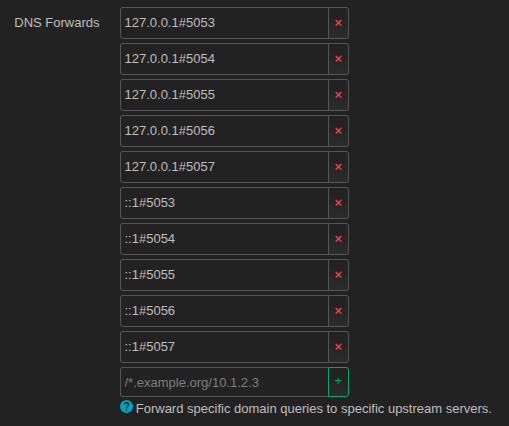
I set up all my IPv4 DoH servers for https-dns-proxy, ensured they were working, then set up my IPv6 DoH servers.
https-dns-proxy sorts the Network >> DNS >> Forwards tab list by reverse order in which the server entry was created… newer entries get shuffled to the top. So now all my IPv6 DoH servers were at the top of the Network >> DNS >> Forwards tab list.
This causes problems… IPv4 DNS queries are delayed by as much as 30 seconds, web pages clock for that amount of time or simply fail to load.
You can go into Network >> DNS >> Forwards tab and manually reshuffle the list to put IPv4 IP addresses back at the top, but as soon as you reboot (or restart the https-dns-proxy service), https-dns-proxy does its thing and puts them right back to the same (wrong) order.
So, I created two scripts to hook into https-dns-proxy, watch for when it makes any changes, then reshuffle the Network >> DNS >> Forwards tab list properly. This works on boot, and when running and you make any changes to your DoH servers in https-dns-proxy.
You can also check that the Network >> DNS >> Forwards tab list is properly sorted, and if not, you can manually trigger the code to properly sort it. Instructions and commands at the end of this post.
This works for any number of configured DoH servers, whether IPv4 or IPv6.
Step 1: Create the Main Sorting Utility Script
Connect to your router via SSH (in a Terminal window, type: ssh [email protected], enter root password) and create the script to handle the sorting. Paste the script below into the Terminal window and press Enter.
cat << 'EOF' > /usr/sbin/sort-dns-forwards
#!/bin/sh

# 1. Clear LuCI UI workspace locks to prevent session collisions
rm -rf /var/state/luci/uci/* 2>/dev/null

# 2. Extract action command flag
ACTION="$1"

if [ "$ACTION" = "check" ]; then
    echo "=== DNS Forwards Order Status ==="
    SERVERS=$(uci -q show [email protected] | awk -F'=' '{print $2}' | tr -d "'")
    [ -z "$SERVERS" ] && SERVERS=$(uci -q show dhcp | grep "\.server=" | awk -F'=' '{print $2}' | tr -d "'")
    if [ -z "$SERVERS" ]; then
        echo "Status: EMPTY (No active forwarders registered in configuration memory)"
        exit 1
    fi

    echo "Current List Order:"
    IPV6_SEEN=0; SCRAMBLED=0
    for item in $SERVERS; do
        echo "  - $item"
        ip_part=$(echo "$item" | cut -d'#' -f1)
        if [ "$ip_part" = "::1" ]; then IPV6_SEEN=1; fi
        if [ "$ip_part" = "127.0.0.1" ] && [ $IPV6_SEEN -eq 1 ]; then SCRAMBLED=1; fi
    done

    echo "---------------------------------"
    if [ $SCRAMBLED -eq 1 ]; then
        echo "Result: SCRAMBLED (IPv6 addresses are sitting above IPv4 addresses!)"
        exit 1
    else
        echo "Result: PERFECTLY SORTED (All IPv4 addresses are stacked safely on top)"
        exit 0
    fi
fi

# Default Action: Execute Reshuffle Logic
[ "$ACTION" = "sort" ] && echo "Reshuffling DNS Forwards list into correct order..."

# Create temporary storage
TMP_SERVER="/tmp/dns_srv.tmp"
TMP_DOH="/tmp/dns_doh.tmp"
TMP_BKUP="/tmp/dns_bkup.tmp"
rm -f "$TMP_SERVER" "$TMP_DOH" "$TMP_BKUP"

# Pass 1: Extract all active IPv4 entries
INDEX=0
while true; do
    port=$(uci -q get https-dns-proxy.@https-dns-proxy[$INDEX].listen_port)
    addr=$(uci -q get https-dns-proxy.@https-dns-proxy[$INDEX].listen_addr)
    [ -z "$port" ] && break
    [ -z "$addr" ] && addr="127.0.0.1"

    if [ "$addr" = "127.0.0.1" ]; then
        echo "	list server '127.0.0.1#${port}'" >> "$TMP_SERVER"
        echo "	list doh_server '127.0.0.1#${port}'" >> "$TMP_DOH"
        echo "	list doh_backup_server '127.0.0.1#${port}'" >> "$TMP_BKUP"
    fi
    INDEX=$((INDEX + 1))
done

# Pass 2: Extract all active IPv6 entries and append them right behind IPv4
INDEX=0
while true; do
    port=$(uci -q get https-dns-proxy.@https-dns-proxy[$INDEX].listen_port)
    addr=$(uci -q get https-dns-proxy.@https-dns-proxy[$INDEX].listen_addr)
    [ -z "$port" ] && break
    [ -z "$addr" ] && addr="127.0.0.1"

    if [ "$addr" = "::1" ]; then
        echo "	list server '::1#${port}'" >> "$TMP_SERVER"
        echo "	list doh_server '::1#${port}'" >> "$TMP_DOH"
        echo "	list doh_backup_server '::1#${port}'" >> "$TMP_BKUP"
    fi
    INDEX=$((INDEX + 1))
done

# Sort each list file after both passes are complete
[ -f "$TMP_SERVER" ] && sort -V -o "$TMP_SERVER" "$TMP_SERVER"
[ -f "$TMP_DOH" ] && sort -V -o "$TMP_DOH" "$TMP_DOH"
[ -f "$TMP_BKUP" ] && sort -V -o "$TMP_BKUP" "$TMP_BKUP"

# 3. CONFIG FILE REBUILD
NEW_DHCP="/tmp/dhcp.new"
rm -f "$NEW_DHCP"

while read -r line || [ -n "$line" ]; do
    # Strip out any unformatted server, doh, or backup instances
    case "$line" in
        *list\ server*) continue ;;
        *list\ doh_server*) continue ;;
        *list\ doh_backup_server*) continue ;;
    esac
    echo "$line" >> "$NEW_DHCP"

    # Inject ordered blocks at the bottom of the dnsmasq block
    if echo "$line" | grep -q "config dnsmasq"; then
        [ -f "$TMP_SERVER" ] && cat "$TMP_SERVER" >> "$NEW_DHCP"
        [ -f "$TMP_DOH" ] && cat "$TMP_DOH" >> "$NEW_DHCP"
        [ -f "$TMP_BKUP" ] && cat "$TMP_BKUP" >> "$NEW_DHCP"
    fi
done < /etc/config/dhcp

# Apply changes
mv "$NEW_DHCP" /etc/config/dhcp
rm -f "$TMP_SERVER" "$TMP_DOH" "$TMP_BKUP"

# Reload dnsmasq daemon
/etc/init.d/dnsmasq reload

# Fetch active parameters for logs
FINAL_LIST=$(uci -q show [email protected] | awk -F'=' '{print $2}' | tr -d "'" | tr '\n' ' ' | sed 's/ $//')
[ -z "$FINAL_LIST" ] && FINAL_LIST=$(uci -q show dhcp | grep "\.server=" | awk -F'=' '{print $2}' | tr -d "'" | tr '\n' ' ')

logger -t https-dns-proxy-order "DNS Forwards sorted: [ $FINAL_LIST ]"

[ "$ACTION" = "sort" ] && echo "Done! Run 'sort-dns-forwards check' to verify the live layout."
EOF
Make the /usr/sbin/sort-dns-forwards file executable:
chmod +x /usr/sbin/sort-dns-forwards
Make /usr/sbin/sort-dns-forwards survive firmware updates:
echo "/usr/sbin/sort-dns-forwards" >> /etc/sysupgrade.conf
Step 2: Create the Automated Boot Hook
Run the lines below one-at-a-time in a terminal window connected to the router via ssh to create the system init startup wrapper. This sets up an event listener using OpenWRT’s Procd service manager. The moment https-dns-proxy writes its default sequence at boot or reload, our hook triggers to sort it.
echo '#!/bin/sh /etc/rc.common' > /etc/init.d/https-dns-proxy-order
echo 'START=99' >> /etc/init.d/https-dns-proxy-order
echo 'start_service() {' >> /etc/init.d/https-dns-proxy-order
echo '    ( sleep 5; /usr/sbin/sort-dns-forwards >/dev/null 2>&1; /etc/init.d/network reload ) &' >> /etc/init.d/https-dns-proxy-order
echo '}' >> /etc/init.d/https-dns-proxy-order
echo 'boot() {' >> /etc/init.d/https-dns-proxy-order
echo '    start_service' >> /etc/init.d/https-dns-proxy-order
echo '}' >> /etc/init.d/https-dns-proxy-order
echo 'service_triggers() {' >> /etc/init.d/https-dns-proxy-order
echo '    procd_add_reload_trigger "https-dns-proxy"' >> /etc/init.d/https-dns-proxy-order
echo '}' >> /etc/init.d/https-dns-proxy-order
echo 'restart() { start_service; }' >> /etc/init.d/https-dns-proxy-order
echo 'reload() { start_service; }' >> /etc/init.d/https-dns-proxy-order
Make /etc/init.d/https-dns-proxy-order executable:
chmod +x /etc/init.d/https-dns-proxy-order
Enable the startup hook service so it registers with the system initialization path:
/etc/init.d/https-dns-proxy-order enable
---------------
Interactive Utility Commands
Users can type these commands directly from any terminal connected to the router via ssh to manage their setup:
Verify the sort (Returns PERFECTLY SORTED or SCRAMBLED):
sort-dns-forwards check
Manually trigger a sort:
sort-dns-forwards sort
Check system logs:
logread | grep https-dns-proxy-order
– or (for displaying new log entries) –
logread -f | grep https-dns-proxy-order