[ EDIT: Updated the /etc/update-doh-bootstrap.sh script… the IP address filter lines were preventing IPv6 addresses being written to the hosts files. Fixed now. }
NOTE: Troubleshooting on this is a bear… I start getting:
daemon.warn: dnsmasq[1]: discarding DNS reply: subnet option mismatch
… in the logs, CPU usage would climb, DNS resolution would get sketchy. I disable DNSSEC, DNS resolution comes right back and the logspam stops… then it comes back, even with DNSSEC disabled. I think I’ve found the root cause. I believe it was dnsmasq itself injecting subnet information, then rejecting packets based upon that subnet information. Crazy. This occurs with either dnsmasq or dnsmasq-full. I’ve got DNSSEC enabled now, and the logs are silent, so hopefully that problem is quashed.
NOTE: DO NOT perform the procedure below if you do not have the CR1220 battery installed to keep the RTC (Real Time Clock) accurate during reboots and power-downs.
NOTE: The CLI (Command Line Interface) still tries to connect by bypassing DoH. You can fix this by replacing the internal utility uclient-fetch (the standard wget is sym-linked to uclient-fetch) with wget-ssl. Once wget-ssl is installed, apk will no longer throw errors because the firewall is blocking its packets, it’ll use DoH to resolve DNS queries.
Just to be sure that wget-ssl is used, even when uclient-fetch is explicitly called, we can do this:
mv /bin/uclient-fetch /bin/uclient-fetch.bak
vi /bin/uclient-fetch
Press i to enter editing mode, then copy-and-paste the following code into vi:
#!/bin/sh

# 1. Identify the parent process ID attempting to call uclient-fetch.
PARENT_PID=$PPID

# 2. Use the PID to extract the calling application name.
CALLER_NAME=$(cat /proc/$PARENT_PID/comm 2>/dev/null || echo "Unknown Process")

# 3. Log it.
logger -t "uclient-intercept" "App: $CALLER_NAME (PID: $PARENT_PID) attempted to call uclient-fetch with args: $*. Using wget-ssl instead."

# 4. Pass control to wget-ssl
exec /usr/libexec/wget-ssl "$@"
Press Esc to exit editing mode, then :wq to save and exit.
Make it executable:
chmod +x /bin/uclient-fetch
Now you’ll see log items such as:
user.notice: uclient-intercept: App: ash (PID: 24919) attempted to call uclient-fetch with args: -q -O - https://openwrt.org. Using wget-ssl instead.
NOTE: THIS IS A DANGEROUS PROCEDURE! DOUBLE-CHECK YOUR WORK!
If you mess up the FQDNs (Fully Qualified Domain Names) below, DO NOT attempt to install or update any software on the router! I did mess up one of the FQDNs (I used
dns.mullvad.netinstead of the properbase.dns.mullvad.net) and I did attempt an upgrade…wgetfailed as it was fetchingdnsmasq-full(to replacednsmasq). Thusdnsmasqgot uninstalled, butdnsmasq-fulldidn’t get installed, thus I had no DNS resolution, thus I couldn’t installdnsmasq-full. I connected to the router via the USB-C interface, logged in (issue:sudo screen /dev/ttyACM0 115200), then issued the command:firstboot -y && rebootto reset the router, then I set it up from the start (to includednsmasq-fullandwget-ssl). If you notice DNS resolution is slow, or you get exit errors when updating the apk packages list, it’s very likely you messed up one of the FQDNs.
The Genesis Of This Procedure:
I put a CR1220 battery in the router so the RTC (Real Time Clock) was kept up-to-date when the router’s power was off, or when rebooting, so the router doesn’t have to reach out to the NTP servers upon startup. I got to thinking, “Why can’t we do something similar for the DoH DNS servers and their IP addresses, so the router doesn’t have to reach out to the bootstrapping DNS servers?”
If you use https-dns-proxy to do DNS queries via DoH (DNS-over-HTTPS), you should know that the router itself is still doing plaintext DNS lookups, to enumerate the DoH servers. It does this curiously frequently.
If you try to completely block Port 53 for device (the router) and lan, the router won’t be able to get the DoH DNS server IP addresses, so https-dns-proxy won’t be able to resolve domains to IP addresses. A router dead-lock. Web pages won’t load. It does this especially on router reboot, but it’ll happen any time you block Port 53.
But, there is a way to get the best of all worlds: Port 53 completely locked down for device (the router) and lan; DNS resolution via DoH still working, no router dead-lock on reboot or any other time.
To do so, we have to trick https-dns-proxy, we have to create several files and populate them with data, edit a few files, create two scripts, and we have to create firewall Traffic Rules and Port Forward Rules.
I crashed my router four times trying to get it working. The procedure below ensures you don’t have to go through the same issues.
First, start a Terminal window on your computer, and log into the router via ssh.
ssh [email protected] {enter root password when prompted}
Type:
cat /etc/config/https-dns-proxy
Using the mouse, highlight the entirety of that file, then right-click, select ‘Copy’. Ctrl-C will not work here to copy.
In a text editor, paste the contents of that file you just copied. At the top, press Enter to create a blank line, and in that top, blank line, type:
cat << 'EOF' > /etc/config/https-dns-proxy
… and at the very end of the file, press Enter to create a blank line, and in that bottom, blank line, type:
EOF
If something goes wrong, you can just copy the entirety of that text from the text editor, paste it all-at-once into the Terminal window, press Enter, then type:
/etc/init.d/https-dns-proxy restart
… and https-dns-proxy will restart with the original settings. I tend to make typos, and this safeguard procedure has allowed me to roll back to a working configuration and try again more than a few times.
With that safeguard in place, copy the entirety of that text into another text editor window (so you’ve got two copies… the original, and the one you’ll be working on).
In the working copy, look for the following headers:
config https-dns-proxy
… under each of those, you’ll see:
option bootstrap_dns
… each line under each header will have the bootstrap DNS servers for that DoH server. Those bootstrap DNS servers are doing plaintext Port 53 DNS lookups. So we’ll just get rid of them.
For each option bootstrap_dns line, clear all of the servers between the ’ ’ marks. Then in each one, put:
127.0.0.1
… for IPv4 DoH DNS servers, or
:1
… for IPv6 DoH DNS servers.
Each one will look like this:
option bootstrap_dns '127.0.0.1'
… for IPv4 DoH DNS servers, and:
option bootstrap_dns '::1'
… for IPv6 DoH DNS servers.
Now, go back to the top of your working copy, look for the following headers:
config https-dns-proxy
… and at the bottom of each block of text under those headings, add:
option edns_client_subnet '0'
Here’s an example:
config https-dns-proxy
option resolver_url 'https://dnsforge.de/dns-query'
option bootstrap_dns '::1'
option listen_addr '::1'
option listen_port '5062'
option force_ip_family 'auto'
option edns_client_subnet '0'
And we have to do:
vi /etc/config/dhcp
… press i to enter editing mode. Search for these two strings under the config dnsmasq heading:
option addsubnet '0,0'
option add_local_subnet '0'
… and delete them, then ensure that:
option stripsubnet '1'
… is present under the config dnsmasq heading, then press Esc, and type :wq to save and exit.
We have to make those changes because of this:
nslookup openwrt.org
Server:		127.0.0.1
Address:	127.0.0.1:53

Non-authoritative answer:
Name:	openwrt.org
Address: 2a03:b0c0:3:d0::1a51:c001

*** Can't find openwrt.org: No answer

Sat Aug 22 11:34:46 2026 daemon.warn dnsmasq[1]: discarding DNS reply: subnet option mismatch
See how dnsmasq is dropping the IPv4 DNS replies? I believe the settings we just changed were causing dnsmasq to inject that subnet information, then it rejects packets based upon that subnet information.
Don’t do anything with that working copy file yet. We’ve got a bit of configuring to do first.
We’re going to create some ‘hosts’ files, specifically formatted to the DoH DNS servers.
In your working copy of /etc/config/https-dns-proxy, look for the following lines:
option resolver_url
… there’ll be a URL after that, for instance:
option resolver_url 'https://base.dns.mullvad.net/dns-query'
… you want to find each of those option resolver_url lines, copy the URLs into another text window, then strip them down to their FQDN (Fully Qualified Domain Name).
For the example above, it would be:
base.dns.mullvad.net
For each of those FQDNs, you’ll do an nslookup:
nslookup base.dns.mullvad.net
Server:		127.0.0.1
Address:	127.0.0.1:53

Name:	dns.mullvad.net
Address: 194.242.2.4

Name:	dns.mullvad.net
Address: 2a07:e340::4
Record the Address: lines in a text file, thusly:
194.242.2.4 base.dns.mullvad.net
2a07:e340::4 base.dns.mullvad.net
And create a bash scriplet to inject those entries into their own hosts file. For example:
echo '194.242.2.4 base.dns.mullvad.net' >> /etc/dnsmasq.d/hosts/base.dns.mullvad.net
echo '2a07:e340::4 base.dns.mullvad.net' >> /etc/dnsmasq.d/hosts/base.dns.mullvad.net
NOTE THE FORMAT: echo ‘[IP ADDRESS] [FQDN]’ >> /etc/dnsmasq.d/hosts/[FQDN]
Make the directory:
mkdir /etc/dnsmasq.d/hosts
Enter each bash scriplet line into Terminal one-at-a-time, for all of the URLs in the /etc/config/https-dns-proxy file.
Now you’ve got several hosts files, all stored at /etc/dnsmasq.d/hosts.
Here’s an example of one of those files:
cat /etc/dnsmasq.d/hosts/dns.adguard-dns.com

94.140.14.14 dns.adguard-dns.com
94.140.15.15 dns.adguard-dns.com
2a10:50c0::ad1:ff dns.adguard-dns.com
2a10:50c0::ad2:ff dns.adguard-dns.com
You can see all of the files by issuing:
ls /etc/dnsmasq.d/hosts
For instance:
root@OpenWrt:~# ls /etc/dnsmasq.d/hosts
dns.adguard-dns.com  base.dns.mullvad.net      dnsforge.de          doh.libredns.gr      doh.opendns.com
If you mess up a file and want to remove it and try again, you can do, for instance:
rm -f /etc/dnsmasq.d/hosts/dns.adguard-dns.com
… then go back up to the bash scriptlet above to redo it.
So I’ve got:
/etc/dnsmasq.d/hosts/dns.adguard-dns.com
/etc/dnsmasq.d/hosts/base.dns.mullvad.net
/etc/dnsmasq.d/hosts/dnsforge.de
/etc/dnsmasq.d/hosts/doh.libredns.gr
/etc/dnsmasq.d/hosts/doh.opendns.com
In the LuCI interface, under Network >> DNS >> Resolv & Hosts Files, enter each of those paths to the Additional hosts files setting, then click the + button next to that entry.
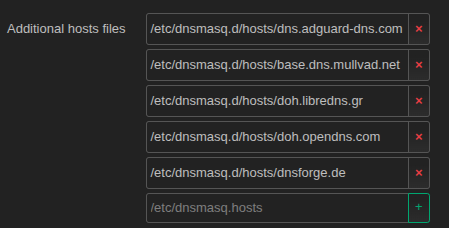
Note the grayed-out last entry:
/etc/dnsmasq.hosts
… that’s an example. That file doesn’t actually exist, unless you create it.
Now do the same exact thing for the 4 NTP servers:
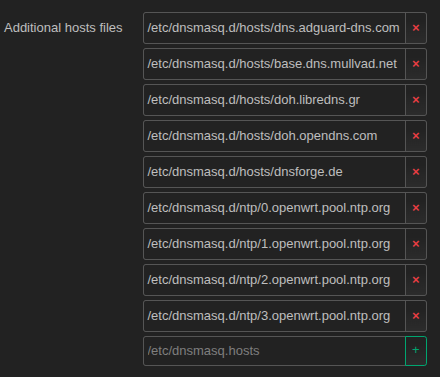
… do an nslookup for each NTP server, then configure the scriptlets (NOTE THE CHANGE from ‘hosts’ to ‘ntp’ in the paths below), then make the directory:
mkdir -p /etc/dnsmasq.d/ntp
… then paste the scriptlets in to Terminal.
Here’s some examples:
echo '149.28.61.105 0.openwrt.pool.ntp.org' >> /etc/dnsmasq.d/ntp/0.openwrt.pool.ntp.org
echo '216.229.4.69 0.openwrt.pool.ntp.org' >> /etc/dnsmasq.d/ntp/0.openwrt.pool.ntp.org
echo '45.83.234.123 0.openwrt.pool.ntp.org' >> /etc/dnsmasq.d/ntp/0.openwrt.pool.ntp.org
echo '72.14.182.49 0.openwrt.pool.ntp.org' >> /etc/dnsmasq.d/ntp/0.openwrt.pool.ntp.org

echo '23.143.196.202 1.openwrt.pool.ntp.org' >> /etc/dnsmasq.d/ntp/1.openwrt.pool.ntp.org
echo '23.150.41.123 1.openwrt.pool.ntp.org' >> /etc/dnsmasq.d/ntp/1.openwrt.pool.ntp.org
echo '172.238.164.57 1.openwrt.pool.ntp.org' >> /etc/dnsmasq.d/ntp/1.openwrt.pool.ntp.org
echo '185.214.143.237 1.openwrt.pool.ntp.org' >> /etc/dnsmasq.d/ntp/1.openwrt.pool.ntp.org

echo '66.118.230.14 2.openwrt.pool.ntp.org' >> /etc/dnsmasq.d/ntp/2.openwrt.pool.ntp.org
echo '172.233.157.223 2.openwrt.pool.ntp.org' >> /etc/dnsmasq.d/ntp/2.openwrt.pool.ntp.org
echo '66.118.228.14 2.openwrt.pool.ntp.org' >> /etc/dnsmasq.d/ntp/2.openwrt.pool.ntp.org
echo '23.186.168.129 2.openwrt.pool.ntp.org' >> /etc/dnsmasq.d/ntp/2.openwrt.pool.ntp.org

echo '23.143.196.201 3.openwrt.pool.ntp.org' >> /etc/dnsmasq.d/ntp/3.openwrt.pool.ntp.org
echo '66.175.236.237 3.openwrt.pool.ntp.org' >> /etc/dnsmasq.d/ntp/3.openwrt.pool.ntp.org
echo '23.143.196.204 3.openwrt.pool.ntp.org' >> /etc/dnsmasq.d/ntp/3.openwrt.pool.ntp.org
echo '172.234.37.140 3.openwrt.pool.ntp.org' >> /etc/dnsmasq.d/ntp/3.openwrt.pool.ntp.org
Now paste these into Network >> DNS >> Resolv & Hosts Files >> Additional hosts files list:
/etc/dnsmasq.d/ntp/0.openwrt.pool.ntp.org
/etc/dnsmasq.d/ntp/1.openwrt.pool.ntp.org
/etc/dnsmasq.d/ntp/2.openwrt.pool.ntp.org
/etc/dnsmasq.d/ntp/3.openwrt.pool.ntp.org
… then click the ‘Save & Apply’ button.
Also paste:
/etc/dnsmasq.d/hosts/
/etc/dnsmasq.d/ntp/
… into the list at System >> Backup / Flash Firmware >> Configuration tab so the changes are sure to survive a firmware update.
Restart the services to pick up those hosts files:
/etc/init.d/dnsmasq restart
/etc/init.d/https-dns-proxy restart
NOW… remember that working copy of /etc/config/https-dns-proxy we worked on above? The one where we changed each option bootstrap_dns line to:
option bootstrap_dns '127.0.0.1'
– or –
option bootstrap_dns '::1'
Copy the entirety of that working copy, from cat at the beginning to EOF at the end, paste it into the Terminal window all-in-one-go, then press `Enter’.
Trigger a restart of https-dns-proxy so it loads the new settings:
/etc/init.d/https-dns-proxy restart
Now you can lock down your firewall. Create the following Network >> Firewall >> Traffic Rules:
Drop-Router-To-Wan (Port 53, 853, 5353)
Outgoing IPv4 and IPv6, protocol TCP, UDP
From this device
To wan, port 53, 853, 5353
Drop output
Reject-LAN-To-Wan (Port 53, 853)
Forwarded IPv4 and IPv6, protocol TCP, UDP
From lan
To wan, port 53, 853
Reject forward
Drop-LAN-To-Wan (Port 5353)
Forwarded IPv4 and IPv6, protocol UDP
From lan
To wan, port 5353
Drop forward
Drop-WAN-To-Router (Port 53, 853)
Incoming IPv4 and IPv6, protocol TCP, UDP
From wan
To this device, port 53, 853
Drop input
Ensure each new Traffic Rule has the Enable checkbox checked, then click Save & Apply at the bottom of the page.
Under Network >> Firewall >> Port Forwards tab, enter:
Redirect-Lan-NTP-IPv4 (Port 123)
Incoming IPv4, protocol UDP
From lan
To this device, port 123
Forward to this device IP 192.168.1.1 port 123

Redirect-Lan-NTP-IPv6 (Port 123)
Incoming IPv6, protocol UDP
From lan
To this device, port 123
Forward to this device IP fe80::2205:b6ff:fe02:23b1 port 123

Redirect Plaintext DNS IPv4
Incoming IPv4, protocol TCP, UDP
From lan
To this device, port 53
Forward to this device IP 192.168.1.1 port 53

Redirect Plaintext DNS IPv6
Incoming IPv6, protocol TCP, UDP
From lan
To this device, port 53
Forward to this device IP fe80::2205:b6ff:fe02:23b1 port 53

Redirect DoT DNS IPv4
Incoming IPv4, protocol TCP, UDP
From lan
To this device, port 853
Forward to this device IP 192.168.1.1 port 53

Redirect DoT DNS IPv6
Incoming IPv6, protocol TCP, UDP
From lan
To this device, port 853
Forward to this device IP fe80::2205:b6ff:fe02:23b1 port 53
Note that “this device” is typically 192.168.1.1 (OpenWrt.lan) for IPv4 and {local IPv6 address} (OpenWrt.lan) in the list.
Be sure the IPv6 local IP address in the rules above is your own.
…
Ensure each new Port Forward Rule has the Enable checkbox checked, then click Save & Apply at the bottom of the page
…
Issue:
/etc/init.d/firewall restart
You’re going to see:
Automatically including '/usr/share/nftables.d/ruleset-post/20-https-dns-proxy-notrack.nft'
That’s normal if you’re using https-dns-proxy.
Or you can do it the easy day… just issue: …
vi /etc/config/firewall
… press ‘i’ to enter editing mode, then copy and paste the following to the bottom of the file:
config rule
 option name 'DROP Router-To-Wan (53, 853, 5353)'
	option dest 'wan'
	option dest_port '53'
	option dest_port '853'
	option dest_port '5353'
	option target 'DROP'
	option enabled '1'

config rule
	option name 'REJECT Lan-To-Wan (53, 853)'
	option src 'lan'
	option dest 'wan'
	option target 'REJECT'
	option dest_port '53'
	option dest_port '853'
	option enabled '1'

config rule
	option name 'DROP Lan-to-Wan (5353)'
	option src 'lan'
	option dest 'wan'
	list proto 'udp'
	option dest_port '5353'
	option target 'DROP'
	option enabled '1'

config rule
	option name 'DROP Wan-To-Router (53, 863)'
	option src 'wan'
	option dest_port '53 853'
	option target 'DROP'
	option enabled '1'

config redirect
	option name 'Redirect-Lan-NTP-IPv4 (Port 123)'
	option target 'DNAT'
	option family 'ipv4'
	list proto 'udp'
	option src 'lan'
	option src_dport '123'
	option dest 'lan'
	option dest_ip '192.168.1.1'
	option dest_port '123'
	option enabled '1'

config redirect
	option name 'Redirect-Lan-NTP-IPv6 (Port 123)'
	option target 'DNAT'
	option family 'ipv6'
	list proto 'udp'
	option src 'lan'
	option src_dport '123'
	option dest_ip 'fe80::2205:b6ff:fe02:23b1'
	option dest_port '123'
	option enabled '1'

config redirect
	option name 'Redirect Plaintext DNS IPv4'
	option target 'DNAT'
	option src 'lan'
	option src_dport '53'
	option dest 'lan'
	option dest_ip '192.168.1.1'
	option dest_port '53'
	list proto 'tcp'
	list proto 'udp'
	option family 'ipv4'
	option enabled '1'

config redirect
	option name 'Redirect Plaintext DNS IPv6'
	option target 'DNAT'
	option src 'lan'
	option src_dport '53'
	option dest_ip 'fe80::2205:b6ff:fe02:23b1'
	option dest_port '53'
	list proto 'tcp'
	list proto 'udp'
	option family 'ipv6'
	option enabled '1'

config redirect
	option name 'Redirect DoT DNS IPv4'
	option target 'DNAT'
	option src 'lan'
	option src_dport '853'
	option dest 'lan'
	option dest_ip '192.168.1.1'
	option dest_port '53'
	list proto 'tcp'
	list proto 'udp'
	option family 'ipv4'
	option enabled '1'

config redirect
	option name 'Redirect DoT DNS IPv6'
	option target 'DNAT'
	option src 'lan'
	option src_dport '853'
	option dest_ip 'fe80::2205:b6ff:fe02:23b1'
	option dest_port '53'
	list proto 'tcp'
	list proto 'udp'
	option family 'ipv6'
	option enabled '1'
Be sure the IPv6 local IP address in the rules above is your own.
Press Esc to exit editing mode, then :wq to save and exit.
Issue:
/etc/init.d/firewall restart
You’re going to see:
Automatically including '/usr/share/nftables.d/ruleset-post/20-https-dns-proxy-notrack.nft'
That’s normal if you’re using https-dns-proxy.
Congratulations, your router and your lan are now locked down for Port 53 plaintext DNS resolution. The only DNS resolution which can take place must take place via DoH.
“But DNS servers sometimes change their IP addresses!”, you exclaim, “My DoH DNS server hosts files will become stale over time!”
Remember my stating that we’d need to create two scripts? We’re at that point now.
Copy the entirety of this script, from cat at the beginning to EOF at the end, paste it into the Terminal window all-in-one-go, then hit Enter.
cat << 'EOF' > /etc/update-doh-bootstrap.sh
#!/bin/sh

LOGGING=2 # Options: 0-disabled, 1-concise, 2-verbose
HOSTS_DIR="/etc/dnsmasq.d/hosts"
UPDATED=0
TEST_DOMAIN="one.one.one.one"

[ ${LOGGING} -gt 0 ] && echo "=== Executing DoH Bootstrap Update ===" | tee >(logger -t update-doh-bootstrap)

# Ensure the hosts directory exists
mkdir -p "${HOSTS_DIR}"

# Scan uci to extract DoH listener addresses and ports
NUM_CONFIG_BLOCKS=$(uci show https-dns-proxy 2>/dev/null | grep -c "=https-dns-proxy")
if [ "${NUM_CONFIG_BLOCKS}" -eq 0 ] || [ -z "${NUM_CONFIG_BLOCKS}" ]; then
    echo "[ERROR] No configuration blocks found in /etc/config/https-dns-proxy. Aborting..."
    [ ${LOGGING} -eq 2 ] && logger -t update-doh-bootstrap "[ERROR] No configuration blocks found in /etc/config/https-dns-proxy. Aborting..."
    exit 1
fi

ACTIVE_DOMAINS=""
SERVER_POOL=""
TOTAL_SERVERS=0

idx=0
while [ "${idx}" -le "$((NUM_CONFIG_BLOCKS - 1))" ]; do
    url=$(uci -q get https-dns-proxy.@https-dns-proxy[$idx].resolver_url)
    listen_addr=$(uci -q get https-dns-proxy.@https-dns-proxy[$idx].listen_addr)
    listen_port=$(uci -q get https-dns-proxy.@https-dns-proxy[$idx].listen_port)
    listen_port=$(echo "$listen_port" | awk '{print $1}')

    if [ -n "${url}" ] && [ -n "${listen_addr}" ] && [ -n "${listen_port}" ]; then
        # Extract FQDN from the resolver URL
        domain=$(echo "$url" | sed -E 's|^[^:]+://||; s|/.*||')

        if [ -n "${domain}" ]; then
            if ! echo " ${ACTIVE_DOMAINS} " | grep -q " ${domain} "; then
                ACTIVE_DOMAINS="${ACTIVE_DOMAINS} ${domain}"
            fi

            # Match listening address to listening port
            if [ "${listen_addr}" = "::1" ]; then
                target_endpoint="[::1]:${listen_port}"
            else
                target_endpoint="127.0.0.1:${listen_port}"
            fi

            SERVER_POOL="${SERVER_POOL} ${target_endpoint}"
            TOTAL_SERVERS=$((TOTAL_SERVERS + 1))
        fi
    fi
    idx=$((idx + 1))
done

ACTIVE_DOMAINS=$(echo $ACTIVE_DOMAINS)
SERVER_POOL=$(echo $SERVER_POOL)

echo "Using ${TOTAL_SERVERS} configured proxy instances."
[ ${LOGGING} -eq 2 ] && logger -t update-doh-bootstrap "Using ${TOTAL_SERVERS} configured proxy instances."

get_server_at_index() {
    target_idx=$1
    count=1
    for s in ${SERVER_POOL}; do
        if [ "${count}" -eq "${target_idx}" ]; then
            echo "$s"
            return
        fi
        count=$((count + 1))
    done
}

# Prune unused DoH hosts files
for file_path in "${HOSTS_DIR}"/*; do
    [ -f "${file_path}" ] || continue
    file_domain=$(basename "$file_path")
    if ! echo " ${ACTIVE_DOMAINS} " | grep -q " ${file_domain} "; then
        echo "  Pruning unused proxy domain config file: ${file_domain}"
        [ ${LOGGING} -eq 2 ] && logger -t update-doh-bootstrap "  Pruning unused proxy domain config file: ${file_domain}"
        rm -f "${file_path}"
        UPDATED=1
    fi
done

url_idx=1
for domain in ${ACTIVE_DOMAINS}; do
    file_path="${HOSTS_DIR}/${domain}"
    TMP_FILE="/tmp/bootstrap.${domain}.tmp"
    rm -f "${TMP_FILE}"

    success=0
    RAW_IPS=""

    # Set DoH listener rotation rules
    if [ "${url_idx}" -eq 1 ]; then
        current_server_idx=${TOTAL_SERVERS}
    else
        current_server_idx=$((url_idx - 1))
        while [ "${current_server_idx}" -gt "${TOTAL_SERVERS}" ]; do
            current_server_idx=$((current_server_idx - TOTAL_SERVERS))
        done
    fi

    attempts=0
    max_retries=${TOTAL_SERVERS}
    if [ "${max_retries}" -lt 3 ]; then max_retries=3; fi

    while [ "${attempts}" -lt "${max_retries}" ] && [ "${success}" -eq 0 ]; do
        target_endpoint=$(get_server_at_index "${current_server_idx}")

        if [ "${attempts}" -eq 0 ]; then
            echo "Processing $domain: Rotating to server [${current_server_idx}/${TOTAL_SERVERS}] via local proxy target ${target_endpoint}..."
            [ ${LOGGING} -eq 2 ] && logger -t update-doh-bootstrap "Processing ${domain}: Rotating to server [${current_server_idx}/${TOTAL_SERVERS}] via local proxy target ${target_endpoint}..."
        fi

        PROXY_HEALTH=$(nslookup "${TEST_DOMAIN}" "${target_endpoint}" 2>&1 | tr -d '\r' | awk '/^Address: / { print $2 } /^Addresses: / { for(i=2; i<=NF; i++) print $i }' | grep -v '^$' | wc -l)

        if [ "${PROXY_HEALTH}" -gt 0 ]; then
            RAW_IPS=$(nslookup "${domain}" "${target_endpoint}" 2>&1 | tr -d '\r' | awk '/^Address: / { print $2 } /^Addresses: / { for(i=2; i<=NF; i++) print $i }' | grep -v '^$')

            if [ -n "${RAW_IPS}" ]; then
                success=1
                break
            fi
        fi

        # FAILOVER: If one DoH listener fails to resolve, move to another and try again.
        attempts=$((attempts + 1))
        prev_idx=${current_server_idx}
        current_server_idx=$((current_server_idx + 1))
        if [ "${current_server_idx}" -gt "${TOTAL_SERVERS}" ]; then
            current_server_idx=1
        fi
        echo "  [WARNING] Target server ${prev_idx} failed to resolve ${domain}. Trying again on server ${current_server_idx}..."
        [ ${LOGGING} -eq 2 ] && logger -t update-doh-bootstrap "  [WARNING] Target server ${prev_idx} failed to resolve ${domain}. Trying again on server ${current_server_idx}..."
    done

    # PUBLIC BOOTSTRAP FALLBACK - should never need to be used.
    if [ "${success}" -eq 0 ] || [ -z "${RAW_IPS}" ]; then
        echo "  [Fallback] Local loopback DNS proxies failed. Executing raw public DNS bootstrap for ${domain}..."
        [ ${LOGGING} -eq 2 ] && logger -t update-doh-bootstrap "  [Fallback] Local loopback DNS proxies failed. Executing raw public DNS bootstrap for ${domain}..."
        RAW_IPS=$( (nslookup "${domain}" 1.1.1.1 2>&1; nslookup "${domain}" 9.9.9.9 2>&1) | tr -d '\r' | awk '/^Address: / { print $2 } /^Addresses: / { for(i=2; i<=NF; i++) print $i }' | grep -v '^$')
    fi

    # Compose hosts files
    if [ -n "${RAW_IPS}" ]; then
        TRACK_WRITTEN=""
        for ip in ${RAW_IPS}; do
            # Validate IP address format
            if echo "${ip}" | grep -q -E '^([0-9]{1,3}\.){3}[0-9]{1,3}$|^([0-9a-fA-F]{0,4}:){1,7}[0-9a-fA-F]{0,4}$'; then
                if ! echo "  ${TRACK_WRITTEN}  " | grep -q "  ${ip}  "; then
                    echo "${ip} ${domain}" >> "${TMP_FILE}"
                    TRACK_WRITTEN="${TRACK_WRITTEN}  ${ip}  "
                fi
            fi
        done

        if [ -f "${TMP_FILE}" ]; then
            sort -u -o "${TMP_FILE}" "${TMP_FILE}"

            # Overwrite files if any change is detected
            if ! cmp -s "${file_path}" "${TMP_FILE}"; then
                echo "  [Update] Changes detected for ${domain}."
                [ ${LOGGING} -eq 2 ] && logger -t update-doh-bootstrap "  [UPDATE] Changes detected for ${domain}."
                mv "${TMP_FILE}" "${file_path}"
                UPDATED=1
            else
                echo "  [OK] Cache is up to date for ${domain}."
                [ ${LOGGING} -eq 2 ] && logger -t update-doh-bootstrap "  [OK] Cache is up to date for ${domain}."
                rm -f "${TMP_FILE}"
            fi
        else
            echo "  [ERROR] No valid IPs mapped for ${domain}. Preserving old definitions."
            [ ${LOGGING} -eq 2 ] && logger -t update-doh-bootstrap "  [ERROR] No valid IPs mapped for ${domain}. Preserving old definitions."
        fi
    else
        echo "  [ERROR] Unable to resolve ${domain}. Preserving old definitions."
        [ ${LOGGING} -eq 2 ] && logger -t update-doh-bootstrap "  [ERROR] Unable to resolve ${domain}. Preserving old definitions."
    fi

    url_idx=$((url_idx + 1))
done

# Reload dnsmasq if configuration changes
if [ "${UPDATED}" -eq 1 ]; then
    echo " Reloading dnsmasq to apply changes..."
    [ ${LOGGING} -gt 0 ] && logger -t update-doh-bootstrap " Reloading dnsmasq to apply changes..."
    /etc/init.d/dnsmasq reload
fi
exit 0
EOF
Make the file executable:
chmod +x /etc/update-doh-bootstrap.sh
Make the file impervious to firmware updates: At System >> Backup / Flash Firmware >> Configuration, add:
/etc/update-doh-bootstrap.sh
… to the list, then click the Save button.
Run the file manually the first time:
sh /etc/update-doh-bootstrap.sh
If you run it a second time immediately, it’ll state that no changes need be made.
You’ll note that the script is using the DoH DNS servers to update the IP addresses in the hosts files, so the router always knows the IP addresses for the DoH DNS server domains.
Now set it up to run automatically. In the LuCI interface, under System >> Scheduled Tasks, enter:
# Update DoH bootstrap servers, so Port 53 plaintext DNS queries can be completely blocked (DAILY @ 0330)
30 3 * * * /etc/update-doh-bootstrap.sh
You can set it to run whenever you like, and however often you like:
# ┌───────────── minute (0–59)
# │ ┌───────────── hour (0–23)
# │ │ ┌───────────── day of month (1–31)
# │ │ │ ┌───────────── month (1–12 or JAN–DEC)
# │ │ │ │ ┌───────────── day of week (0–7 or SUN–SAT, 0 and 7 = Sunday)
# │ │ │ │ │
# * * * * *
For instance:
# Update DoH bootstrap servers, so Port 53 plaintext DNS queries can be completely blocked (THRICE DAILY ON THE HALF HOUR)
30 0,8,16 * * * /etc/update-doh-bootstrap.sh
You can test each DoH DNS server by doing an nslookup on domains you’ve not visited (so they’re not in the dnsmasq cache):
nslookup -port=5053 redstate.com 127.0.0.1
nslookup -port=5054 redstate.com 127.0.0.1
nslookup -port=5055 redstate.com 127.0.0.1
nslookup -port=5056 redstate.com 127.0.0.1
nslookup -port=5057 redstate.com 127.0.0.1
nslookup -port=5058 redstate.com ::1
nslookup -port=5059 redstate.com ::1
nslookup -port=5060 redstate.com ::1
nslookup -port=5061 redstate.com ::1
nslookup -port=5062 redstate.com ::1
… etc., etc., for however many ports you’re using in https-dns-proxy.
Now we go back and work on the NTP server update process.
Copy this script in its entirety and paste it into Terminal, then press Enter:
cat << 'EOF' > /etc/update-ntp-bootstrap.sh
#!/bin/sh

LOGGING=2 # Options: 0-disabled, 1-concise, 2-verbose
HOSTS_DIR="/etc/dnsmasq.d/ntp"
UPDATED=0

[ ${LOGGING} -gt 0 ] && echo "=== Executing NTP Bootstrap Update ===" | tee >(logger -t update-ntp-bootstrap)

# Ensure the hosts directory exists
mkdir -p "${HOSTS_DIR}"

# This parses the configuration block layout to map each port to its assigned IP family
PROXY_MAP=""
NUM_CONFIG_BLOCKS=$(uci show https-dns-proxy 2>/dev/null | grep -c "=https-dns-proxy")

if [ -z "${NUM_CONFIG_BLOCKS}" ] || [ "${NUM_CONFIG_BLOCKS}" -eq 0 ]; then
    echo "  [ERROR] No active https-dns-proxy configuration blocks found. Aborting."
    [ ${LOGGING} -eq 2 ] && logger -t update-ntp-bootstrap "  [ERROR] No active https-dns-proxy configuration blocks found. Aborting."
    exit 1
fi

idx=0
while [ "$idx" -le "$((NUM_CONFIG_BLOCKS - 1))" ]; do
    port=$(uci -q get https-dns-proxy.@https-dns-proxy[$idx].listen_port)
    addr=$(uci -q get https-dns-proxy.@https-dns-proxy[$idx].listen_addr)

    if [ -n "${port}" ] && [ -n "${addr}" ]; then
        # Format entry as addr#port and append
        case " ${PROXY_MAP} " in
            *" ${addr}#${port} "*) ;;
            *) PROXY_MAP="${PROXY_MAP} ${addr}#${port}" ;;
         esac
    fi
    idx=$((idx + 1))
done

PROXY_MAP=$(echo $PROXY_MAP)
echo "Proxy map: $PROXY_MAP"
echo ""
TOTAL_PROXIES=$(echo "$PROXY_MAP" | wc -w)
PROXY_INDEX=1

if [ "${TOTAL_PROXIES}" -eq 0 ]; then
    echo "  [ERROR] No valid listen_port/listen_addr mappings found. Aborting."
    [ ${LOGGING} -eq 2 ] && logger -t update-ntp-bootstrap "  [ERROR] No valid listen_port/listen_addr mappings found. Aborting."
    exit 1
fi

ACTIVE_NTP=$(uci -q get system.ntp.server | tr '\n' ' ')

if [ -z "${ACTIVE_NTP}" ] || [ "${ACTIVE_NTP}" = " " ]; then
    echo "  [ERROR] No NTP servers found in /etc/config/system. Aborting..."
    [ ${LOGGING} -eq 2 ] && logger -t update-ntp-bootstrap "  [ERROR] No NTP servers found in /etc/config/system. Aborting..."
    exit 1
fi

# Prune unused NTP hosts files
for file_path in "${HOSTS_DIR}"/*; do
    [ -f "${file_path}" ] || continue
    file_domain=$(basename "$file_path")

    MATCH=0
    for target in ${ACTIVE_NTP}; do
        if [ "${target}" = "${file_domain}" ]; then
            MATCH=1
            break
        fi
    done

    if [ "${MATCH}" -eq 0 ]; then
        echo "  Pruning stale NTP domain profile: ${file_domain}"
        [ ${LOGGING} -eq 2 ] && logger -t update-ntp-bootstrap "  Pruning stale NTP domain profile: ${file_domain}"
        rm -f "${file_path}"
        UPDATED=1
    fi
done

# Resolve NTP servers
for domain in ${ACTIVE_NTP}; do
    file_path="${HOSTS_DIR}/${domain}"
    tmp_path="/tmp/ntp_bootstrap.${domain}.tmp"
    rm -f "${tmp_path}"

    # Extract the current port/addr pairing
    CURRENT_PAIR=$(echo "${PROXY_MAP}" | awk "{print \$$PROXY_INDEX}")
    CURRENT_PORT=$(echo "${CURRENT_PAIR}" | cut -d'#' -f2)
    CURRENT_ADDR=$(echo "${CURRENT_PAIR}" | cut -d'#' -f1)

    echo "  Resolving ${domain} via proxy on port ${CURRENT_PORT} bound to loopback ${CURRENT_ADDR}..."
    [ ${LOGGING} -eq 2 ] && logger -t update-ntp-bootstrap "  Resolving ${domain} via proxy on port ${CURRENT_PORT} bound to loopback ${CURRENT_ADDR}..."

    # Move to the next proxy configuration pair, loop back to index 1 if we overrun
    PROXY_INDEX=$((PROXY_INDEX + 1))
    if [ "${PROXY_INDEX}" -gt "${TOTAL_PROXIES}" ]; then PROXY_INDEX=1; fi

    # Pass the loopback address (127.0.0.1 or ::1) to nslookup
    RAW_IPS=$(nslookup -port=${CURRENT_PORT} ${domain} ${CURRENT_ADDR} 2>/dev/null | awk '/Address:/ {print $NF}' | grep -v -E '(127.0.0.1|::1)')

    if [ -n "${RAW_IPS}" ]; then
        for ip in ${RAW_IPS}; do
            echo "${ip} ${domain}" >> "${tmp_path}"
        done

        if ! cmp -s "${file_path}" "${tmp_path}"; then
            echo "    [UPDATE] IP changes detected for ${domain}."
            [ ${LOGGING} -eq 2 ] && logger -t update-ntp-bootstrap "    [UPDATE] Changes detected for ${domain}."
             mv "${tmp_path}" "${file_path}"
            UPDATED=1
        else
            echo "    [OK] Cache is up to date for ${domain}."
            [ ${LOGGING} -eq 2 ] && logger -t update-ntp-bootstrap "    [OK] Cache is up to date for ${domain}."
            rm -f "${tmp_path}"
        fi
    else
        echo "    [ERROR] Could not resolve ${domain} on port ${CURRENT_PORT} via ${CURRENT_ADDR}."
        [ ${LOGGING} -eq 2 ] && logger -t update-ntp-bootstrap "    [ERROR] Could not resolve ${domain} on port ${CURRENT_PORT} via ${CURRENT_ADDR}."
    fi
done

# Reload dnsmasq if configuration changes
if [ "${UPDATED}" = "1" ]; then
    echo " Reloading dnsmasq to apply changes..."
    [ ${LOGGING} -gt 0 ] && logger -t update-ntp-bootstrap " Reloading dnsmasq to apply changes..."
    /etc/init.d/dnsmasq reload
fi
exit 0
EOF
Then make that script executable:
chmod +x /etc/update-ntp-bootstrap.sh
Make the file impervious to firmware updates: At System >> Backup / Flash Firmware >> Configuration, add:
/etc/update-ntp-bootstrap.sh
… to the list, then click the Save button.
Now set it up to run automatically. In the LuCI interface, under System >> Scheduled Tasks, enter:
# Update NTP servers, so all NTP queries must be handled by the router (TWICE DAILY, TEN AFTER NOON AND MIDNIGHT)
10 0,12 * * * /etc/update-ntp-bootstrap.sh
You can set it up to run whenever and however often you like. For instance:
# Update NTP servers, so all NTP queries must be handled by the router (THRICE DAILY ON THE QUARTER HOUR)
15 0,8,16 * * * /etc/update-ntp-bootstrap.sh
---------------------
Pro-Tip: To speed up DNS resolution (in the LuCI interface):
Network >> DNS >> General >> All Servers {checked}
Network >> DNS >> Resolv & Hosts Files >> Strict order {unchecked}
Pro-Tip: If things go wrong and you quickly need DNS resolution, create this Network >> Firewall >> Traffic Rule, but leave it Disabled (uncheck 'Enable`). Enable it to allow regular DNS resolution:
Allow-Router-Bootstrap (Port 53)
Outgoing IPv4 and IPv6, protocol UDP
From this device
To wan, IP 94.140.14.14, 94.140.15.15, 2a10:50c0::1:ff, 2a10:50c0::2:ff, port 53
Accept output
… use whichever IP addresses from your list of DoH DNS servers you want. Click-and-hold the ‘three-horizontal-lines’ button for that new rule, then drag it above the Drop-Router-To-Wan (Port 53, 853, 5353) rule, then click Save & Apply.
For reference, here’s my /etc/config/https-dns-proxy file. I’ve put Canary Domains into a separate file and set it up to pull them in via an include (Https-dns-proxy Canary Domain glitch), because https-dns-proxy messes up the Network >> DNS >> Forwards list if it has to handle the Canary Domains:
config main 'config'
option canary_domains_icloud '0'
option canary_domains_mozilla '0'
option dnsmasq_config_update '-'
option force_dns '1'
option notrack_dns '1'
list force_dns_port '53'
list force_dns_port '853'
list force_dns_src_interface 'lan'
option procd_trigger_wan6 '0'
option heartbeat_domain 'heartbeat.mossdef.org'
option heartbeat_sleep_timeout '30'
option heartbeat_wait_timeout '30'
option user 'nobody'
option group 'nogroup'
option listen_addr '127.0.0.1'
option force_ip_family 'auto'

config https-dns-proxy
option resolver_url 'https://dns.adguard-dns.com/dns-query'
option bootstrap_dns '127.0.0.1'
option listen_addr '127.0.0.1'
option listen_port '5053'
option force_ip_family 'auto'
option edns_client_subnet '0'
option proxy_dnssec '1'

config https-dns-proxy
option resolver_url 'https://base.dns.mullvad.net/dns-query'
option bootstrap_dns '127.0.0.1'
option listen_addr '127.0.0.1'
option listen_port '5054'
option force_ip_family 'auto'
option edns_client_subnet '0'
option proxy_dnssec '1'

config https-dns-proxy
option resolver_url 'https://doh.libredns.gr/ads'
option bootstrap_dns '127.0.0.1'
option listen_addr '127.0.0.1'
option listen_port '5055'
option force_ip_family 'auto'
option edns_client_subnet '0'
option proxy_dnssec '1'

config https-dns-proxy
option resolver_url 'https://doh.opendns.com/dns-query'
option bootstrap_dns '127.0.0.1'
option listen_addr '127.0.0.1'
option listen_port '5056'
option force_ip_family 'auto'
option edns_client_subnet '0'
option proxy_dnssec '1'

config https-dns-proxy
option resolver_url 'https://dnsforge.de/dns-query'
option bootstrap_dns '127.0.0.1'
option listen_addr '127.0.0.1'
option listen_port '5057'
option force_ip_family 'auto'
option edns_client_subnet '0'
option proxy_dnssec '1'

config https-dns-proxy
option resolver_url 'https://dns.adguard-dns.com/dns-query'
option bootstrap_dns '::1'
option listen_addr '::1'
option listen_port '5058'
option force_ip_family 'auto'
option edns_client_subnet '0'
option proxy_dnssec '1'

config https-dns-proxy
option resolver_url 'https://base.dns.mullvad.net/dns-query'
option bootstrap_dns '::1'
option listen_addr '::1'
option listen_port '5059'
option force_ip_family 'auto'
option edns_client_subnet '0'
option proxy_dnssec '1'

config https-dns-proxy
option resolver_url 'https://doh.libredns.gr/dns-query'
option bootstrap_dns '::1'
option listen_addr '::1'
option listen_port '5060'
option force_ip_family 'auto'
option edns_client_subnet '0'
option proxy_dnssec '1'

config https-dns-proxy
option resolver_url 'https://doh.opendns.com/dns-query'
option bootstrap_dns '::1'
option listen_addr '::1'
option listen_port '5061'
option force_ip_family 'auto'
option edns_client_subnet '0'
option proxy_dnssec '1'

config https-dns-proxy
option resolver_url 'https://dnsforge.de/dns-query'
option bootstrap_dns '::1'
option listen_addr '::1'
option listen_port '5062'
option force_ip_family 'auto'
option edns_client_subnet '0'
option proxy_dnssec '1'
One last tweak:
In the LuCI interface, at Network >> DNS >> Cache, under ‘Cache arbitrary RR’, ensure A, AAAA, CNAME, HTTPS, NS, SRV, SVCB and TXT are selected. This lowers network traffic and speeds up DNS resolution. I’ve tested it extensively, it works well with the settings above.