Collecting a List of SSDs Used with the BPI-R4

Hello everyone,

I’ve been testing SSD on the Banana PI R4 recently and would like to gather feedback on the SSDs others have used with this device. This will help us better understand which SSDs perform well on the R4.

So far, I found some developers used the following SSDs:

  • SanDisk 256GB: Read speed 150MB/s
  • Crucial Micron 1TB SSD (NVMe PCIe4.0*4): PS5 expansion, read speed 6600MB/s
  • BC711
  • Samsung 970 Evo 256GB

If you’ve used other SSD models on the R4, please share your experience and any relevant data. I hope that with everyone’s input, we can provide valuable references for other users.

Thank you!

Perhaps you can add here:

https://github.com/frank-w/BPI-Router-Linux/wiki/BPI%E2%80%90Router%E2%80%90Linux-Wiki

1 Like

wow, thanks, bro!!! :wink:

Ediloca EN870, 2 TB PCIe Gen4, NVMe M.2 2280, ReadSpeed 7450 MB/s, 3D NAND TLC

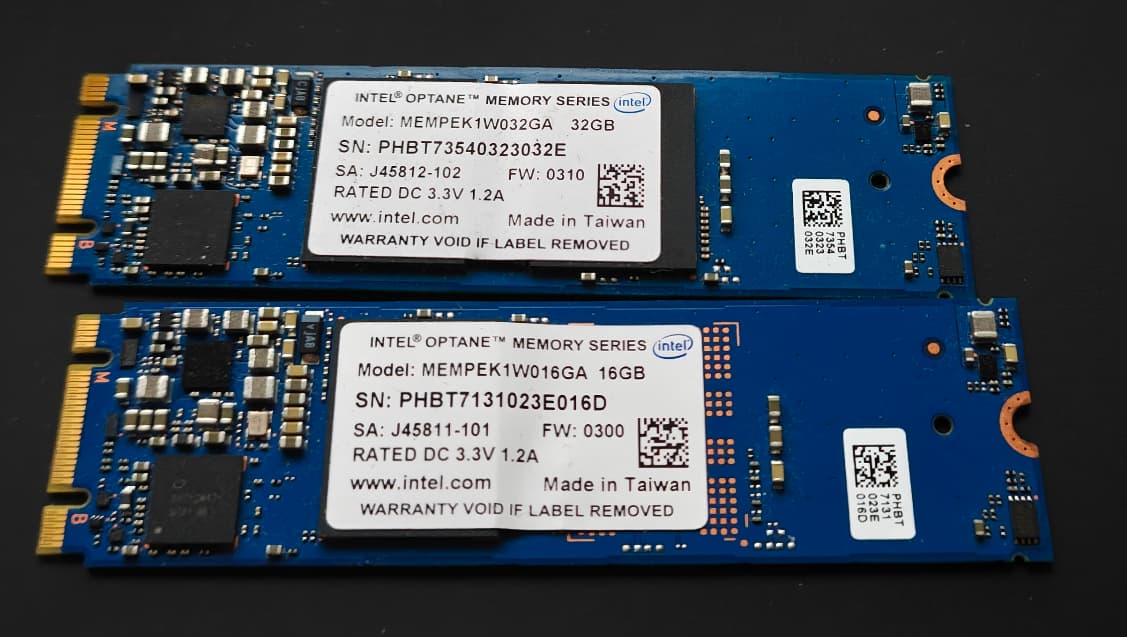
If anyone is interested I’ve found that Intel Optane 16 gig 2242 size M.2 works in the cellular modem slot in my new BPi-R4 (2.5 gig replace SFP+ model) because they are Key B + M style. Not a lot of storage but they can be had cheap (on FleaBay or AliE) from China - like 5 or 10 bucks delivered. Buy extras! I haven’t done actual testing on the BPi yet but since I had it pre-formatted ext4 it automounted at boot and shows properly in LuCI. Speedwise these normally write only about 150 MB/s but reads can max out a single PCIe lane at about 800 MB/s so good for boot drive stuff. Not especially energy efficient (they run hot) but are supposedly very durable. I’ve used them for a while in my TrueNAS servers with no issues so far!

Can you enter this in the list?

:slightly_smiling_face:

1 Like

Possibly after I do testing & set up an account on GitHub!

-A-A-A-A-A-A-A-A-A-A-A-A-A-A-A-A-A-A-A-A-A-A-A-A

:see_no_evil: :hear_no_evil: :speak_no_evil:

Thanks

-A-A-A-A-A-A-A-A-A-A-A-A-A-A-A-A-A-A-A-A-A-A-A-A

Intel SSD 760p 2 TB working without an issue. Beware though, that NVMe sticks that have chips on both sides won’t sit flat on the PCB because of tall inductors underneath. Tightening the screw all the way would warp the SSD, so I had to loosen it a few turns. Another candidate for change in the future revision of the board.

I noticed that the “Crucial Micron 1TB SSD” Isn’t listed in the hardware compatibility list. What does that mean?

It was not tested before :slight_smile:

XPG SPECTRIX S40G 4Tb

I just got a 1TB KingSpec NE 2242 and it has been working flawlessly on the M.2 KEY-B for 5G.

Both M.2 slots (bottom key-M and top key-B) write at around 750MB/s and read at around 950MB/s.

I just set up a 1TB BTRFS raid1 using both M.2 slots.

https://a.aliexpress.com/_mqLlIzn

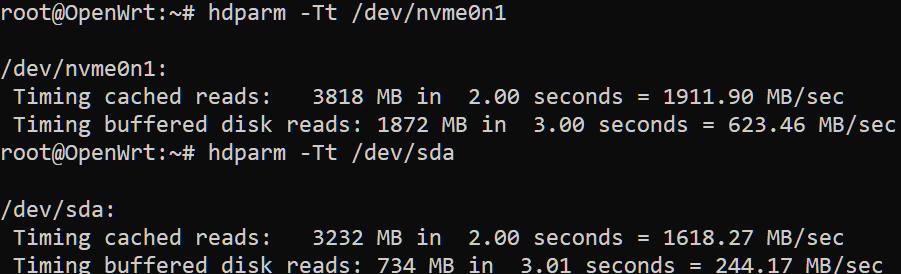
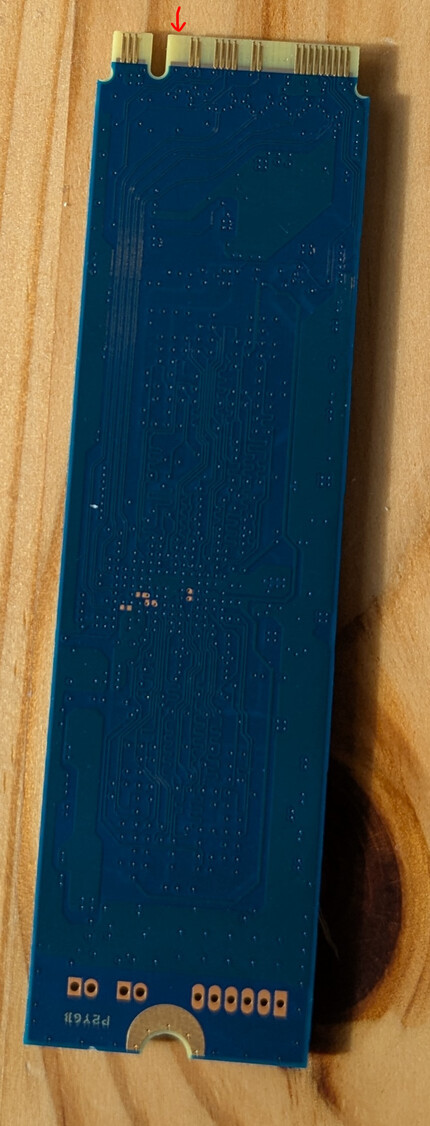
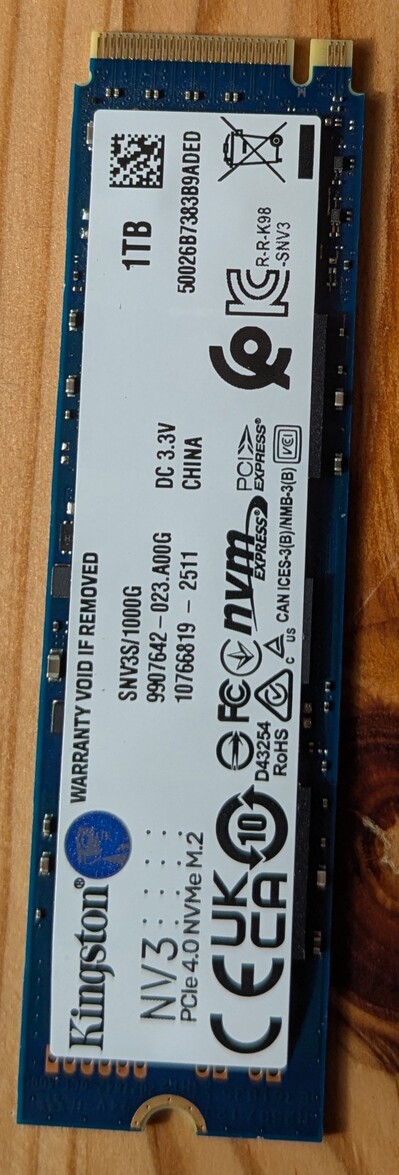
  • Kingston NV3 M.2 NVMe Gen 4 1TB (S/N: SNV3S/1000G)
  • Pins taped precautiously.
  • OpenWRT 24.10.2 - r28739-d9340319c6

It would be nice to add this and all other results of your tests to compatibility list, if possible. :slight_smile: Thanks for the information anyway

I tried this SSD in my banana pi R4 and it works

can you please update over here - BPI‐Router‐Linux Wiki · frank-w/BPI-Router-Linux Wiki · GitHub

hey, I’m trying to set up a Kingston NV3 (1000 GB, M.2 2280) with the bpi-r4 poe 8gb soc (openwrt 25.12.0). Unfortunately it is not even listed by lspci. can you elaborate on how yoi got it working? thanks

edit:

Could you also elaborate on what you meant by this:

Pins taped precautiously

I found this post [BPI-R4] nvme+i2c, but the mentioned pins are not present on the ssd:

put optane 16gb and its works… after 2 days - no device, hmm died. Switched to 32gb and its works 10-12hrs and died too Take care, its abnormal 16GB is a new unused drive, 32GB has been used in TrueNAS as a boot pool for many months.

This one works fine: Patriot M.2 P300 128GB

# nvme list
Node                  Generic               SN                   Model                                    Namespace  Usage                      Format           FW Rev  
--------------------- --------------------- -------------------- ---------------------------------------- ---------- -------------------------- ---------------- --------
/dev/nvme0n1          /dev/ng0n1            P300ADBB22090207760  Patriot M.2 P300 128GB                   0x1          9.00  MB / 128.04  GB    512   B +  0 B   H220625a
# dmesg | grep nvme
[   10.675827] nvme 0002:01:00.0: assign IRQ: got 124
[   10.680742] nvme nvme0: pci function 0002:01:00.0
[   10.685470] nvme 0002:01:00.0: enabling device (0000 -> 0002)
[   10.691211] nvme 0002:01:00.0: enabling bus mastering
[   10.704775] nvme 0002:01:00.0: save config 0x00: 0x12021e4b
[   10.710337] nvme 0002:01:00.0: save config 0x04: 0x00100406
[   10.715903] nvme 0002:01:00.0: save config 0x08: 0x01080201
[   10.721463] nvme 0002:01:00.0: save config 0x0c: 0x00000000
[   10.727028] nvme 0002:01:00.0: save config 0x10: 0x28200004
[   10.732589] nvme 0002:01:00.0: save config 0x14: 0x00000000
[   10.738157] nvme 0002:01:00.0: save config 0x18: 0x00000000
[   10.743721] nvme 0002:01:00.0: save config 0x1c: 0x00000000
[   10.749283] nvme 0002:01:00.0: save config 0x20: 0x00000000
[   10.754846] nvme 0002:01:00.0: save config 0x24: 0x00000000
[   10.760407] nvme 0002:01:00.0: save config 0x28: 0x00000000
[   10.765971] nvme 0002:01:00.0: save config 0x2c: 0x12021e4b
[   10.771532] nvme 0002:01:00.0: save config 0x30: 0x00000000
[   10.777095] nvme 0002:01:00.0: save config 0x34: 0x00000040
[   10.782656] nvme 0002:01:00.0: save config 0x38: 0x00000000
[   10.788220] nvme 0002:01:00.0: save config 0x3c: 0x0000017c
[   10.796301] nvme nvme0: missing or invalid SUBNQN field.
[   10.824197] nvme nvme0: allocated 8 MiB host memory buffer (2 segments).
[   10.874637] nvme nvme0: 4/0/0 default/read/poll queues
[   10.881639] nvme nvme0: Ignoring bogus Namespace Identifiers
[   11.727074] EXT4-fs (nvme0n1): mounted filesystem 6a375cc4-1fa3-4682-aed6-70d8650a42a4 r/w with ordered data mode. Quota mode: disabled.
[   21.731612] Modules linked in: pppoe ppp_async nft_fib_inet nf_flow_table_inet wireguard pppox ppp_generic nft_reject_ipv6 nft_reject_ipv4 nft_reject_inet nft_reject nft_redir nft_quota nft_numgen nft_nat nft_masq nft_log nft_limit nft_hash nft_flow_offload nft_fib_ipv6 nft_fib_ipv4 nft_fib nft_ct nft_chain_nat nf_tables nf_nat nf_flow_table nf_conntrack_netlink nf_conntrack mt7996e(O) mt76_connac_lib(O) mt76(O) mac80211(O) libchacha20poly1305 cfg80211(O) slhc sfp rtc_pcf8563 nfnetlink nf_reject_ipv6 nf_reject_ipv4 nf_log_syslog nf_defrag_ipv6 nf_defrag_ipv4 mdio_i2c libpoly1305 libcurve25519 libchacha compat(O) at24 crypto_safexcel pwm_fan i2c_mux_pca954x i2c_mux ip6_udp_tunnel udp_tunnel sit tunnel4 ip_tunnel sha1 seqiv md5 libmd5 geniv des_generic libdes authencesn authenc uas usb_storage nvme nvme_core leds_gpio xhci_plat_hcd xhci_pci xhci_mtk_hcd xhci_hcd gpio_button_hotplug(O) usbcore usb_common aquantia crc_itu_t
# hdparm -tT /dev/nvme0n1

/dev/nvme0n1:
 Timing cached reads:   3316 MB in  2.00 seconds = 1660.58 MB/sec
 Timing buffered disk reads: 2356 MB in  3.00 seconds = 785.13 MB/sec