In another post I created a hotspot monitor. I used the OpenWRT One’s built-in radio0 to wait for a signal from a specific SSID, then it would spin up a secondary Client Mode wireless network to connect to it. That way, if our main ISP went down, all I had to do was turn on my cellphone hotspot, and the entire lan had internet again.
It worked well enough, but I wanted something that didn’t require tearing down and restarting radio0 each time the hotspot connected or disconnected (which had to be done due to glitches). I also wanted the ability to pick up 5 GHz hotspots (which can’t be done with the in-built radio1, there’s not enough bandwidth to serve both the usual 5 GHz WiFi and a 5 GHz hotspot… that’s just a limitation of 5 GHz due to its default 80 MHz bandwidth).
I also wanted some way of connecting to any number of available hotspots, not just one. With the new setup, I can configure any number of Client Mode wireless networks, each for a certain hotspot. So even if I’m not home, anyone can start their own cellphone’s hotspot, and the lan will have internet access.
I bought an EDUP WiFi 6E AX3000M Wireless USB Adapter with the MediaTek MT7921AU chip.
I installed the necessary MediaTek MT7921 drivers and the USB utilities:
| Name | Version | Size | Description |
|---|---|---|---|
| kmod-mt7921-common | 6.12.94.2026.03.19~39c960c3-r2 | 29.22 KiB | MediaTek MT7921 wireless driver common code |
| kmod-mt7921-firmware | 6.12.94.2026.03.19~39c960c3-r2 | 501.63 KiB | MediaTek MT7921 firmware |
| kmod-mt7921u | 6.12.94.2026.03.19~39c960c3-r2 | 3.96 KiB | MediaTek MT7921U wireless driver |
| kmod-mt792x-common | 6.12.94.2026.03.19~39c960c3-r2 | 15.61 KiB | MediaTek MT792x wireless driver common code |
| kmod-mt792x-usb | 6.12.94.2026.03.19~39c960c3-r2 | 3.70 KiB | MediaTek MT792x wireless driver USB code |
| kmod-usb3 | 6.12.94-r1 | 10.20 KiB | Kernel support for USB3 (XHCI) controllers |
| usbutils | 019-r1 | 54.64 KiB | USB devices listing utilities |
I also bought a USB hub (the Rosonway RSH-A104, which purportedly can have power to its USB ports programmatically controlled, which I’ll use to turn on and off a cooling fan for the router).
I plugged the USB hub into the router, plugged the power supply into the USB hub, plugged the external USB hard drive into the USB hub, plugged the cooling fan into the USB hub, and plugged the AX3000M WiFi adapter into the USB hub.
As soon as I fired it all up, the router recognized the external WiFi adapter as radio2. Then it was a simple matter of setting it up as a Client Mode wireless network with the associated interfaces.
Here are my settings. Yours may vary, depending upon your setup.
Network >> Interface >> Devices >> phy2-sta0 >> Configure >> General Device Options:
Device Type: Network device
Existing device: phy2-sta0
MTU: 1500
MAC ADDRESS: blank
TX queue length: blank
Enable IPv6: Automatic
IPv6 MTU: blank
DAD transmits: blank
Network >> Interface >> Devices >> phy2-sta0 >> Configure >> Advanced Device Options:
Enable promiscuous mode: Automatic
Reverse path filter: disabled
Accept local: Automatic
Send ICMP redirects: Automatic
Honor gratuitous ARP: Automatic
Drop gratuitous ARP: Automatic
Neighbor validity cache: blank
Stale neighbor cache timeout: blank
Minimum ARP validity time: blank
Enable IPv6 segment routing: Automatic
Drop unsolicited NA: Automatic
Enable multicast support: Automatic
Force IGMP version: No enforcement
Force MLD version: No enforcement
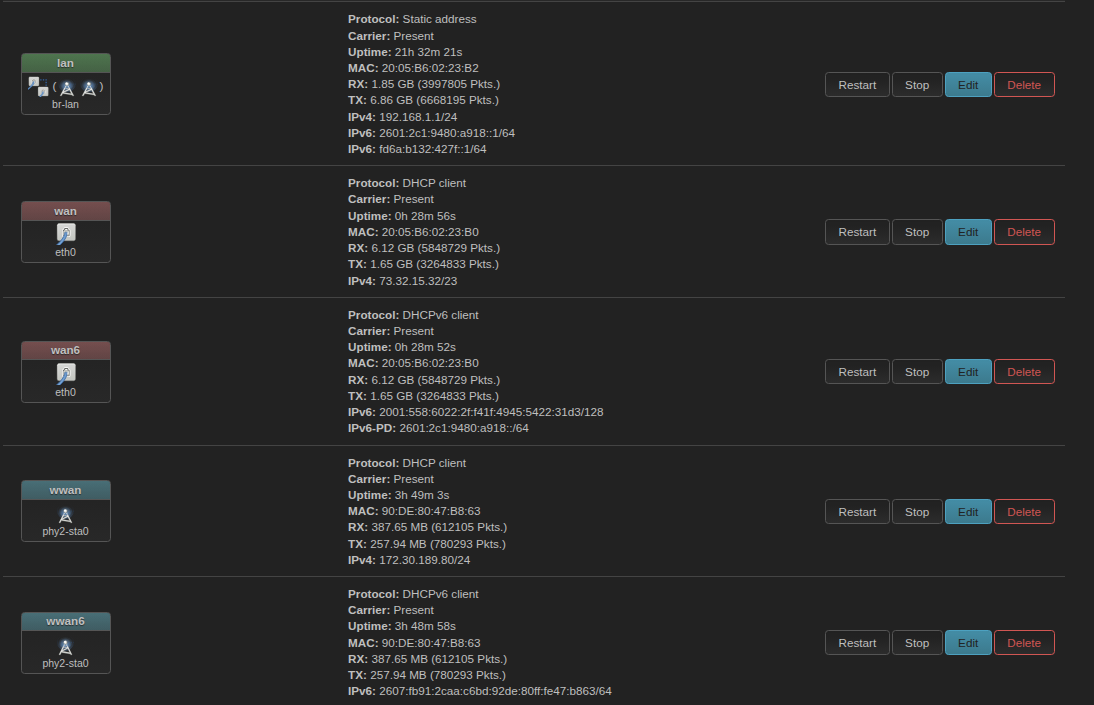
Network >> Interfaces >> wwan >> edit >> General Settings:
Protocol: DHCP client
Device: phy2-sta0
Disable this interface: unchecked
Bring up on boot: checked
Hostname to send when requesting DHCP: Do not send a hostname
Network >> Interfaces >> wwan >> edit >> Advanced Settings:
Force link: unchecked
Use broadcast flag: unchecked
Preferred client ID: Automatic
Client ID to send when requesting DHCP: blank
Vendor class to send when requesting DHCP: blank
Use default gateway: checked
Use DNS servers advertised by peer: unchecked
Use custom DNS servers: 127.0.0.1
NOTE: The above setting is for if you are using https-dns-proxy and my custom Port 53-blocking technique.
https://forum.banana-pi.org/t/https-dns-proxy-doh-port-53-completely-locked-down-no-router-dead-locks-on-reboot/27924/1
DNS weight: blank
Use gateway metric: 50
Multi-path TCP: Off
Override IPv4 routing table: blank
Override IPv6 routing table: blank
Delegate IPv6 prefixes: checked
IPv6 assignment length: disabled
IPv6 prefix filter: blank
IPv6 suffix: blank
IPv6 preference: 50
Network >> Interfaces >> wwan >> edit >> Firewall Settings:
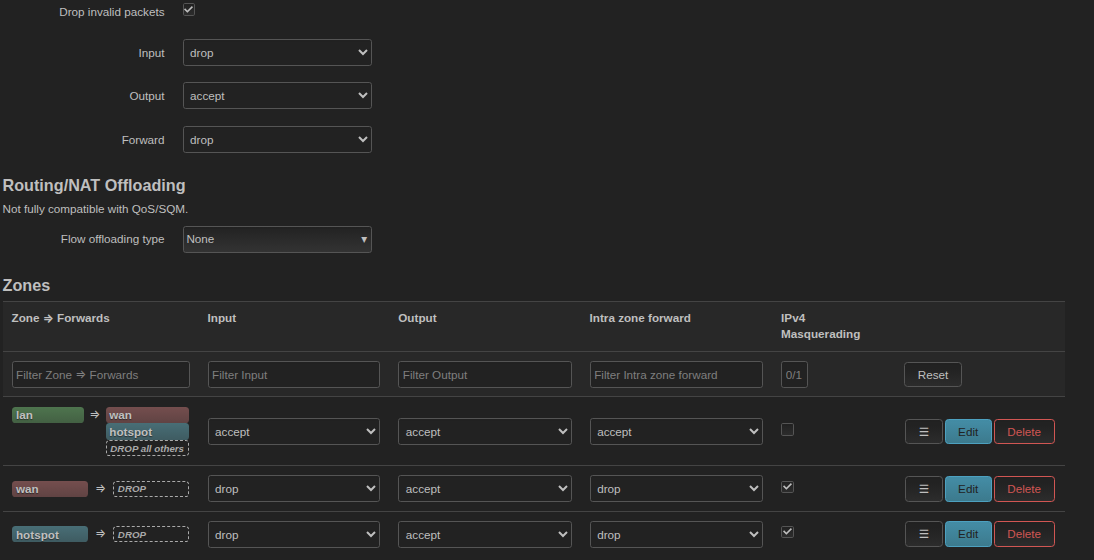
Create / assign firewall zone: wan | wan6 | wwan | wwan6
Network >> Interfaces >> wwan >> edit >> DHCP server >> General setup:
Ignore interface: checked
Network >> Interfaces >> wwan >> edit >> DHCP server >> IPv6 settings:
Designated master: unchecked
RA-Service: disabled
DHCP6-Service: disabled
NDP-Proxy: disabled
Network >> Interfaces >> wwan6 >> edit >> General Settings:
Protocol: DHCPv6 client
Device: phy2-sta0
Disable this interface: unchecked
Bring up on boot: checked
Request IPv6-address: try
Request IPv6-prefix: Automatic
Extend prefix: unchecked
Do not send a Release when restarting: checked
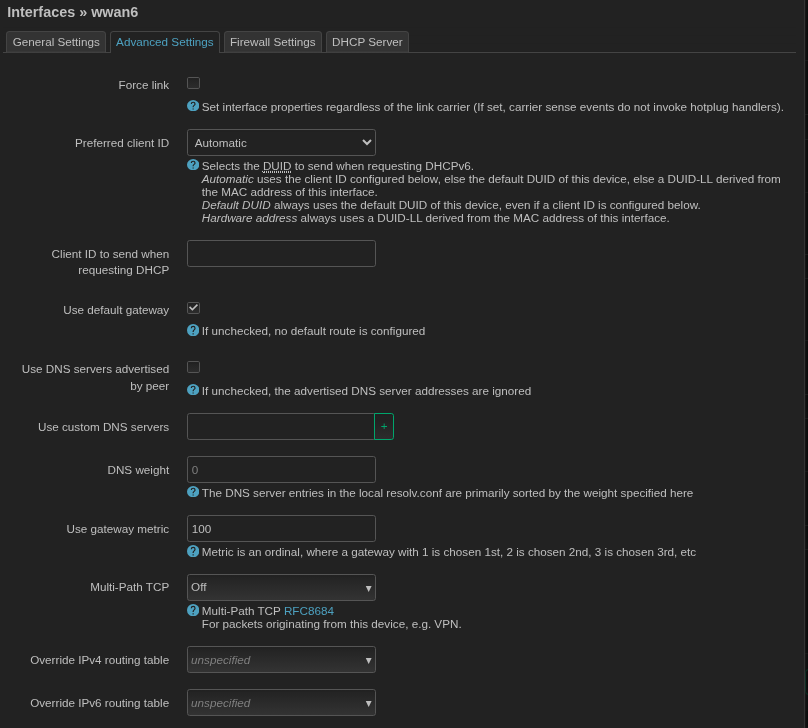
Network >> Interfaces >> wwan6 >> edit >> Advanced Settings:
Force link: unchecked
Preferred client ID: Automatic
Client IDs to send when requesting DHCP: blank
Use default gateway: checked
Use DNS servers advertised by peer: unchecked
Use custom DNS servers: ::1
NOTE: The above setting is for if you are using https-dns-proxy and my custom Port 53-blocking technique.
https://forum.banana-pi.org/t/https-dns-proxy-doh-port-53-completely-locked-down-no-router-dead-locks-on-reboot/27924/1
DNS weight: blank
Use gateway metric: blank
Multi-Path TCP: off
Override IPv4 routing table: blank
Override IPv6 routing table: blank
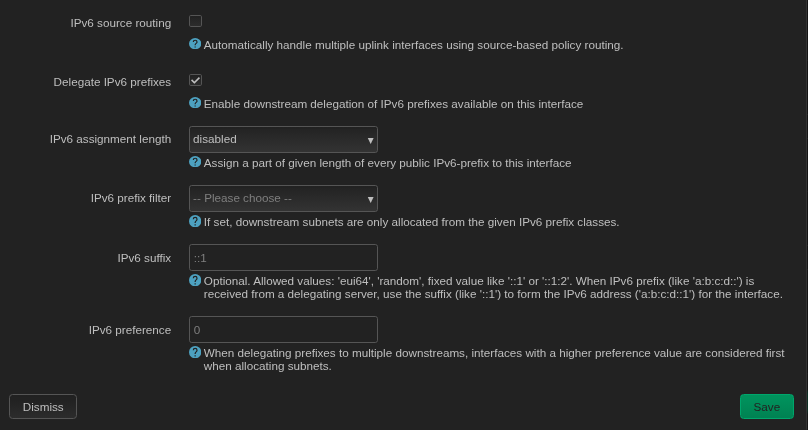
IPv6 source routing: checked
Delegate IPv6 prefixes: checked
IPv6 assignment length: disabled
IPv6 prefix filter: blank
IPv6 suffix: blank
IPv6 preference: 50
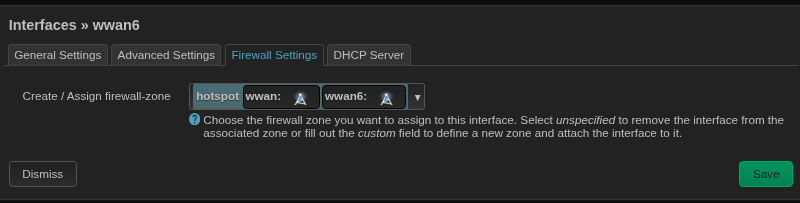
Network >> Interfaces >> wwan6 >> edit >> Firewall Settings:
Create / Assign firewall-zone: wan | wan6 | wwan | wwan6
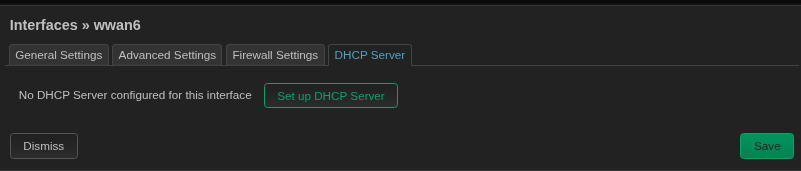
Network >> Interfaces >> wwan6 >> edit >> DHCP server:
No DHCP server configured for this interface
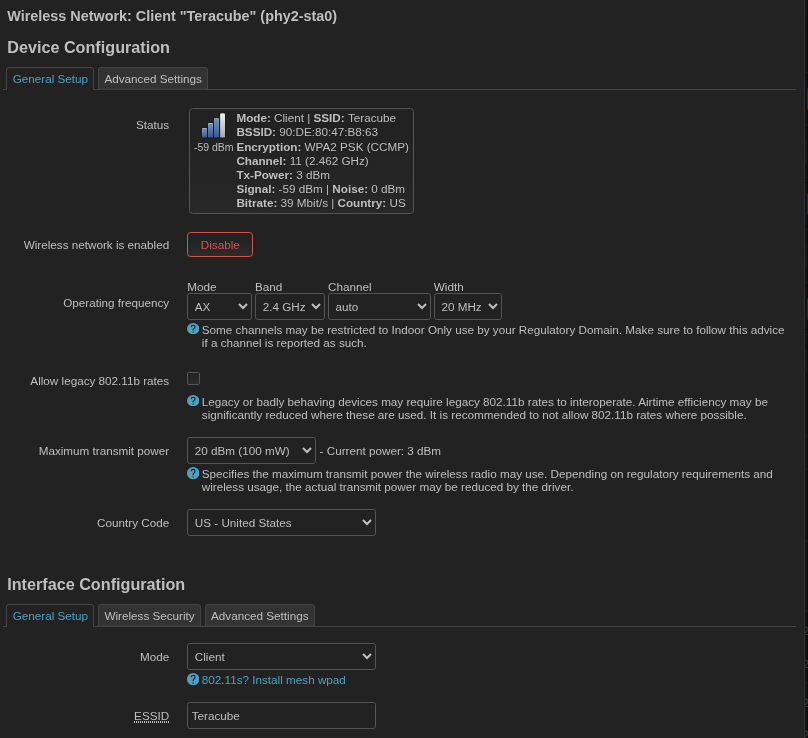
Network >> Wireless >> radio2 >> Device Configuration >> General Setup:
Operating frequency: AX
Band: 2.4 GHz
Channel: auto
Width: 20 MHz
Allow legacy 802.11b rates: unchecked
Maximum transmit power: Driver default
County code: { ENTER YOUR COUNTRY HERE }
Network >> Wireless >> radio2 >> Device Configuration >> Advanced Settings:
Coverage cell density: Disabled
Distance optimization: blank
Fragmentation threshold: blank
RTS/CTS Threshold: blank
Force 40MHz mode: unchecked
Beacon interval: 100
Rx LDCP: checked
Tx LDCP checked
Network >> Wireless >> radio2 >> Interface Configuration >> General Setup:
Mode: Client
ESSID: { PUT THE SSID OF YOUR HOTSPOT HERE }
BSSID: blank
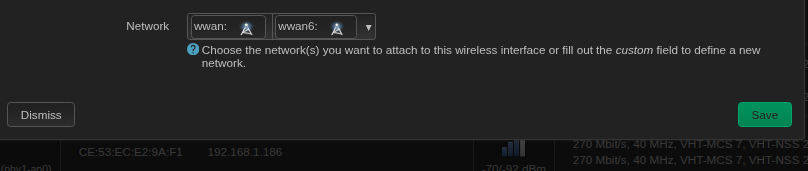
Network: wwan, wwan6
Network >> Wireless >> radio2 >> Interface Configuration >> Wireless Security:
Encryption: WPA2-PSK/WPA3-SAE mixed mode
Key: { PUT THE PASSPHRASE OF YOUR HOTSPOT HERE }
802.11w Management Frame Protection: Optional
802.11w retry timeout: blank
Operating Channel: Disabled
Network >> Wireless >> radio2 >> Interface Configuration >> Advanced Settings:
Multi to Unicast: unchecked
Isolate Bridge Port: unchecked
Interface name: phy2-sta0
MAC address: Driver default
Short preamble: checked
DTIM interval: blank
Time interval for relaying GTK: blank
Disable inactvity Polling: unchecked
Station inactivity Limit: blank
Maximum allowed listen interval: blank
Dissociate on Low Acknowledgement: checked
Now, if the main ISP goes down or its routing goes wonky, I start my cellphone hotspot, the AX3000M connects and the lan still has internet connectivity.
I’m using metrics to direct packet flow… the main ISP has a metric of 10, the Client Mode wireless network has a metric of 100. So if both the main ISP and the hotspot are connected, data preferentially flows to the main ISP.
If the main ISP drops, the router automatically shuts down those interfaces (wan, wan6), and data flows through the hotspot via the wwan and wwan6 interfaces.
But there is one circumstance in which the main ISP could appear to be up, but it’s really not. The data still won’t flow to the hotspot, because the router thinks the main ISP is still up. If the main ISP’s routing goes hinky or a cable outside is cut or unplugged, that can (and has) happened.
So I created a script which pings a server on an interval (otherwise known as a Canary Ping) via the eth0 device (the 2.5 Gb/s wired port, connected to the modem for the main ISP). If that ping fails and a hotspot is available, the script routes data to the hotspot. Should the ping succeed again (the main ISP comes back up), it routes to the main ISP.
First, install the iputils-arping package.
This is pasted in System >> Startup >> Local Startup (ie: /etc/rc.local), above the ‘exit 0’ line.
If anything goes wrong and you’re locked out of the ssh terminal and the LuCI interface, connect to the router via the USB-C interface, log into the router in a terminal window via the ‘screen’ application (for Linux): sudo screen /dev/ttyACM0 115200), then issue: vi /etc/rc.local and press i to enter editing mode, then delete the Hotspot Monitor script. You’ll likely have to go to the bottom and backspace to the top of the script to erase it. Then press Esc to exit editing mode, press :wq to save the file and exit, type exit at the terminal window to exit the USB-C connection to the router, then reboot the router by pulling power, waiting 15 seconds, then reapplying power. I had to do this a few times in perfecting this script.
# HOTSPOT MONITOR FOR EXTERNAL (USB) RADIO
# NOTE: This script requires the iputils-arping package.
# NOTE: Place this script in /etc/rc.local (LuCI Interface: System >> Startup >> Local Startup)
# NOTE: Find and kill any prior instances:
# NOTE: ps | grep rc.local then kill the process with '/etc/rc.local' (the process with 'grep rc.local' is the search you just did).
# NOTE: Then run it: sh /etc/rc.local
(
    logger -t hotspot_monitor "[HOTSPOT MONITOR]: Initialized"
    sleep 30 # Allow external USB WiFi adapter and drivers to cleanly start

    PRIMARY_DEV="eth0"			# SET THIS TO THE PORT YOU HAVE YOUR MODEM PLUGGED INTO.
    LOGGING=1				# 1: ENABLE; 0: DISABLE

    MIN_INTERVAL=15			# ADAPTIVE TIMEOUT MINIMUM
    MAX_INTERVAL=300			# ADAPTIVE TIMEOUT MAXIMUM
    INTERVAL_STEP=1			# ADAPTIVE TIMEOUT STEP SIZE

    # DO NOT CHANGE ANYTHING BELOW THIS LINE!
    CURRENT_INTERVAL=$MIN_INTERVAL
    PRIMARY_STATUS="UP"
    SAVED_ISP_GW=""

    while true; do

        # 1. GET AND STORE THE ISP GATEWAY IP ADDRESS
        IFACE_GW=$(ip route show dev "$PRIMARY_DEV" table main | awk '/default via/ {print $3; exit}')
        if [ -n "$IFACE_GW" ]; then
            SAVED_ISP_GW="$IFACE_GW"
        fi

        # 2. Briefly bring up WAN to satisfy arping requirements
        if [ "$PRIMARY_STATUS" = "DOWN" ]; then
            ubus call network.interface.wan up 2>/dev/null
            sleep 10
        fi

        # 3. ASSIGN PROBE TARGET (Prioritize the ISP gateway)
        if [ -n "$SAVED_ISP_GW" ]; then
            TARGET_MODEM="$SAVED_ISP_GW"
        else
            # Fallback if cold-booting with no wire attached
            TARGET_MODEM="192.168.100.1"
        fi

        # 4. EXECUTE LAYER-2 ARP PROBE
        arping -I "$PRIMARY_DEV" -c 1 -w 3 "$TARGET_MODEM" >/dev/null 2>&1
        ARP_STATUS=$?

        if [ "$LOGGING" -eq 1 ]; then
            [ "$ARP_STATUS" -eq 0 ] && HEARTBEAT="SUCCESS" || HEARTBEAT="FAILED"
            logger -t hotspot_monitor "[HOTSPOT MONITOR] Mode: $PRIMARY_STATUS | Probe: $HEARTBEAT | Target: $TARGET_MODEM"
        fi

        # 5. STATE EVALUATION BLOCK
        if [ "$ARP_STATUS" -ne 0 ]; then
            CURRENT_INTERVAL=$MIN_INTERVAL # Frequent check interval on link failure

            if [ "$PRIMARY_STATUS" = "UP" ]; then
                logger -t hotspot_monitor "[HOTSPOT MONITOR] PRIMARY down. Routing to BACKUP."
                ubus call network.interface.wan down 2>/dev/null
                ubus call network.interface.wan6 down 2>/dev/null
                conntrack -F 2>/dev/null
                PRIMARY_STATUS="DOWN"
            else
                # Allow ubus wan to time out so we don't spam the network interface layer.
                ubus call network.interface.wan down 2>/dev/null
            fi
        else
            if [ "$PRIMARY_STATUS" = "DOWN" ]; then
                logger -t hotspot_monitor "[HOTSPOT MONITOR] PRIMARY up. Routing to PRIMARY."

                # Bring up wan and wan6
                ubus call network.interface.wan up 2>/dev/null
                ubus call network.interface.wan6 up 2>/dev/null

                conntrack -F 2>/dev/null
                PRIMARY_STATUS="UP"
                CURRENT_INTERVAL=$MIN_INTERVAL
            else
                # Connection is long-term stable, step back check interval
                CURRENT_INTERVAL=$((CURRENT_INTERVAL + INTERVAL_STEP))
                [ "$CURRENT_INTERVAL" -gt "$MAX_INTERVAL" ] && CURRENT_INTERVAL=$MAX_INTERVAL
            fi
        fi

        sleep "$CURRENT_INTERVAL"
    done
) &