[Potential Hardware Fault] BPI-R4 Pro (2.5GbE): 12V Rail Failure & Buck1 Dependency Cycle
Disappointment & Logistics Concerns
I am writing this with a heavy heart. After waiting a month for my BPI-R4 Pro to arrive in the UK from the official SinoVoip Shop on AliExpress, the board appears to have developed a hardware failure after just seven days of perfect operation.
While I can pursue an AliExpress refund, the logistics are a nightmare: I’d face another 4-6 week wait for a replacement, and because I bought this during a sale, a re-order would now cost me £65 more than my original purchase. I am hoping a BPI staff member (@simon / @sinovoip) can confirm if this is a known issue or if there is a way to rectify this without a full return/refund cycle that leaves me out of pocket.
Back Story & Setup
The unit worked brilliantly out of the box with stock firmware. I took every precaution:
- Cooling: 3D-printed custom case with dual Noctua NF-S12A PWM fans (12V, 0.12A).
- Protection: Case was treated with ESD anti-static coating prior to installation.
- Power: High-quality Netgear 12V 5A PSU (tested under load with minimal voltage sag).
- Performance: Under 99% load, the CPU was stable at a cool 41°C. No Wi-Fi modules were installed.
The Failure
After one week of stable runtime (no config changes), I found the unit idling at 60°C with both fans stopped. After hours of troubleshooting and factory resets, I’ve confirmed a hardware failure (or at least, I’ve run out of software fixes):
- Fans: Tested externally in a PC; they work perfectly.
- Physical Voltage: Multimeter confirms 0V output at the fan headers.
- Firmware: Using stock builds; reset multiple times with no change.
The “Smoking Gun” Evidence (I2C & Regulator Logs)
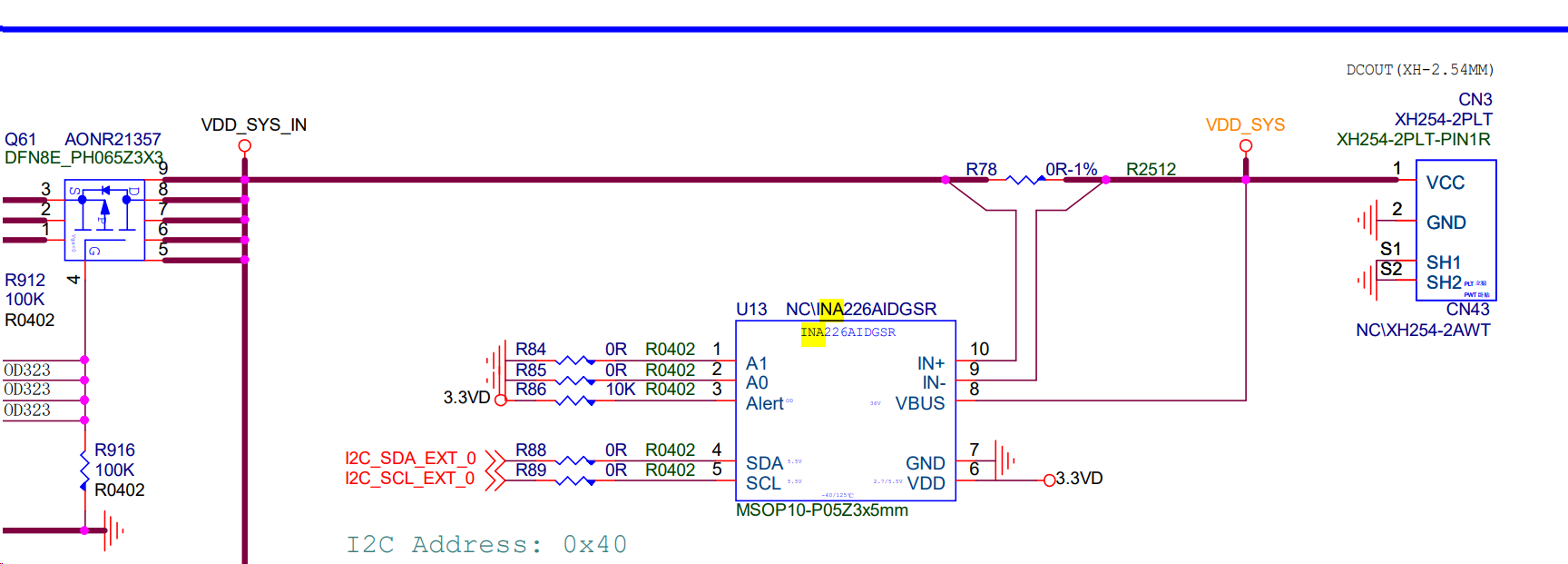
The software seems to think the rail is active, but the hardware has disappeared from the bus. On the BPI-R4 Pro, I believe, I could be wrong, but the INA2xx power monitor is powered by the 12V rail it monitors. I haven’t changed any configuration regarding the fans; out of the box, they just worked silently and perfectly. I’m providing my technical findings below in hopes they shed light on the issue.
System Information
root@BPI-Pro-Router:~# {
   echo "--- SYSTEM IDENTITY ---"
   echo -n "Kernel: "; uname -a
   echo "--- OPENWRT RELEASE ---"
   cat /etc/openwrt_release
   echo "--- BOARD IDENTIFICATION ---"
   echo -n "Model (Sysinfo): "; cat /tmp/sysinfo/model
   echo -n "Device Compatible: "; strings /proc/device-tree/compatible | head -n 1
   echo -n "CPU Architecture: "; opkg print-architecture | head -n 1
}
--- SYSTEM IDENTITY ---
Kernel: Linux BPI-Pro-Router 6.6.93 #0 SMP Tue Jun 17 03:09:13 2025 aarch64 GNU/Linux
--- OPENWRT RELEASE ---
DISTRIB_ID='OpenWrt'
DISTRIB_RELEASE='24.10-SNAPSHOT'
DISTRIB_REVISION='unknown'
DISTRIB_TARGET='mediatek/filogic'
DISTRIB_ARCH='aarch64_cortex-a53'
DISTRIB_DESCRIPTION='OpenWrt 24.10-SNAPSHOT unknown'
DISTRIB_TAINTS='no-all busybox'
--- BOARD IDENTIFICATION ---
Model (Sysinfo): Bananapi BPI-R4-PRO-8X
Device Compatible: bananapi,bpi-r4-pro-8x
CPU Architecture: arch all 1
root@BPI-Pro-Router:~# ls /sys/bus/platform/drivers/
alarmtimer            clk-mt7986-apmixed    clk-mt7988-infracfg   i2c-gpio              mt7530-mmio           mtk-lvts-thermal      mtk-tphy              of_serial             serial8250
an8855                clk-mt7986-eth        clk-mt7988-topckgen   i2c-mt65xx            mt753x                mtk-msdc              mtk-wdt               pwm-fan               sfp
an8855-efuse          clk-mt7986-infracfg   clk-mt7988-xfipll     i2c-mux-gpio          mt7981-pinctrl        mtk-nand              mtk-xfi-tphy          pwm-mediatek          simple-pm-bus
an8855-mdio           clk-mt7986-topckgen   crypto-safexcel       leds-gpio             mt7986a-pinctrl       mtk-pcie-gen3         mtk-xsphy             pwrseq_emmc           syscon
an8855-switch         clk-mt7987-eth        fitblk                leds_pwm              mt7986b-pinctrl       mtk-pcs-lynxi         mtk_hsdma             pwrseq_simple         syscon-reboot
armv8-pmu             clk-mt7987-infracfg   gpio-clk              leds_pwm_multicolor   mt7987-apmixedsys     mtk-power-controller  mtk_rng               ramoops               ti-syscon-reset
clk-mt7981-apmixed    clk-mt7987-mcusys     gpio-export           mediatek,efuse        mt7987-pinctrl        mtk-scpsys            mtk_soc_eth           reg-dummy             virt-mtdconcat
clk-mt7981-eth        clk-mt7987-topckgen   gpio-keys             mt-pmic-pwrap         mt7988-pinctrl        mtk-snand             mtk_usxgmii           reg-fixed-voltage     xhci-hcd
clk-mt7981-infracfg   clk-mt7988-apmixed    gpio-keys-polled      mt6380-regulator      mtk-cpufreq           mtk-spi               of_fixed_clk          rproc-virtio          xhci-mtk
clk-mt7981-topckgen   clk-mt7988-eth        gpio-wdt              mt6577-uart           mtk-ecc               mtk-thermal           of_fixed_factor_clk   rtc_mt7622
root@BPI-Pro-Router:~#
cat /sys/kernel/debug/pinctrl/*pinctrl_moore/pinmux-pins | grep "515"
Result: pin 3 (UART2_RTS): GPIO pinctrl_moore:515
DTS Report
root@BPI-Pro-Router:~# grep -A 15 "pwm-fan" /tmp/stock_bpi_pro.dts
        pwm-fan {
                pinctrl-names = "default";
                pinctrl-0 = <0x09>;
                cooling-levels = <0x00 0x50 0x80 0xff>;
                #thermal-sensor-cells = <0x01>;
                compatible = "pwm-fan";
                status = "okay";
                phandle = <0x62>;
                pwms = <0x0a 0x00 0xc350>;
                #cooling-cells = <0x02>;
        };

        aliases {
                i2c3 = "/soc/i2c@11005000/i2c-switch@70/i2c@0";
                ethernet0 = "/soc/ethernet@15100000/mac@0";
                i2c1 = "/soc/i2c@11004000";
                i2c6 = "/soc/i2c@11005000/i2c-switch@70/i2c@3";
                i2c4 = "/soc/i2c@11005000/i2c-switch@70/i2c@1";
                ethernet1 = "/soc/ethernet@15100000/mac@1";
                i2c2 = "/soc/i2c@11005000";
                i2c0 = "/soc/i2c@11003000";
--
                fan = "/pwm-fan";
                cpu2 = "/cpus/cpu@2";
                uart1 = "/soc/serial@11000100";
                i2p5gbe_led0_pins = "/soc/pinctrl@1001f000/2p5gbe-led0-pins";
                mmc0_pins_sdcard = "/soc/pinctrl@1001f000/mmc0-pins-sdcard";
                spi_nand = "/soc/spi@11007000/spi_nand@0";
                gsw_phy1_led0 = "/soc/switch@15020000/mdio/ethernet-phy@1/leds/gsw-phy1-led0@0";
                pcie0_pins = "/soc/pinctrl@1001f000/pcie0-pins";
                usxgmiisys0 = "/soc/pcs@10080000";
                sgmiisys1 = "/soc/syscon@10070000";
                wed1 = "/soc/wed@15012000";
                gsw_phy0 = "/soc/switch@15020000/mdio/ethernet-phy@0";
                gsw_port0 = "/soc/switch@15020000/ports/port@0";
                imux3_wifi = "/soc/i2c@11005000/i2c-switch@70/i2c@3";
                uart2_3_pins = "/soc/pinctrl@1001f000/uart2-3-pins";
                switchphy0 = "/soc/ethernet@15100000/mdio-bus/switch@16/mdio/switchphy@0";
root@BPI-Pro-Router:~# grep -A 20 "serial@11000200" /tmp/stock_bpi_pro.dts
                serial@11000200 {
                        pinctrl-names = "default";
                        pinctrl-0 = <0x14>;
                        clock-names = "baud", "bus";
                        assigned-clocks = <0x03 0x27 0x0c 0x02>;
                        assigned-clock-parents = <0x03 0x00 0x03 0x27>;
                        interrupts = <0x00 0x7d 0x04>;
                        clocks = <0x03 0x27 0x0c 0x31>;
                        compatible = "mediatek,mt7986-uart", "mediatek,mt6577-uart";
                        status = "okay";
                        reg = <0x00 0x11000200 0x00 0x100>;
                        phandle = <0x8d>;
                };

                clock-controller@15031000 {
                        #reset-cells = <0x01>;
                        #clock-cells = <0x01>;
                        compatible = "mediatek,mt7988-ethwarp";
                        reg = <0x00 0x15031000 0x00 0x1000>;
                        phandle = <0x3e>;
                };
--
                uart2 = "/soc/serial@11000200";
                gsw_phy1_led1 = "/soc/switch@15020000/mdio/ethernet-phy@1/leds/gsw-phy1-led1@1";
                eth = "/soc/ethernet@15100000";
                gic = "/soc/interrupt-controller@c000000";
                tphyu3port0 = "/soc/tphy@11c50000/usb-phy@11c50700";
                pcie0 = "/soc/pcie@11300000";
                port0 = "/soc/ethernet@15100000/mdio-bus/switch@16/ports/port@0";
                uart1_0_pins = "/soc/pinctrl@1001f000/uart1-0-pins";
                usxgmiisys1 = "/soc/pcs@10081000";
                wed2 = "/soc/wed@15014000";
                sgmiipcs0 = "/soc/syscon@10060000/pcs";
                phy_calibration_p0 = "/soc/efuse@11f50000/calib@940";
                gbe2_led0_pins = "/soc/pinctrl@1001f000/gbe2-led0-pins";
                gsw_phy1 = "/soc/switch@15020000/mdio/ethernet-phy@1";
                wifi_eeprom = "/soc/i2c@11005000/i2c-switch@70/i2c@3/eeprom@51";
                switch = "/soc/switch@15020000";
                switchphy1 = "/soc/ethernet@15100000/mdio-bus/switch@16/mdio/switchphy@1";
                mux1 = "/soc/ethernet@15100000/mux-bus/ethernet-mux@1";
                cpu1 = "/cpus/cpu@1";
                uart2_0_pins = "/soc/pinctrl@1001f000/uart2-0-pins";
                uart0 = "/soc/serial@11000000";
root@BPI-Pro-Router:~# grep -E "phandle = <0x09>|phandle = <0x14>" -B 15 /tmp/stock_bpi_pro.dts
                                        function = "flash";
                                        groups = "sdcard";
                                };
                        };

                        gbe3-led0-pins {
                                phandle = <0x49>;

                                mux {
                                        function = "led";
                                        groups = "gbe3_led0";
                                };
                        };

                        uart2-3-pins {
                                phandle = <0x14>;
--
                                        function = "uart";
                                        groups = "uart2_1";
                                };
                        };

                        2p5gbe-led1-pins {
                                phandle = <0x7d>;

                                mux {
                                        function = "led";
                                        groups = "2p5gbe_led1";
                                };
                        };

                        pwm0-pins {
                                phandle = <0x09>;
I2C Bus Scan (i2cdetect -y 3)
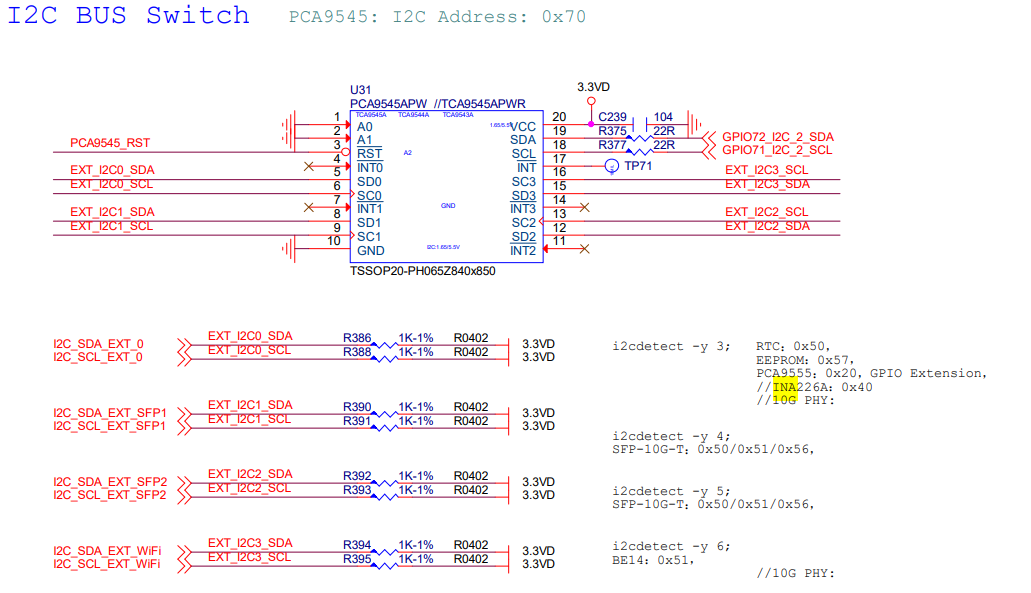
I ran a scan on I2C bus 3 to see which devices are being detected. Most of the reserved addresses appear to be showing up as expected, but I noticed that address 0x40 is completely missing.
I’m assuming this is where the INA2xx sensor should be, based on the errors I’m seeing in the logs. If that’s the case, its absence in the scan might be another sign that the sensor—and the rail it’s responsible for—isn’t getting power. I’d be interested to know if this address shows up normally on a healthy R4 Pro.
root@BPI-Pro-Router:~# i2cdetect -y 3
     0  1  2  3  4  5  6  7  8  9  a  b  c  d  e  f
00:          -- -- -- -- -- -- -- -- -- -- -- -- --
10: -- -- -- -- -- -- -- -- -- -- -- -- -- -- -- --
20: UU -- -- -- -- -- -- -- -- -- -- -- -- -- -- --
30: -- -- -- -- -- -- -- -- -- -- -- -- -- -- -- --
40: -- -- -- -- -- -- -- -- -- -- -- -- -- -- -- --
50: -- UU -- -- -- -- -- UU -- -- -- -- -- -- -- --
60: -- -- -- -- -- -- -- -- -- -- -- -- -- -- -- --
70: UU -- -- -- -- -- -- --
Kernel Error (dmesg)
I took a look at dmesg to see how the system is handling the power-on sequence. I noticed a couple of errors that I’m not entirely sure about, but they seem relevant to the missing 12V output.
First, the ina2xx driver seems to be having trouble. It mentions it can’t find its supply and then fails with a “device configuration” error. Since I’m getting 0V at the fan headers, I’m wondering if this chip is failing to initialize because of that missing voltage, or if this is just a software quirk.
Also, I noticed a “Fixed dependency cycle” involving the rt5190a buck1 regulator. I don’t have enough experience with the PMIC logic to know if this is normal for the R4 Pro, but since buck1 appears linked to the initialization sequence, I thought it was worth sharing.
root@BPI-Pro-Router:~# dmesg | grep ina2xx
[   90.147671] ina2xx 3-0040: supply vs not found, using dummy regulator
[   90.155424] ina2xx 3-0040: error configuring the device: -6

root@BPI-Pro-Router:~# dmesg | grep cycle
[    0.015847] /soc/interrupt-controller@c000000: Fixed dependency cycle(s) with /soc/interrupt-controller@c000000
[    3.222113] /soc/i2c@11003000/rt5190a@64: Fixed dependency cycle(s) with /soc/i2c@11003000/rt5190a@64/regulators/buck1
Regulator State
I’ve been looking into the regulator states to see if there is any obvious software-side reason for the 12V failure. The output below shows the current state of the regulators on my unit.
It seems the kernel identifies the RT5190A components and has them marked as enabled, yet as I mentioned, there is no physical voltage at the headers. I’m not an expert on the PMIC’s internal mapping, but seeing buck1 and buck4 enabled while the 12V-dependent monitor at 0x40 remains invisible is confusing.
root@BPI-Pro-Router:~# for r in /sys/class/regulator/regulator.*; do echo -n "$(basename $r) ($(cat $r/name)): "; cat $r/state; done
regulator.0 (regulator-dummy): cat: can't open '/sys/class/regulator/regulator.0/state': No such file or directory
regulator.1 (fixed-1.8V): cat: can't open '/sys/class/regulator/regulator.1/state': No such file or directory
regulator.2 (fixed-3.3V): cat: can't open '/sys/class/regulator/regulator.2/state': No such file or directory
regulator.3 (rt5190a-buck1): enabled
regulator.4 (vcore): enabled
regulator.5 (vproc): enabled
regulator.6 (rt5190a-buck4): enabled
regulator.7 (rt5190a-ldo): enabled
Other Note Worthy Commands Tested
I had read people having an issue with the fans, regarding being locked out of the status of it being active, I tried to see what I could do and I was successful at unbinding the SFP+ for both LAN and WAN, unable to turn of the LEDs but was able to put bridghtness to 0, something seems to be locking the GPIO, or the 12v is simply faulty, other stuff i did, and this is just the tip of the iceberg. I have spent hours trying to do various things to get them to turn on. So frustrated. It worked, nothing has changed.
root@BPI-Pro-Router:~# ls /sys/class/pwm/
pwmchip0
root@BPI-Pro-Router:~# cat /sys/class/thermal/cooling_device*/type
pwm-fan
echo "gpio-leds" > /sys/bus/platform/drivers/leds-gpio/unbind 2>/dev/null
echo "pwm-fan" > /sys/bus/platform/drivers/pwm-fan/unbind 2>/dev/null

for pin in $(seq 596 611); do
    echo $pin > /sys/class/gpio/export 2>/dev/null
    echo out > /sys/class/gpio/gpio$pin/direction 2>/dev/null
    echo 1 > /sys/class/gpio/gpio$pin/value 2>/dev/null
done

echo 0 > /sys/class/pwm/pwmchip0/export 2>/dev/null
echo 0 > /sys/class/pwm/pwmchip0/pwm0/enable 2>/dev/null
echo 0 > /sys/class/pwm/pwmchip0/pwm0/duty_cycle 2>/dev/null
echo 40000 > /sys/class/pwm/pwmchip0/pwm0/period
echo 20000 > /sys/class/pwm/pwmchip0/pwm0/duty_cycle
echo 1 > /sys/class/pwm/pwmchip0/pwm0/enable

cat /sys/kernel/debug/pinctrl/*pinctrl_moore/pinmux-pins | grep "515"

for master_en in 533 566; do
    echo $master_en > /sys/class/gpio/export 2>/dev/null
    echo out > /sys/class/gpio/gpio$master_en/direction 2>/dev/null
    echo 1 > /sys/class/gpio/gpio$master_en/value 2>/dev/null
done

cat /sys/kernel/debug/gpio | grep -E "596|597|515|533|566"

root@BPI-Pro-Router:~# ls /sys/class/pwm/pwmchip0/
device     export     npwm       power      subsystem  uevent     unexport
root@BPI-Pro-Router:~# cat /sys/kernel/debug/pinctrl/*pinctrl_moore/pinmux-pins | grep "515"
pin 3 (UART2_RTS): GPIO pinctrl_moore:515
root@BPI-Pro-Router:~# echo 0 > /sys/class/pwm/pwmchip0/export 2>/dev/null
root@BPI-Pro-Router:~# cat /sys/kernel/debug/pinctrl/*pinctrl_moore/pinmux-pins | grep "515"
pin 3 (UART2_RTS): GPIO pinctrl_moore:515
root@BPI-Pro-Router:~# echo 40000 > /sys/class/pwm/pwmchip0/pwm0/period 2>/dev/null
root@BPI-Pro-Router:~# echo 20000 > /sys/class/pwm/pwmchip0/pwm0/duty_cycle 2>/dev/null
root@BPI-Pro-Router:~# echo 1 > /sys/class/pwm/pwmchip0/pwm0/enable 2>/dev/null
root@BPI-Pro-Router:~# echo 40000 > /sys/class/pwm/pwmchip0/pwm0/duty_cycle
root@BPI-Pro-Router:~# echo "11000200.serial" > /sys/bus/platform/drivers/serial8250/unbind 2>/dev/null
root@BPI-Pro-Router:~# echo "pwm-fan" > /sys/bus/platform/drivers/pwm-fan/unbind 2>/dev/null
root@BPI-Pro-Router:~# echo "10048000.pwm" > /sys/bus/platform/drivers/pwm-mediatek/unbind 2>/dev/null
root@BPI-Pro-Router:~# echo "10048000.pwm" > /sys/bus/platform/drivers/pwm-mediatek/bind 2>/dev/null
root@BPI-Pro-Router:~# cat /sys/kernel/debug/pinctrl/*pinctrl_moore/pinmux-pins | grep "515"
pin 3 (UART2_RTS): GPIO pinctrl_moore:515
root@BPI-Pro-Router:~# cat /sys/class/pwm/pwmchip0/pwm0/duty_cycle
cat: can't open '/sys/class/pwm/pwmchip0/pwm0/duty_cycle': No such file or directory
root@BPI-Pro-Router:~# ^C

root@BPI-Pro-Router:~# echo 0 > /sys/class/pwm/pwmchip0/export
root@BPI-Pro-Router:~# echo 40000 > /sys/class/pwm/pwmchip0/pwm0/period
root@BPI-Pro-Router:~# echo 20000 > /sys/class/pwm/pwmchip0/pwm0/duty_cycle
root@BPI-Pro-Router:~# echo 1 > /sys/class/pwm/pwmchip0/pwm0/enable
root@BPI-Pro-Router:~# cat /sys/class/pwm/pwmchip0/pwm0/duty_cycle
20000
root@BPI-Pro-Router:~# grep -A 20 "pwm" /tmp/stock_bpi_pro.dts | grep "pins"
                        pwm0-pins {
                        pcie2-pins {
                        uart1-0-pins {
                mmc0_pins_emmc_45 = "/soc/pinctrl@1001f000/mmc0-pins-emmc-45";
                uart1_2_pins = "/soc/pinctrl@1001f000/uart1-2-pins";
                pwm0_pins = "/soc/pinctrl@1001f000/pwm0-pins";
                gbe0_led0_pins = "/soc/pinctrl@1001f000/gbe0-led0-pins";
                i2c1_pins = "/soc/pinctrl@1001f000/i2c1-pins-g0";
                i2c2_0_pins = "/soc/pinctrl@1001f000/i2c2-pins-g0";
                pcie2_pins = "/soc/pinctrl@1001f000/pcie2-pins";
                gbe3_led1_pins = "/soc/pinctrl@1001f000/gbe3-led1-pins";
                uart2_pins = "/soc/pinctrl@1001f000/uart2-pins";
                spi1_pins = "/soc/pinctrl@1001f000/spi1-pins";
                i2p5gbe_led0_pins = "/soc/pinctrl@1001f000/2p5gbe-led0-pins";
                mmc0_pins_sdcard = "/soc/pinctrl@1001f000/mmc0-pins-sdcard";
                pcie0_pins = "/soc/pinctrl@1001f000/pcie0-pins";
                uart2_3_pins = "/soc/pinctrl@1001f000/uart2-3-pins";
                uart0_pins = "/soc/pinctrl@1001f000/uart0-pins";
root@BPI-Pro-Router:~# cat /sys/class/pwm/pwmchip0/npwm
8
root@BPI-Pro-Router:~# for i in 1 2 3 4 5 6 7; do echo $i > /sys/class/pwm/pwmchip0/export 2>/dev/null; done
root@BPI-Pro-Router:~# for i in 1 2 3 4 5 6 7; do
>     echo 40000 > /sys/class/pwm/pwmchip0/pwm$i/period 2>/dev/null
>     echo 20000 > /sys/class/pwm/pwmchip0/pwm$i/duty_cycle 2>/dev/null
>     echo 1 > /sys/class/pwm/pwmchip0/pwm$i/enable 2>/dev/null
> done
root@BPI-Pro-Router:~#

root@BPI-Pro-Router:~# cat /sys/kernel/debug/pinctrl/*pinctrl_moore/pinmux-pins | grep "515"
pin 3 (UART2_RTS): GPIO pinctrl_moore:515
root@BPI-Pro-Router:~# ls /sys/class/pwm/pwmchip0/
device     export     npwm       power      subsystem  uevent     unexport
root@BPI-Pro-Router:~# dmesg | grep -E "pwm|uart|pinctrl" | tail -n 20
[    0.010707] pinctrl core: initialized pinctrl subsystem
root@BPI-Pro-Router:~# cat /sys/kernel/debug/pinctrl/*pinctrl_moore/pinmux-pins | grep "516"
pin 4 (GPIO_A): GPIO pinctrl_moore:516
root@BPI-Pro-Router:~# echo 1 > /sys/class/pwm/pwmchip0/export 2>/dev/null
root@BPI-Pro-Router:~# echo 40000 > /sys/class/pwm/pwmchip0/pwm1/period 2>/dev/null
root@BPI-Pro-Router:~# echo 20000 > /sys/class/pwm/pwmchip0/pwm1/duty_cycle 2>/dev/null
root@BPI-Pro-Router:~# echo 1 > /sys/class/pwm/pwmchip0/pwm1/enable 2>/dev/null
root@BPI-Pro-Router:~# cat /sys/kernel/debug/pinctrl/*pinctrl_moore/pinmux-pins | grep "516"
pin 4 (GPIO_A): GPIO pinctrl_moore:516
root@BPI-Pro-Router:~#
I’m hoping this data helps the team identify if this is a known batch issue or a software bug. I really love the board’s performance otherwise and would love to get this sorted without the long AliExpress refund loop.
Thanks in advance for any help or guidance you can provide! Keep up the great work on these boards.