I’m not sure what your issue is…eth1 is named wan,so ethtool has to be called with this,but you had link-up there,so i guess this is working.
1 Like
Yes. It works great.
UPD1:
sfp-lan is empty.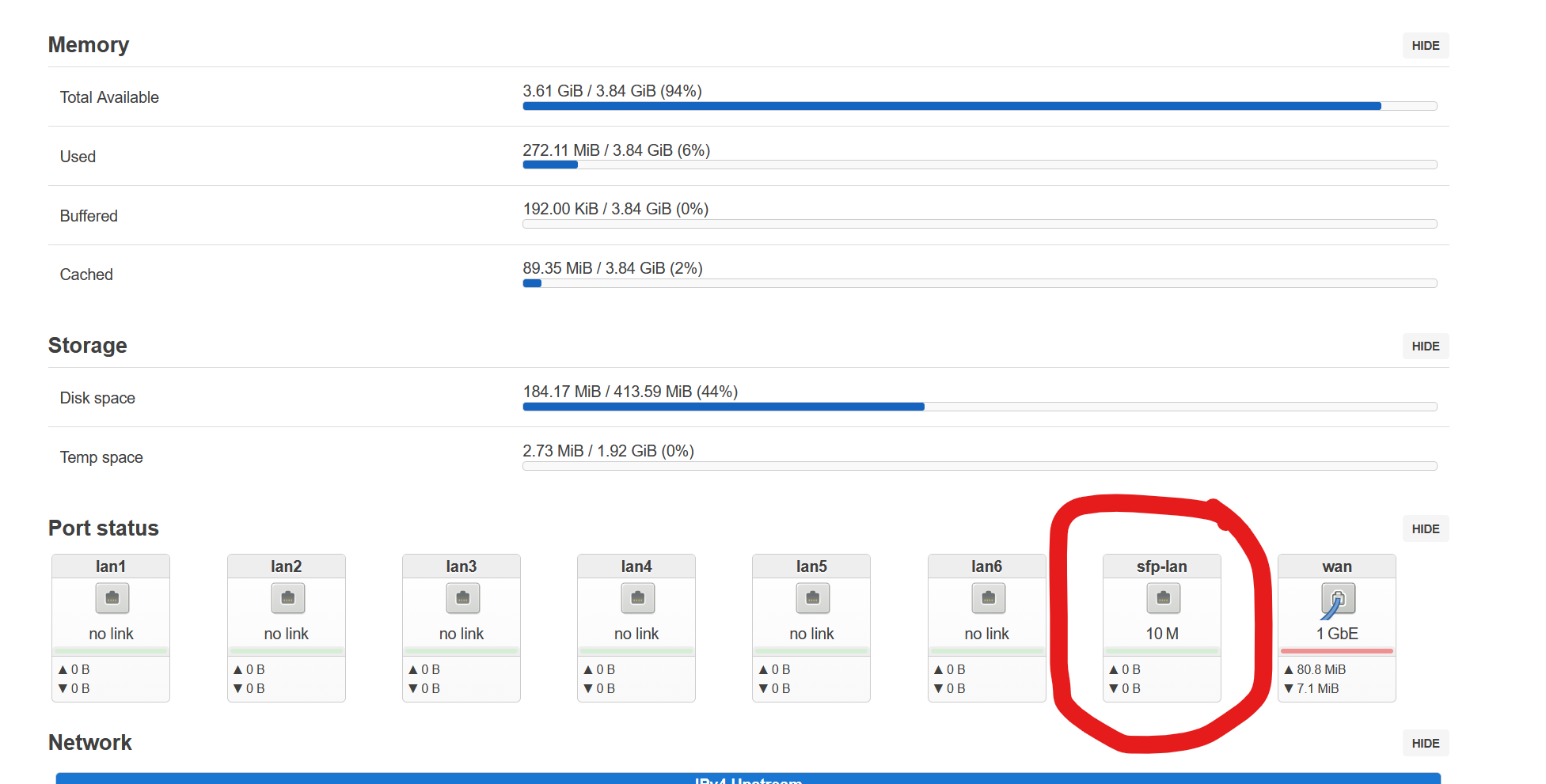
Can i switch all ports in the build? Or i have some limits?
seems only sfp2 (wan) is detected on your system…have you tried to remove and re-insert the lan-sfp? do not see something for sfp1/sfp-lan in your log…i guess it is not inserted correctly…did somewhere an full log with both sfp where both were working in my case on 4e
is SFP the same as on wan-port? then i guess no specific patches are needed, what kind (1/2.5G,/10G,ONT or something else) is it?
basicly it should work to bridge all ports, but this adds additional logical layer, so first let us detect the sfp itself (i2c), then check serdes (linkup,autoneg,etc) and then traffic through port directly without bridge
maybe you need a phy driver for your sfp, this is what i got on my last flashed version
root@OpenWrt:~# dmesg|grep -i sfp
[    2.844985] FIT:          flat_dt sub-image 0x0062e000..0x0062e1a4 "fdt-mt7988a-bananapi-bpi-r4-pro-4e-wan-sfp" (ARM64 OpenWrt bananapi_bpi-r4-pro-4e device tree overlay mt7988a-bananapi-bpi-r4-pro-4e-wan-sfp)
[   14.803770] sfp sfp1: Host maximum power 3.0W
[   14.808546] sfp sfp2: Host maximum power 3.0W
[   15.124559] sfp sfp1: module OEM              SFP-10G-T        rev 1    sn 2506020093       dc 250530
[   17.886889] mxl862xx mdio-bus:10 sfp-lan: configuring for inband/usxgmii link mode
[   17.898182] br-lan: port 7(sfp-lan) entered blocking state
[   17.903704] br-lan: port 7(sfp-lan) entered disabled state
[   17.909212] mxl862xx mdio-bus:10 sfp-lan: entered allmulticast mode
[   17.928733] mxl862xx mdio-bus:10 sfp-lan: entered promiscuous mode
[   18.743526] mxl862xx mdio-bus:10 sfp-lan: PHY i2c:sfp1:11 (id 0x00000000) has no driver loaded
[   18.752145] mxl862xx mdio-bus:10 sfp-lan: Drivers which handle known common cases: CONFIG_BCM84881_PHY, CONFIG_MARVELL_PHY
[   18.763300] sfp sfp1: sfp_add_phy failed: -EINVAL
but as wan works for you it should work for when using the same sfp in sfp-lan slot
enabled now these phy drivers:
- kmod-phy-aquantia
- kmod-phy-bcm84881
- kmod-phy-marvell-10g
with this image flashed it looks like this for me (only cable in sfp-lan 10G SFP):
root@OpenWrt:~# dmesg | grep -i sfp
[    2.801406] FIT:          flat_dt sub-image 0x0062e000..0x0062e1a4 "fdt-mt7988a-bananapi-bpi-r4-pro-4e-wan-sfp" (ARM64 OpenWrt bananapi_bpi-r4-pro-4e device tree overlay mt7988a-bananapi-bpi-r4-pro-4e-wan-sfp)
[   15.111756] sfp sfp1: Host maximum power 3.0W
[   15.116587] sfp sfp2: Host maximum power 3.0W
[   15.434834] sfp sfp1: module OEM              SFP-10G-T        rev 1    sn 2506020093       dc 250530
[   18.016370] mxl862xx mdio-bus:10 sfp-lan: configuring for inband/usxgmii link mode
[   18.027537] br-lan: port 7(sfp-lan) entered blocking state
[   18.033040] br-lan: port 7(sfp-lan) entered disabled state
[   18.038596] mxl862xx mdio-bus:10 sfp-lan: entered allmulticast mode
[   18.058395] mxl862xx mdio-bus:10 sfp-lan: entered promiscuous mode
[   20.045390] mxl862xx mdio-bus:10 sfp-lan: PHY [i2c:sfp1:11] driver [Aquantia AQR113C] (irq=POLL)
[   20.085305] mxl862xx mdio-bus:10 sfp-lan: switched to inband/10gbase-r link mode
[   25.686777] mxl862xx mdio-bus:10 sfp-lan: Link is Up - 1Gbps/Full - flow control rx/tx
[   25.694715] br-lan: port 7(sfp-lan) entered blocking state
[   25.700195] br-lan: port 7(sfp-lan) entered forwarding state
root@OpenWrt:~# ip a s sfp-lan
11: sfp-lan@eth2: <BROADCAST,MULTICAST,UP,LOWER_UP> mtu 1500 qdisc noqueue master br-lan state UP qlen 1000
    link/ether ae:44:dc:3e:70:89 brd ff:ff:ff:ff:ff:ff
root@OpenWrt:~# ip a s br-lan
12: br-lan: <BROADCAST,MULTICAST,UP,LOWER_UP> mtu 1500 qdisc noqueue state UP qlen 1000
    link/ether ae:44:dc:3e:70:89 brd ff:ff:ff:ff:ff:ff
    inet 192.168.1.1/24 brd 192.168.1.255 scope global br-lan
       valid_lft forever preferred_lft forever
    inet6 fd96:7c4f:17d2::1/60 scope global noprefixroute
       valid_lft forever preferred_lft forever
    inet6 fe80::ac44:dcff:fe3e:7089/64 scope link
       valid_lft forever preferred_lft forever
root@OpenWrt:~# ip a a 192.168.0.19/24 dev br-lan
root@OpenWrt:~# ping 192.168.0.21
PING 192.168.0.21 (192.168.0.21): 56 data bytes
64 bytes from 192.168.0.21: seq=0 ttl=64 time=0.465 ms
64 bytes from 192.168.0.21: seq=1 ttl=64 time=0.212 ms
64 bytes from 192.168.0.21: seq=2 ttl=64 time=0.505 ms
^C
--- 192.168.0.21 ping statistics ---
3 packets transmitted, 3 packets received, 0% packet loss
round-trip min/avg/max = 0.212/0.394/0.505 ms
updated 4e+8x image built from R4Pro_PR10 branch on my gdrive
config (changed to 8x): config.txt (293,2 KB)
I don`t use SFP-LAN it is empty. It set to LAN6. LAN6 is work OK. In 4e i need manual switch and now it set to LAN6.
root@BPI:~# dmesg|grep -i sfp
[    2.396325] sfp sfp1: Host maximum power 3.0W
[    2.396930] sfp sfp2: Host maximum power 3.0W
[    2.747156] sfp sfp2: module PACBTECH         PAC-GLC-T        rev A    sn PA26054221       dc 260527
[    2.869386] FIT:          flat_dt sub-image 0x00633000..0x006331a4 "fdt-mt7988a-bananapi-bpi-r4-pro-4e-wan-sfp" (ARM64 OpenWrt bananapi_bpi-r4-pro-4e device tree overlay mt7988a-bananapi-bpi-r4-pro-4e-wan-sfp)
[   23.164466] mxl862xx mdio-bus:10 sfp-lan: configuring for inband/usxgmii link mode
[   23.175763] br-lan: port 7(sfp-lan) entered blocking state
[   23.181260] br-lan: port 7(sfp-lan) entered disabled state
[   23.186847] mxl862xx mdio-bus:10 sfp-lan: entered allmulticast mode
[   23.206636] mxl862xx mdio-bus:10 sfp-lan: entered promiscuous mode
root@BPI:~#
I use a self-made build(I need more soft)
Lan-sfp-port is not switchable on 4e…only wan.
lan6 is a second port from internal switch.
so i do not understand whats not working in your case
It looks like connect bit it empty and switch to LAN6. LAN6 port is combo (1G/10G). Now it set to 1G and work OK. In LUCI i can see that sfp-lan has 10 M link.
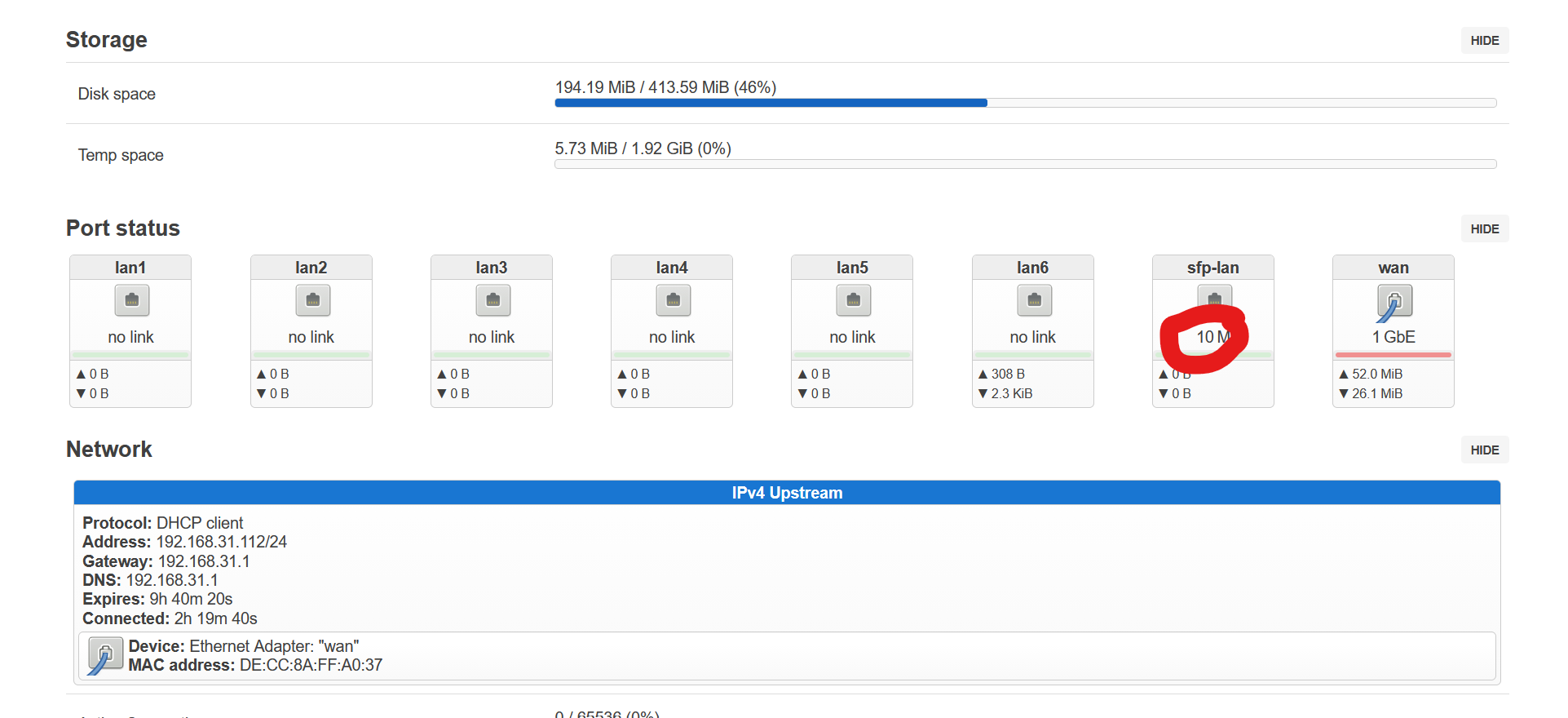
Lan is no combo on 4e…lan6 is second port from mt7988 internal switch and allows only 1G… sfp-lan is directly connected to mxl switch port13 and allows 10G mode (sharing 10G uplink with the 2.5g ports like on 8X). Only wan is a combo with manual switch (via overlay) between mt7988 internal 2.5g phy on mac and sfp slot.
1 Like
Understend. sorry. But sfp-lan is empty. In luci i can see 10 M link.
Not sure why luci shows 10M instead of no link…etztool shows “link detected: no” but speed fallback 10M
Btw. Tftp and usb working,i just missed an $ at beginning of bootconf_extra so this var was not expanded…after fixing this both ways worked as expected
MT7988> env print loadaddr
loadaddr=0x50000000
MT7988> env print bootconf
bootconf=config-mt7988a-bananapi-bpi-r4-pro-4e
MT7988> env print bootconf_sd
bootconf_sd=mt7988a-bananapi-bpi-r4-pro-sd
MT7988> env print bootconf_extra
bootconf_extra=mt7988a-bananapi-bpi-r4-pro-cn13#mt7988a-bananapi-bpi-r4-pro-cn14#mt7988a-bananapi-bpi-r4-pro-4e-wan-sfp
MT7988> env print bootfile
bootfile=openwrt-mediatek-filogic-bananapi_bpi-r4-pro-4e-initramfs-recovery.itb
MT7988> setenv ipaddr 192.168.0.19
MT7988> tftpboot ${loadaddr} 192.168.0.11:${bootfile}
Using ethernet@15110100 device
TFTP from server 192.168.0.11; our IP address is 192.168.0.19
Filename 'openwrt-mediatek-filogic-bananapi_bpi-r4-pro-4e-initramfs-recovery.itb'.
Load address: 0x50000000
Loading: #################################################################
         #################################################################
         #################################################################
         #################################################################
         #################################################################
         #################################################################
         #################################################################
         #################################################################
         #################################################################
         #################################################################
         #################################################################
         #################################################################
         #################################################################
         #################################################################
         #################################################################
         #################################################################
         #################################################################
         #################################################################
         #################################################################
         ###############################################
         1.1 MiB/s
done
Bytes transferred = 18808832 (11f0000 hex)
MT7988> bootm $loadaddr#$bootconf#$bootconf_sd#$bootconf_extra
...
MT7988> env print loadaddr
loadaddr=0x50000000
MT7988> env print bootconf
bootconf=config-mt7988a-bananapi-bpi-r4-pro-4e
MT7988> env print bootconf_sd
bootconf_sd=mt7988a-bananapi-bpi-r4-pro-sd
MT7988> env print bootconf_extra
bootconf_extra=mt7988a-bananapi-bpi-r4-pro-cn13#mt7988a-bananapi-bpi-r4-pro-cn14#mt7988a-bananapi-bpi-r4-pro-4e-wan-sfp
MT7988> usb start
starting USB...
xhci-mtk xhci@11200000: hcd: 0x0000000011200000, ippc: 0x0000000011203e00
xhci-mtk xhci@11200000: ports disabled mask: u3p-0x0, u2p-0x0
xhci-mtk xhci@11200000: u2p:1, u3p:1
USB XHCI 1.10
Bus xhci@11200000: 4 USB Device(s) found
       scanning usb for storage devices... 1 Storage Device(s) found
MT7988> load usb 0:1 $loadaddr ${bootfile}
18808832 bytes read in 1580 ms (11.4 MiB/s)
MT7988> env print bootfile
bootfile=openwrt-mediatek-filogic-bananapi_bpi-r4-pro-4e-initramfs-recovery.itb
MT7988> bootm $loadaddr#$bootconf#$bootconf_sd#$bootconf_extra
2 Likes
I think it is going to be possible to update the firmware directly from with OpenWRT soon using fwupdmgr and/or fwupdtool (they are both available in the OpenWRT package manager). I suspect it is failing below because I am already at the latest firmware???
root@OpenWrt ~# cat /etc/os-release
NAME="OpenWrt"
VERSION="SNAPSHOT"
ID="openwrt"
ID_LIKE="lede openwrt"
PRETTY_NAME="OpenWrt SNAPSHOT"
VERSION_ID="snapshot"
HOME_URL="https://openwrt.org/"
BUG_URL="https://bugs.openwrt.org/"
SUPPORT_URL="https://forum.openwrt.org/"
FIRMWARE_URL="https://downloads.openwrt.org/"
BUILD_ID="r35939-b642d8495a"
OPENWRT_BOARD="mediatek/filogic"
OPENWRT_ARCH="aarch64_cortex-a53"
OPENWRT_TAINTS="no-all busybox"
OPENWRT_DEVICE_MANUFACTURER="OpenWrt"
OPENWRT_DEVICE_MANUFACTURER_URL="https://openwrt.org/"
OPENWRT_DEVICE_PRODUCT="Generic"
OPENWRT_DEVICE_REVISION="v0"
OPENWRT_RELEASE="OpenWrt SNAPSHOT r35939-b642d8495a"
OPENWRT_BUILD_DATE="1787856917"
root@OpenWrt ~# devlink -v -p dev
platform/15020000.switch
mdio_bus/mdio-bus:10
root@OpenWrt ~# fwupdtool get-updates --show-all
Loading…                 ▕⣿⣿⣿⣷                                   ▏11:18:43.030 FuPluginDevlink      failed to get serial number for devlink device platform/15020000.switch: failed to get device info: netlink error: Not supported
Loading…                 ▕⣿⣿⣿⣿⣿⣿⣿⣿⣿⣿⣿⣿⣿⣿⣿⣿⣿⣿⣿⣿⣿⣿⣿⣿⣿⣿⣿⣿⣿⣿⣿⣿⣿⣿⣿⣿⣿⣿⣄▏
WARNING: UEFI ESP partition not detected or configured
See https://github.com/fwupd/fwupd/wiki/PluginFlag:esp-not-found for more information.
No updates available for remaining devices
root@OpenWrt ~ [2]# fwupdmgr get-updates --show-all
WARNING: UEFI ESP partition not detected or configured
See https://github.com/fwupd/fwupd/wiki/PluginFlag:esp-not-found for more information.
No updatable devices
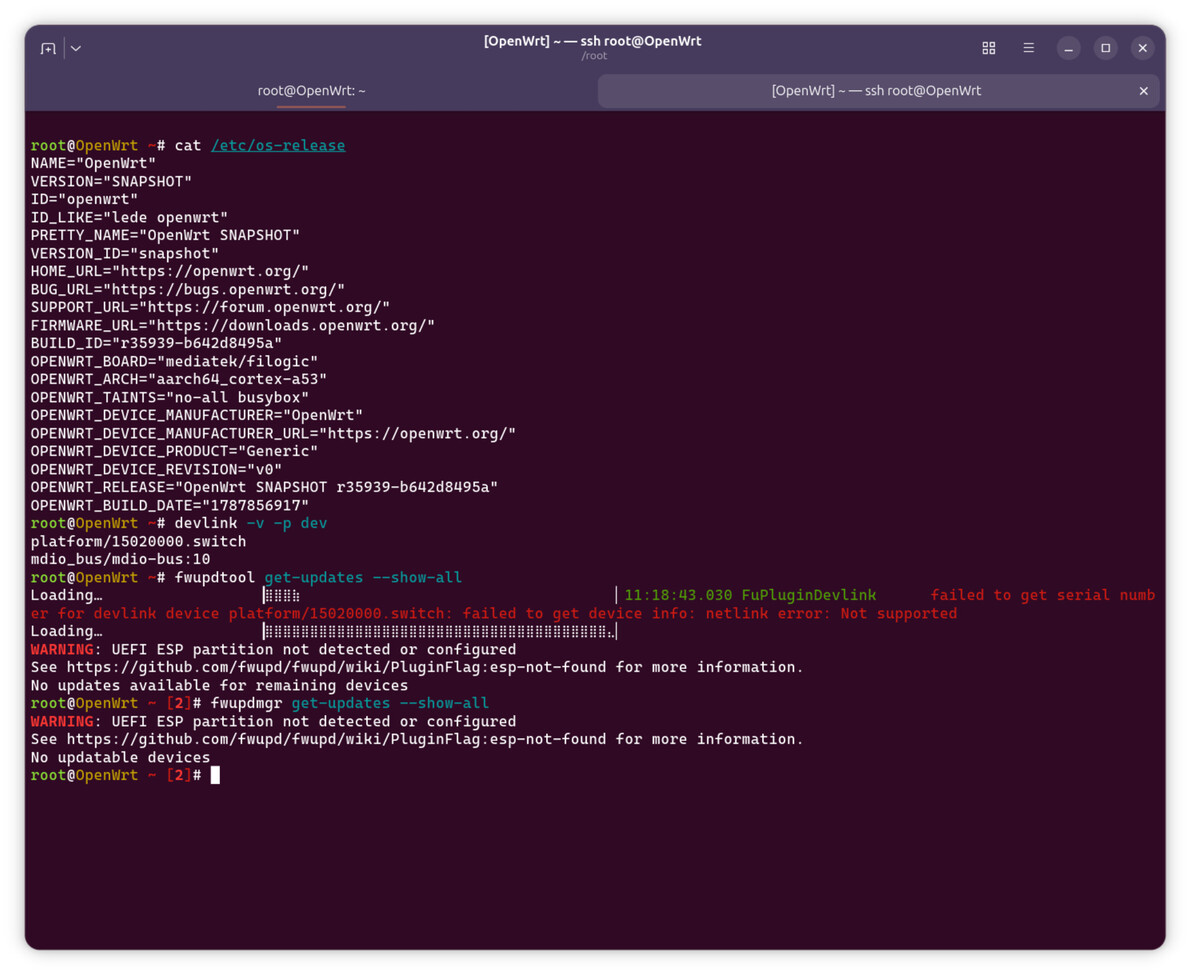
This should not come up,but i have not tried the fwupd way yet.
@frank-w check pls Add BPI-R4 pro 4e variant by frank-w · Pull Request #24897 · openwrt/openwrt · GitHub
AI found little problem. I hope it last fix before merged.
Yes,i saw it already…i just squash the 2 commits (r4pro aliases + r4pro 4e support) together
To r4pro 4e users: just more test results would be great…just say what you have tested (lan-ports,sfp,wan-phy/sfp,anything else from basic support).
1 Like
I tested LAN6 like WAN and sfp-WAN (and little wan-phy). Wifi BE-14 works OK (i changed /etc/config/wireless file) for me also. I tested FANs it work OK also.
1 Like
I think it would be easier to create a document of some sorts like a spreadsheet detailing what has and hasn’t been tested and by whom it was tested and make it shareable so others can contribute to it. I think this will be much easier than following this whole thread.
It would also be much easier to test if no forced pushes were taking place so I can say at revision X such and such was observed.
Doing a forced push after the pull request has been approved is okay, I guess.
Going against what I just wrote:
- I’d say that default WiFi config needs to be adjusted somewhat to get WiFi working. I don’t think this is desirable behavior.
- MLO doesn’t work in the upstream branch whilst it works in the vendor shipped image.
Hi. Could you please share with me the way you add LAN6 to WAN interface. Thanks in advance.
not sure how i can create such to allow everybody add his tests there (e.g. in the PRs description).
lan6 is internal switch and completely different to wan-sfp…you mean you tested it with 1G link partner? how did you tested it (ping, normal traffic, iperf3,…)? have you tested wan-sfp/wan-phy with >1G
my tests were only with 1G link-partner as my switch and laptop is only 1G. using higher speed i have to extend my home-lab temporary (and disassemble afterwards) so i hope for some more tests 
I’m not sure how i can predefine the wireless config as wifi is not the base support here due to external card and imho this should be done separately. at least pcie itself is tested so far. Same is for MLO which needs to be done in additional PR from people have more knowledge about this. I have some patches for it in my dedicated kernel 7.2/7.3 repo/trees for led-handling, but found no time yet to do tests.
as i said before, the R4Pro_4e branch is directly connected to the PR and i must use force-pushes to keep the commits clean to be merged…i cannot add commits on top when fixing refreshes/ai comments there. Thats the reason i created the R4Pro_PRx branches in my repo with andrews/pietros PRs to see what has changed and have a testing base without rebases/force-pushes…of course they only represent a specific timeslot of the containing PRs
1 Like
why do you want to bridge lan with wan (basicly this should work)? are you talking about 4E or 8x?
Sorry, I must have explained wrong. I’m testing the official OpenWrt Snapshot for BPI R4 Pro 8. Since I can’t get using the wan interface through the 10 GB RJ45, what I intend is to take LAN6 out of the LAN brigde and provisionally use it as a WAN interface.