root@banana:~#
root@banana:~# ethtool -k eth1  | grep -v fixed
Features for eth1:
rx-checksumming: on
tx-checksumming: on
        tx-checksum-ipv4: on
        tx-checksum-ipv6: on
scatter-gather: on
        tx-scatter-gather: on
tcp-segmentation-offload: off
        tx-tcp-segmentation: off
        tx-tcp-ecn-segmentation: off
        tx-tcp-mangleid-segmentation: off
        tx-tcp6-segmentation: off
generic-segmentation-offload: off
generic-receive-offload: on
large-receive-offload: off
tx-vlan-offload: on
tx-nocache-copy: off
hw-tc-offload: on
rx-gro-list: off
rx-udp-gro-forwarding: off
root@banana:~#
@sinovoip
Hello,
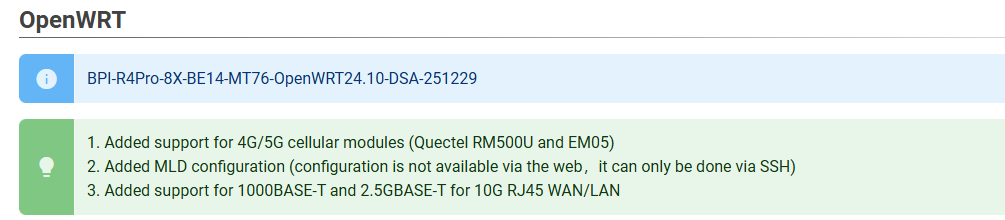
I’m using BPI-R4Pro-8X-BE14-MT76-OpenWRT24.10-DSA-251229 — this issue from the current discussion thread is still relevant for the present version; would it be possible to include this patch in the next release?
I ran additional tests, and here’s the issue: the upload speed drops to 100 Mbps when I’m connected via the LAN RJ45 10G port. The ISP connection was tested alternately through the WAN RJ45 10G port and the SFP WAN port. However, once I switch the PC from the 10G LAN port to the 2.5G port, the symmetric 1 Gbps speed is restored.
I’m testing my BPI-R4 Pro with OpenWrt 24.10-SNAPSHOT. I noticed the following behavior:
PC NIC: Intel I225-V 2.5G
When connecting via LAN 2.5G ports (mxl_lan0–3) → upload/download is normal, full 2.5G/2.5G
When connecting the same PC to 10G combo RJ45/SFP+ port → download is fine, but upload drops to ~100 Mbps
On Windows, the link shows 2.5G/2.5G, so the PHY negotiation is correct.
I’ve attached the ethtool mxl_lan5 output for reference.
It seems that the 10G MAC + DSA driver in OpenWrt 24.10 cannot handle TX at 2.5G NBASE-T speeds, although the PHY link is established correctly. Using a 1G NIC on the PC works fine.
Settings for mxl_lan5:
        Supported ports: [ TP    MII ]
        Supported link modes:   100baseT/Full
                                1000baseT/Half 1000baseT/Full
                                10000baseT/Full
                                2500baseT/Full
        Supported pause frame use: Symmetric Receive-only
        Supports auto-negotiation: Yes
        Supported FEC modes: Not reported
        Advertised link modes:  100baseT/Full
                                1000baseT/Half 1000baseT/Full
                                10000baseT/Full
                                2500baseT/Full
        Advertised pause frame use: Symmetric Receive-only
        Advertised auto-negotiation: Yes
        Advertised FEC modes: Not reported
        Link partner advertised link modes:  10baseT/Half 10baseT/Full
                                             100baseT/Half 100baseT/Full
                                             1000baseT/Full
        Link partner advertised pause frame use: Symmetric Receive-only
        Link partner advertised auto-negotiation: Yes
        Link partner advertised FEC modes: Not reported
        Speed: 2500Mb/s
        Duplex: Full
        Auto-negotiation: on
        Port: Twisted Pair
        PHYAD: 18
        Transceiver: external
        MDI-X: Unknown
        Supports Wake-on: d
        Wake-on: d
        Link detected: yes
Update:
I’ve confirmed that this issue occurs only when the PC NIC is in auto-negotiation mode. In this case, Windows negotiates 2.5G/2.5G, but ethtool on OpenWrt still shows the partner advertised modes only up to 1G. Despite this, the physical link is established at 2.5G.
Temporary workaround: forcing the Intel I225-V NIC in Windows to 1G Full Duplex restores normal upload speeds.
Ideally, I’d like a solution so that the 10G combo LAN port on the BPI-R4 can handle 2.5G TX reliably, without limiting the PC NIC speed.
Yes, only at 10G. For that one, I have to manually set 1G in the network adapter settings in Windows. At the same time, the neighboring 2.5G port works perfectly and doesn’t throttle the uplink speed.
well this clearly matches with " 3). Change mxl862xx DSA CPU port to 10GBASE-R and mxl_lan5 to USXGMII, although the mxl862xx DSA driver ignores these settings."
means that mediatek switched the ports in usxgmii mode to achieve autonegotiation but because the lan 10g port is behind the maxlinear switch it won’t work as DSA driver ignores that settings.
For now there is no solution. The only one could save us is @dangowrt for a DSA driver that supports that
P5 (cpu port) is really strange as it is changed from usxgmii to 10gbase-r,but gmac2 should be configured as usxgmii (not changed in patch).
I made some tests with Christian (dev from as phy) and we had some issues with the phy when running in usxgmii mode. Afair it was with rate adaption at lower speeds,but not sure.