Hi, the BPI-R4 has two M.2 slots, but one is an M.2 B-KEY and the other is an M.2 M-KEY.
Are you using both of these two slots?
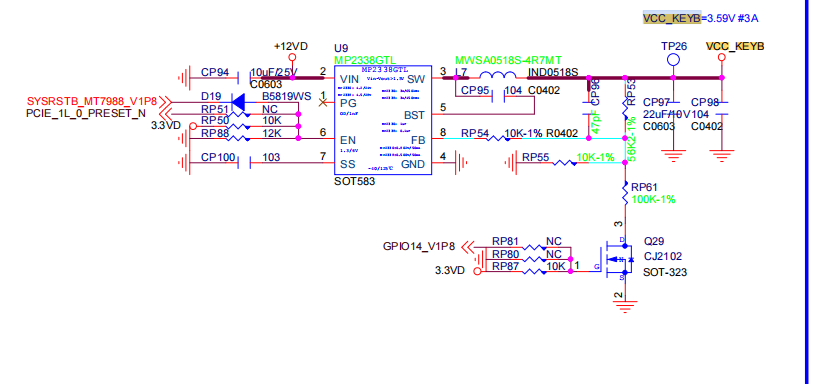
The one on the top of the PCB is the B-KEY, which is for the 4G/5G module. We’ve set the voltage to 3.59V, while typical PCIe to SATA chips require 3.3V. Therefore, plugging into this slot might cause it to overheat.
Yes, I am using both of the m.2 slots, and the B-key one with the adapter. I did not know that there is bigger voltage. High temperature was on both of the ASM1166 adapters.
Does the higher voltage on B-key m.2 slot is standard / common?
I really hope to this too, and I could say, that this kind of surprise, if it is not any standard or my fault, could be really show-stopper for development product like SFP NAS based on the bpi-r4 for me.
But, I am quite positive in this manner, because I am using our own sfp nas v1.0 several months on daily basis, even as iSCSI server.
But I would be curious if this could cause these restarts, because of just “unsupported conditions for the SATA adapter”. It could be tricky to figure it out if it really is caused by the slightly bigger voltage.
Please @simon, does it is the same voltage even on PRO version?
On r4pro you can choose between key-m (default in upstream version) and key-b. Key-m (and also keyb) seems to have really 3.3v based on schematic i have.
the BPI-R4 is restarting on higher iops usage no matter what I am trying to do, and it looks like BPI-R4 PRO which could FIX THIS BOARD BUG will never be delivered. Does it is possible to change the voltage to the 3V3 as it should be? I know that there should be needed soldering of tiny smd rezistor, but I am out of possibilities.
As I did install total count of 5 heatpipes (3 for cpu and 2 for both of the m.2 to sata ASM1166 adapters), I think, that the restarts are not because of overheating. The others 2 asm1064 minipciEx sata adapters have just ordinary heatsink installed.
But it is true, that I do not know how to monitor the temperature of the ASM1166 chips itself, therefore I have no proof.
It is the cause why I created this topic, I would like to know any ideas of the others.
The operating voltage of most 5G modules is 3.3V~4.2V. Due to the large current, using 3.3V will cause module instability, So we increased the 3.3V voltage of the B-KEY slightly.
Therefore, it is not recommended to connect B-KEY to other modules.
Could you test the heat dissipation of your ASM1166 on the M-KEY?
Based on our previous tests, some PCIe to Ethernet modules do generate more heat when placed on the BPI-R4 B-KEY (3.59V), but we’re unsure if yours is similar.
really thanks for Your support here, and thanks for let me know reasons about the bigger voltage on m.2 B, it makes much better sense now.
It would not be so ease to just test heat, to get reproductible a trustworthy results.
As I have thermo camera already, to be able to do this, I would need replace bpi-r4 board in my sfp nas as I am testing it on some pre-production.
But, what I coud try soon is move almost all drives to the sata ports of other controllers, and let just only 1 sata drive in the m.2 B. I am using too many drives to let the m.2 B key sata controller unoccupied completelly.
Personally, I think you could first consider adjusting the voltage of this power supply on R4. I guess it might be because the SATA devices have very strict voltage requirements, otherwise they wouldn’t restart so frequently.
Thanks, great idea… For playing with it and joy, why not, but I am using it already as my iscsi and nfs server, not only for my backups, videos, music…
And this update is also not good idea when thinking about SFP NAS series production. I just do not have so much time to just “play with it for fun”.
Could you or @simon confirm me that the m.2 B key have soc addr 11280000? I am not as skilled, and I would like have confirmation.
Right at this time I moved all of the drives out from the m.2 sata controller connected to the m.2 B-key.
I am not able to shut down the nas now, the controller remains connected, but without any use.
We will se in the next weeks/month if it will helps or not. The last drive is now connected using usb to sata box.
I was trying to find any thermo images of the bpi-r4 board itself, but I no luck. Does there is any component too hot with needs of active cooling? I have my own thermo camera now, but I am not able to do detailed images when running in the case.
The CPU definitely requires cooling. For the SFP module, if there are any power modules used, it is also recommended to add cooling. Also, if the BE14 WiFi module is used, this heat generation will be quite significant.
CPU have 3 heatpipes and its temp is about 47oC - never had 50oC.
I am using just 1 sfp+ AOC cable with length just 2m, and the module have limited power, therefore its temp is always around 40oC.
No wifi is used, all m.2 ports are occupied with sata adaters asm1166.
Both mini-pciex ports are occupied with sata adapters asm1064.
As I moved all the drives out from the m.2 B controller, I needed to make backup copy of img file from an r5 ssd array (all drives on one minipci-Ex asm 1064 sata controller) to r6 hdd array ( 6 from 8 drives on the m.2 M keycontroller, 1 drive on the second minipci-Ex sata controller and the last drive on usb3 ) and the board restarted again.
Now whenever I will be ready to “accept to stop all my VMs”, I will try to remove the m.2 B key sata controller completelly. I do not expect nothing from this, but I just want to know the result.
As never reboot accured in case of high IOPS usage on minipci-Ex controllers, it looks like an issue on the asm1166 controller connected to m.2 M key with soc address 0x11290000.
I will be back in case of any new results available.