Hi, I’ve recently purchased:
Banana Pi BPI-R4 (8GB version) together with BPI-R4-NIC-BE14 WiFi7. Tonight I’ve found some time to test it finally and it appears that WIFI does not work out of the box with vendor’s image.
I’ve also noticed an official OpenWrt support, however I’m not quite sure if a team already introduced support for 320Mhz channels.
What image should I use OpenWrt (24.10.4 or snapshot) or Vendor’s one (as a temporary solution). And if the second one, I’m not sure about the image: -BPI-R4-8G-BE1350-WIFI_MP4_1-SDK-20240318
- OpenWRT MTK MP4.1 wifi SDK wifi driver for BE14000 Wifi Card
- OpenWRT MTK MP4.0 wifi SDK wifi driver for BE14000 Wifi Card
- OpenWRT MTK MP3.1 wifi SDK or MT76 wifi driver for BE14000 Wifi Card
- OpenWRT MTK MP3.0 SDK for BE19000 Wifi Card
I would be appreciate for a help.
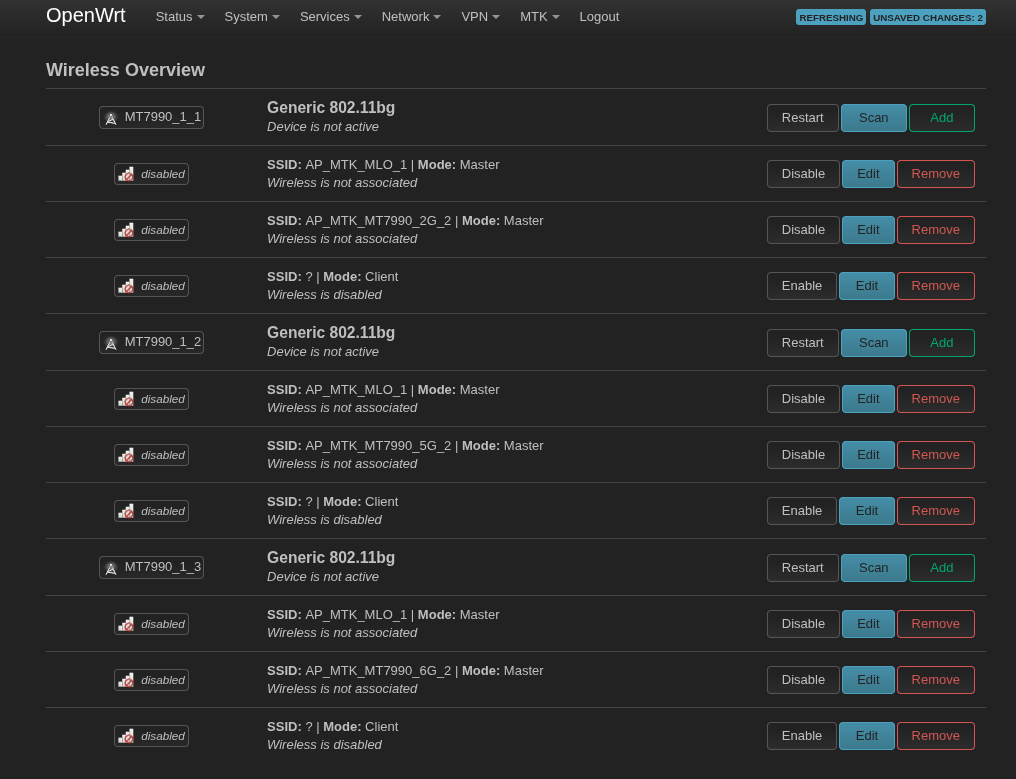
uname -a
Linux OpenWrt 5.4.271 #0 SMP Wed Jun 5 06:11:29 2024 aarch64 GNU/Linux
lspci -nn
0002:00:00.0 PCI bridge [0604]: MEDIATEK Corp. Device [14c3:7988] (rev 01)
0002:01:00.0 Non-Volatile memory controller [0108]: Kingston Technology Company, Inc. Device [2646:5028] (rev 03)
0004:00:00.0 Unclassified device [0002]: MEDIATEK Corp. Device [14c3:7981]
lsmod | grep mt
cfg80211              311296  2 mt_wifi,mt_wifi_cmn
mt_wifi              9105408  2 connac_if,mtk_hwifi
mt_wifi_cmn            16384  4 mt7990,mtk_pci,mtk_hwifi,mt_wifi
mt7990               5308416  0
mt7991                 16384  0
mtfwd                  36864  1
mtk_hwifi             139264  5 mt7991,mt7990,mtk_wed,mtk_pci,connac_if
mtk_pci                40960  0
mtk_warp              425984  1 mtk_wed
mtk_wed                20480  0
mtkhnat               266240  2 mt_wifi,mtk_warp
mtqos                  98304  0
find /lib/firmware/
/lib/firmware/
/lib/firmware/7988_WOCPU0_RAM_CODE_release.bin
/lib/firmware/7988_WOCPU1_RAM_CODE_release.bin
/lib/firmware/7988_WOCPU2_RAM_CODE_release.bin
/lib/firmware/AQR-G4_v5.7.0-AQR_EVB_Generic_X3410_StdCfg_MDISwap_USX_ID46316_VER2148.cld
/lib/firmware/EthMD32.DSP.bin
/lib/firmware/EthMD32.dm.bin
/lib/firmware/MT7990_EEPROM.bin
/lib/firmware/MT7990_EEPROM_iFEM233.bin
/lib/firmware/MT7990_iPAiLNA_EEPROM.bin
/lib/firmware/Rhe-05.06-Candidate7-AQR_Mediatek_23B_StartOff_ID45623_VER36657.cld
/lib/firmware/Rhe-05.06-Candidate9-AQR_Mediatek_23B_P5_ID45824_LCLVER1.cld
/lib/firmware/WIFI_MT7990_PATCH_MCU_1_1_hdr.bin
/lib/firmware/WIFI_MT7990_PHY_RAM_CODE_1_1.bin
/lib/firmware/WIFI_MT7990_WACPU_RAM_CODE_1_1.bin
/lib/firmware/WIFI_RAM_CODE_MT7990_1_1.bin
/lib/firmware/WIFI_RAM_CODE_MT7990_1_1_TESTMODE.bin
/lib/firmware/firmware_eip207_ifpp.bin
/lib/firmware/firmware_eip207_ipue.bin
/lib/firmware/firmware_eip207_ofpp.bin
/lib/firmware/firmware_eip207_opue.bin
/lib/firmware/inside-secure
/lib/firmware/inside-secure/eip197_minifw
/lib/firmware/inside-secure/eip197_minifw/ifpp.bin
/lib/firmware/inside-secure/eip197_minifw/ipue.bin
/lib/firmware/mediatek
/lib/firmware/mediatek/mt7988
/lib/firmware/mediatek/mt7988/i2p5ge-phy-pmb.bin
/lib/firmware/mediatek/mtk_wo_0.bin
/lib/firmware/mediatek/mtk_wo_1.bin
/lib/firmware/mediatek/mtk_wo_2.bin
/lib/firmware/regulatory.db
/lib/firmware/e2p
dmesg | grep -i mt7
[    1.775455] mt7988-pinctrl 1001f000.pinctrl: invalid function mdio in map table
[    3.436032] MediaTek MT7988 PHY dsa-0.0:00: TX-VCM SW cal result: 0x2
[    3.461556] MediaTek MT7988 PHY dsa-0.0:01: TX-VCM SW cal result: 0x2
[    3.489671] MediaTek MT7988 PHY dsa-0.0:02: TX-VCM SW cal result: 0x2
[    3.515873] MediaTek MT7988 PHY dsa-0.0:03: TX-VCM SW cal result: 0x2
[    3.534663] mt7530 mdio-bus:1f lan0 (uninitialized): PHY [dsa-0.0:00] driver [MediaTek MT7988 PHY]
[    3.554795] mt7530 mdio-bus:1f lan1 (uninitialized): PHY [dsa-0.0:01] driver [MediaTek MT7988 PHY]
[    3.574865] mt7530 mdio-bus:1f lan2 (uninitialized): PHY [dsa-0.0:02] driver [MediaTek MT7988 PHY]
[    3.594895] mt7530 mdio-bus:1f lan3 (uninitialized): PHY [dsa-0.0:03] driver [MediaTek MT7988 PHY]
[    3.604048] mt7530 mdio-bus:1f: configuring for fixed/10gbase-kr link mode
[    3.610932] mt7530 mdio-bus:1f: Link is Up - 10Gbps/Full - flow control rx/tx
[    3.613886] mt7530-nl: genl_register_family_with_ops
[    5.086931] mt7530 mdio-bus:1f lan1: configuring for phy/gmii link mode
[    5.094015] mt7530 mdio-bus:1f lan1: Link is Up - 1Gbps/Full - flow control off
[   10.269909] mt7530 mdio-bus:1f lan1: Link is Down
[   13.680171] mt7990: module uses symbols from proprietary module mtk_hwifi, inheriting taint.
[   13.692916] mt7991: module uses symbols from proprietary module mtk_hwifi, inheriting taint.
[   19.795948] mt7530 mdio-bus:1f lan1: configuring for phy/gmii link mode
[   19.803515] mt7530 mdio-bus:1f lan2: configuring for phy/gmii link mode
[   19.805400] mt7530 mdio-bus:1f lan3: configuring for phy/gmii link mode
[   19.832648] mt7530 mdio-bus:1f lan0: configuring for phy/gmii link mode
[   22.853054] mt7530 mdio-bus:1f lan1: Link is Up - 1Gbps/Full - flow control off
[25987.396947] mt7530 mdio-bus:1f lan1: Link is Down
[1845562.697327] mt7530 mdio-bus:1f lan1: Link is Up - 1Gbps/Full - flow control off
[1845993.758804] mt7530 mdio-bus:1f lan1: Link is Down
[1845993.883538] mt7530 mdio-bus:1f lan1: configuring for phy/gmii link mode
[1845993.885118] mt7530 mdio-bus:1f lan2: configuring for phy/gmii link mode
[1845993.886334] mt7530 mdio-bus:1f lan3: configuring for phy/gmii link mode
[1845997.961468] mt7530 mdio-bus:1f lan1: Link is Up - 1Gbps/Full - flow control off
[1846300.959152] mt7530 mdio-bus:1f lan0: configuring for phy/gmii link mode
[1846390.025178] mt7530 mdio-bus:1f lan0: Link is Up - 1Gbps/Full - flow control off
iw list
(empty)