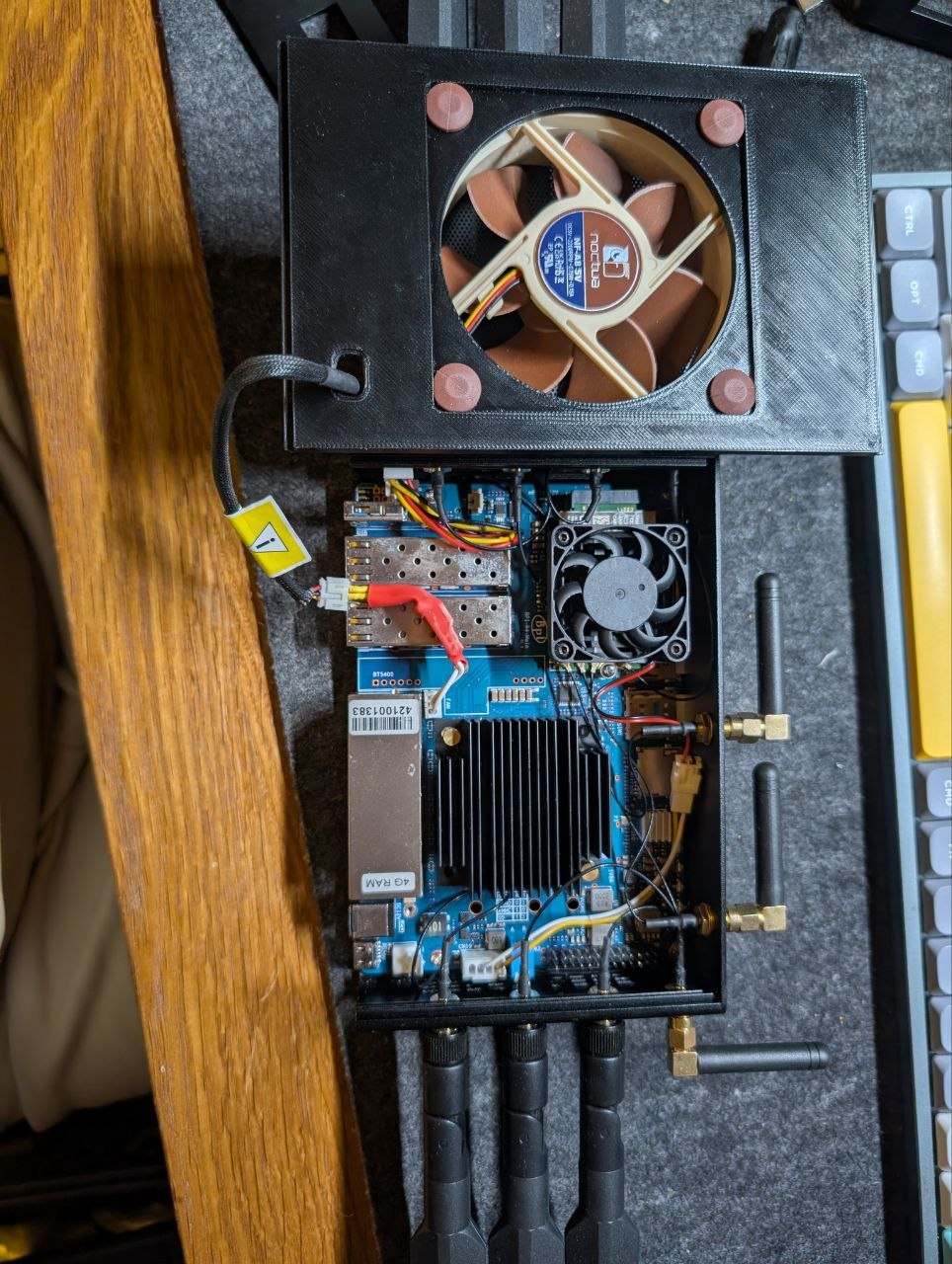
BPI-R4 - Modem M.2 Key B issues with PCIe

Hi all,

I face a strange issue with 5G Modems in this slot. The slot seems to work fine if I install a M.2 adapter with a M.2 NIC 2.5 Gbps. I can get full speed both directions via Ethernet port.

But if I connect a 5G modem like FM350-GL or Dell DW5934e into this slot I get some errors like this:

[   74.858008] mtk_t7xx 0003:01:00.0: MD handshake timeout
[   74.863243] mtk_t7xx 0003:01:00.0: Boot Handshake failure
[   85.032006] pcieport 0003:00:00.0: AER: Correctable error message received from 0003:00:00.0
[   85.040463] pcieport 0003:00:00.0: PCIe Bus Error: severity=Correctable, type=Physical Layer, (Receiver ID)
[   85.050200] pcieport 0003:00:00.0:   device [14c3:7988] error status/mask=00000001/00006000
[   85.058549] pcieport 0003:00:00.0:    [ 0] RxErr                  (First)
[   85.080389] pcieport 0003:00:00.0: AER: Uncorrectable (Fatal) error message received from 0003:00:00.0
[   85.089709] pcieport 0003:00:00.0: PCIe Bus Error: severity=Uncorrectable (Fatal), type=Transaction Layer, (Receiver ID)
[   85.100573] pcieport 0003:00:00.0:   device [14c3:7988] error status/mask=00000020/00400000
[   85.108919] pcieport 0003:00:00.0:    [ 5] SDES                   (First)
[   85.115703] pcieport 0003:00:00.0: AER: broadcast error_detected message
[   85.122399] mtk_t7xx 0003:01:00.0: AER: can't recover (no error_detected callback)
[   85.147996] pcieport 0003:00:00.0: waiting 100 ms for downstream link, after activation
[   86.177996] pcieport 0003:00:00.0: broken device, retraining non-functional downstream link at 2.5GT/s
[   86.337485] mtk_t7xx 0003:01:00.0: ready 0ms after bus reset
[   86.343149] pcieport 0003:00:00.0: AER: Root Port link has been reset (0)
[   86.349987] pcieport 0003:00:00.0: AER: device recovery failed

Or sometimes it doesn’t get this error but the driver mtk_t7xx is loaded but it doesn’t expose any kind of /dev/wwan0* interface.

On my Ryzen 5900X PC with a PCIe to M.2 B+M adapter and then M.2 Key B with SIM to M.2 Key B+M, the modem works OK with mtk_t7xx and it expose /dev/wwan0* interfaces.

The only difference between these 2 setups is the second one doesn’t have an USB 2.0/3.0 interface, so in my Ryzen 5900X works only in PCIe mode.

Both Ryzen 5900X and BPi R4 are running Kernel 7.1.x:

root@EasyOS:/# uname -a
Linux EasyOS 7.1.2-EasyOS-bpi-r4 #1 SMP PREEMPT Fri Jul  3 17:55:33 CEST 2026 aarch64 GNU/Linux

root@Ryzen5900X:~# uname -a
Linux Ryzen5900X 7.1-amd64 #1 SMP PREEMPT_DYNAMIC Debian 7.1.1-1~exp1 (2026-06-19) x86_64 GNU/Linux

But in BPi R4 I can see modem on both interfaces: PCIe and USB.

And in logs I get:

# dmesg | grep mtk_t7xx
[   13.112835] mtk_t7xx 0003:01:00.0: vgaarb: pci_notify
[   13.123268] mtk_t7xx 0003:01:00.0: assign IRQ: got 120
[   13.128529] mtk_t7xx 0003:01:00.0: enabling device (0000 -> 0002)
[   13.134632] mtk_t7xx 0003:01:00.0: enabling bus mastering
[   13.361667] mtk_t7xx 0003:01:00.0: vgaarb: pci_notify
[   74.840882] mtk_t7xx 0003:01:00.0: MD handshake timeout
[   74.846119] mtk_t7xx 0003:01:00.0: Boot Handshake failure

I tried to disable all USB drivers for FM350-GL in /etc/modprobe.d/blacklist-mtk-usb.conf:

# Blacklist for USB driver for FM350-GL
blacklist option
blacklist cdc_acm
blacklist cdc_mbim
blacklist cdc_wdm

Also /etc/udev/rules.d/99-disable-mtk-usb.rules:

# Disable USB interfaces for FM350-GL (0e8d:7127)
ATTR{idVendor}=="0e8d", ATTR{idProduct}=="7127", ATTR{authorized}="0"

//LE If I don’t load any USB drivers, the PCIe works better, mtk_t7xx is loaded but doesn’t expose any /dev/wwan0* interface.

Any ideas?

Hi all,

I found the issue. The FM350-GL firmware version 81600.0000.00.29.23.22_GC, F30 is a little bit stupid! When I cross check with the configuration in my Ryzen 5900X and notice that if is connected on PCIe only is working fine, then I decided to block these pins on the modem PCB:

7 -> USB_D+
9 -> USB_D-
29 -> PERn1/USB3.1-Rx-/SSIC-RxN (is used for USB 3.0 in BPi R4)
31 -> PERp1/USB3.1-Rx+/SSIC-RxP (is used for USB 3.0 in BPi R4)
35 -> PETn1/USB3.1-Tx-/SSIC-TxN (is used for USB 3.0 in BPi R4)
37 -> PETp1/USB3.1-Tx+/SSIC-TxP (is used for USB 3.0 in BPi R4)

Guess what?!

# dmesg | grep "mtk_t7xx\|wwan"
[   17.316429] mtk_t7xx 0003:01:00.0: vgaarb: pci_notify
[   17.321620] mtk_t7xx 0003:01:00.0: assign IRQ: got 120
[   17.326795] mtk_t7xx 0003:01:00.0: enabling device (0000 -> 0002)
[   17.353675] mtk_t7xx 0003:01:00.0: enabling bus mastering
[   17.514806] mtk_t7xx 0003:01:00.0: vgaarb: pci_notify
[   17.560841] wwan wwan0: port wwan0at0 attached
[   17.587432] wwan wwan0: port wwan0mbim0 attached

# ls -l /dev/wwan0*
crw------- 1 root root 238, 0 Jul  9 10:04 /dev/wwan0at0
crw------- 1 root root 238, 1 Jul  9 10:04 /dev/wwan0mbim0

# mmcli -m 0
  -----------------------------
  General  |              path: /org/freedesktop/ModemManager1/Modem/0
           |         device id: 2d1dce3741c7812bb8ca39d3196ad844f98984fc
  -----------------------------
  Hardware |      manufacturer: mtk
           |             model: MBIM [14C3:4D75]
           | firmware revision: 81600.0000.00.29.23.22_GC
           |                    F30
           |      h/w revision: V1.0.6
           |         supported: gsm-umts, lte, 5gnr
           |           current: gsm-umts, lte, 5gnr
           |      equipment id: 35417XXXXXXXXXX
  -----------------------------
  System   |            device: /sys/devices/platform/soc/11280000.pcie/pci0003:00/0003:00:00.0/0003:01:00.0
           |           physdev: /sys/devices/platform/soc/11280000.pcie/pci0003:00/0003:00:00.0/0003:01:00.0
           |           drivers: mtk_t7xx
           |            plugin: mtk
           |      primary port: wwan0mbim0
           |             ports: wwan0 (net), wwan0at0 (at), wwan0mbim0 (mbim)
  -----------------------------
  Status   |             state: failed
           |     failed reason: sim-missing
           |       power state: low
  -----------------------------
  Modes    |         supported: allowed: 3g; preferred: none
           |                    allowed: 4g; preferred: none
           |                    allowed: 3g, 4g; preferred: none
           |                    allowed: 5g; preferred: none
           |                    allowed: 3g, 5g; preferred: none
           |                    allowed: 4g, 5g; preferred: none
           |                    allowed: 3g, 4g, 5g; preferred: none
           |           current: allowed: any; preferred: none
  -----------------------------
  IP       |         supported: ipv4, ipv6, ipv4v6
  -----------------------------
  3GPP     |              imei: 35417XXXXXXXXXX
  -----------------------------
  SIM      |    sim slot paths: slot 1: none (active)
           |                    slot 2: /org/freedesktop/ModemManager1/SIM/0

I can’t believe the firmware prioritize USB connection over PCIe!! :person_facepalming:

The modem is working fine right know, but I get such messages in dmesg:

[ 1672.622714] mtk_t7xx 0003:01:00.0: save config 0x04: 0x00100406
[ 1672.628639] mtk_t7xx 0003:01:00.0: save config 0x08: 0x0d400001
[ 1672.634564] mtk_t7xx 0003:01:00.0: save config 0x0c: 0x00000000
[ 1672.640473] mtk_t7xx 0003:01:00.0: save config 0x10: 0x2180000c
[ 1672.646396] mtk_t7xx 0003:01:00.0: save config 0x14: 0x00000000
[ 1672.652340] mtk_t7xx 0003:01:00.0: save config 0x18: 0x20800004
[ 1672.658259] mtk_t7xx 0003:01:00.0: save config 0x1c: 0x00000000
[ 1672.664175] mtk_t7xx 0003:01:00.0: save config 0x20: 0x2100000c
[ 1672.670085] mtk_t7xx 0003:01:00.0: save config 0x24: 0x00000000
[ 1672.676012] mtk_t7xx 0003:01:00.0: save config 0x28: 0x00000000
[ 1672.681921] mtk_t7xx 0003:01:00.0: save config 0x2c: 0x8c4a103c
[ 1672.687842] mtk_t7xx 0003:01:00.0: save config 0x30: 0x00000000
[ 1672.693773] mtk_t7xx 0003:01:00.0: save config 0x34: 0x00000080
[ 1672.699684] mtk_t7xx 0003:01:00.0: save config 0x38: 0x00000000
[ 1672.705600] mtk_t7xx 0003:01:00.0: save config 0x3c: 0x00000173
[ 1672.711572] mtk_t7xx 0003:01:00.0: PME# enabled
[ 1672.728145] pcieport 0003:00:00.0: save config 0x00: 0x798814c3
[ 1672.734066] pcieport 0003:00:00.0: save config 0x04: 0x00100406
[ 1672.739975] pcieport 0003:00:00.0: save config 0x08: 0x06040001
[ 1672.745912] pcieport 0003:00:00.0: save config 0x0c: 0x00010000
[ 1672.751825] pcieport 0003:00:00.0: save config 0x10: 0x20200004
[ 1672.757742] pcieport 0003:00:00.0: save config 0x14: 0x00000000
[ 1672.763664] pcieport 0003:00:00.0: save config 0x18: 0x00010100
[ 1672.769596] pcieport 0003:00:00.0: save config 0x1c: 0x000001f1
[ 1672.775512] pcieport 0003:00:00.0: save config 0x20: 0x20f02080
[ 1672.781421] pcieport 0003:00:00.0: save config 0x24: 0x21812101
[ 1672.787335] pcieport 0003:00:00.0: save config 0x28: 0x00000000
[ 1672.793243] pcieport 0003:00:00.0: save config 0x2c: 0x00000000
[ 1672.799156] pcieport 0003:00:00.0: save config 0x30: 0x00000000
[ 1672.805073] pcieport 0003:00:00.0: save config 0x34: 0x00000080
[ 1672.810981] pcieport 0003:00:00.0: save config 0x38: 0x00000000
[ 1672.816899] pcieport 0003:00:00.0: save config 0x3c: 0x00020173
[ 1672.822837] pcieport 0003:00:00.0: PME# enabled
[ 1674.746565] pcieport 0003:00:00.0: restore config 0x2c: 0x00000000 -> 0x00000000
[ 1674.753985] pcieport 0003:00:00.0: restore config 0x28: 0x00000000 -> 0x00000000
[ 1674.761390] pcieport 0003:00:00.0: restore config 0x24: 0x21812101 -> 0x21812101
[ 1674.768838] pcieport 0003:00:00.0: PME# disabled
[ 1674.785654] mtk_t7xx 0003:01:00.0: PME# disabled

My questions are:

  1. There is a way to disable USB 3.0 on M.2 Key B slot?
  2. There is an ongoing issue with PCIe on BPi R4?
1 Like

Hello, this is a long-standing problem and I rewrote the firmware to make it compatible with Fibocom 350 since I own it myself. Yes, the problem is with the PCI port and it needs to be disabled.

Please note that data polling must go through tty USB1 in modemmanager, and specify USB3 in the ATC interface. Also note that in this mode, this modem heats up a lot, I’m not kidding, you will need to cool it with a small cooler.

1 Like