upload the image to /tmp folder using scp (scp firmware_image [email protected]:/tmp) then start the upgrade by run this command sysupgrade -n /tmp/firmware_image
Thank you for the answer. I suppose the RM500U-CN shouldn’t cause any issue either then. Did you have to install drivers (QMI is proprietary as far as I know) using opkg or was the card found without issues?
I have installed these packages: kmod-usb-net-qmi-wwan and luci-proto-qmi and uqmi. card are automatically detected. driver support was added for RM520N since Sep 2022 https://lore.kernel.org/linux-usb/[email protected]/
Thank you for providing the packages! I will get my R3 Mini in about 2 weeks and will test this. For anyone wondering: The drivers for the RM500U-CN have been added on March 2023 [PATCH] USB: serial: option: add Quectel RM500U-CN modem - Bjørn Mork
Will report back if the module installation in the R3 Mini was “plug and play”
How do you have this connected? Via USB?
In stock version, GPIO 431 used to power on 5G card as GPIO_ACTIVE_LOW. the following script taken from stock: #!/bin/sh /etc/rc.common
if [ ! -f /sys/class/gpio/export ]; then exit 0 fi
enable M.2 5G RM500U-CN Module Power
echo 443 > /sys/class/gpio/export echo 431 > /sys/class/gpio/export echo out > /sys/class/gpio/gpio431/direction echo 0 > /sys/class/gpio/gpio431/value
sleep 30
result=lsusb | grep "2c7c:0" | wc -l
if [ ${result} -eq 1 ]; then
#echo “######################### Start 5G RM500U-CN Calling Process ############################”
#/sbin/quectel-CM 2>&1 | tee -a /var/log/quectel-CM_RM500U-CN_Calling.log
#echo “##########################################################################################”
/sbin/quectel-CM &
fi
In immortal image gpio 431 was exported by default as follows
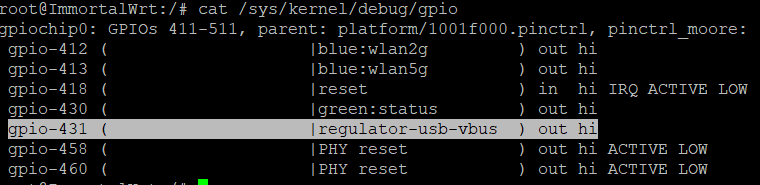
Is it possible to update dts file to automatically power on the card and be detected by the system.
R3 mini has M.2 B-Key (USB3) interface for 5G card connectivity
1 Like
Yes I have fixed it.
Unfortunately, 5g card not detected. Temporary solution, I have edited the dts file as follows:

and in startup script , I have added the following commands:
echo 443 > /sys/class/gpio/export
echo 431 > /sys/class/gpio/export
echo out > /sys/class/gpio/gpio431/direction
echo 0 > /sys/class/gpio/gpio431/value
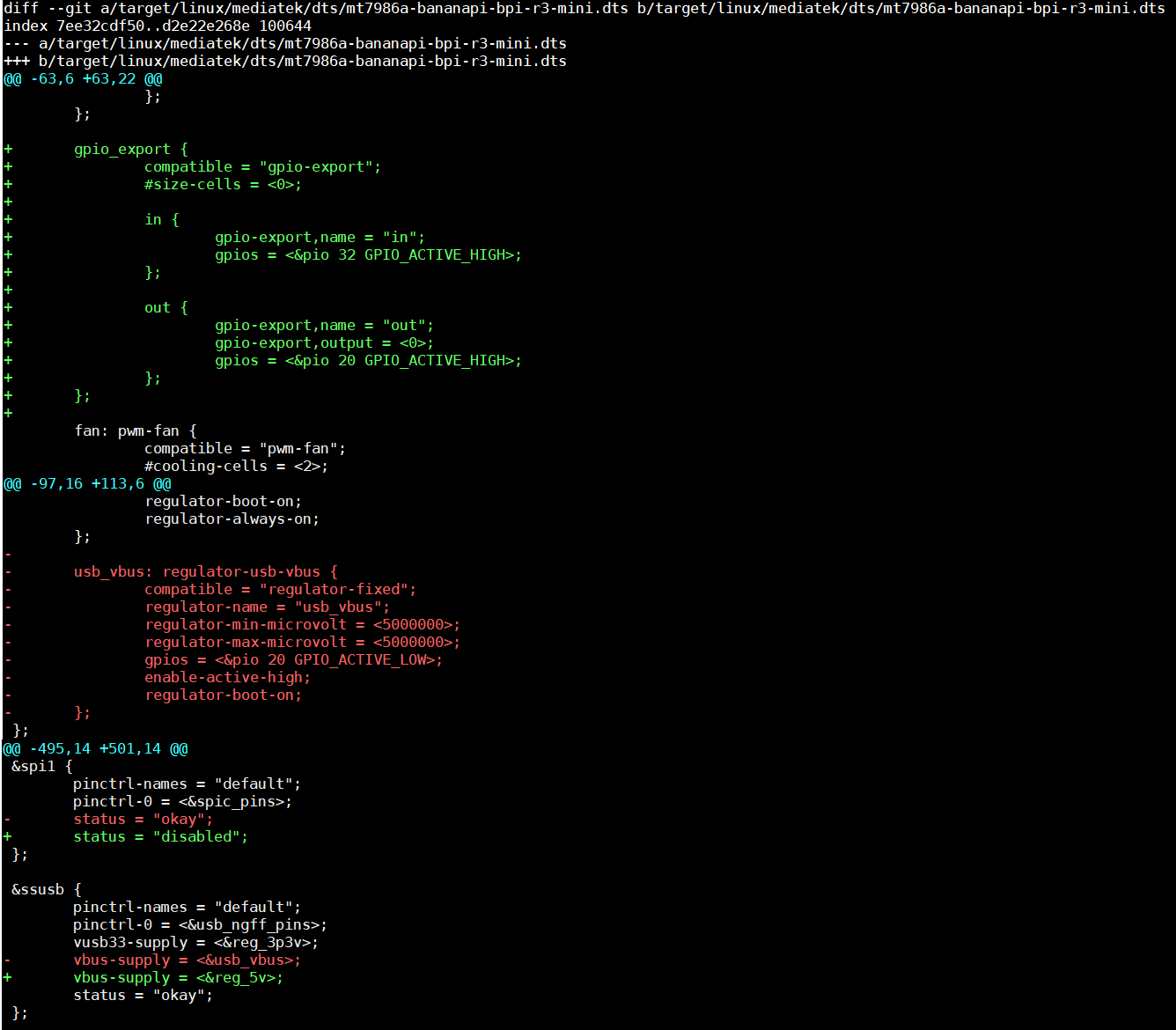

Thx for posting your changes! This will be super helpful when I’ll tackle my R3 Mini with the RM500U-CN module - unless @1715173329 updates the image before I receive my R3 Mini 
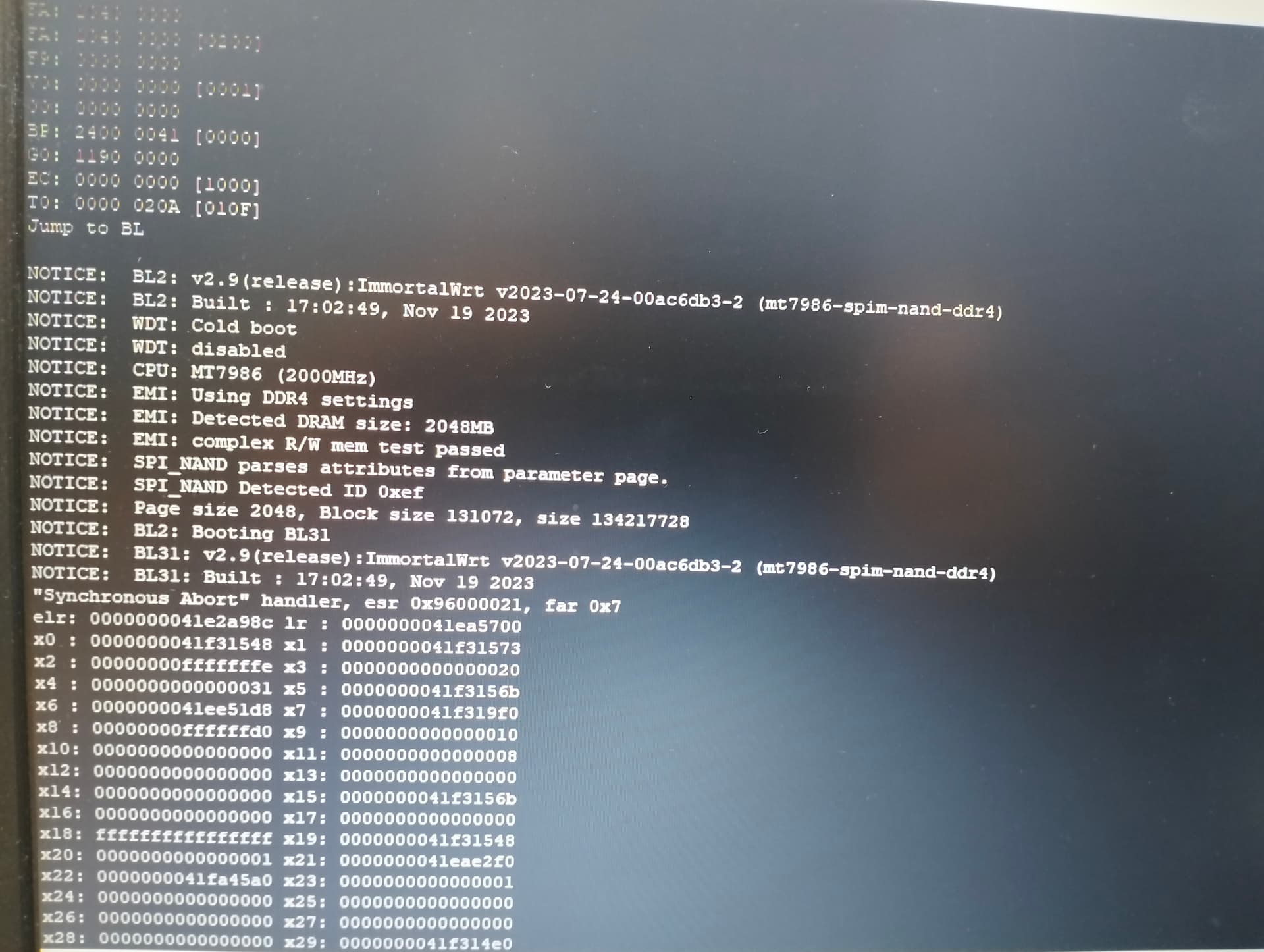
hi, I flashed emmc on immortalwrt 23.05.1 and now I’m trying to flash nand immortalwrt, I’m cleaning and updating bl2 and fip and when I boot from nand I get an error like in the screenshot. Help, how to fix booting from nand?
Is this change still relevant? Do I have to adjust the .dts too? I finally got my antenna but they’ve sent me the RM500U-CNV instead of the RM500U-CN
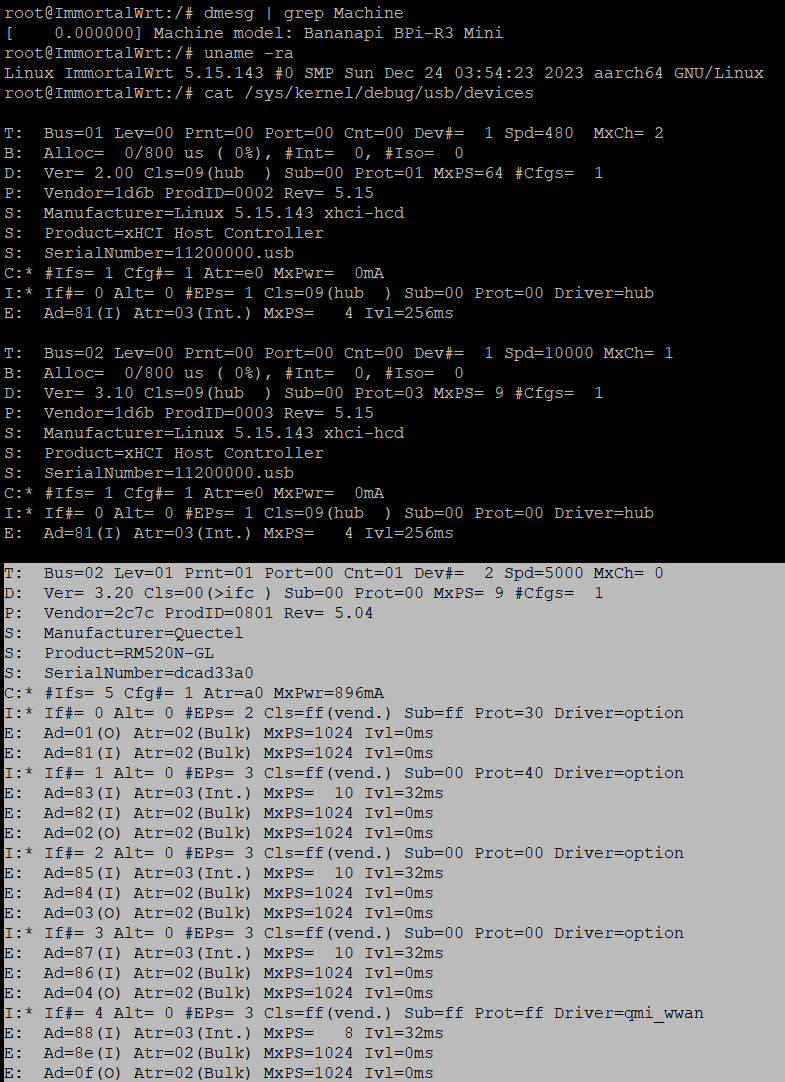
I compiled the immortalwrt source and installed it on the emmc. This is my kernel log:
cat /sys/kernel/debug/usb/devices
us=02 Lev=01 Prnt=01 Port=00 Cnt=01 Dev#=  2 Spd=5000 MxCh= 0
D:  Ver= 3.10 Cls=00(>ifc ) Sub=00 Prot=00 MxPS= 9 #Cfgs=  1
P:  Vendor=2c7c ProdID=0900 Rev= 4.04
S:  Manufacturer=Quectel
S:  Product=RM500U-CNV
S:  SerialNumber=0123456789ABCDEF
C:* #Ifs= 7 Cfg#= 1 Atr=c0 MxPwr=504mA
A:  FirstIf#= 0 IfCount= 2 Cls=02(comm.) Sub=0d Prot=00
I:* If#= 0 Alt= 0 #EPs= 1 Cls=02(comm.) Sub=0d Prot=00 Driver=cdc_ncm
E:  Ad=82(I) Atr=03(Int.) MxPS=  16 Ivl=32ms
I:  If#= 1 Alt= 0 #EPs= 0 Cls=0a(data ) Sub=00 Prot=01 Driver=cdc_ncm
I:* If#= 1 Alt= 1 #EPs= 2 Cls=0a(data ) Sub=00 Prot=01 Driver=cdc_ncm
E:  Ad=81(I) Atr=02(Bulk) MxPS=1024 Ivl=0ms
E:  Ad=01(O) Atr=02(Bulk) MxPS=1024 Ivl=0ms
I:* If#= 2 Alt= 0 #EPs= 2 Cls=ff(vend.) Sub=00 Prot=00 Driver=option
E:  Ad=83(I) Atr=02(Bulk) MxPS=1024 Ivl=0ms
E:  Ad=02(O) Atr=02(Bulk) MxPS=1024 Ivl=0ms
I:* If#= 3 Alt= 0 #EPs= 2 Cls=ff(vend.) Sub=00 Prot=00 Driver=option
E:  Ad=84(I) Atr=02(Bulk) MxPS=1024 Ivl=0ms
E:  Ad=03(O) Atr=02(Bulk) MxPS=1024 Ivl=0ms
I:* If#= 4 Alt= 0 #EPs= 2 Cls=ff(vend.) Sub=00 Prot=00 Driver=option
E:  Ad=85(I) Atr=02(Bulk) MxPS=1024 Ivl=0ms
E:  Ad=04(O) Atr=02(Bulk) MxPS=1024 Ivl=0ms
I:* If#= 5 Alt= 0 #EPs= 2 Cls=ff(vend.) Sub=00 Prot=00 Driver=option
E:  Ad=86(I) Atr=02(Bulk) MxPS=1024 Ivl=0ms
E:  Ad=05(O) Atr=02(Bulk) MxPS=1024 Ivl=0ms
I:* If#= 6 Alt= 0 #EPs= 2 Cls=ff(vend.) Sub=00 Prot=00 Driver=option
E:  Ad=87(I) Atr=02(Bulk) MxPS=1024 Ivl=0ms
E:  Ad=06(O) Atr=02(Bulk) MxPS=1024 Ivl=0ms
So it seems the 5G Module is found. But when I add an interface with the QMI Protocol I get:
Protocol: QMI Cellular
RX: 0 B (0 Pkts.)
TX: 0 B (0 Pkts.)
Error: Network device is not present
and this is the system log:
Sat Jan 20 05:55:28 2024 daemon.notice netifd: WWAN (2517): ls: /net: No such file or directory
Sat Jan 20 05:55:28 2024 daemon.notice netifd: WWAN (2517): The interface could not be found.
Sat Jan 20 05:55:28 2024 daemon.notice netifd: wan (2583): udhcpc: started, v1.36.1
Sat Jan 20 05:55:28 2024 daemon.err odhcp6c[2595]: Failed to send RS (Address not available)
Sat Jan 20 05:55:28 2024 daemon.notice netifd: WWAN (2596): Stopping network WWAN
Sat Jan 20 05:55:28 2024 daemon.notice netifd: WWAN (2596): Command failed: ubus call network.interface notify_proto { "action": 0, "link-up": false, "keep": false, "interface": "WWAN" } (Permission denied)
Sat Jan 20 05:55:28 2024 daemon.notice netifd: Interface 'WWAN' is now down
Any idea what this means? I haven’t inserted a SIM Card yet. Is it because of that? Or do I need to send an AT Command?
Also: I configured tftp-server on my fedora39 laptop and set a static ip (192.168.1.254) in the NetworkManager. But when booting u-boot on the banana pi both ethernet ports wouldn’t work. What I did is to dd the immortalwrt-mediatek-filogic-bananapi_bpi-r3-mini-squashfs-sysupgrade.itb with:
dd if=immortalwrt-mediatek-filogic-bananapi_bpi-r3-mini-squashfs-sysupgrade.itb of=/dev/mmcblk0p5 bs=512 conv=fsync
after doing this immortalwrt booted but when switching back to NAND i now get a boot loop.
EMMC with immortalWRT boots fine. but the NAND just boot loops. I will flash the original image on the NAND and see if I then can boot from EMMC and NAND again
From the logs, your card is booting using ECM mode. To use QMI or MBIM, you have to send AT commands. install picocom tool to send this command to switch QMI mode AT+QCFG=“usbnet”,0
Thank you! I will try this after i made sure the original image on the nand works (don’t want to end up with a bricked device) So the changes you made in the .dts should be obsolete? I already compiled a new images with your changes to the dts but I keep them around
Question about flashing the NAND. The official documentation says this:
 4. Execute following command to erase the whole Nand flash and copy image to nand device:
    * mtd erase /dev/mtd0
    * dd if=mtk-bpi-r3mini-NAND-20230719-single-image.bin of=/dev/mtdblock0
mtd erase /dev/mtd0 outputs: Could not open mtd device: mtd0
I couldn’t find good answers via google
You have to run the following commands prior to start erasing and writing the nand
opkg install kmod-mtd-rw
insmod mtd-rw i_want_a_brick=y
Based on past experience, following the official instruction was not okay for me. From EMMC boot-loader console I had to erase the nand and write bl2 and bl31 through tftpboot command
Also, I still keep dts changes to automatically detect the 5g card.
Thanks again for the fast reply! I’m really greatful for your help.
My biggest issue is that with the immortalWRT u-boot I have no ethernet link and I can’t serve files using tftp 
I will have to use dd to get the initramfs image to the nand. Do you know by any chance to which mtdblock 0 - 4 i have to dd the initramfs image?
I just found this thread about erasing and flashing the nand: BPI-R3 Mini NAND flash problem
I think I misunderstood something. Can I only run either immortalWRT or the official image on EMMC and NAND? I can’t have the official on NAND and immortalWRT on emmc?
I had tested before, you can have two different images on nand and emmc. For your case, I think the referenced URL in ur post has the solution and you can follow the @windows10 instructions.
Thanks! I succeded in booting from NAND again. Funny enough, now the EMMC boot loops (more down below). Nonenthless let me share the steps I did:
Steps:
- Flip the Switch to boot from EMMC
- Don’t boot into openwrt/immortalwrt but start the U-BOOT console
- Type “usb start” to load the USB Controller (didn’t work for me otherwise)
- Type “usb tree” to find attached USB Devices
- Type “usb storage”, verify that the USB Drive is the same as in tree and remember the the Device Number. Mine was Device 0:
- Type “ls usb 0:X” ( X is the number you had to remember) to list the files on the USB Drive and verify your image is there
- Type “fatload usb 0:X $loadaddr firmware.bin” to load firmware (again type the device number here for X). firmware.bin is the image you want to put on the NAND
- Type “nand info” to get information about the NAND
- Erase the ubi block with “nand erase ubi” (Disclaimer: frank-w in is tutorial deleted the whole spi-nand - but deleting only ubi worked for me)
- Write the image you loaded before with “nand write $loadaddr 0 0x8000000”
- Power off the R3-Mini
- Flip the Switch to NAND and pray it worked
Unfortunately this will bring the stock image in NAND back and it will boot but for me, once i switched to EMMC, immortalWRT started boot looping. Maybe my custom compiled image is at fault but at least now i can boot from nand and try another immortalWRT build to see if this helps.
I have modified your steps to help you boot immortalWRT image from the nand.
Here you go:
1- Put bl2, bl31 and initramfs images into USB flash.
2- Form EMMC uboot console, fatload usb 0:X $loadaddr bl2_nand.bin
3- Erase the bl2 block with nand erase bl2
4- nand write $loadaddr 0x00000 0x100000
5- fatload usb 0:X $loadaddr bl3_nand.fip
6- Erase the bl3 block with nand erase fip
7- nand write $loadaddr 0x380000 0x200000
8- Flip the Switch to boot from nand
9- Form nand uboot console, fatload usb 0:X $loadaddr initramfs.itb
10- bootm ${loadaddr}