Update: Samsung 256 GB eMMC Upgrade — Confirmed Findings and Open Questions
Hello everyone,
I have installed the Samsung KLMEG8UERM-C041 256 GB eMMC on my Banana Pi BPI-R3 Mini. I am currently investigating why Linux fails to switch the device to an eight-bit bus.
I have separated the observations confirmed by command output from possible explanations that have not yet been verified.
A. Confirmed facts
1. Test environment and storage
- Board: Banana Pi BPI-R3 Mini, MediaTek MT7986.
- Current OS: BananaWRT v25.12-linkup, booted from the board’s SPI-NAND for testing.
- Replacement eMMC: Samsung KLMEG8UERM-C041, nominal 256 GB.
- Linux-reported device name: EURM4S.
- Detected capacity: 233 GiB.
- eMMC revision: 5.1.
- Boot partitions: boot0 and boot1, 4 MiB each.
- RPMB: 4 MiB.
The replacement is detected by both U-Boot and Linux. Ubuntu has not yet been flashed to the replacement eMMC.
2. Linux initialization and current operating mode
The boot log contains:
mmc0: switch to bus width 8 failed
mmc0: new HS200 MMC card at address 0001
mmcblk0: mmc0:0001 EURM4S 233 GiB
The live controller state, read from /sys/kernel/debug/mmc0/ios, reports:
bus width:      2 (4 bits)
timing spec:    9 (mmc HS200)
signal voltage: 1.80 V
actual clock:   104000000 Hz
Therefore, Linux is currently operating the Samsung in four-bit HS200 mode, not HS400.
3. Samsung eMMC capabilities
The EXT_CSD data reports:
EXT_CSD_REV: 0x08
CARD_TYPE:   0x57
SEC_COUNT:   00c01e1d
The revision indicates eMMC 5.1. The CARD_TYPE value advertises HS200 and HS400 support at 1.8 V. SEC_COUNT is consistent with the detected capacity.
This confirms the advertised capabilities, but does not establish that the board can successfully initialize all those modes.
4. Active device-tree and pinctrl configuration
The live device tree contains:
bus-width          = 8
max-frequency      = 200000000
mmc-hs200-1_8v     = present
mmc-hs400-1_8v     = present
hs400-ds-delay     = 0x00014014
The clocks, assigned-clocks and assigned-clock-parents properties are also present.
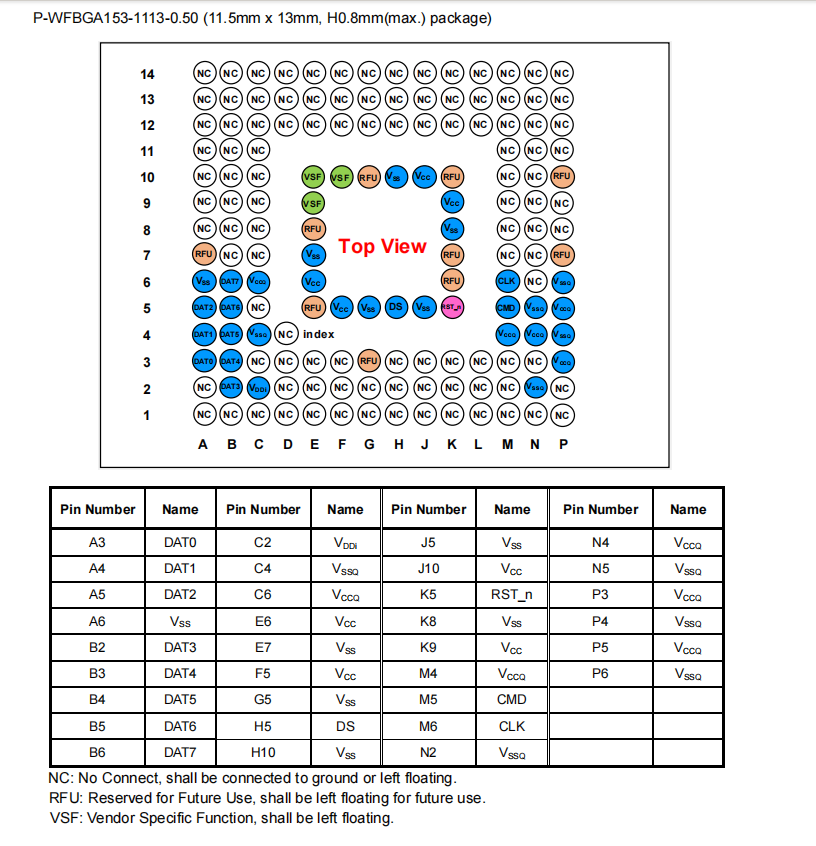
Linux pinctrl reports all 12 eMMC signals assigned to the controller:
- DAT0–DAT7
- CMD
- CLK
- DS
- RSTB
The pin configuration is present for all 12 signals. These checks establish the software assignments, not physical continuity of the PCB traces or BGA solder joints.
5. U-Boot result
U-Boot reports:
Mode: MMC High Speed (52MHz)
Bus Width: 4-bit
Requesting MMC mode index 10 did not change the reported mode. The capabilities of this particular U-Boot build have not been independently established, so this result alone does not prove a hardware problem.
In my earlier logs, the original Kioxia THGBMJG6C1LBAIL 8 GB eMMC successfully reached HS400 on this board.
B. Hypotheses—not yet confirmed
The cause of the failed eight-bit switch remains unresolved.
Hypothesis 1: Physical connection issue
A poor BGA solder joint or PCB connection affecting DAT4–DAT7 could prevent eight-bit operation while allowing the device to work in four-bit mode. This is plausible but has not been demonstrated by continuity measurements or BGA inspection.
Hypothesis 2: Controller or driver initialization issue
The MediaTek MSDC driver, the firmware version, or a chip-specific initialization difference could explain the failure. The presence of the expected device-tree properties does not prove that every initialization step is correct.
Hypothesis 3: Clock or timing configuration
The clock-parent configuration or HS400 timing parameters might require further investigation. However, the current clock-tree information has not established that these are the cause.
The hs400-ds-delay setting may matter when tuning HS400, but the eight-bit switch fails before HS400 is activated. I therefore do not want to change the data-strobe delay prematurely.
No evidence currently proves that the Samsung chip itself is defective or that its soldering is faulty.
C. Questions for the community
- Are there known initialization quirks or MediaTek MSDC patches for the Samsung KLMEG8UERM-C041 on MT7986?
- What is the recommended way to debug
switch to bus width 8 failed in the Linux MMC core and MediaTek MSDC driver?
- Can anyone confirm HS400 operation with this Samsung part on the BPI-R3 Mini or another MT7986 platform?
- What is the most reliable procedure for separating a driver/configuration issue from a physical DAT4–DAT7 connection problem?
My objective is to diagnose the eight-bit initialization failure before changing the device tree or performing further BGA rework.
Thank you for your technical advice.