Best boot strategy for BPI-R4: eMMC/NAND -> NVMe with SD fallback + Frank’s U-Boot?

I’m trying to design a clean boot setup for my Banana Pi R4 (8GB) with these goals:

  • Normal boot of OpenWrt rootfs from NVMe (ideally eMMC → NVMe, or NAND → NVMe)
  • Ability to insert an SD card with a snapshot build and boot it easily for testing
  • Easy rootfs upgrades later (e.g. sysupgrade?)

From what I understand, the easiest path may be to install Fran’s U-Boot since it supports PCIe on R4 and uEnv.txt.

I’d like to confirm a few points:

  1. Is NVMe boot on R4 currently supported in upstream U-Boot / OpenWrt snapshot U-Boot, or is Fran’s build still required?
  2. If I install Fran’s U-Boot, can I follow @ycfunet’s tutorial as-is, or are there important changes due to newer U-Boot/OpenWrt versions?
  3. When tutorials mention “switch to eMMC boot and boot into U-Boot menu”, does this imply I must use a USB–TTL serial adapter to interact with U-Boot? (I have a CH340-based adapter /1a86:7523/, and I’ve read about some problems connected to its led)
  4. Is the recommended layout still:
  • Bootloader on eMMC (or NAND)
  • Kernel + rootfs on NVMe
  • SD card overrides boot when present?

I followed those two threads:

but any pointers to up-to-date documentation or best practices would be greatly appreciated.

Thanks!

CC: @frank-w , @ycfunet

Imho you do not need my uboot for openwrt. Latest snapshots already having 8g image. Not sure if pcie works in openwrt uboot for R4. Bit imho it will be easier to add it there than simularing openwrt parts in my uboot.

1 Like

Do not see it in:

https://firmware-selector.openwrt.org/?version=24.10.5&target=mediatek%2Ffilogic&id=bananapi_bpi-r4

Why not have openwrt on emmc?

You can only physically switch emmc to sd with the hardware bootswitch.

1 Like

Thank you @frank-w and @ericwoud for a prompt response. I experiment with my home ‘production’ router so take some time till I find the right moment I can introduce a blackout :stuck_out_tongue:

You can only physically switch emmc to sd with the hardware bootswitch.

I am aware of a physical switch and they are fine to make a quick test with newer snapshot. As long as I don’t have to dissemble my case. I assumed that it is only a default priority and if I choose physical switch to SD card then if it’s missing another boot option will be chosen.

I’ve successfully installed a snapshot version to eMMC. I booted using SD card and used a UBS TTL serial adapter to flash NAND and eMMC. Btw I’ll update a R4 wiki a bit to make so the procedure may be more straight forward.

Do not see it in: OpenWrt Firmware Selector

So I guess the only option to boot rootfs from nvme is to install frank’s uboot?

Bit imho it will be easier to add it there than simularing openwrt parts in my uboot.

I’m rather a java/kotlin dev. Is upstreaming such feature an easy task?

afaik openwrt uboot has also the patches for nvme support, but not the environment set.

using my uboot will break your openwrt on this boot-device, so if you want to keep it it would be more save to extend uboot env after a manual test

this is how i made it (including the bootnvme which uses the usenvme)

so for manual test just try these commands to check for uboot nvme support:

pci enum; nvme scan;nvme info

but doing this on production is no goot idea, as it will some time to get it running…you have to think about which kernel/rootfs you want to boot from nvme. I’m not sure if this can be archived with openwrt.

1 Like

pci enum; nvme scan;nvme info

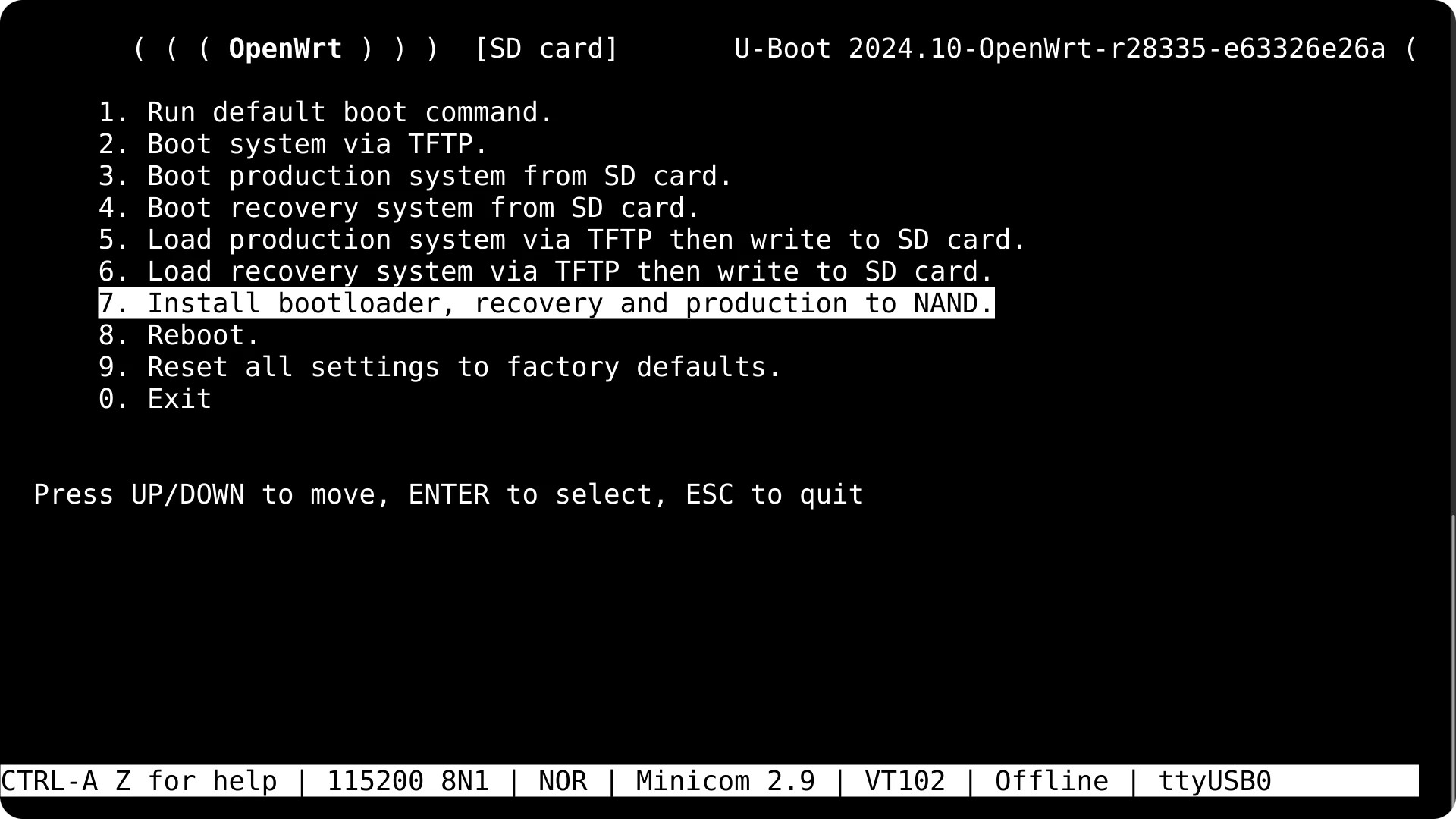
I’ll have a look at your instruction and will try to check that. Just to be on the same page, in order to execute a given command I need to connect to connect with serial console and when I see a boot entry like this:

then I need to exit it (0) and a prompt should appear where I can test this command?

but doing this on production is no goot idea, as it will some time to get it running…

I understand the risks and know this is not ideal setup.

you have to think about which kernel/rootfs you want to boot from nvme.

I’ve noticed there were some experiments on this forum to boot Debian. I’ve also noticed somewhere Gentoo but I might be wrong. I thought about OpenWrt as a first citizen because it’s harden and dedicated for routers and in the past I had a very good experience working with it. The default configuration can secure your network.

On the other hand BPI R4 is very powerful and you may run much more on it. I’ve bought it because I thought I could experiment with some small projects like filtering out commercials, start my own private DNS, maintain VPN connection(s) for dedicated VLANs and possibly run some simple docker services. I thought that if I need some more sophisticated tooling I might create a LXC container(s) on top of OpenWrt and run another minimal distro in it.

I’m not sure if this can be archived with openwrt.

So far I rely on some basic OpenWrt features on not so capable devices, but I potential problems when I want to upgrade to a new build (squeezed filesystem, installed packages, configuration). Keeping a persisted state could be a challenge here. Would you recommend a better approach?

Right,in uboot console after “exit” you should execute these 3 commands…last one should display some information about your ssd

It is no experiment…i run debian there. But with mainline kernel and additional patches which is hard to compare with downstream sdk. Gentoo afaik was an older board.but basicly rootfs is independ of kernel…except openwrt where both are bundled. If you have bootchain till uboot and linux kernel you can use any rootfs like archlinux, mint,…only bsd does not work with linux kernel and needs own porting

My preference is U-Boot on Nand with distroboot. It will search devices, including sd/emmc/nvme for extlinux.conf or boot.scr.

So once installed (easily with a tool) only btrfs rootfs is needed on nvme, including linux kernel and extlinux.conf.

If there is none, a rescue linux (full bash with tools like parted and debootstrap) is loaded from an initramdisk also on nand.

I also tried distroboot,but this does not allow scripts from bootmenu like i use for tftp or selecting from multiple kernels…but of course this is development specific,not needed for end users

You can make a boot.scr script.

That can be done with extlinux.conf and boot.scr also I guess

I have adopted my images, now it can install multiple linux kernel packages. The tool creates an extlinux.conf with multiple entries (still need to test, I did this only on other devices before)

There is also even a dhcp boot dev: BOOTENV_DEV_DHCP

Afaik you cannot point to boot.scr in extlinux.conf it is only a fallback when no extlinux.conf is found. Also boot.scr needs to be compiled where bootmenu i can change via uenv.txt due to my bootchain

For networking can add 2 more targets: pxe and dhcp.

Haven’t tried them, but pxe boot should provide a menu to choose from multiple kernels.

I use tftp which is imho different to pxe and also dhcp…have fixed ip in uboot

I have bad news:

MT7988> pci enum; nvme scan;nvme info
Unknown command 'nvme' - try 'help'
Unknown command 'nvme' - try 'help
MT7988> version
U-Boot 2026.01-OpenWrt-r32883-16239e90ad (Jan 31 2026 - 22:13:46 +0000)
cat /etc/openwrt_release
DISTRIB_ID='OpenWrt'
DISTRIB_RELEASE='SNAPSHOT'
DISTRIB_REVISION='r32883-16239e90ad'
DISTRIB_TARGET='mediatek/filogic'
DISTRIB_ARCH='aarch64_cortex-a53'
DISTRIB_DESCRIPTION='OpenWrt SNAPSHOT r32883-16239e90ad'
DISTRIB_TAINTS=''
MT7988> help
?         - alias for 'help'
askenv    - get environment variables from stdin
base      - print or set address offset
bdinfo    - print Board Info structure
blkcache  - block cache diagnostics and control
boot      - boot default, i.e., run 'bootcmd'
bootd     - boot default, i.e., run 'bootcmd'
bootefi   - Boots an EFI payload from memory
bootelf   - Boot from an ELF image in memory
bootflow  - Boot flows
booti     - boot Linux kernel 'Image' format from memory
bootm     - boot application image from memory
bootmenu  - ANSI terminal bootmenu
bootp     - boot image via network using BOOTP/TFTP protocol
bootvx    - Boot vxWorks from an ELF image
button    - manage buttons
cdp       - Perform CDP network configuration
cmp       - memory compare
coninfo   - print console devices and information
cp        - memory copy
cpu       - display information about CPUs
crc32     - checksum calculation
dcache    - enable or disable data cache
dhcp      - boot image via network using DHCP/TFTP protocol
dm        - Driver model low level access
dns       - lookup the IP of a hostname
echo      - echo args to console
editenv   - edit environment variable
eficonfig - provide menu-driven UEFI variable maintenance interface
env       - environment handling commands
eraseenv  - erase environment variables from persistent storage
exit      - exit script
ext4load  - load binary file from a Ext4 filesystem
ext4ls    - list files in a directory (default /)
ext4size  - determine a file's size
false     - do nothing, unsuccessfully
fatinfo   - print information about filesystem
fatload   - load binary file from a dos filesystem
fatls     - list files in a directory (default /)
fatmkdir  - create a directory
fatrm     - delete a file
fatsize   - determine a file's size
fatwrite  - write file into a dos filesystem
fdt       - flattened device tree utility commands
fstype    - Look up a filesystem type
fstypes   - List supported filesystem types
fsuuid    - Look up a filesystem UUID
go        - start application at address 'addr'
gpio      - query and control gpio pins
gpt       - GUID Partition Table
guid      - GUID - generate Globally Unique Identifier based on random UUID
gzwrite   - unzip and write memory to block device
hash      - compute hash message digest
help      - print command description/usage
icache    - enable or disable instruction cache
iminfo    - print header information for application image
imsz      - get image total size (in bytes)
imszb     - get image total size (in blocks)
imxtract  - extract a part of a multi-image
itest     - return true/false on integer compare
led       - manage LEDs
license   - print GPL license text
linklocal - acquire a network IP address using the link-local protocol
ln        - Create a symbolic link
load      - load binary file from a filesystem
loadb     - load binary file over serial line (kermit mode)
loads     - load S-Record file over serial line
loadx     - load binary file over serial line (xmodem mode)
loady     - load binary file over serial line (ymodem mode)
loop      - infinite loop on address range
ls        - list files in a directory (default /)
lzmadec   - lzma uncompress a memory region
md        - memory display
mkdir     - create a directory
mm        - memory modify (auto-incrementing address)
mmc       - MMC sub system
mmcinfo   - display MMC info
msize     - get detected ram size, optional set env variable with value
mtd       - MTD utils
mv        - rename/move a file/directory
mw        - memory write (fill)
nand      - NAND utility
net       - NET sub-system
nm        - memory modify (constant address)
panic     - Panic with optional message
part      - disk partition related commands
pci       - list and access PCI Configuration Space
ping      - send ICMP ECHO_REQUEST to network host
pinmux    - show pin-controller muxing
printenv  - print environment variables
pstore    - Manage Linux Persistent Storage
pwm       - control pwm channels
pxe       - get and boot from pxe files
random    - fill memory with random pattern
rarpboot  - boot image via network using RARP/TFTP protocol
readmem   - get environment variable from memory address
reset     - Perform RESET of the CPU
rm        - delete a file
run       - run commands in an environment variable
save      - save file to a filesystem
saveenv   - save environment variables to persistent storage
scsi      - SCSI sub-system
scsiboot  - boot from SCSI device
setenv    - set environment variables
setexpr   - set environment variable as the result of eval expression
sf        - SPI flash sub-system
showvar   - print local hushshell variables
size      - determine a file's size
sleep     - delay execution for some time
smc       - Issue a Secure Monitor Call
sntp      - synchronize RTC via network
source    - run script from memory
strings   - display strings
test      - minimal test like /bin/sh
tftpboot  - load file via network using TFTP protocol
tftpsrv   - act as a TFTP server and boot the first received file
true      - do nothing, successfully
ubi       - ubi commands
ubifsload - load file from an UBIFS filesystem
ubifsls   - list files in a directory
ubifsmount- mount UBIFS volume
ubifsumount- unmount UBIFS volume
unlz4     - lz4 uncompress a memory region
unzip     - unzip a memory region
usb       - USB sub-system
usbboot   - boot from USB device
uuid      - UUID - generate random Universally Unique Identifier
version   - print monitor, compiler and linker version

I need to take into consideration that approach, the main advantage is a mainline kernel. I am not entirely convinced to switch to other distros. I would love to see archlinux as a desktop or debian in a container, but that’s just my preference. If there were only major router projects based on that. Btw. have you seen openwrt-one-debian dedicated for another BananaPi board - OpenWRT One?

That only means that command is not selected,so just try compile openwrt with cmd_nvme enabled.

I have no openwrt-one board and not looked if there is a debian for it

1 Like

Do you have in mind building from main branch? with this config enabled:

CONFIG_PACKAGE_kmod-nvme=m

Edit: I think I’ve found the right config: CONFIG_CMD_NVME.

Shall I select:

Target (System/Subtarget/Profile): 
(MediaTek ARM)  / (Filogic 8x0 (MT798x)) / (OpenWrt One)

Edit: Target Profile: Bananapi BPI-R4

Where can I find an ‘official’ config for BPI-R4 used by a build system?

Edit: I’ve found the one in config.buildinfo

Yes first select board,then cmd_nvme in uboot config (but you will need kmod too if you want nvme in openwrt linux too).

Thank you, I was able to compile openwrt with uboot changes last night.

I was looking into menuconfig dependencies and later on have found this documentation:

And it seems that we need:

CONFIG_NVME           # Enable NVMe device support 
CONFIG_NVME_PCI   # Enable PCIe NVMe device support 
CONFIG_CMD_NVME # Enable basic NVMe commands

I’ve seen CONFIG_PCI as another dependency, but I’ve seen that config set already.

So I applied my changes (I didn’t create a new patch yet, just modified existing one):

diff --git a/package/boot/uboot-mediatek/patches/450-add-bpi-r4.patch b/package/boot/uboot-mediatek/patches/450-add-bpi-r4.patch
index 1ebeaf0..82331e4 100644
--- a/package/boot/uboot-mediatek/patches/450-add-bpi-r4.patch
+++ b/package/boot/uboot-mediatek/patches/450-add-bpi-r4.patch
@@ -141,6 +141,9 @@
 +CONFIG_USB_STORAGE=y
 +CONFIG_ZSTD=y
 +CONFIG_HEXDUMP=y
++CONFIG_CMD_NVME=y
++CONFIG_NVME=y
++CONFIG_NVME_PCI=y
 --- /dev/null
 +++ b/configs/mt7988a_bananapi_bpi-r4-sdmmc_defconfig
 @@ -0,0 +1,139 @@
@@ -283,6 +286,9 @@
 +CONFIG_USB_STORAGE=y
 +CONFIG_ZSTD=y
 +CONFIG_HEXDUMP=y
++CONFIG_CMD_NVME=y
++CONFIG_NVME=y
++CONFIG_NVME_PCI=y
 --- /dev/null
 +++ b/configs/mt7988a_bananapi_bpi-r4-snand_defconfig
 @@ -0,0 +1,140 @@
@@ -426,6 +432,9 @@
 +CONFIG_USB_STORAGE=y
 +CONFIG_ZSTD=y
 +CONFIG_HEXDUMP=y
++CONFIG_CMD_NVME=y
++CONFIG_NVME=y
++CONFIG_NVME_PCI=y
 --- /dev/null
 +++ b/defenvs/bananapi_bpi-r4_sdmmc_env
 @@ -0,0 +1,66 @@

And followed the procedure:

git clone --depth 1 https://github.com/openwrt/openwrt.git
./scripts/feeds update -a
./scripts/feeds install -a
make menuconfig
# applied my changes
make defconfig download clean world

Then I installed emmc images using installing_directly_to_emmc.

Also tried to boot a compiled/built SD card image.

But without success. I mean I was able to boot the system, but nvme command was not available by u-boot.

I checked the logs if a patch was applied, and I haven’t seen any error:

make package/boot/uboot-mediatek/{clean,compile} V=s

Did I miss anything? Or shall I change something?

I’m no expert in openwrt building,but either your changes are not applied (options are not activated) or something else (e.g. missing depency like some dm stuff)…independ of hw support,the command itself must be available.