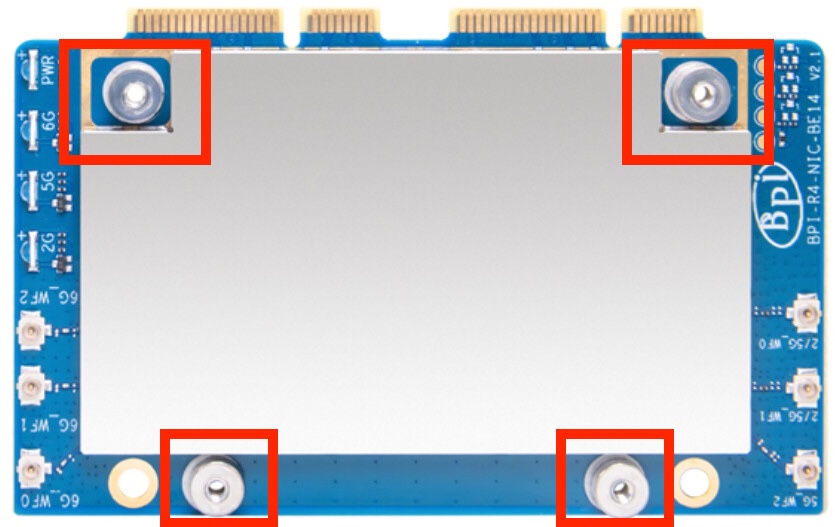
Banana Pi BPI-R4-NIC-BE14 V2.1 Wifi module

Standing directly in front of the router, my Pixel 9 reached 1.1 Gb/s download and 1.9 Gb/s upload on the 6 GHz band with a 160 MHz channel width.

All Apple devices (macbook pro, iphone, ipad), however, topped out at around 500 Mb/s upload under the same conditions.

1 Like

What about power values ? Is there still only 6 or 7db level, or you can choose more without using the tx power overlay ?

No power overlay was used:

# iwinfo phy0.0-ap0 txpowerlist
   0 dbm (   1 mW)
   1 dbm (   1 mW)
   2 dbm (   1 mW)
   3 dbm (   1 mW)
   4 dbm (   2 mW)
   5 dbm (   3 mW)
   6 dbm (   3 mW)
   7 dbm (   5 mW)
   8 dbm (   6 mW)
   9 dbm (   7 mW)
  10 dbm (  10 mW)
  11 dbm (  12 mW)
  12 dbm (  15 mW)
  13 dbm (  19 mW)
  14 dbm (  25 mW)
  15 dbm (  31 mW)
  16 dbm (  39 mW)
  17 dbm (  50 mW)
  18 dbm (  63 mW)
  19 dbm (  79 mW)
* 20 dbm ( 100 mW)

# iwinfo phy0.1-ap0 txpowerlist
   0 dbm (   1 mW)
   1 dbm (   1 mW)
   2 dbm (   1 mW)
   3 dbm (   1 mW)
   4 dbm (   2 mW)
   5 dbm (   3 mW)
   6 dbm (   3 mW)
   7 dbm (   5 mW)
   8 dbm (   6 mW)
   9 dbm (   7 mW)
  10 dbm (  10 mW)
  11 dbm (  12 mW)
  12 dbm (  15 mW)
  13 dbm (  19 mW)
  14 dbm (  25 mW)
  15 dbm (  31 mW)
  16 dbm (  39 mW)
  17 dbm (  50 mW)
  18 dbm (  63 mW)
  19 dbm (  79 mW)
* 20 dbm ( 100 mW)

# iwinfo phy0.2-ap0 txpowerlist
   0 dbm (   1 mW)
   1 dbm (   1 mW)
   2 dbm (   1 mW)
   3 dbm (   1 mW)
   4 dbm (   2 mW)
   5 dbm (   3 mW)
   6 dbm (   3 mW)
   7 dbm (   5 mW)
   8 dbm (   6 mW)
   9 dbm (   7 mW)
  10 dbm (  10 mW)
  11 dbm (  12 mW)
  12 dbm (  15 mW)
  13 dbm (  19 mW)
  14 dbm (  25 mW)
  15 dbm (  31 mW)
  16 dbm (  39 mW)
  17 dbm (  50 mW)
  18 dbm (  63 mW)
  19 dbm (  79 mW)
  20 dbm ( 100 mW)
  21 dbm ( 125 mW)
  22 dbm ( 158 mW)
* 23 dbm ( 199 mW)

From your dmesg i see that you have be14 overlay activated. Can you disable it to see what are the power values reported in LuCI ?

Do you mean that fdt-mt7988a-bananapi-bpi-r4-wifi-be14 is specifically a TX power overlay? I thought it was the standard device tree overlay used to enable the BE14 hardware.

I’ll disable it and let you know.

I mean this:

"fdt-mt7988a-bananapi-bpi-r4-wifi-be14" (ARM64 OpenWrt bananapi_bpi-r4-poe device tree overlay mt7988a-bananapi-bpi-r4-wifi-be14)

The wifi-be14 line in dmesg only shows that this overlay is included in the FIT image. It is not active.

The active boot configuration is:

config-mt7988a-bananapi-bpi-r4-poe#mt7988a-bananapi-bpi-r4-emmc#

So only the eMMC overlay is applied. The BE14 TX power overlay is not enabled, and the reported TX-power values are without it.

Are you sure? dtc.txt (64.5 KB)

Oh, so it means, that they fixed the EEPROM TX power values ? If you can pick more than 6 or 7db in LuCI without activating the ā€œmt7988a-bananapi-bpi-r4-wifi-be14ā€ overlay then that means it’s fixed. That’s good :slight_smile:

I hope they fixed it! :grinning:

Noise floor of -89 dBm is same as before what people got from the original BE14 with tedious ā€œoptimisation tricksā€ such as careful pigtail routing, adding metal deadweight & etc in the official R4 aluminium case.

So it seems BE14 V2.1 didn’t have surprise improvement in noise reduction. However, if owners of V2.1 no longer need those ā€œoptimisation tricksā€, then they still gain something.

Just not that with the design overhaul & shield cans, the noise isn’t reduced to something more dramatic like less than -90 dBm.

Noise floor of -89 dBm is same as before what people got from the original BE14 with tedious ā€œoptimisation tricksā€ such as careful pigtail routing, adding metal deadweight & etc in the official R4 aluminium case.

This is the noise level I’m getting from the original BE14 with all the mentioned tricks. But I’m using the 80 MHz bandwidth. The owner of the new BE14 here has it set to 160 MHz, which means a wider noise floor. So, looks like improvement to me.

2 Likes

-89dBm would be a big improvement for me. My results were about -72 to -79, without any tricks or messing around. Used 5GHz and channel width 80.

But I am not yet convinced it’s a real fixed module. I keep on waiting for more results. :crossed_fingers:

1 Like

Only comparing numbers is not always a right way. For example my bpi-r3 shows -91dBm, not much difference.

Anyway I didn’t expect much improvement in speed, because wifi7 features like MLO is still correctly applied only in overpriced commercial products. At least if the module will be as reliable as r3, I will buy it.

Hi, dmrbdlln

You mentioned that the new BE14 V2.1 version cannot be installed on the R4 shell. What exactly is the problem? If you could provide me with some photos, I would be extremely grateful.

Speaking of that, what’s the temperature situation of the Phys on the new board and is the RF shielding easily removable for replacing the thermal pads?

What was / is your noise floor dBm when you set to 160MHz bandwidth?

Right now at 80 MHz, channel 64, I get -85 dBm. -82 dBm after switching to 160 MHz. For the 6 GHz radio on channel 1 it’s -88 dBm and -85 dBm respectively.

For clarity, this is the original BE14 with DIY shielding, plastic router case, pigtails correctly routed and grounded on both ends, both SFP+ slots populated.

1 Like

Thank you for sharing the data.

More people will be picking up BE14 v2.1. Let’s see what kind of consensus data we will get for the new BE14.

The issue is the new metal standoffs on the BE14 v2.1 shield. They protrude slightly, so they touch the inside of the BPI-R4 low-profile case before the PCB is fully seated.

When the case screws are tightened, the Wi-Fi PCB ends up being slightly bent because the standoffs act as the contact points. It still fits, but there is visible mechanical stress on the board.

That is what I meant by ā€œbarely fitsā€. I would not recommend installing it this way for long-term use.