Fibocom FM350GL works with with BPI-R4? What kind of configuration you run on BPI-R4?
That’s an image from Openwrt forum…
To me it seems that most modems expect the SIM-detection signal to be inverted. For the FM350-GL there is a AT command which allows you to ignore the SIM-detection signal, then it works on the R4 as PCIe device.
I have t99w175 (or something like that, writing from memory). Cheap version from Aliexpress for 50-60 USD. It works correctly. Was able to have modemmanager with it and openwrt. Have also Fibocom 350, but this still wait - was not able to have modem manager with it, so for the time being it is postponed. Additional question, when you put sim card and modem is on, do you have additional led light? I think it is blue.
The only modems worth buying are Quectel 5G modems, all other brands or modems are garbage and a waste of money.
What is the difference between the RM520N-GL AA and AP models?
Ø For RM520NGLAA, default communication interface is USB, PCle is disabled but could be enabled by AT command.
Ø For RM520NGLAP, default communication interface is PCle, USB is disabled and cannot be used.

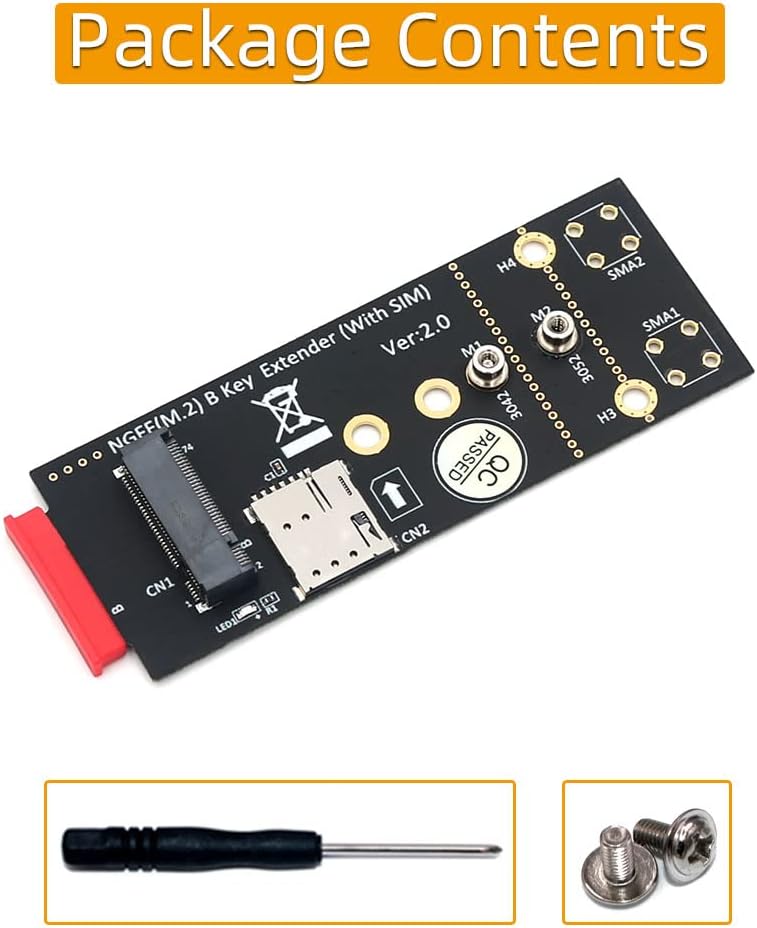
i agreed with you. Its has problem with SIM detection with on board SIM Slot. I order this M.2(NGFF) Key B Adapter with SIM Card for 3G/4G/5G Module expansion board and insert the sim in the the expansion board, the modem manager pickup the sim on the expansion board.
Expansion Board:
Modem Manager:
root@GFriendWRT:/# mmcli -L
    /org/freedesktop/ModemManager1/Modem/0 [generic] RM520N-GL
root@GFriendWRT:/# mmcli -m 0
  ------------------------------------
  General   |                    path: /org/freedesktop/ModemManager1/Modem/0
            |               device id: 0488c1e012b820b06cd784e5e7e6b543edbb972e
  ------------------------------------
  Hardware  |            manufacturer: generic
            |                   model: RM520N-GL
            |       firmware revision: RM520NGLAPR01A03M4G
            |          carrier config: ROW_Commercial
            | carrier config revision: 0A010809
            |            h/w revision: RM520N-GL
            |               supported: gsm-umts, lte, 5gnr
            |                 current: gsm-umts, lte, 5gnr
            |            equipment id: xxxxxxxxxxxxxxxxxx
  ------------------------------------
  System    |                  device: /sys/devices/platform/soc/11280000.pcie/pci0003:00/0003:00:00.0/0003:01:00.0
            |                 physdev: /sys/devices/platform/soc/11280000.pcie/pci0003:00/0003:00:00.0/0003:01:00.0
            |                 drivers: mhi_net, mhi-pci-generic
            |                  plugin: generic
            |            primary port: wwan0mbim0
            |                   ports: mhi_hwip0 (net), mhi_swip0 (net), wwan0mbim0 (mbim),
            |                          wwan0qcdm0 (ignored)
  ------------------------------------
  Status    |                    lock: sim-pin2
            |          unlock retries: sim-pin2 (3)
            |                   state: enabled
            |             power state: on
            |          signal quality: 0% (recent)
  ------------------------------------
  Modes     |               supported: allowed: 3g; preferred: none
            |                          allowed: 4g; preferred: none
            |                          allowed: 3g, 4g; preferred: 4g
            |                          allowed: 3g, 4g; preferred: 3g
            |                          allowed: 5g; preferred: none
            |                          allowed: 4g, 5g; preferred: 5g
            |                          allowed: 4g, 5g; preferred: 4g
            |                          allowed: 3g, 5g; preferred: 5g
            |                          allowed: 3g, 5g; preferred: 3g
            |                          allowed: 3g, 4g, 5g; preferred: 5g
            |                          allowed: 3g, 4g, 5g; preferred: 4g
            |                          allowed: 3g, 4g, 5g; preferred: 3g
            |                 current: allowed: 3g, 4g, 5g; preferred: 5g
  ------------------------------------
  Bands     |               supported: utran-1, utran-4, utran-6, utran-5, utran-8, utran-2,
            |                          eutran-1, eutran-2, eutran-3, eutran-4, eutran-5, eutran-7, eutran-8,
            |                          eutran-12, eutran-13, eutran-14, eutran-17, eutran-18, eutran-19,
            |                          eutran-20, eutran-25, eutran-26, eutran-28, eutran-29, eutran-30,
            |                          eutran-32, eutran-34, eutran-38, eutran-39, eutran-40, eutran-41,
            |                          eutran-42, eutran-43, eutran-46, eutran-48, eutran-66, eutran-71,
            |                          utran-19, ngran-1, ngran-2, ngran-3, ngran-5, ngran-7, ngran-8,
            |                          ngran-12, ngran-13, ngran-14, ngran-18, ngran-20, ngran-25, ngran-26,
            |                          ngran-28, ngran-29, ngran-30, ngran-38, ngran-40, ngran-41, ngran-48,
            |                          ngran-66, ngran-70, ngran-71, ngran-75, ngran-76, ngran-77, ngran-78,
            |                          ngran-79
            |                 current: utran-1, utran-4, utran-5, utran-8, utran-2, eutran-1,
            |                          eutran-2, eutran-3, eutran-4, eutran-5, eutran-7, eutran-8,
            |                          eutran-12, eutran-13, eutran-14, eutran-17, eutran-18, eutran-19,
            |                          eutran-20, eutran-25, eutran-26, eutran-28, eutran-29, eutran-30,
            |                          eutran-32, eutran-34, eutran-38, eutran-39, eutran-40, eutran-41,
            |                          eutran-42, eutran-43, eutran-46, eutran-48, eutran-66, eutran-71,
            |                          utran-19, ngran-1, ngran-2, ngran-3, ngran-5, ngran-7, ngran-8,
            |                          ngran-12, ngran-13, ngran-14, ngran-18, ngran-20, ngran-25, ngran-26,
            |                          ngran-28, ngran-29, ngran-30, ngran-38, ngran-40, ngran-41, ngran-48,
            |                          ngran-66, ngran-70, ngran-71, ngran-75, ngran-76, ngran-77, ngran-78,
            |                          ngran-79
  ------------------------------------
  IP        |               supported: ipv4, ipv6, ipv4v6
  ------------------------------------
  3GPP      |                    imei: xxxxxxxxxxxxxxxxxxxxxx
            |           enabled locks: fixed-dialing
            |            registration: idle
  ------------------------------------
  3GPP EPS  |  initial bearer ip type: ipv4v6
  ------------------------------------
  3GPP 5GNR |               mico mode: unsupported
            |               drx cycle: unsupported
  ------------------------------------
  SIM       |        primary sim path: /org/freedesktop/ModemManager1/SIM/0
            |          sim slot paths: slot 1: /org/freedesktop/ModemManager1/SIM/0 (active)
            |                          slot 2: none
I have module FM350GL but i doesnt have time to test with BPIR4. Yesterday i tried the module in BPIR4 with modem manager, the module works in modem manager.
When i put the sim card and on the BPIR4 the blue led light only flash once with booting process after the booting process complete the led doesnt light up.
I’ve read about T99W175 too but i not sure which version should i buy. Because T99W175 had many version. I saw another forum this module cloud work with USB but required some MODS. On your setup do you run the module in PCIe or USB protocol?
1 Like
Thank you for sharing the info. I knew that the RM520NGLAA will work in most board because it has the USB line. The reason i choose RM520NGLAP because i had this module laying around and just want to test if the BPIR4 compatible with the PCIe only Modem. It also will be cheaper alternative if the RM520NGLAP work in BPIR4.
Still fighting with this and losing.
- Quectel EM120R-GL (PCIE) - SIM not detected. LED blinks briefly on boot.
- Quectel EM060K-GL (USB) - SIM LED stays on but SIM not detected.
(SIM was actually detected once after resetting the Modem)
- Huawei ME936 (USB) - SIM LED stays on but SIM is not detected.
I was really hoping the EM120R-GL would work but no luck except perhaps with an eSIM.
I really hope it’s not only compatible modules that work with this.
This problem may cause by sim pin detection or sim slot confinguration in quectel module. Can you share these AT Command response for EM120R.
AT+QUIMSLOT?
AT+QSIMDET?
AT+QSIMSTAT?
From what I see in PCIE mode, there’s no AT interface on the EM120R or I’m missing something in my setup.
Had no luck with mbimcli ATR as well.
Hi,
thanks for the answer,
i also was hit by this problem (at R3 with EC25).
It is possible with AT commands to turn the detection around. First time I played with it, I thought, is “just” for the status indication.
BUT it is not just for notification. If detection is wrong set, you get immidiatly after turning in the SIM card, a information that there is no SIM-Card inside (if notification is activated). The software is not even trying to connect because there is no SIM Card inside (in the systems view).
PS: I thing the notification “SIM not detected” can also be caused by other problems. After my first trys, i came to the conclusion, that it is may better not to install all packages … just what you want to try.
if you manage to get the AT Command, for EM120R you have to disable sim pin detection. According to the AT Command document by Quectel, EM120R sim pin detection was enable by default.
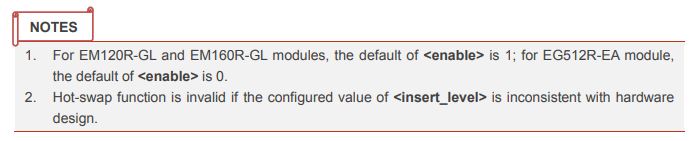
To disable the sim pin detection run these AT command then restart the module.:
1.Switch to sim slot 1:
AT+QUIMSLOT=1

2.Disable sim pin detection:
AT+QSIMDET=0,0

3.Restart Module:
AT+CFUN=1,1
1 Like
Thank you. I’ll try this out. Hopefully I can get an AT interface up.
Thanks. This resolved the issue on the EM060K-GL.
The EM120R-GL is still a problem with no AT interface.
Still hunting for a way to set it up. 
  -----------------------------------
  SIM      |        primary sim path: /org/freedesktop/ModemManager1/SIM/0
           |          sim slot paths: slot 1: /org/freedesktop/ModemManager1/SIM/0 (active)
           |                          slot 2: none
  -----------------------------------
This worked after getting an AT interface using Quectel’s MHI driver.
And persisted on OpenWRT using mhi* drivers.
FCC locking can also be turned off using:
AT+QCFG="fcc_enable",0
1 Like
You cannot send AT-Command with modemmanager. For RM520-GLAP it need quectel driver to work. In my case with GLAP i’ve using this firmware for manage the module mobile network connection and AT Command.
Firmware:
Thank you so much! I was able to get this image going : ). I was able to get the AT commands figured out to the DUN port. But cannot figure out how to set up the internet connect and also set up my TTL values.
To enhance user experience, I recommend starting by changing the theme to “Argon” for a more user-friendly interface.
Setting Up an Internet Connection:
-
Open the Modem Configuration
Go to the menu: Network > Modem. This will open theluci-app-modeminterface, where you can access all necessary functions for configuring your modem connection, including AT Commands, connection settings, and more. -
Configure the Dial Settings
- Select the Dial tab. Here, you can set up your Internet connection profile, add the ISP’s APN (Access Point Name), and other settings.
- Enter your ISP’s APN manually in the APN Selection section.
- For GLAP, choose Quectel CM as the connection manager.
-
Activate the APN Profile
Once you’ve finished adding your APN profile, enable it. The Quectel CM connection manager will handle the rest of the connection process automatically.
For TTL you have to change it manually inside the file(10-custom-filter-chains.nft). You can edit the TTL using Tiny File Manager(user:admin:pass:admin). By default the TTL was set to 64. You also can add any interface you want to the file.
Changing TTL Settings:
-
Locate the Configuration File
Navigate to the file named10-custom-filter-chains.nftin the directory:etc/nftables.d. -
Find the TTL Chains
Look for the following lines in the file:chain mangle_postrouting_ttl64 { type filter hook postrouting priority 300; policy accept; oifname {"rmnet_mhi0.1","wwan0"} counter ip ttl set 64 } chain mangle_prerouting_ttl64 { type filter hook prerouting priority 300; policy accept; iifname {"rmnet_mhi0.1","wwan0"} counter ip ttl set 64 } -
Add Additional Interfaces (If Needed)
To add additional interfaces, include them within the curly braces in bothoifnameandiifnamesections. For example:{"rmnet_mhi0.1","wwan0","interface1","interface2"} -
Save and Reload the Firewall
After saving the changes, reload the firewall with the following command:fw4 reload