107392+0 records in 107392+0 records out 54984704 bytes (55 MB, 52 MiB) copied, 0.183166 s, 300 MB/s rm “/mnt/SSD2/openwrt/build_dir/target-aarch64_cortex-a53_musl/linux-mediatek_filogic/tmp/openwrt-mediatek-filogic-bananapi_bpi-r4-pro-8x-sdcard.img.gz.stripmeta” WARNING: Image file /mnt/SSD2/openwrt/build_dir/target-aarch64_cortex-a53_musl/linux-mediatek_filogic/tmp/openwrt-mediatek-filogic-bananapi_bpi-r4-pro-8x-sdcard.img.gz is too big: 67567616 > 46137344 dd if=/mnt/SSD2/openwrt/build_dir/target-aarch64_cortex-a53_musl/linux-mediatek_filogic/tmp/openwrt-mediatek-filogic-bananapi_bpi-r4-pro-8x-sdcard.img.gz of=/mnt/SSD2/openwrt/build_dir/target-aarch64_cortex-a53_musl/linux-mediatek_filogic/tmp/openwrt-mediatek-filogic-bananapi_bpi-r4-pro-8x-sdcard.img.gz.new bs=44M conv=sync dd: failed to open ‘/mnt/SSD2/openwrt/build_dir/target-aarch64_cortex-a53_musl/linux-mediatek_filogic/tmp/openwrt-mediatek-filogic-bananapi_bpi-r4-pro-8x-sdcard.img.gz’: No such file or directory make[5]: *** [Makefile:48: /mnt/SSD2/openwrt/build_dir/target-aarch64_cortex-a53_musl/linux-mediatek_filogic/tmp/openwrt-mediatek-filogic-bananapi_bpi-r4-pro-8x-sdcard.img.gz] Error 1 make[5]: Leaving directory ‘/mnt/SSD2/openwrt/target/linux/mediatek/image’ make[4]: *** [Makefile:17: install] Error 2 make[4]: Leaving directory ‘/mnt/SSD2/openwrt/target/linux/mediatek’ make[3]: *** [Makefile:12: install] Error 2 make[3]: Leaving directory ‘/mnt/SSD2/openwrt/target/linux’ time: target/linux/install#310.46#18.86#243.33 ERROR: target/linux failed to build. make[2]: *** [target/Makefile:32: target/linux/install] Error 1 make[2]: Leaving directory ‘/mnt/SSD2/openwrt’ make[1]: *** [target/Makefile:26: /mnt/SSD2/openwrt/staging_dir/target-aarch64_cortex-a53_musl/stamp/.target_install] Error 2 make[1]: Leaving directory ‘/mnt/SSD2/openwrt’ make: *** [/mnt/SSD2/openwrt/include/toplevel.mk:233: world] Error 2
i am using frank-w code based (R4pro_PR9) my image size has increase because i have create a go package which binary compile to 10mb to fix this i have made change in linux/mediatek/image/filogic.mk
i changed 44m to 128m and respectively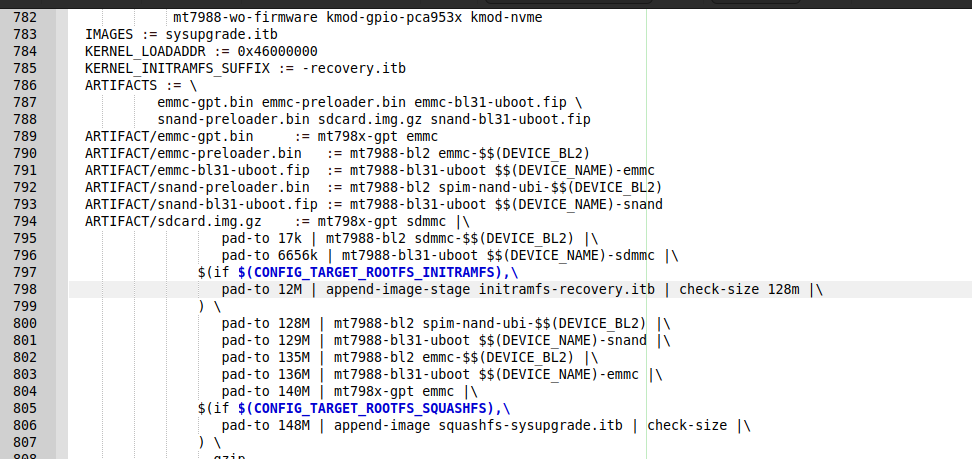
after this make successfully completed and i got img of 236MB i flash it to sd-card using balena and power on the board
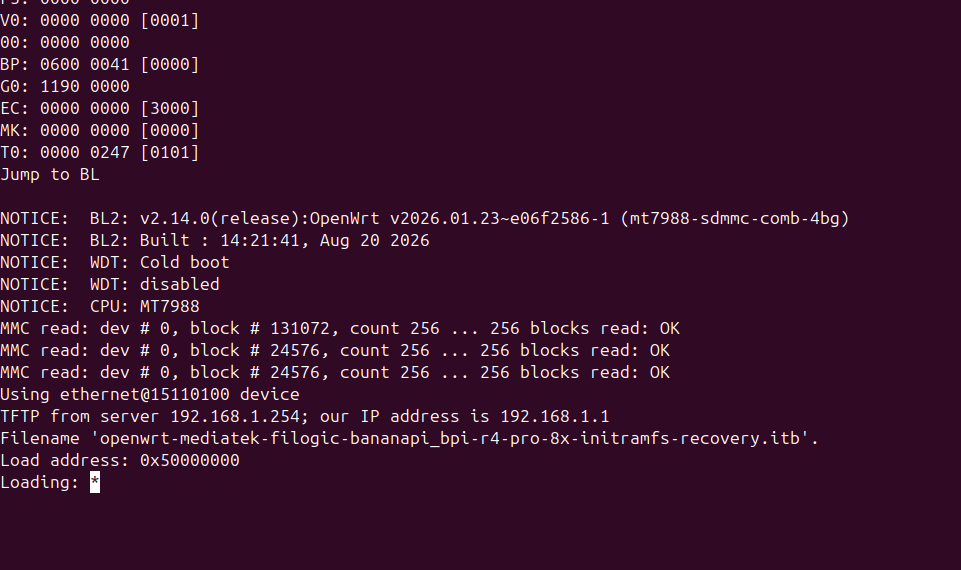
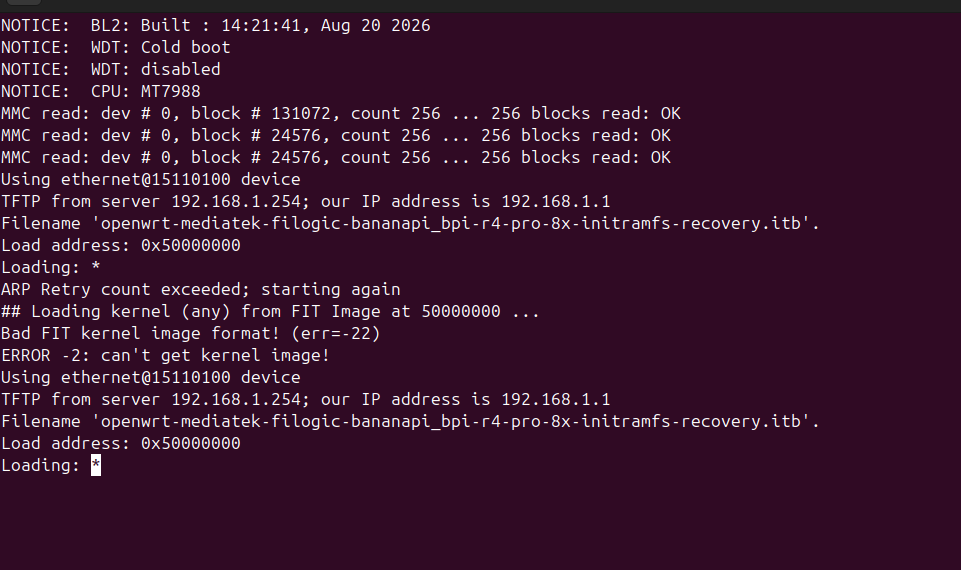
It is not loading the image basically failling