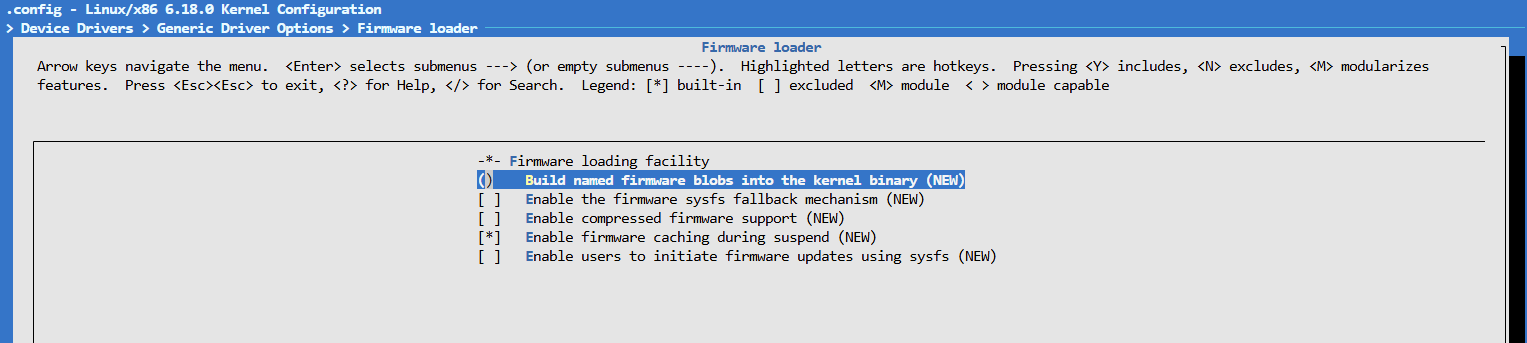
Pcie is probed really early. Maybe you need to make the realtek phy driver also builtin including firmware blob
https://forums.gentoo.org/viewtopic-p-8801241.html?sid=c000ab276090eb125e0396823d42268b#8801241
But do both builtin…
Pcie is probed really early. Maybe you need to make the realtek phy driver also builtin including firmware blob
https://forums.gentoo.org/viewtopic-p-8801241.html?sid=c000ab276090eb125e0396823d42268b#8801241
But do both builtin…
Do you mean to download the corresponding RTL8125 firmware and build it in like the link said “rtl_nic/rtl8125b-2.fw”?
If so, do you have experience on adding firmware blob?
In BPI-R4 (MT7988), we do not need to do such things manually.
The bpi-r4 from my repo does this for mt7988/87 and r3mini phy to be loaded from utils/firmware directory,just copy it there and extend the option in defconfig
Get it from here and add it to the dir in my repo
https://git.kernel.org/pub/scm/linux/kernel/git/firmware/linux-firmware.git/tree/rtl_nic
Thanks a lot.
I have added rtl_nic firmware in utils/firmware and extended CONFIG_EXTRA_FIRMWARE in defconfig:
ubuntu@c40702609f18:~/BPI-Router-Linux$ ls utils/firmware/rtl_nic/
rtl8105e-1.fw  rtl8107e-2.fw  rtl8125bp-2.fw  rtl8126a-2.fw  rtl8153a-3.fw  rtl8156a-2.fw  rtl8168e-1.fw  rtl8168f-2.fw   rtl8168g-3.fw  rtl8411-1.fw
rtl8106e-1.fw  rtl8125a-3.fw  rtl8125d-1.fw   rtl8126a-3.fw  rtl8153a-4.fw  rtl8156b-2.fw  rtl8168e-2.fw  rtl8168fp-3.fw  rtl8168h-1.fw  rtl8411-2.fw
rtl8106e-2.fw  rtl8125b-1.fw  rtl8125d-2.fw   rtl8127a-1.fw  rtl8153b-2.fw  rtl8168d-1.fw  rtl8168e-3.fw  rtl8168g-1.fw   rtl8168h-2.fw  rtl9151a-1.fw
rtl8107e-1.fw  rtl8125b-2.fw  rtl8125k-1.fw   rtl8153a-2.fw  rtl8153c-1.fw  rtl8168d-2.fw  rtl8168f-1.fw  rtl8168g-2.fw   rtl8402-1.fw
ubuntu@c40702609f18:~/BPI-Router-Linux$
ubuntu@c40702609f18:~/BPI-Router-Linux$ ack EXTRA_FIRMWARE arch/arm64/configs/mt7988a_bpi-r4_defconfig
CONFIG_EXTRA_FIRMWARE="aeonsemi/as21x1x_fw.bin mediatek/mt7987/i2p5ge-phy-DSPBitTb.bin mediatek/mt7987/i2p5ge-phy-pmb.bin rtl_nic/rtl8105e-1.fw rtl_nic/rtl8106e-1.fw rtl_nic/rtl8106e-2.fw rtl_nic/rtl8107e-1.fw rtl_nic/rtl8107e-2.fw rtl_nic/rtl8125a-3.fw rtl_nic/rtl8125b-1.fw rtl_nic/rtl8125b-2.fw rtl_nic/rtl8125bp-2.fw rtl_nic/rtl8125d-1.fw rtl_nic/rtl8125d-2.fw rtl_nic/rtl8125k-1.fw rtl_nic/rtl8126a-2.fw rtl_nic/rtl8126a-3.fw rtl_nic/rtl8127a-1.fw rtl_nic/rtl8153a-2.fw rtl_nic/rtl8153a-3.fw rtl_nic/rtl8153a-4.fw rtl_nic/rtl8153b-2.fw rtl_nic/rtl8153c-1.fw rtl_nic/rtl8156a-2.fw rtl_nic/rtl8156b-2.fw rtl_nic/rtl8168d-1.fw rtl_nic/rtl8168d-2.fw rtl_nic/rtl8168e-1.fw rtl_nic/rtl8168e-2.fw rtl_nic/rtl8168e-3.fw rtl_nic/rtl8168f-1.fw rtl_nic/rtl8168f-2.fw rtl_nic/rtl8168fp-3.fw rtl_nic/rtl8168g-1.fw rtl_nic/rtl8168g-2.fw rtl_nic/rtl8168g-3.fw rtl_nic/rtl8168h-1.fw rtl_nic/rtl8168h-2.fw rtl_nic/rtl8402-1.fw rtl_nic/rtl8411-1.fw rtl_nic/rtl8411-2.fw rtl_nic/rtl9151a-1.fw"
CONFIG_EXTRA_FIRMWARE_DIR="utils/firmware/"
ubuntu@c40702609f18:~/BPI-Router-Linux$
Flashed to r4lite and checked in system:
root@bpi-r4:/# zcat proc/config.gz | grep EXTRA_FIRMWARE
CONFIG_EXTRA_FIRMWARE="aeonsemi/as21x1x_fw.bin mediatek/mt7987/i2p5ge-phy-DSPBitTb.bin mediatek/mt7987/i2p5ge-phy-pmb.bin rtl_nic/rtl8105e-1.fw rtl_nic/rtl8106e-1.fw rtl_nic/rtl8106e-2.fw rtl_nic/rtl8107e-1.fw rtl_nic/rtl8107e-2.fw rtl_nic/rtl8125a-3.fw rtl_nic/rtl8125b-1.fw rtl_nic/rtl8125b-2.fw rtl_nic/rtl8125bp-2.fw rtl_nic/rtl8125d-1.fw rtl_nic/rtl8125d-2.fw rtl_nic/rtl8125k-1.fw rtl_nic/rtl8126a-2.fw rtl_nic/rtl8126a-3.fw rtl_nic/rtl8127a-1.fw rtl_nic/rtl8153a-2.fw rtl_nic/rtl8153a-3.fw rtl_nic/rtl8153a-4.fw rtl_nic/rtl8153b-2.fw rtl_nic/rtl8153c-1.fw rtl_nic/rtl8156a-2.fw rtl_nic/rtl8156b-2.fw rtl_nic/rtl8168d-1.fw rtl_nic/rtl8168d-2.fw rtl_nic/rtl8168e-1.fw rtl_nic/rtl8168e-2.fw rtl_nic/rtl8168e-3.fw rtl_nic/rtl8168f-1.fw rtl_nic/rtl8168f-2.fw rtl_nic/rtl8168fp-3.fw rtl_nic/rtl8168g-1.fw rtl_nic/rtl8168g-2.fw rtl_nic/rtl8168g-3.fw rtl_nic/rtl8168h-1.fw rtl_nic/rtl8168h-2.fw rtl_nic/rtl8402-1.fw rtl_nic/rtl8411-1.fw rtl_nic/rtl8411-2.fw rtl_nic/rtl9151a-1.fw"
CONFIG_EXTRA_FIRMWARE_DIR="utils/firmware/"
root@bpi-r4:/#
However, there is no rtl_nic or related firmware installed in device:
root@bpi-r4:/# ll /lib/firmware/
total 32
drwxr-xr-x  5 root root 4096 Jan  6  2026 ./
drwxr-xr-x 42 root root 4096 Jan  6  2026 ../
drwxr-xr-x  2 root root 4096 Jan  6  2026 aeonsemi/
drwxr-xr-x  2 root root 4096 Jan  6  2026 airoha/
drwxr-xr-x 15 root root 4096 Jan  6  2026 mediatek/
lrwxrwxrwx  1 root root   31 Jan  6  2026 regulatory.db -> /etc/alternatives/regulatory.db
-rw-r--r--  1 root root 4896 Jan  6  2026 regulatory.db-git
lrwxrwxrwx  1 root root   35 Jan  6  2026 regulatory.db.p7s -> /etc/alternatives/regulatory.db.p7s
-rw-r--r--  1 root root 1182 Jan  6  2026 regulatory.db.p7s-git
root@bpi-r4:/#
root@bpi-r4:/# find -type d -name *rtl_nic*
root@bpi-r4:/#
root@bpi-r4:/# find -name *8125*
root@bpi-r4:/#
How to ensure the extra firmware images are installed to device?
And the r4 (mt7988) does not have the same error as r4lite (mt7987). Both of them have no rtl_nic firmware loaded. Is the PHY setup of r4lite different to r4?
[    2.800015] r8169 0000:01:00.0: no dedicated PHY driver found for PHY ID 0x00000000, maybe realtek.ko needs to be added to initramfs?
[    2.812024] r8169 0000:01:00.0: probe with driver r8169 failed with error -49
It is builtin in kernel,not image…i guess image is too late because filesystem is not yet mounted when cie is probed. But your config.gz shows the firmware is there…else build would have fail.
So is the driver builtin too? What does dmesg now say about phy? If the new rtl driver is also loaded maybe it prints the firmware version
Do you have the realtek card in both devices? R4 lite has both pcie lanes mapped to the first mpcie slot per default because of the be14 card. You can split pcie lanes to both slots with overlay. But have bot tested this completely…only have be14 card in the r4lite.
Both R4 and R4Lite devices have tested with the same RTL8125 NIC module. They are just enabled “CONFIG_R8169=y” driver in Linux. No “rtl_nic” firmware needed to add manually.
R4: RTL8125 operated and at least pingable with peer devices. (I tested 2 months ago in this thread: [RESOLVED] Support PCIe Ethernet RTL8125 - #12 by brucerry)
R4Lite: no dedicated PHY driver found for PHY ID 0x00000000.
root@bpi-r4:/# dmesg | grep -e PHY -e mdio -e 8125 -e 8169
[    1.412643] MediaTek MT7987 2.5GbE PHY mdio-bus:0f: Firmware date code: 2025/8/22, version: 7.10
[    1.432948] MediaTek MT7987 2.5GbE PHY mdio-bus:0f: Firmware loading/trigger ok.
[    1.440388] MediaTek MT7987 2.5GbE PHY mdio-bus:0f: DEBUG: mt7987 detected!
[    1.736128] mt7530-mdio mdio-bus:1f: no interrupt support
[    1.768091] pci 0000:01:00.0: [10ec:8125] type 00 class 0x020000 PCIe Endpoint
[    1.846919] mt7530-mdio mdio-bus:1f: configuring for fixed/2500base-x link mode
[    1.861023] mt7530-mdio mdio-bus:1f: Link is Up - 2.5Gbps/Full - flow control rx/tx
[    1.862572] mt7530-mdio mdio-bus:1f lan0 (uninitialized): PHY [mt7530-0:00] driver [Generic PHY] (irq=POLL)
[    1.868642] mt7530-mdio mdio-bus:1f lan1 (uninitialized): PHY [mt7530-0:01] driver [Generic PHY] (irq=POLL)
[    1.874774] mt7530-mdio mdio-bus:1f lan2 (uninitialized): PHY [mt7530-0:02] driver [Generic PHY] (irq=POLL)
[    1.894651] mt7530-mdio mdio-bus:1f lan3 (uninitialized): PHY [mt7530-0:03] driver [Generic PHY] (irq=POLL)
[    2.490008] r8169 0000:01:00.0: vgaarb: pci_notify
[    2.494819] r8169 0000:01:00.0: assign IRQ: got 82
[    2.499660] r8169 0000:01:00.0: enabling device (0000 -> 0003)
[    2.505497] r8169 0000:01:00.0: enabling Mem-Wr-Inval
[    2.610117] x20: 0000000000000000 x19: ffffffc081257350 x18: 00000000ffffffff
[    2.679386]  mdiobus_scan+0x34/0x118
[    2.682951]  __mdiobus_register+0x204/0x450
[    2.687123]  __devm_mdiobus_register+0x70/0xe8
[    2.799888] r8169 0000:01:00.0: no dedicated PHY driver found for PHY ID 0x00000000, maybe realtek.ko needs to be added to initramfs?
[    2.811939] r8169 0000:01:00.0: probe with driver r8169 failed with error -49
[    2.819081] r8169 0000:01:00.0: vgaarb: pci_notify
[    2.981258]     /sbin/init
[    8.713301] mt7530-mdio mdio-bus:1f lan0: entered allmulticast mode
[    8.715679] mt7530-mdio mdio-bus:1f lan0: entered promiscuous mode
[    8.719115] mt7530-mdio mdio-bus:1f lan1: entered allmulticast mode
[    8.720593] mt7530-mdio mdio-bus:1f lan1: entered promiscuous mode
[    8.723820] mt7530-mdio mdio-bus:1f lan2: entered allmulticast mode
[    8.725279] mt7530-mdio mdio-bus:1f lan2: entered promiscuous mode
[    8.728269] mt7530-mdio mdio-bus:1f lan3: entered allmulticast mode
[    8.729884] mt7530-mdio mdio-bus:1f lan3: entered promiscuous mode
[    8.790817] mt7530-mdio mdio-bus:1f lan0: configuring for phy/gmii link mode
[    8.794659] mt7530-mdio mdio-bus:1f lan1: configuring for phy/gmii link mode
[    8.798875] mt7530-mdio mdio-bus:1f lan2: configuring for phy/gmii link mode
[    8.803051] mt7530-mdio mdio-bus:1f lan3: configuring for phy/gmii link mode
root@bpi-r4:/#
root@bpi-r4:/# zcat proc/config.gz | grep EXTRA_FIRMWARE
CONFIG_EXTRA_FIRMWARE="aeonsemi/as21x1x_fw.bin mediatek/mt7987/i2p5ge-phy-DSPBitTb.bin mediatek/mt7987/i2p5ge-phy-pmb.bin rtl_nic/rtl8105e-1.fw rtl_nic/rtl8106e-1.fw rtl_nic/rtl8106e-2.fw rtl_nic/rtl8107e-1.fw rtl_nic/rtl8107e-2.fw rtl_nic/rtl8125a-3.fw rtl_nic/rtl8125b-1.fw rtl_nic/rtl8125b-2.fw rtl_nic/rtl8125bp-2.fw rtl_nic/rtl8125d-1.fw rtl_nic/rtl8125d-2.fw rtl_nic/rtl8125k-1.fw rtl_nic/rtl8126a-2.fw rtl_nic/rtl8126a-3.fw rtl_nic/rtl8127a-1.fw rtl_nic/rtl8153a-2.fw rtl_nic/rtl8153a-3.fw rtl_nic/rtl8153a-4.fw rtl_nic/rtl8153b-2.fw rtl_nic/rtl8153c-1.fw rtl_nic/rtl8156a-2.fw rtl_nic/rtl8156b-2.fw rtl_nic/rtl8168d-1.fw rtl_nic/rtl8168d-2.fw rtl_nic/rtl8168e-1.fw rtl_nic/rtl8168e-2.fw rtl_nic/rtl8168e-3.fw rtl_nic/rtl8168f-1.fw rtl_nic/rtl8168f-2.fw rtl_nic/rtl8168fp-3.fw rtl_nic/rtl8168g-1.fw rtl_nic/rtl8168g-2.fw rtl_nic/rtl8168g-3.fw rtl_nic/rtl8168h-1.fw rtl_nic/rtl8168h-2.fw rtl_nic/rtl8402-1.fw rtl_nic/rtl8411-1.fw rtl_nic/rtl8411-2.fw rtl_nic/rtl9151a-1.fw"
CONFIG_EXTRA_FIRMWARE_DIR="utils/firmware/"
root@bpi-r4:/#
If same kernel works with r4 you can try applying the overlay for splitting pcie lanes
Ignore name of variable it is just to add another overlay
wificfg=#ov-lite-2pcie1l
In your uEnv.txt on BPI-BOOT partition (no reflash of card,just edit txt file). Then boot this card and look just before linux starts if the overlay is correctly applied.
I do not know these cards only read about firmware so wanted to be sure it is not the issue…if you have it working you can drop your changes regarding firmware. You have driver enabled for the phy?
I guess the way to edit uEnv.txt you meant is to insert the SD card in PC, but I’m playing with eMMC instead, not installing the Ubuntu firmware in SD.
How to test “splitting PCIe lanes” with eMMC based on your recommendation?
In arch/arm64/configs/mt7988a_bpi-r4_defconfig
CONFIG_R8169=y
CONFIG_R8169_LEDS=y
No other changes needed for operating RTL8125 in R4.
For emmc you have to change the uEnv.txt from booted linux.
How to do so?
Or I can edit the uEnv_r4.txt. What is the variable to be added?
Boot you linux and use
nano /boot/uEnv.txt
Not change builtin env as long as you do not know what it does 
Here is the new boot after modifying /boot/uEnv.txt. It seems not work?
root@bpi-r4:~# dmesg | grep -e 8125 -e 8169
[    1.810921] pci 0000:01:00.0: [10ec:8125] type 00 class 0x020000 PCIe Endpoint
[    2.228169] mtk-pcie-gen3 11280000.pcie: msi#0xd address_hi 0x0 address_lo 0x11280c00 data 13
[    2.526068] r8169 0000:01:00.0: vgaarb: pci_notify
[    2.537385] r8169 0000:01:00.0: assign IRQ: got 82
[    2.542213] r8169 0000:01:00.0: enabling device (0000 -> 0003)
[    2.548055] r8169 0000:01:00.0: enabling Mem-Wr-Inval
[    2.659703] x20: 0000000000000000 x19: ffffffc081257350 x18: 00000000ffffffff
[    2.857173] r8169 0000:01:00.0: no dedicated PHY driver found for PHY ID 0x00000000, maybe realtek.ko needs to be added to initramfs?
[    2.869194] r8169 0000:01:00.0: probe with driver r8169 failed with error -49
[    2.876334] r8169 0000:01:00.0: vgaarb: pci_notify
root@bpi-r4:~#
root@bpi-r4:~# lspci
00:00.0 PCI bridge: MEDIATEK Corp. Device 7987 (rev 01)
01:00.0 Ethernet controller: Realtek Semiconductor Co., Ltd. RTL8125 2.5GbE Controller (rev 05)
root@bpi-r4:~#
root@bpi-r4:~# cat /boot/uEnv.txt
# is2g5=1
# isr4pro=1
isr4lite=1
wificfg=#ov-lite-2pcie1l
abc=123
efg=#bruce
root@bpi-r4:~#
Shouldn’t it be saved to u-boot-env?
BPI-R4L> pri wificfg
## Error: "wificfg" not defined
BPI-R4L>
My uboot loads this file directly before display bootmenu (bootcmd - reloadmenu - loadenv) and overwrites/extend the builtin env. Have you wait bootmenu displayed?
I see. The new variables appeared after stopping at bootmenu.
However, it seems not help reading the PHY driver/ID:
BPI-R4L> pri wificfg
wificfg=#ov-lite-2pcie1l
BPI-R4L> pri abc
abc=123
BPI-R4L> pri efg
efg=#bruce
BPI-R4L>


[    2.849407] r8169 0000:01:00.0: no dedicated PHY driver found for PHY ID 0x00000000, maybe realtek.ko needs to be added to initramfs?
[    2.861507] r8169 0000:01:00.0: probe with driver r8169 failed with error -49
[    2.868655] r8169 0000:01:00.0: vgaarb: pci_notify

root@bpi-r4:/# cat /boot/uEnv.txt
# is2g5=1
# isr4pro=1
isr4lite=1
wificfg=#ov-lite-2pcie1l
abc=123
efg=#bruce
root@bpi-r4:/#
root@bpi-r4:/# lspci
00:00.0 PCI bridge: MEDIATEK Corp. Device 7987 (rev 01)
01:00.0 Ethernet controller: Realtek Semiconductor Co., Ltd. RTL8125 2.5GbE Controller (rev 05)
root@bpi-r4:/#
Workaround:
At least pingable.
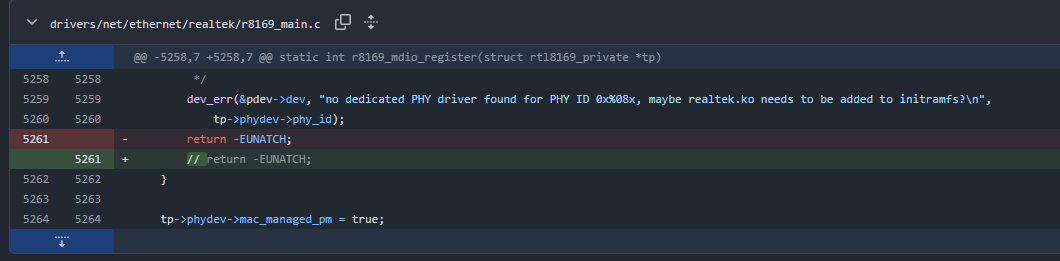
Patch Linux drivers/net/ethernet/realtek/r8169_main.c to skip returning from no dedicated PHY driver:
root@bpi-r4:~# dmesg | grep 8169
[    2.475562] r8169 0000:01:00.0: vgaarb: pci_notify
[    2.480384] r8169 0000:01:00.0: assign IRQ: got 82
[    2.485218] r8169 0000:01:00.0: enabling device (0000 -> 0003)
[    2.491059] r8169 0000:01:00.0: enabling Mem-Wr-Inval
[    2.797585] r8169 0000:01:00.0: no dedicated PHY driver found for PHY ID 0x00000000, maybe realtek.ko needs to be added to initramfs?
[    2.810174] r8169 0000:01:00.0 eth2: RTL8125B, 00:e0:4c:68:33:8e, XID 641, IRQ 84
[    2.817671] r8169 0000:01:00.0 eth2: jumbo features [frames: 16362 bytes, tx checksumming: ko]
[    2.826285] r8169 0000:01:00.0: vgaarb: pci_notify
[    8.552878] r8169 0000:01:00.0 eth2: entered allmulticast mode
[    8.553051] r8169 0000:01:00.0 eth2: entered promiscuous mode
[    8.655123] Generic PHY r8169-0-100:00: attached PHY driver (mii_bus:phy_addr=r8169-0-100:00, irq=MAC)
[    8.655155] r8169 0000:01:00.0: enabling bus mastering
[    8.736614]  r8169_hw_phy_config+0x24/0x38
[    8.736622]  rtl8169_up+0x44/0x10c
[    8.812924] r8169 0000:01:00.0 eth2: Link is Down
[   12.900413] r8169 0000:01:00.0 eth2: Link is Up - 1Gbps/Full - flow control off
root@bpi-r4:~#
Add the new LAN interface (eth2 in this case) to /etc/systemd/network/21-lanbr-bind.network:
root@bpi-r4:/etc/systemd/network# cat 21-lanbr-bind.network
[Match]
Name=lan0 lan1 lan2 lan3 eth3 eth2

[Network]
Bridge=lanbr0
root@bpi-r4:/etc/systemd/network#
root@bpi-r4:/etc/systemd/network# ip a show eth2
10: eth2: <BROADCAST,MULTICAST,UP,LOWER_UP> mtu 1500 qdisc fq_codel master lanbr0 state UP group default qlen 1000
    link/ether 00:e0:4c:68:33:8e brd ff:ff:ff:ff:ff:ff
root@bpi-r4:/etc/systemd/network#
root@bpi-r4:/etc/systemd/network# ping 192.168.1.10 -c 4
PING 192.168.1.10 (192.168.1.10) 56(84) bytes of data.
64 bytes from 192.168.1.10: icmp_seq=1 ttl=128 time=0.463 ms
64 bytes from 192.168.1.10: icmp_seq=2 ttl=128 time=0.663 ms
64 bytes from 192.168.1.10: icmp_seq=3 ttl=128 time=0.323 ms
64 bytes from 192.168.1.10: icmp_seq=4 ttl=128 time=0.309 ms

--- 192.168.1.10 ping statistics ---
4 packets transmitted, 4 received, 0% packet loss, time 3086ms
rtt min/avg/max/mdev = 0.309/0.439/0.663/0.142 ms
root@bpi-r4:/etc/systemd/network#
Can you post output of serial console after bootmenu entry was choosen before linux kernel is started? There should be the loaded overlays printed. Maybe there is something missig
Here is the log in-between bootmenu and linux start:
## Error: "initrd" not defined
EXT_CSD[179], PARTITION_CONFIG:
BOOT_ACK: 0x1
BOOT_PARTITION_ENABLE: 0x1 (boot0)
PARTITION_ACCESS: 0x0 (user)
emmc available
SF: Detected w25q256 with page size 256 Bytes, erase size 4 KiB, total 32 MiB
NOR available
bootconf=#conf-base-r4lite#ov-lite-emmc#ov-lite-nor
fit=bpi-r4.itb
10395696 bytes read in 772 ms (12.8 MiB/s)
No UBIFS volume mounted!
## Loading kernel (any) from FIT Image at 46000000 ...
   Using 'conf-base-r4lite' configuration
   Trying 'kernel-1' kernel subimage
     Description:  Linux Kernel 6.18.0-main
     Type:         Kernel Image
     Compression:  gzip compressed
     Data Start:   0x460000e8
     Data Size:    10211470 Bytes = 9.7 MiB
     Architecture: AArch64
     OS:           Linux
     Load Address: 0x44000000
     Entry Point:  0x44000000
     Hash algo:    sha1
     Hash value:   5d8da90cf1d549d9e5227ad25c8bb85d4c7b9ec1
   Verifying Hash Integrity ... sha1+ OK
## Loading fdt (any) from FIT Image at 46000000 ...
   Using 'conf-base-r4lite' configuration
   Trying 'fdt-base-lite' fdt subimage
     Description:  Flattened Device Tree blob BPI-R4 Lite
     Type:         Flat Device Tree
     Compression:  uncompressed
     Data Start:   0x469df20c
     Data Size:    31002 Bytes = 30.3 KiB
     Architecture: AArch64
     Load Address: 0x47000000
     Hash algo:    sha1
     Hash value:   394f22549ac95838afcf11fe12630463893b3a13
   Verifying Hash Integrity ... sha1+ OK
   Loading fdt from 0x469df20c to 0x47000000
   Loading Device Tree to 00000000be7ed000, end 00000000be7f7fff ... OK
Working FDT set to be7ed000
## Loading fdt (any) from FIT Image at 46000000 ...
   Using 'ov-lite-emmc' configuration
   Trying 'fdt-ov-lite-emmc' fdt subimage
     Description:  Flattened Device Tree blob
     Type:         Flat Device Tree
     Compression:  uncompressed
     Data Start:   0x469e77ac
     Data Size:    878 Bytes = 878 Bytes
     Architecture: Unknown Architecture
   Verifying Hash Integrity ... OK
## Loading fdt (any) from FIT Image at 46000000 ...
   Using 'ov-lite-nor' configuration
   Trying 'fdt-ov-lite-nor' fdt subimage
     Description:  Flattened Device Tree blob
     Type:         Flat Device Tree
     Compression:  uncompressed
     Data Start:   0x469e80d8
     Data Size:    919 Bytes = 919 Bytes
     Architecture: Unknown Architecture
   Verifying Hash Integrity ... OK
   Booting using the fdt blob at 0xbe7ed000
Working FDT set to be7ed000
   Uncompressing Kernel Image to 44000000
   Loading Device Tree to 00000000be7e2000, end 00000000be7ecca6 ... OK
Working FDT set to be7e2000

Starting kernel ...
Check uEnv.txt:
root@bpi-r4:~# cat /boot/uEnv.txt
# is2g5=1
# isr4pro=1
isr4lite=1
wificfg=#ov-lite-2pcie1l
abc=123
efg=#bruce
root@bpi-r4:~#
So overlay is not applied…
Should be added here (and not replaced by checkwifi)
Checked that overlay sets gpio and pcie state
Which uboot version do you have installed and can you print the setbootconf function (but afair ther was not much change till there).
Could you try put value in quotes so it is not detected as comment because of sharp (#)?
U-boot 2026-01-bpi
U-Boot 2026.01-rc5-bpi-g7f8bdf9fc212-dirty (Jan 06 2026 - 10:22:20 +0800)

CPU:   MediaTek MT7987
Model: MediaTek MT7987A BPI-R4 Lite
DRAM:  2 GiB
Core:  89 devices, 22 uclasses, devicetree: separate
MMC:   mmc@11230000: 0
Loading Environment from nowhere... OK
In:    serial@11000000
Out:   serial@11000000
Err:   serial@11000000
Net:   MediaTek MT7531

Warning: ethernet@15110100 (eth0) using random MAC address - e6:86:a6:3b:20:64
eth0: ethernet@15110100
Hit any key to stop autoboot: 0
BPI-R4L> pri setbootconf
setbootconf=run check2g5;run checkmmc;run checksata;run checkwifi;run checkr4lite;run checkr4pro;setenv bootconf "#conf-base$variant$version$ovmmc$ovspi$addconf";printenv bootconf
BPI-R4L>
“wificfg” is missing in 2026-01 but 2025-10. And some other changes you made in 2026-01.
I tried to renew setbootconf in /boot/uEnv.txt. We can see it applied the correct bootconf this time:
root@bpi-r4:/# cat boot/uEnv.txt
# is2g5=1
# isr4pro=1
isr4lite=1
wificfg=#ov-lite-2pcie1l
abc=123
efg=#bruce
setbootconf=run check2g5;run checkmmc;run checksata;run checkwifi;run checkr4lite;run checkr4pro;setenv bootconf "#conf-base$variant$version$ovmmc$ovspi$wificfg$satacfg";printenv bootconf
root@bpi-r4:/#
## Error: "initrd" not defined
EXT_CSD[179], PARTITION_CONFIG:
BOOT_ACK: 0x1
BOOT_PARTITION_ENABLE: 0x1 (boot0)
PARTITION_ACCESS: 0x0 (user)
emmc available
SF: Detected w25q256 with page size 256 Bytes, erase size 4 KiB, total 32 MiB
NOR available
bootconf=#conf-base-r4lite#ov-lite-emmc#ov-lite-nor#ov-lite-2pcie1l
fit=bpi-r4.itb
10395696 bytes read in 771 ms (12.9 MiB/s)
No UBIFS volume mounted!
## Loading kernel (any) from FIT Image at 46000000 ...
   Using 'conf-base-r4lite' configuration
   Trying 'kernel-1' kernel subimage
     Description:  Linux Kernel 6.18.0-main
     Type:         Kernel Image
     Compression:  gzip compressed
     Data Start:   0x460000e8
     Data Size:    10211470 Bytes = 9.7 MiB
     Architecture: AArch64
     OS:           Linux
     Load Address: 0x44000000
     Entry Point:  0x44000000
     Hash algo:    sha1
     Hash value:   5d8da90cf1d549d9e5227ad25c8bb85d4c7b9ec1
   Verifying Hash Integrity ... sha1+ OK
## Loading fdt (any) from FIT Image at 46000000 ...
   Using 'conf-base-r4lite' configuration
   Trying 'fdt-base-lite' fdt subimage
     Description:  Flattened Device Tree blob BPI-R4 Lite
     Type:         Flat Device Tree
     Compression:  uncompressed
     Data Start:   0x469df20c
     Data Size:    31002 Bytes = 30.3 KiB
     Architecture: AArch64
     Load Address: 0x47000000
     Hash algo:    sha1
     Hash value:   394f22549ac95838afcf11fe12630463893b3a13
   Verifying Hash Integrity ... sha1+ OK
   Loading fdt from 0x469df20c to 0x47000000
   Loading Device Tree to 00000000be7ed000, end 00000000be7f7fff ... OK
Working FDT set to be7ed000
## Loading fdt (any) from FIT Image at 46000000 ...
   Using 'ov-lite-emmc' configuration
   Trying 'fdt-ov-lite-emmc' fdt subimage
     Description:  Flattened Device Tree blob
     Type:         Flat Device Tree
     Compression:  uncompressed
     Data Start:   0x469e77ac
     Data Size:    878 Bytes = 878 Bytes
     Architecture: Unknown Architecture
   Verifying Hash Integrity ... OK
## Loading fdt (any) from FIT Image at 46000000 ...
   Using 'ov-lite-nor' configuration
   Trying 'fdt-ov-lite-nor' fdt subimage
     Description:  Flattened Device Tree blob
     Type:         Flat Device Tree
     Compression:  uncompressed
     Data Start:   0x469e80d8
     Data Size:    919 Bytes = 919 Bytes
     Architecture: Unknown Architecture
   Verifying Hash Integrity ... OK
## Loading fdt (any) from FIT Image at 46000000 ...
   Using 'ov-lite-2pcie1l' configuration
   Trying 'fdt-ov-lite-2pcie' fdt subimage
     Description:  DT overlay for R4Lite 2 pcie a 1 Lanes
     Type:         Flat Device Tree
     Compression:  uncompressed
     Data Start:   0x469e867c
     Data Size:    294 Bytes = 294 Bytes
     Architecture: Unknown Architecture
   Verifying Hash Integrity ... OK
   Booting using the fdt blob at 0xbe7ed000
Working FDT set to be7ed000
   Uncompressing Kernel Image to 44000000
   Loading Device Tree to 00000000be7e2000, end 00000000be7eccb9 ... OK
Working FDT set to be7e2000

Starting kernel ...
However, this does not resolve the issue of
[ 2.809655] r8169 0000:01:00.0: no dedicated PHY driver found for PHY ID 0x00000000, maybe realtek.ko needs to be added to initramfs?
Anyway, I think it is okay to have a little workaround as I posted above. It would be very nice to have experts fixing that.
Ah,ok,if you use the 2026.01 there i have this change merging the additional configs to not have a var+check for each specific case (especially for R4Lite and R4pro pcie).
Ok that was only idea i had except builtin driver/firmware. Is it a known bug (so not R4lite specific) where you get the workaround patch? On the other side you’ve said it works with same kernel on R4