OpenWRT One: Persistent dnsmasq cachefile

[ NOTE: SEE POST BELOW FOR A MUCH MORE ELEGANT SOLUTION. This post shows essentially a brute-force solution. I’ve figure out a much more elegant solution below. ]

If you’re tired of dnsmasq wiping the cachefile every time it has to restart (usually because your cable provider has set DHCP lease time to a very short 1 or 2 hours, and you get a new IP address each time), so you can never really build up a good-sized cachefile, this will set it up to repopulate the dnsmasq cachefile on each restart of dnsmasq.

You’re going to need an external USB drive to save dnsmasq logfiles to. Mine is /dev/sda2, and the logfile sits at /mnt/sda2/dns/dnsmasq.log.

In a terminal window connected to the router, issue:

mkdir /mnt/sda2/dns
touch /mnt/sda2/dns/dnsmasq.log
chown -R dnsmasq:dnsmasq /mnt/sda2/dns
chmod 755 /mnt/sda2/dns

In the LuCI interface, under Networking >> DNS >> Log tab, check the Log queries checkbox, and under Log Facility, enter the path to your logfile: /mnt/sda2/dns/dnsmasq.log

Click Save & Apply. You’ll see the /mnt/sda2/dns/dnsmasq.log file size growing.

Of course, we don’t want it to grow forever, so we have to trim it.

Under System >> Scheduled Tasks, enter:

# Trim DNS Pre-Warming Log
0 4 * * * tail -n 100000 /mnt/sda2/dns/dnsmasq.log > /mnt/sda2/dns/dnsmasq.log.tmp && cat /mnt/sda2/dns/dnsmasq.log.tmp > /mnt/sda2/dns/dnsmasq.log && rm /mnt/sda2/dns/dnsmasq.log.tmp

You can set that 100000 to whatever number you want. You’ll have to experiment to get the right number.

Now, we’ve got the logfile growing, we’ve got the logfile trimmer set up. Now we have to set up the code to repopulate the cachefile, and a way to trigger it.

Create a file and set permissions:

touch /etc/dns_cache_prewarm.sh
chmod +x /etc/dns_cache_prewarm.sh

Populate that file with this code:

#!/bin/sh

# SETTINGS
# == == == == == == == == == == == == == == ==
LOGFILE="/mnt/sda2/dns/dnsmasq.log"
LOGGING=1 # Options: 0-off, 1-concise, 2-verbose
# == == == == == == == == == == == == == == ==

PIDFILE="/tmp/dns_cache_prewarm.pid"
TMP_DOMAINS="/tmp/dns_cache_prewarm.domains"

# If ${LOGFILE} doesn't exist, exit.
[ -f "${LOGFILE}" ] || exit 0

# Kill any previous instance (and its child processes)
# == == == == == == == == == == == == == == ==
if [ -f "${PIDFILE}" ]; then
    OLD_PID=$(cat "${PIDFILE}")
    if [ -n "${OLD_PID}" ] && [ -d "/proc/${OLD_PID}" ]; then
        [ ${LOGGING} -gt 0 ] && echo "Existing dns_cache_prewarm process (PID ${OLD_PID}) found. Terminating PID ${OLD_PID}..." | tee >(logger -t dns_cache_prewarm)
        for p in /proc/[0-9]*/stat; do
            [ -r "$p" ] || continue
            read -r pid comm state ppid _ < "$p"
            if [ "$ppid" = "${OLD_PID}" ]; then
                kill -9 "${pid}" 2>/dev/null
            fi
        done
        kill -9 "${OLD_PID}" 2>/dev/null
    fi
fi

# Register current PID and clean up temp files on exit
echo $$ > "${PIDFILE}"
trap 'rm -f "${PIDFILE}" "${TMP_DOMAINS}"' EXIT
# == == == == == == == == == == == == == == ==

[ ${LOGGING} -gt 0 ] && echo "DNS cachefile repopulate started." | tee >(logger -t dns_cache_prewarm)

# Wait for dnsmasq to finish initializing
sleep 10

# Extract unique FQDNs into a tmp file
awk '{
    for(i=1; i<NF; i++) {
        if($i == "forwarded" && $(i+1) ~ /^[a-zA-Z0-9.-]+\.[a-zA-Z]{2,}$/) {
            print $(i+1)
        }
    }
}' "${LOGFILE}" \
    | grep -vE '\.arpa$' \
    | sort -u > "${TMP_DOMAINS}"

COUNT=0

# Loop over the file, count the domains
while read -r domain; do
    [ -z "${domain}" ] && continue

    # Abort if a newer instance took over the PID file
    [ -f "${PIDFILE}" ] && [ "$(cat "${PIDFILE}")" = "$$" ] || exit 0

    nslookup "${domain}" 127.0.0.1 >/dev/null 2>&1 &
    COUNT=$((COUNT + 1))
    sleep 0.3

    # Terminal-only creeper dot (prints a dot every 5 domains when LOGGING=1)
    if [ -t 1 ] && [ "${LOGGING}" -lt 2 ] && [ $((COUNT % 5)) -eq 0 ]; then
        printf "."
    fi

    [ ${LOGGING} -eq 2 ] && echo "${domain} repopulated" | tee >(logger -t dns_cache_prewarm)
done < "${TMP_DOMAINS}"

if [ -t 1 ]; then
    printf "\n"
fi
[ ${LOGGING} -gt 0 ] && echo "DNS cachefile repopulate complete. ${COUNT} domains repopulated." | tee >(logger -t dns_cache_prewarm)

If your OpenWRT throws an error, it’s going to most likely be that sleep 0.3… BusyBox’s sleep command only takes integer values. Either change it to sleep 1 or install the coreutils-sleep package.

The code above kills any prior instance of itself, so if dnsmasq is restarted before this script can finish, this script will start over repopulating the dnsmasq cachefile.

Note the sort -u in the code above. It’ll only attempt to re-resolve each domain once, no matter how many times a domain occurs in your dnsmasq logfile.

Note the creeper dot when you’re running the script in a terminal and you’ve got LOGGING=1 (concise)… that’s so you know the script is still running alright.

Ok, now we have to trigger that code. In /etc/init.d/dnsmasq, you’ll see the code:

start_service() {
	local instance="$1"
	local instance_found=0
	local first_instance=""

	. /lib/functions/network.sh

	config_cb() {
		local type="$1"
		local name="$2"
		if [ "$type" = "dnsmasq" ]; then
			if [ -n "$instance" ] && [ "$instance" = "$name" ]; then
				instance_found=1
			fi
			if [ -z "$DEFAULT_INSTANCE" ]; then
				local disabled
				config_get_bool disabled "$name" disabled 0
				if [ "$disabled" -eq 0 ]; then
					# First enabled section will be assigned default instance name.
					# Unnamed sections get precedence over named sections.
					if expr "$cfg" : 'cfg[0-9a-f]*$' >/dev/null = "9"; then # See uci_fixup_section.
						DEFAULT_INSTANCE="$name" # Unnamed config section.
					elif [ -z "$first_instance" ]; then
						first_instance="$name"
					fi
				fi
			fi
		fi
	}

	DEFAULT_INSTANCE=""
	config_load dhcp
	if [ -z "$DEFAULT_INSTANCE" ]; then
		DEFAULT_INSTANCE="$first_instance" # No unnamed config section was found.
	fi

	if [ -n "$instance" ]; then
		[ "$instance_found" -gt 0 ] || return
		dnsmasq_start "$instance"
	else
		config_foreach dnsmasq_start dnsmasq
	fi
}

Change that to:

start_service() {
	local instance="$1"
	local instance_found=0
	local first_instance=""

	. /lib/functions/network.sh

	config_cb() {
		local type="$1"
		local name="$2"
		if [ "$type" = "dnsmasq" ]; then
			if [ -n "$instance" ] && [ "$instance" = "$name" ]; then
				instance_found=1
			fi
			if [ -z "$DEFAULT_INSTANCE" ]; then
				local disabled
				config_get_bool disabled "$name" disabled 0
				if [ "$disabled" -eq 0 ]; then
					# First enabled section will be assigned default instance name.
					# Unnamed sections get precedence over named sections.
					if expr "$cfg" : 'cfg[0-9a-f]*$' >/dev/null = "9"; then # See uci_fixup_section.
						DEFAULT_INSTANCE="$name" # Unnamed config section.
					elif [ -z "$first_instance" ]; then
						first_instance="$name"
					fi
				fi
			fi
		fi
	}

	DEFAULT_INSTANCE=""
	config_load dhcp
	if [ -z "$DEFAULT_INSTANCE" ]; then
		DEFAULT_INSTANCE="$first_instance" # No unnamed config section was found.
	fi

	if [ -n "$instance" ]; then
		[ "$instance_found" -gt 0 ] || return
		dnsmasq_start "$instance"
	else
		config_foreach dnsmasq_start dnsmasq
	fi

	(sleep 2 && /etc/dns_cache_prewarm.sh) &
}

Now, when dnsmasq restarts, in your logs (with LOGGING=2), you’ll see entries like:

user.notice: dns_cache_prewarm: DNS cachefile repopulate started.
... ... (snipped for brevity)
user.notice: dns_cache_prewarm: url8947.nightly.pray.com repopulated
user.notice: dns_cache_prewarm: use1-nf.naver.com.akadns.net repopulated
user.notice: dns_cache_prewarm: v10.events.data.microsoft.com repopulated
user.notice: dns_cache_prewarm: v20.events.data.microsoft.com repopulated
user.notice: dns_cache_prewarm: valid.apple.com repopulated
user.notice: dns_cache_prewarm: variations.brave.com repopulated
user.notice: dns_cache_prewarm: video-fa.scdn.co repopulated
user.notice: dns_cache_prewarm: www.bing.com repopulated
user.notice: dns_cache_prewarm: www.collegeboard.org repopulated
user.notice: dns_cache_prewarm: www.facebook.com repopulated
user.notice: dns_cache_prewarm: www.google.com repopulated
user.notice: dns_cache_prewarm: www.googleapis.com repopulated
user.notice: dns_cache_prewarm: www.gstatic.com repopulated
user.notice: dns_cache_prewarm: www.msftncsi.com repopulated
user.notice: dns_cache_prewarm: www.spotify.com repopulated
user.notice: dns_cache_prewarm: www.youtube.com repopulated
user.notice: dns_cache_prewarm: DNS cachefile repopulate complete. 1121 domains repopulated.

If you run it manually in the terminal (with LOGGING=1), you’ll see something like:

root@OpenWRT:~# sh /etc/dns_cache_prewarm.sh

DNS cachefile repopulate started.
.............................................................................................................................................................
...................................................................
DNS cachefile repopulate complete. 1121 domains repopulated.

All you’ll see in the logs when LOGGING=1 is something like:

DNS cachefile repopulate started.
DNS cachefile repopulate complete. 1121 domains repopulated.
1 Like

Thanks for sharing this in such detail, LunkHead — the step-by-step through LuCI, the trimming cron job and the pre-warm script is really clear.

The sort -u point stood out to me, as did the note about BusyBox sleep only taking integer values; that is exactly the sort of small detail that can waste a lot of time when you are setting this up for the first time.

Out of interest, how long does the pre-warm usually take on your OpenWrt One when it repopulates around a thousand domains, and did you find much practical difference between trimming the log to 10,000 lines and keeping it at 100,000? I am weighing up how much of the log is worth keeping on a USB drive.

A thousand domains at ~3 domains per second (that’s the sleep 0.3) will take about 6 minutes, accounting for latency in resolving domains.

You’re not going to get 100,000 domains out of a logfile that has 100,000 lines… there’s a lot of extra stuff in there. I’ve got 341545 lines in the logfile right now (it’s 35 MB in size), and it repopulated 2042 domains.

It’ll vary, because the script is stripping out all repeated domains. You’ll have to experiment to get the right number of loglines to trim to.

I’m running the dnsmasq cachefile at 100000 domains right now just to experiment. It’ll likely change (go lower). I’ll keep dropping it until I just start to see the Forced Live Frees cache evictions ticking up a bit, then I’ll increase it a bit.

Using LunkHead’s 341,545 lines → 2,042 unique domains as a rough guide, 10,000 lines would prewarm only about 60 domains and 100,000 lines about 600. So the smaller trim saves very little USB space (a few MB) but leaves a much thinner cache. If the drive is otherwise idle, I’d keep 100,000 lines and reduce it only if prewarm time or cache evictions become a problem.

[ The Much More Elegant Solution ]

This setup uses a FIFO (Named Pipe) that dnsmasq outputs to. A script (started by a service) picks that data up from the Named Pipe, picks out the FQDNs and saves them to the hard drive file. A cron job then de-duplicates the file on a periodic basis. This saves a lot of space… rather than hundreds of thousands of lines of dnsmasq output saved to a file on the hard drive, only the de-duplicated domains are saved.

Whereas for the setup above, we were dealing with a multiple-megabyte logfile that we then had to parse through, on this setup, I tested it by resolving 100,000 domains. The /mnt/sda2/dns/clean_domains.txt file ended up with 101,553 domains in it, and it had a size of 1.4 MB.

If you’re saving less than ~100,000 domains, you could put clean_domains.txt under /tmp (ie: DOMAIN_FILE="/tmp/clean_domains.txt). It’ll be less than ~2 MB, and it’ll run faster because it’s in memory, not on a drive. But it won’t persist across a router reboot.

This setup needs the python3-light package.

Issue:

touch /etc/dns_log_filter.sh

This script increases the named pipe buffer size, creates the FIFO and listens continuously with a 4 MB buffer. We use a cron job (see below) to de-dup the /mnt/sda2/dns/clean_domains.txt file.

Populate the /etc/dns_log_filter.sh file with this code:

#!/bin/sh

PIPE_DIR="/tmp/dnsmasq_pipe"
PIPE="${PIPE_DIR}/dnsmasq.fifo"
DOMAIN_FILE="/mnt/sda2/dns/clean_domains.txt"
PIPE_SIZE=4194304 # 4 MB

# Increase Named Pipe buffer
sysctl -w fs.pipe-max-size=${PIPE_SIZE} >/dev/null

# Ensure storage directory and domain file exist
mkdir -p "$(dirname "${DOMAIN_FILE}")"
touch "${DOMAIN_FILE}"

# Create a dedicated directory for the pipe (bypasses fs.protected_fifos)
mkdir -p "${PIPE_DIR}"
chown dnsmasq:dnsmasq "${PIPE_DIR}"
chmod 755 "${PIPE_DIR}"

# Create and secure the named pipe
[ -p "${PIPE}" ] || mkfifo "${PIPE}"
chown dnsmasq:dnsmasq "${PIPE}"
chmod 600 "${PIPE}"

# Open FIFO in read-write mode (prevents EOF on dnsmasq restart),
# resize buffer to 4 MB (1031 = F_SETPIPE_SZ), and stream to awk.
python3 -c "
import fcntl, os, subprocess

fd = os.open('${PIPE}', os.O_RDWR)
fcntl.fcntl(fd, 1031, ${PIPE_SIZE})
os.set_inheritable(fd, True)

awk_prog = '''
{
    for (i = 1; i < NF; i++) {
        if (\$i == \"forwarded\" && \$(i+1) ~ /^[a-zA-Z0-9.-]+\\.[a-zA-Z]{2,}\$/ && \$(i+1) !~ /\\.arpa\$/) {
            print \$(i+1) >> \"${DOMAIN_FILE}\"
            close(\"${DOMAIN_FILE}\")
        }
    }
}
'''

subprocess.run(['awk', awk_prog], stdin=fd)
"

Make it executable:

chmod +x /etc/dns_log_filter.sh

Create /etc/init.d/dns_log_filter so OpenWrt’s procd starts the filter script (START=18) above before dnsmasq (START=19) and automatically restarts it if it ever exits.

touch /etc/init.d/dns_log_filter

Populate the /etc/init.d/dns_log_filter file with this code:

#!/bin/sh /etc/rc.common

START=18
STOP=90
USE_PROCD=1

start_service() {
    procd_open_instance
    procd_set_param command /etc/dns_log_filter.sh
    procd_set_param respawn
    procd_close_instance
}

stop_service() {
    killall -9 python3 awk 2>/dev/null
}

Set executable, then enable and start the service:

chmod +x /etc/init.d/dns_log_filter
/etc/init.d/dns_log_filter enable
/etc/init.d/dns_log_filter start

Ensure it’s running:

ps | grep dns_log_filter

… which should return something like:

20711 root      1336 S    {dns_log_filter.} /bin/sh /etc/dns_log_filter.sh

Ensure the FIFO Named Pipe is working:

ls -l /proc/$(pidof awk)/fd/0

… which should return something like:

lrwx------    1 root     root            64 Nov 13 14:41 /proc/27262/fd/0 -> /tmp/dnsmasq_pipe/dnsmasq.fifo
cat /proc/$(pidof awk)/fdinfo/0

… which should return something like:

pos:	0
flags:	0400002
mnt_id:	18
ino:	111208

For /etc/dns_cache_prewarm.sh, since /mnt/sda2/dns/clean_domains.txt is already filtered and deduplicated, it skips the awk parsing pass used in the prior post, and goes straight to resolving domains. We still copy all the domains into a /tmp file, so /mnt/sda2/dns/clean_domains.txt isn’t operated upon directly.

Create a file and set permissions:

touch /etc/dns_cache_prewarm.sh
chmod +x /etc/dns_cache_prewarm.sh

Populate /etc/dns_cache_prewarm.sh with the following code:

#!/bin/sh

# SETTINGS
# == == == == == == == == == == == == == == ==
LOGFILE="/mnt/sda2/dns/clean_domains.txt"
LOGGING=1 # Options: 0-off, 1-concise, 2-verbose
# == == == == == == == == == == == == == == ==

PIDFILE="/tmp/dns_cache_prewarm.pid"
TMP_DOMAINS="/tmp/dns_cache_prewarm.domains"

# If ${LOGFILE} doesn't exist, exit.
[ -f "${LOGFILE}" ] || exit 0

# Kill any previous instance (and its child processes)
# == == == == == == == == == == == == == == ==
if [ -f "${PIDFILE}" ]; then
    OLD_PID=$(cat "${PIDFILE}")
    if [ -n "${OLD_PID}" ] && [ -d "/proc/${OLD_PID}" ]; then
        [ ${LOGGING} -gt 0 ] && echo "Existing dns_cache_prewarm process (PID ${OLD_PID}) found. Terminating PID ${OLD_PID}..." | tee >(logger -t dns_cache_prewarm)
        for p in /proc/[0-9]*/stat; do
            [ -r "$p" ] || continue
            read -r pid comm state ppid _ < "$p"
            if [ "$ppid" = "${OLD_PID}" ]; then
                kill -9 "${pid}" 2>/dev/null
            fi
        done
        kill -9 "${OLD_PID}" 2>/dev/null
    fi
fi

# Register current PID and clean up temp files on exit
echo $$ > "${PIDFILE}"
trap 'rm -f "${PIDFILE}" "${TMP_DOMAINS}"' EXIT
# == == == == == == == == == == == == == == ==

[ ${LOGGING} -gt 0 ] && echo "DNS cachefile repopulate started." | tee >(logger -t dns_cache_prewarm)

# Wait for dnsmasq to finish initializing
sleep 10

# Extract unique FQDNs into a tmp file
grep -E '^[a-zA-Z0-9.-]+\.[a-zA-Z]{2,}$' "${LOGFILE}" \
    | grep -vE '\.arpa$' \
    | sort -u > "${TMP_DOMAINS}"

COUNT=0

# Loop over the file, count the domains as nslookup proceeds
while read -r domain; do
    [ -z "${domain}" ] && continue

    # Abort if a newer instance took over the PID file
    [ -f "${PIDFILE}" ] && [ "$(cat "${PIDFILE}")" = "$$" ] || exit 0

    # Ensure we don't swamp the router with nslookups
    while [ "$(pgrep -x nslookup 2>/dev/null | wc -l)" -ge 15 ]; do
        sleep 1
    done

    nslookup "${domain}" 127.0.0.1 >/dev/null 2>&1 &
    COUNT=$((COUNT + 1))
    sleep 0.3

    # Terminal-only creeper dot (prints a dot every 5 domains when LOGGING=1)
    if [ -t 1 ] && [ "${LOGGING}" -lt 2 ] && [ $((COUNT % 5)) -eq 0 ]; then
        printf "."
    fi

    [ ${LOGGING} -eq 2 ] && echo "${domain} repopulated" | tee >(logger -t dns_cache_prewarm)
done < "${TMP_DOMAINS}"

if [ -t 1 ]; then
    printf "\n"
fi
[ ${LOGGING} -gt 0 ] && echo "DNS cachefile repopulate complete. ${COUNT} domains repopulated." | tee >(logger -t dns_cache_prewarm)

If your OpenWRT throws an error, it’s going to most likely be that sleep 0.3 … BusyBox ’s sleep command only takes integer values. Either change it to sleep 1 or install the coreutils-sleep package.

Ok, now we have to trigger that code. In /etc/init.d/dnsmasq, you’ll see the code:

start_service() {
	local instance="$1"
	local instance_found=0
	local first_instance=""

	. /lib/functions/network.sh

	config_cb() {
		local type="$1"
		local name="$2"
		if [ "$type" = "dnsmasq" ]; then
			if [ -n "$instance" ] && [ "$instance" = "$name" ]; then
				instance_found=1
			fi
			if [ -z "$DEFAULT_INSTANCE" ]; then
				local disabled
				config_get_bool disabled "$name" disabled 0
				if [ "$disabled" -eq 0 ]; then
					# First enabled section will be assigned default instance name.
					# Unnamed sections get precedence over named sections.
					if expr "$cfg" : 'cfg[0-9a-f]*$' >/dev/null = "9"; then # See uci_fixup_section.
						DEFAULT_INSTANCE="$name" # Unnamed config section.
					elif [ -z "$first_instance" ]; then
						first_instance="$name"
					fi
				fi
			fi
		fi
	}

	DEFAULT_INSTANCE=""
	config_load dhcp
	if [ -z "$DEFAULT_INSTANCE" ]; then
		DEFAULT_INSTANCE="$first_instance" # No unnamed config section was found.
	fi

	if [ -n "$instance" ]; then
		[ "$instance_found" -gt 0 ] || return
		dnsmasq_start "$instance"
	else
		config_foreach dnsmasq_start dnsmasq
	fi
}

Change that to:

start_service() {
	local instance="$1"
	local instance_found=0
	local first_instance=""

	. /lib/functions/network.sh

	config_cb() {
		local type="$1"
		local name="$2"
		if [ "$type" = "dnsmasq" ]; then
			if [ -n "$instance" ] && [ "$instance" = "$name" ]; then
				instance_found=1
			fi
			if [ -z "$DEFAULT_INSTANCE" ]; then
				local disabled
				config_get_bool disabled "$name" disabled 0
				if [ "$disabled" -eq 0 ]; then
					# First enabled section will be assigned default instance name.
					# Unnamed sections get precedence over named sections.
					if expr "$cfg" : 'cfg[0-9a-f]*$' >/dev/null = "9"; then # See uci_fixup_section.
						DEFAULT_INSTANCE="$name" # Unnamed config section.
					elif [ -z "$first_instance" ]; then
						first_instance="$name"
					fi
				fi
			fi
		fi
	}

	DEFAULT_INSTANCE=""
	config_load dhcp
	if [ -z "$DEFAULT_INSTANCE" ]; then
		DEFAULT_INSTANCE="$first_instance" # No unnamed config section was found.
	fi

	if [ -n "$instance" ]; then
		[ "$instance_found" -gt 0 ] || return
		dnsmasq_start "$instance"
	else
		config_foreach dnsmasq_start dnsmasq
	fi

    (sleep 2 && /etc/dns_cache_prewarm.sh >/dev/null 2>&1) &
}

Now set dnsmasq to log to the Named Pipe:

In LuCI, go to Network >> DNS >> Log tab.

Ensure the Log queries checkbox is checked.

Change Log Facility to:

/tmp/dnsmasq_pipe/dnsmasq.fifo

Click the Save & Apply button.

Now we can set up the cron job (System >> Scheduled Tasks):

We want to set it up to filter from the top of the clean_domains.txt list (ie: remove oldest domains first), which ensures that oft-visited new domains will remain longer when your logfile size limit is hit.

touch /etc/dns_log_dedup.sh
chmod +x /etc/dns_log_dedup.sh

… and populate that file with the following code:

#!/bin/sh
SIZE=$(uci get dhcp.@dnsmasq[0].cachesize 2>/dev/null || echo 1000)
FILE="/mnt/sda2/dns/clean_domains.txt"

awk -v max="${SIZE}" '{lines[NR]=$0} END {
    for (i=NR; i>=1; i--) if (!seen[lines[i]]++) {
        out[++count]=lines[i]
        if (count==max) break
    }
    for (j=count; j>=1; j--) print out[j]
}' "${FILE}" > "${FILE}.tmp" && [ -s "${FILE}.tmp" ] && mv "${FILE}.tmp" "${FILE}"

echo "dnsmasq de-dup" | tee >(logger -t dns_cache_prewarm)
/etc/init.d/dns_log_filter restart

… that automatically trims the clean_domains.txt file to your dnsmasq cachefile size (with a fallback to 1000 if the cachefile size isn’t explicitly set), makes a log entry, and restarts the dns_log_filter service, just in case something happens to the clean_domains.txt file’s inode that prevents dns_log_filter.sh from writing to the file.

Now we can set up the cron job:

# De-dup and trim dnsmasq cachefile rewarm logfile
0 4 * * * /bin/sh -c /etc/dns_log_dedup.sh

Watch new unique domains stream into your file live in a terminal connected via ssh to the router:

tail -f /mnt/sda2/dns/clean_domains.txt | awk '!seen[$0]++ { print; fflush() }'

… that filters out duplicate domains. If you want to see all domains as they roll in, remove the:

 | awk '!seen[$0]++ { print; fflush() }'

… part.


So we’ve got:

The service...
/etc/init.d/dns_log_filter
... which starts...

/etc/dns_log_filter.sh
... which captures dnsmasq's log output, picks out FQDNs, and saves to clean_domains.txt.

This de-duplicates and trims the clean_domains.txt file...
/etc/dns_log_dedup.sh

... and this repopulates the dnsmasq cachefile from clean_domains.txt...
/etc/dns_cache_prewarm.sh

Now add:

/etc/dns_cache_prewarm.sh
/etc/dns_log_dedup.sh
/etc/dns_log_filter.sh
/etc/init.d/dns_log_filter

… to System >> Backup / Flash Firmware >> Configuration tab to make them impervious to firmware updates.


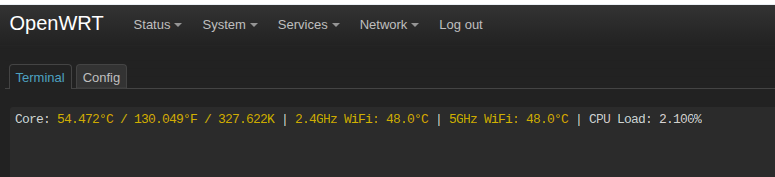
The router is running cool, not stressed in the slightest:

1 Like