Not sure this helps?:
We try uboot here… I have already copied dts nodes from linux added/modified drivers and see the eeprom.
But i cannot access via i2c command (where the most examples base on),read vie eeprom command seems to work (my eeprom is empty).
Btw parts of the txt are from me using my oled display on r3.
so did a small test:
# echo "TEST" | dd of=/sys/bus/i2c/devices/2-0057/eeprom bs=1
5+0 records in
5+0 records out
5 bytes copied, 0.00206577 s, 2.4 kB/s
root@bpi-r4-v11:~
# dd if=/sys/bus/i2c/devices/2-0057/eeprom bs=1 count=5
test
5+0 records in
5+0 records out
5 bytes copied, 0.00272846 s, 1.8 kB/s
wonder why text is lowercase on reading, but basicly it seems working in linux so far.
in uboot i have not yet fuigured out how to read as i always get a -19 error with i2c command
and with eeprom-command i get this:
BPI-R4> i2c dev 2
Setting bus to 2
BPI-R4> eeprom read 57 $loadaddr 0 5

EEPROM @0x57 read: addr 0x46000000  off 0x0000  count 5 ... eeprom_rw_block: Cannot find udev for a bus -1
done
BPI-R4> md $loadaddr
46000000: 1400000a d503201f 41e00000 00000000  ..... .....A....
Pipe the output to hexdump?
Edit:
| hexdump -C
# dd if=/sys/bus/i2c/devices/2-0057/eeprom bs=1 count=5|hexdump -C
5+0 records in
5+0 records out
5 bytes copied, 0.00266515 s, 1.9 kB/s
00000000  74 65 73 74 0a                                    |test.|
00000005
root@bpi-r4-v11:~
# echo "TEST" |hexdump -C
00000000  54 45 53 54 0a                                    |TEST.|
00000005
btw. i tried
echo "BLAH" > /sys/bus/i2c/devices/2-0057/eeprom
but this does not work, and noticed, that i cannot repeat this with another write from linux (i guess i have to erase the blocks first, but have not found out how yet)
root@bpi-r4-v11:~
# echo "BLAH" | dd of=/sys/bus/i2c/devices/2-0057/eeprom bs=1
5+0 records in
5+0 records out
5 bytes copied, 0.00221038 s, 2.3 kB/s
root@bpi-r4-v11:~
# dd if=/sys/bus/i2c/devices/2-0057/eeprom bs=1 count=5|hexdump -C
00000000  74 65 73 74 0a                                    |test.|
5+0 records in
5+0 records out
00000005
5 bytes copied, 0.0027213 s, 1.8 kB/s
added some debugs in uboot and this is the result:
BPI-R4> i2c dev 2
Setting bus to 2
mtk_i2c_probe:791 i2c@11005000 probe start
mtk_i2c_probe:801 i2c@11005000 probe finish
pca954x_select:126 i2c-mux@70 select start bus i2c@11005000->i2c-mux@70->i2c@0 channel:#0
pca954x_select:132 i2c-mux@70 select end
mtk_i2c_transfer:700 i2c@11005000 transfer start
mtk_i2c_transfer:758 i2c@11005000 transfer end
mtk_i2c_transfer:700 i2c@11005000 transfer start
mtk_i2c_transfer:758 i2c@11005000 transfer end
BPI-R4> eeprom read 57 $loadaddr 0 5

EEPROM @0x57 read: addr 0x46000000  off 0x0000  count 5 ... eeprom_rw_block: Cannot find udev for a bus -1
done
so it looks right till the i2c-mux, but it seems the eeprom itself is not probed, but compatible is there
when i do a i2c probe then it looks like the eeprom-probe is called
i2c_eeprom_std_probe:158 eeprom@57 probe start
i2c_eeprom_read:28 eeprom@57 start
i2c_eeprom_read:31 eeprom@57 read end
pca954x_select:126 i2c-mux@70 select start bus i2c@11005000->i2c-mux@70->i2c@0 channel:#0
pca954x_select:132 i2c-mux@70 select end
mtk_i2c_transfer:700 i2c@11005000 transfer start
mtk_i2c_transfer:758 i2c@11005000 transfer end
mtk_i2c_transfer:700 i2c@11005000 transfer start
mtk_i2c_transfer:758 i2c@11005000 transfer end
mtk_i2c_transfer:700 i2c@11005000 transfer start
mtk_i2c_transfer:758 i2c@11005000 transfer end
i2c_eeprom_std_probe:174 eeprom@57 probe end
 57pca954x_select:126 i2c-mux@70 select start bus i2c@11005000->i2c-mux@70->i2c@0 channel:#0
pca954x_select:132 i2c-mux@70 select end
https://docs.phytec.com/projects/yocto-phycore-am65x/en/latest/interfaceguides/eeprom.html
dd if=/dev/zero
got the eeprom read this way…so i2c layer works and it is a uboot eeprom driver issue
edit: added previous commands without debug
BPI-R4> i2c bus
Bus 0:  i2c@11004000
Bus 1:  i2c@11005000
   70: i2c-mux@70, offset len 1, flags 0
Bus 2:  i2c@11005000->i2c-mux@70->i2c@0
   57: eeprom@57, offset len 1, flags 0
BPI-R4> i2c dev 2
Setting bus to 2
BPI-R4> i2c probe
BPI-R4> i2c md 0x57 0 5
pca954x_select:126 i2c-mux@70 select start bus i2c@11005000->i2c-mux@70->i2c@0 channel:#0
pca954x_select:132 i2c-mux@70 select end
mtk_i2c_transfer:700 i2c@11005000 transfer start
mtk_i2c_transfer:758 i2c@11005000 transfer end
mtk_i2c_transfer:700 i2c@11005000 transfer start
mtk_i2c_transfer:758 i2c@11005000 transfer end
mtk_i2c_transfer:700 i2c@11005000 transfer start
mtk_i2c_transfer:758 i2c@11005000 transfer end
0000: 74 65 73 74 0a    test.
also loading to mem address works so far
BPI-R4> i2c read 0x57 0 5 $loadaddr
BPI-R4> md.b $loadaddr 5
46000000: 74 65 73 74 0a                                   test.
also looks like the “i2c probe” command is optional and is done on i2c md/read
but the eeprom-command seems not accessing the i2c bus. but got u-boot crashing with the eeprom-command
BPI-R4> eeprom read 2 0x57 $loadaddr 0 5

EEPROM @0x57 read: addr 0x46000000  off 0x0000  count 5 ... i2c_eeprom_read:28 0
"Synchronous Abort" handler, esr 0x96000021, far 0x31
seems not working
root@bpi-r4-v11:~
# dd if=/dev/zero of=/sys/bus/i2c/devices/2-0057/eeprom bs=16 count=1
1+0 records in
1+0 records out
16 bytes copied, 0.00567577 s, 2.8 kB/s
root@bpi-r4-v11:~
# cat /sys/bus/i2c/devices/2-0057/eeprom | hexdump -C
00000000  74 65 73 74 0a ff ff ff  ff ff ff ff ff ff ff ff  |test............|
00000010  ff ff ff ff ff ff ff ff  ff ff ff ff ff ff ff ff  |................|
*
00000100
tried with 512 blocksize first, but got “dd: error writing ‘/sys/bus/i2c/devices/2-0057/eeprom’: File too large”
possibly the case-issue was because i wrote first small case “test” and afterwards with big letters, which was not written like the “BLAH” above
also tried erasing with 0xFF, but same as normal write it gets ignored
# echo -en "\xff\xff\xff\xff\xff" | dd of=/sys/bus/i2c/devices/2-0057/eeprom
0+1 records in
0+1 records out
5 bytes copied, 0.00197715 s, 2.5 kB/s
root@bpi-r4-v11:~
# cat /sys/bus/i2c/devices/2-0057/eeprom | hexdump -C
00000000  74 65 73 74 0a ff ff ff  ff ff ff ff ff ff ff ff  |test............|
00000010  ff ff ff ff ff ff ff ff  ff ff ff ff ff ff ff ff  |................|
*
00000100
does eeprom only support full page write (so maybe i need to write x bytes to allow overwriting it) or remember last write position (but then i had the TEST after my lowercase test)?
i tried also writing from uboot
i2c mw 0x57 0 0xff 6
BPI-R4> i2c md 0x57 0 10
0000: ff ff ff ff ff ff ff ff ff ff ff ff ff ff ff ff    ................
Maybe try to find the largest possible?
Would it be better to use the command eeprog instead of sysfs?
eeprog - reads and writes 24Cxx EEPROMs connected to I2C serial bus
seems 256 is the largest blocksize to be written.
eeprog seems having no package on debian and needs to be compiled
The 24c02 is only 256 bytes 
Yes you are right,i thought it was a bit bigger (at least kbytes),but linux kernel confirms
at24 2-0057: 256 byte 24c02 EEPROM, writable, 1 bytes/write
It is set in the devicetree,size = 256, but for this eeprom, it is the actual size.
AT24C02A/04A : PAGE WRITE: The 2K EEPROM is capable of an 8-byte page write, and the 4K device is capable of 16-byte page writes.
So should be able to add:
pagesize = <8>;
To the devicetree, but leaving it out <1> is the safer option, get it functional without first.
The WP pin is connected to the same gpio pin as the green led So you would need to switch this led on or off to enable writing to the eeprom.
1 Like
tlv_eeprom
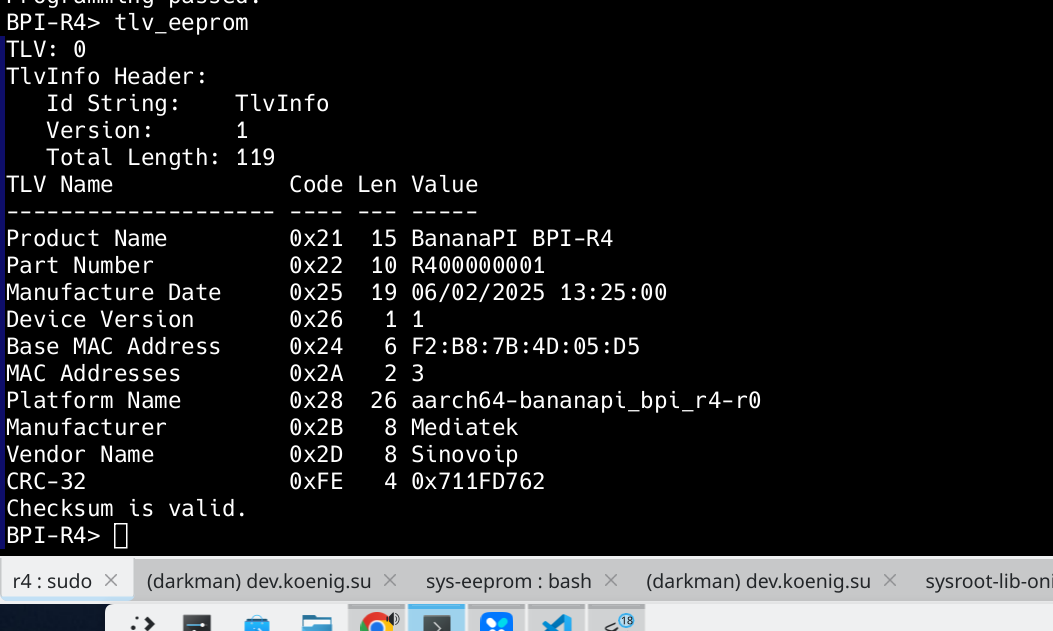
For Board Information (Type Code and Value) https://opencomputeproject.github.io/onie/design-spec/hw_requirements.html
This information can now be used to pre-configure the device. For example, assigning mac address
How to use
Add this line to .config
CONFIG_CMD_TLV_EEPROM=y
Read and erase eeprom data
tlv_eeprom read
tlv_eeprom erase
Programming data to eeprom
tlv_eeprom set 0x21 'BananaPI BPI-R4'
tlv_eeprom set 0x22 '<Serial Number>'
tlv_eeprom set 0x25 'DD/MM/YYYY HH:MM:SS'
tlv_eeprom set 0x26 '0x01'
tlv_eeprom set 0x24 '<Base Mac Address>'
tlv_eeprom set 0x2A '<Number of mac address (3 GMAC == 3 mac Address)>'
tlv_eeprom set 0x28 '(aarch|arm)64-bananapi_bpi_r4-r0'
tlv_eeprom set 0x2B 'Mediatek'
tlv_eeprom set 0x2D 'Sinovoip'
tlv_eeprom write
Enjoy
Ah,this is a command in mainline uboot?
Does it generate 3 mac addresses based on the base mac? Does it update devicetree for linux?
At the moment, no. But I’m working on it.
But basic read+write seems to work now,right?
Yes. i’ts work. EEPROM is now programming.