I don’t have v1.0.78. I meant that I reported we need v1.0.78.
1 Like
Bump, we need this firmware
1 Like
Quick question — am I reading this right? @dangowrt just opened PR #23477 in OpenWrt (“generic: update MxL862xx DSA switch driver kernel”, May 21), and his kernel patch series for the MxL862xx DSA driver is already at v12 on LKML. To me that looks like the driver side really is being prepared for integration now.
Can anyone closer to the development confirm — is this what it looks like, or am I being too optimistic?
well only daniel can give you any timeline… and i believe there is no timeline according to the speed of changes i have been seeing from the patches he is upstreaming 1.0.70-1.0.73-1.0.75-1.0.78-1.0.80 and now 1.0.84 also, this one Netdev + BPF - Patchwork
1 Like
Can someone tell me what software bug exists in version V1.0.70 of the mxl862?
I checked relevant forums, and it seems the network port problem is caused by incompatibility with the open-source OpenWrt image.
If you can provide more detailed information, please let me know.
Mainline driver (used also in openwrt) sometimes run in timeout (internal phys not recognized or bot completely configured) because switch is initialized first completely with all possible options in non-dsa mode which has also some security relevant issues and then driver configures some parts for dsa. For upstreaming switch has to be initialized in very basic mode (full isolation,no web-ui,etc.) and then configured like dt says. With current software afair 10g port mode cannot be changed, 10gbase-r is imho fixed for ports used for cpu and sfp/phy.
1 Like
@sinovoip @sinovoip1 any words on this? Can we get some clarity on how you plan to handle this?
We would love some clear feedback on the topic.
Good morning @Pedro Ameruoso, they’re not going to answer you, and we don’t expect them to.
We’re still waiting for them to mass-produce all of this:
and this: BPI-R4 Accessories : WIFI7 module extension suites
You can wait a long time for them to show up and give any explanation; they’re only interested in the dollars.
Have a good day.
Equipment used: R4Pro 8X, CAT7 Ethernet cable, and a PC with a 10G Ethernet port.
Image name: BPI-R4Pro-8X-BE14-MT76-OpenWRT24.10-DSA-snand-251229.bin
MXL firmware version: 1.0.70.70
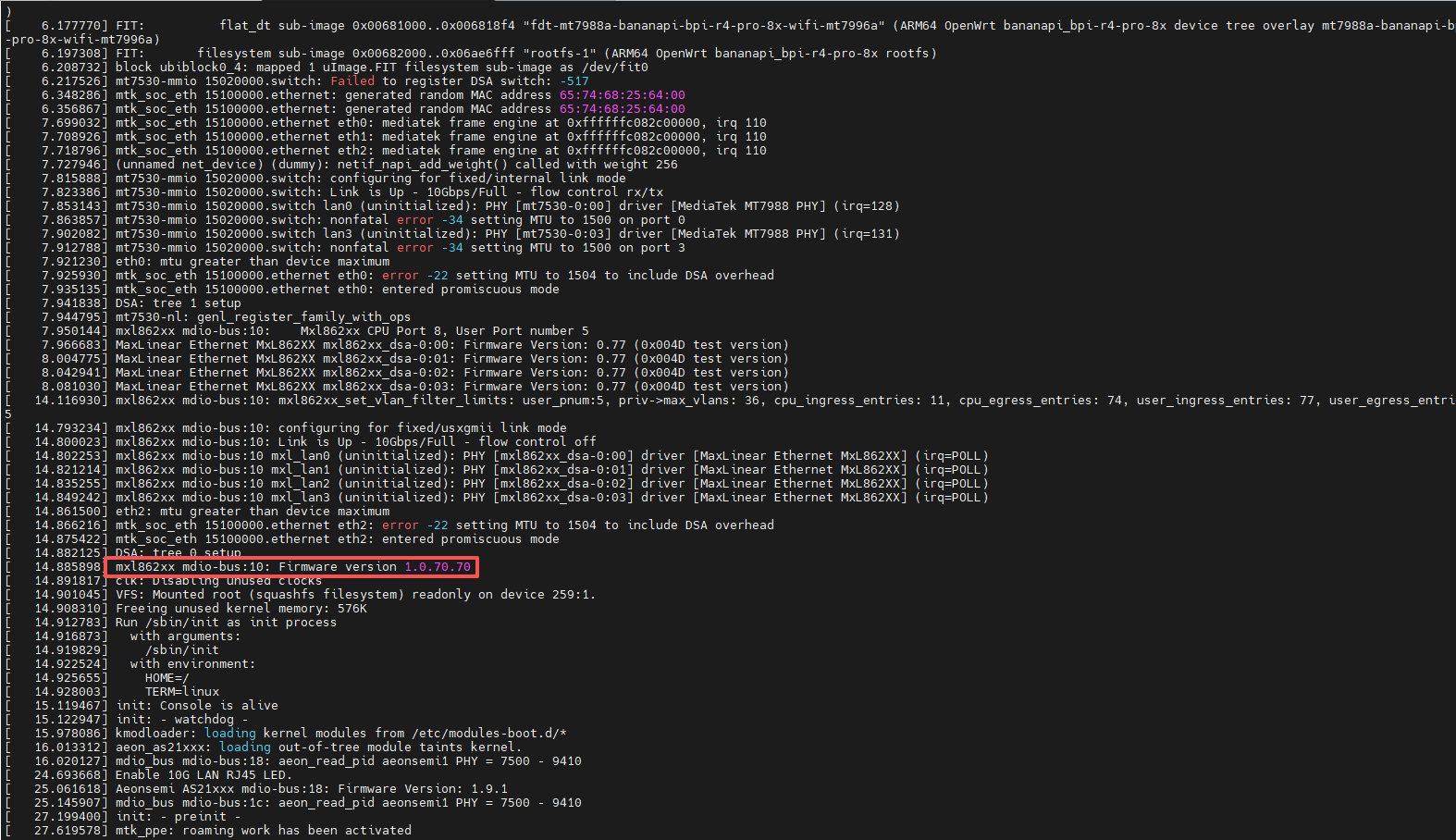
I tested the network port using the image from the BPI official website and did not experience any instability. Please try using the BPI official website image or source code.If you are using third-party source code, you may need to check the code’s compatibility.
I know that the downstream driver works,but mainline driver has some requirements which are not filled there. These require port isolation and very basic preconfig till driver kicks in. And then configuring all needed based on dts.
1 Like
Hi everyone, BPI has put the latest 1.0.85 Mxl firmware on its official website. If you need to upgrade, you can download it from here. The flashing instructions are in gettingstart.
5 Likes
Hiya, thanks for that. I have a few questions.
- Can you also please provide the previous (working) firmware so if things don’t go right, I can revert it to the previous version.
- Why exactly should I update to this firmware? A detailed list of reasons would be great.
- Please provide
sha256sumof all the firmware files, including the previous one. - Has anyone tried out this firmware update? If so, what have you noticed?
Thanks,
- Bana
For 1 I tried asking this in the past to pbi. They never allowed me to have it. I decided to use flashrom and a sop-8 clip to dump it myself for backup purposes.
For 2 look at the thread on openwrt pull request and focus on Daniel posts. It will give you visibility in what should have been addressed.
- Agree @hyf please provide sha256 at least of the firmware file so we can be sure we are downloading a good binary file.
Hello everyone.
I decided to trust the firmware files provided by Banana Pi and updated the MaxLinear MxL862xx switch firmware on my BPI-R4 Pro 8X.
I used this file:
mxl862xxc_1030_1085_1085_0069_signed_xfi_upgrade_fca.bin
The flashing process reported:
Erase flash
Program flash
successfully download firmware to target
However, immediately after that, the kernel started showing multiple errors:
mxl862xx: failed to read mmd on port 1
mxl862xx: failed to read mmd on port 2
phy_check_link_status returned: -22
FW Upload Failed - Register Read Failed
During reboot, there were also many bridge and VLAN-related errors:
failed to remove port from bridge
failed to clear bridge port flag
failed to delete vlan 1: -EPERM
WARNING at nbp_vlan_flush
After reboot, the switch firmware version is detected as:
Firmware version 1.0.85.85
Firmware Version: 0.105 (0x0069 test version)

root@OpenWrt:~# dmesg | grep -iE 'mxl.*firmware|firmware.*mxl'
[    6.801806] MaxLinear Ethernet MxL862XX mxl862xx_dsa-0:00: Firmware Version: 0.105 (0x0069 test version)
[    6.839988] MaxLinear Ethernet MxL862XX mxl862xx_dsa-0:01: Firmware Version: 0.105 (0x0069 test version)
[    6.878171] MaxLinear Ethernet MxL862XX mxl862xx_dsa-0:02: Firmware Version: 0.105 (0x0069 test version)
[    6.916339] MaxLinear Ethernet MxL862XX mxl862xx_dsa-0:03: Firmware Version: 0.105 (0x0069 test version)
[   11.781786] mxl862xx mdio-bus:10: Firmware version 1.0.85.85
The router boots and the MxL ports appear to work, but the log still contains repeated messages such as:
mxl862xx: failed to write mmd on port 30
So the firmware update itself seems to have completed, but the amount of errors and the “test version” label are concerning.
Is this expected behavior for firmware version 1.0.85.85 / build 0x0069?
I would suggest you put all your findings on the openwrt pull request for Daniel to comment and see if it is normal
1 Like
This is caused by the as21 phy driver writing to non-existent device before checking for as21 phy.
This is only happen when using the downstream as21 driver from bpi/mtk-sdk and can be fixed like this:
Even then how do you know what you read is the correct firmware? I think without, at least, the checksum this is risky business.