This patch series has a lot of good info. Thanks for sharing it. For the R4 Pro, I assume it’s an internal MII mux?
It is just software based on moddef0 gpio which is used in driver to bind different phylink instance. No specific hardware afaik. This mux must be done in another way for mainline. I just modified the sdk driver to work in 6.18.
2 Likes
Following this… Very keen to have mainline support. Thanks to all working on this.
The current state is only bootup and function of management port as this is the only part i could upstream to linux because of missing pcs and mxl driver. Next part is mxl driver as daniel currently upstream it.
Pcs is already part of openwrt,but combo parts need phy driver and ethmux. This parts could be added based on my 6.18-main branch. But it will be tricky when using only mainline phy driver and the not yet ready ethmux based on phy ports series.
Got the frank-w 6.18 kernel up and running because I wanted to test how the aeonsemi phys are working with different speed links with future mainline support.
Here is my finding:
R4-Pro 10g lan phy attached to a 2.5 gbit switch connected to my ex5601-t0 2.5gbit router. The phy correctly auto-negotiates 2.5gbit and the download speeds are ok. (I have 2.5down/1up gbit fiber at home).
If I run an iperf for testing upload the speed is very bad. I believe because of missing pause frames? Or some sort of flow control?
root@bpi-r4:~# ethtool mxl_lan4
Settings for mxl_lan4:
        Supported ports: [ TP    MII ]
        Supported link modes:   100baseT/Full
                                1000baseT/Half 1000baseT/Full
                                10000baseT/Full
                                2500baseT/Full
        Supported pause frame use: Symmetric Receive-only
        Supports auto-negotiation: Yes
        Supported FEC modes: Not reported
        Advertised link modes:  100baseT/Full
                                1000baseT/Half 1000baseT/Full
                                10000baseT/Full
                                2500baseT/Full
        Advertised pause frame use: Symmetric Receive-only
        Advertised auto-negotiation: Yes
        Advertised FEC modes: Not reported
        Link partner advertised link modes:  10baseT/Half 10baseT/Full
                                             100baseT/Half 100baseT/Full
                                             1000baseT/Full
        Link partner advertised pause frame use: Symmetric Receive-only
        Link partner advertised auto-negotiation: Yes
        Link partner advertised FEC modes: Not reported
        Speed: 2500Mb/s
        Duplex: Full
        Auto-negotiation: on
        Port: Twisted Pair
        PHYAD: 24
        Transceiver: external
        MDI-X: Unknown
        Supports Wake-on: d
        Wake-on: d
        Link detected: yes

root@bpi-r4:~# iperf3 -c it1.speedtest.aruba.it -p 5201
Connecting to host it1.speedtest.aruba.it, port 5201
[  5] local 10.10.1.3 port 45204 connected to 31.14.130.68 port 5201
[ ID] Interval           Transfer     Bitrate         Retr  Cwnd
[  5]   0.00-1.00   sec  1.38 MBytes  11.5 Mbits/sec    2   1.39 KBytes
[  5]   1.00-2.00   sec  0.00 Bytes  0.00 bits/sec    1   1.39 KBytes
[  5]   2.00-3.00   sec  0.00 Bytes  0.00 bits/sec    0   1.39 KBytes
[  5]   3.00-4.00   sec  0.00 Bytes  0.00 bits/sec  127   89.0 KBytes
[  5]   4.00-5.00   sec  0.00 Bytes  0.00 bits/sec   12   1.39 KBytes
[  5]   5.00-6.00   sec  1.00 MBytes  8.39 Mbits/sec  121   94.6 KBytes
[  5]   6.00-7.00   sec   640 KBytes  5.24 Mbits/sec    7   1.39 KBytes
[  5]   7.00-8.00   sec  0.00 Bytes  0.00 bits/sec    1   1.39 KBytes
[  5]   8.00-9.00   sec  0.00 Bytes  0.00 bits/sec    0   1.39 KBytes
[  5]   9.00-10.01  sec  0.00 Bytes  0.00 bits/sec    0   1.39 KBytes
- - - - - - - - - - - - - - - - - - - - - - - - -
[ ID] Interval           Transfer     Bitrate         Retr
[  5]   0.00-10.01  sec  3.00 MBytes  2.51 Mbits/sec  271             sender
[  5]   0.00-13.60  sec  1.75 MBytes  1.08 Mbits/sec                  receiver
R4-PRO 10g phy attached to a 10gbit switch port connected to my ex5601-t0 2.5gbit router. The phy correctly auto-negotiates 10g with my switch and the upload speeds are ok.
root@bpi-r4:~# ethtool mxl_lan4
Settings for mxl_lan4:
        Supported ports: [ TP    MII ]
        Supported link modes:   100baseT/Full
                                1000baseT/Half 1000baseT/Full
                                10000baseT/Full
                                2500baseT/Full
        Supported pause frame use: Symmetric Receive-only
        Supports auto-negotiation: Yes
        Supported FEC modes: Not reported
        Advertised link modes:  100baseT/Full
                                1000baseT/Half 1000baseT/Full
                                10000baseT/Full
                                2500baseT/Full
        Advertised pause frame use: Symmetric Receive-only
        Advertised auto-negotiation: Yes
        Advertised FEC modes: Not reported
        Link partner advertised link modes:  1000baseT/Full
        Link partner advertised pause frame use: Symmetric Receive-only
        Link partner advertised auto-negotiation: Yes
        Link partner advertised FEC modes: Not reported
        Speed: 10000Mb/s
        Duplex: Full
        Auto-negotiation: on
        Port: Twisted Pair
        PHYAD: 24
        Transceiver: external
        MDI-X: Unknown
        Supports Wake-on: d
        Wake-on: d
        Link detected: yes

root@bpi-r4:~# iperf3 -c it1.speedtest.aruba.it -p 5201
Connecting to host it1.speedtest.aruba.it, port 5201
[  5] local 10.10.1.3 port 39480 connected to 31.14.130.68 port 5201
[ ID] Interval           Transfer     Bitrate         Retr  Cwnd
[  5]   0.00-1.00   sec  92.1 MBytes   772 Mbits/sec    0   4.10 MBytes
[  5]   1.00-2.00   sec   112 MBytes   935 Mbits/sec    0   4.10 MBytes
[  5]   2.00-3.00   sec   110 MBytes   922 Mbits/sec    0   4.10 MBytes
[  5]   3.00-4.00   sec   108 MBytes   909 Mbits/sec    0   4.10 MBytes
[  5]   4.00-5.00   sec   111 MBytes   933 Mbits/sec    0   4.10 MBytes
[  5]   5.00-6.00   sec   107 MBytes   899 Mbits/sec    0   4.10 MBytes
[  5]   6.00-7.00   sec   111 MBytes   929 Mbits/sec    0   4.10 MBytes
[  5]   7.00-8.00   sec   111 MBytes   930 Mbits/sec    0   4.10 MBytes
[  5]   8.00-9.00   sec   110 MBytes   924 Mbits/sec    0   4.10 MBytes
[  5]   9.00-10.01  sec   112 MBytes   926 Mbits/sec    0   4.10 MBytes
- - - - - - - - - - - - - - - - - - - - - - - - -
[ ID] Interval           Transfer     Bitrate         Retr
[  5]   0.00-10.01  sec  1.06 GBytes   908 Mbits/sec    0             sender
[  5]   0.00-10.04  sec  1.06 GBytes   906 Mbits/sec                  receiver
@frank-w did you have chances to test the combinations i mentioned?
The switch is the same, it has 4 2.5gbit ports and 2 10g sfp+ ports. The connection from the switch to the router uses one of the 2.5gbit ports.
1 Like
So there is an issue with 10g phy in 2.5g mode? Cannot do much speed tests because i have no matching heatsink yet.
Well It looks like when the phy negotiates 10g it doesn’t need to choke himself… as the switch on the other side or the router (ex5601) itself is taking care of reducing the amount of traffic that can be sent.
If the phy is in 2500mode (and I believe in 1000mode is even more visible) it is not able to choke himself and tries to push as much as possible (maybe the maxlinear switch still thinks the phy is in 10g mode?) leading to unstable throughput… and maybe this could even cause interface flaps or resets if used in 1000 mode.
This is just my theory, probably I need to do tcpdumps while generating traffic to see if there are any flags related to flow control …
Or maybe it is just the aeonsemi firmware that has a bug… I should test this on the official image with the 1.9.1 binary… if I am not wrong your kernel has 1.8.5 of something similar
1 Like
Your guess is reasonable but can be other causes too.
Yes i still have 1.8.5 firmware as i had not tested newer one yet. Thanks for reporting that newer one is there.
Can you test with the wan phy to exclude mxl switch for this issue?
this is the wan aeonsemi 10g phy attached to my 2.5gbit switch port. same issue.
root@bpi-r4:~# ethtool eth1
Settings for eth1:
        Supported ports: [ TP    MII ]
        Supported link modes:   100baseT/Full
                                1000baseT/Half 1000baseT/Full
                                10000baseT/Full
                                2500baseT/Full
                                5000baseT/Full
        Supported pause frame use: Symmetric Receive-only
        Supports auto-negotiation: Yes
        Supported FEC modes: Not reported
        Advertised link modes:  100baseT/Full
                                1000baseT/Half 1000baseT/Full
                                10000baseT/Full
                                2500baseT/Full
                                5000baseT/Full
        Advertised pause frame use: Symmetric Receive-only
        Advertised auto-negotiation: Yes
        Advertised FEC modes: Not reported
        Link partner advertised link modes:  10baseT/Half 10baseT/Full
                                             100baseT/Half 100baseT/Full
                                             1000baseT/Full
        Link partner advertised pause frame use: Symmetric Receive-only
        Link partner advertised auto-negotiation: Yes
        Link partner advertised FEC modes: Not reported
        Speed: 2500Mb/s
        Duplex: Full
        Auto-negotiation: on
        Port: Twisted Pair
        PHYAD: 28
        Transceiver: external
        MDI-X: Unknown
        Current message level: 0x000000ff (255)
                               drv probe link timer ifdown ifup rx_err tx_err
        Link detected: yes
root@bpi-r4:~# iperf3 -c it1.speedtest.aruba.it -p 5201
Connecting to host it1.speedtest.aruba.it, port 5201
[  5] local 10.10.1.3 port 47082 connected to 31.14.130.68 port 5201
[ ID] Interval           Transfer     Bitrate         Retr  Cwnd
[  5]   0.00-1.00   sec  1.00 MBytes  8.38 Mbits/sec    7   1.39 KBytes
[  5]   1.00-2.00   sec  0.00 Bytes  0.00 bits/sec    1   1.39 KBytes
[  5]   2.00-3.00   sec  0.00 Bytes  0.00 bits/sec    0   1.39 KBytes
[  5]   3.00-4.00   sec   384 KBytes  3.15 Mbits/sec  111    132 KBytes
[  5]   4.00-5.00   sec  0.00 Bytes  0.00 bits/sec    2   1.39 KBytes
[  5]   5.00-6.00   sec   384 KBytes  3.15 Mbits/sec   95    110 KBytes
[  5]   6.00-7.00   sec  2.38 MBytes  19.9 Mbits/sec    5   1.39 KBytes
[  5]   7.00-8.00   sec  0.00 Bytes  0.00 bits/sec    1   1.39 KBytes
[  5]   8.00-9.00   sec  0.00 Bytes  0.00 bits/sec    1   1.39 KBytes
[  5]   9.00-10.04  sec  0.00 Bytes  0.00 bits/sec    0   1.39 KBytes
- - - - - - - - - - - - - - - - - - - - - - - - -
[ ID] Interval           Transfer     Bitrate         Retr
[  5]   0.00-10.04  sec  4.12 MBytes  3.45 Mbits/sec  223             sender
[  5]   0.00-14.71  sec  2.88 MBytes  1.64 Mbits/sec                  receiver
I decided to try with a 10gbit rj45(not fiber) transceiver in the wan SFP+ port:
[ 3886.369228] mtk_soc_eth 15100000.ethernet eth1: Link is Down
[ 3886.380758] lanbr0: port 6(eth1) entered disabled state
[ 3888.739178] mtk_soc_eth 15100000.ethernet: ethernet mux: line:5381 new channel:1,sfp:1
[ 3888.959178] mtk_soc_eth 15100000.ethernet: ethernet mux: switch to channel1
[ 3888.984273] sfp sfp2: module OEM              SFP+-T30         rev A    sn C2504010121      dc 250327
[ 3889.002896] mtk_soc_eth 15100000.ethernet: Created phylink for channel 1
[ 3889.016169] mtk_soc_eth 15100000.ethernet eth1: configuring for inband/10gbase-r link mode
[ 3889.038543] hwmon hwmon6: temp1_input not attached to any thermal zone
[ 3895.611981] mtk_soc_eth 15100000.ethernet eth1: Link is Up - 10Gbps/Full - flow control off
[ 3895.612029] lanbr0: port 6(eth1) entered blocking state
[ 3895.638864] lanbr0: port 6(eth1) entered forwarding state
root@bpi-r4:~# ethtool eth1
Settings for eth1:
        Supported ports: [ FIBRE ]
        Supported link modes:   10000baseSR/Full
        Supported pause frame use: Symmetric Receive-only
        Supports auto-negotiation: Yes
        Supported FEC modes: Not reported
        Advertised link modes:  10000baseSR/Full
        Advertised pause frame use: Symmetric Receive-only
        Advertised auto-negotiation: Yes
        Advertised FEC modes: Not reported
        Speed: 10000Mb/s
        Duplex: Full
        Auto-negotiation: on
        Port: FIBRE
        PHYAD: 0
        Transceiver: internal
        Current message level: 0x000000ff (255)
                               drv probe link timer ifdown ifup rx_err tx_err
        Link detected: yes

root@bpi-r4:~# iperf3 -c it1.speedtest.aruba.it -p 5201
Connecting to host it1.speedtest.aruba.it, port 5201
[  5] local 10.10.1.3 port 60346 connected to 31.14.130.68 port 5201
[ ID] Interval           Transfer     Bitrate         Retr  Cwnd
[  5]   0.00-1.00   sec  20.5 MBytes   172 Mbits/sec  536    254 KBytes
[  5]   1.00-2.00   sec  11.1 MBytes  93.3 Mbits/sec    0    284 KBytes
[  5]   2.00-3.00   sec  12.6 MBytes   106 Mbits/sec    0    314 KBytes
[  5]   3.00-4.00   sec  12.5 MBytes   105 Mbits/sec    0    345 KBytes
[  5]   4.00-5.00   sec  12.5 MBytes   105 Mbits/sec   92   90.4 KBytes
[  5]   5.00-6.00   sec  4.25 MBytes  35.7 Mbits/sec    0    120 KBytes
[  5]   6.00-7.00   sec  5.50 MBytes  46.1 Mbits/sec    0    149 KBytes
[  5]   7.00-8.00   sec  4.12 MBytes  34.6 Mbits/sec    9    132 KBytes
[  5]   8.00-9.00   sec  7.00 MBytes  58.7 Mbits/sec    0    161 KBytes
[  5]   9.00-10.01  sec  7.00 MBytes  58.1 Mbits/sec    0    193 KBytes
- - - - - - - - - - - - - - - - - - - - - - - - -
[ ID] Interval           Transfer     Bitrate         Retr
[  5]   0.00-10.01  sec  97.1 MBytes  81.4 Mbits/sec  637             sender
[  5]   0.00-10.04  sec  93.6 MBytes  78.2 Mbits/sec                  receiver

same test with 5 concurrency
[ ID] Interval           Transfer     Bitrate         Retr
[  5]   0.00-10.01  sec  67.2 MBytes  56.3 Mbits/sec   86             sender
[  5]   0.00-10.04  sec  66.0 MBytes  55.2 Mbits/sec                  receiver
[  7]   0.00-10.01  sec  72.1 MBytes  60.4 Mbits/sec   40             sender
[  7]   0.00-10.04  sec  70.9 MBytes  59.2 Mbits/sec                  receiver
[  9]   0.00-10.01  sec  78.8 MBytes  66.0 Mbits/sec  182             sender
[  9]   0.00-10.04  sec  76.4 MBytes  63.8 Mbits/sec                  receiver
[ 11]   0.00-10.01  sec  84.0 MBytes  70.4 Mbits/sec  106             sender
[ 11]   0.00-10.04  sec  82.5 MBytes  69.0 Mbits/sec                  receiver
[ 13]   0.00-10.01  sec  99.9 MBytes  83.7 Mbits/sec  339             sender
[ 13]   0.00-10.04  sec  97.0 MBytes  81.1 Mbits/sec                  receiver
[SUM]   0.00-10.01  sec   402 MBytes   337 Mbits/sec  753             sender
[SUM]   0.00-10.04  sec   393 MBytes   328 Mbits/sec                  receiver
it looks like the issue is on the phy side even if my transceiver supports 2500/5000/10000… I expected to negotiate 2500… so it is normal without flow control to see bad speeds.
I ll do more tests later with the official bananapi image that has 1.9.1 phy firmware
1 Like
As you have the issue also with wan-sfp it is more mtk driver issue because sfp is not connected to the airoha phy.
I can maybe force with ethtool my transceiver to set 2500 as speed and see if the issue is still there… will do more tests later, I have a 92mm fan spinning on it with a custom designed case xD
Could you do local speedtest,just to limit way to your endpoint which can also cause speeddrops?
1 Like
Did a test with my local truenas 10.10.1.20 with 2.5gbit interface.
The switch is still in the middle.
BPI 10g airoha wan PHY → 2,5g switch port → 2,5g truenas port.
Connecting to host 10.10.1.20, port 5201
[  5] local 10.10.1.3 port 50018 connected to 10.10.1.20 port 5201
[ ID] Interval           Transfer     Bitrate         Retr  Cwnd
[  5]   0.00-1.00   sec   128 KBytes  1.05 Mbits/sec    2   1.41 KBytes
[  5]   1.00-2.00   sec  0.00 Bytes  0.00 bits/sec    1   1.41 KBytes
[  5]   2.00-3.00   sec  0.00 Bytes  0.00 bits/sec    0   1.41 KBytes
[  5]   3.00-4.00   sec   128 KBytes  1.05 Mbits/sec   36   1.41 KBytes
[  5]   4.00-5.00   sec   128 KBytes  1.05 Mbits/sec   13   24.0 KBytes
[  5]   5.00-6.00   sec  0.00 Bytes  0.00 bits/sec    2   1.41 KBytes
[  5]   6.00-7.00   sec  0.00 Bytes  0.00 bits/sec    1   1.41 KBytes
[  5]   7.00-8.00   sec  0.00 Bytes  0.00 bits/sec    0   1.41 KBytes
[  5]   8.00-9.00   sec  0.00 Bytes  0.00 bits/sec    0   1.41 KBytes
[  5]   9.00-10.01  sec  0.00 Bytes  0.00 bits/sec    0   1.41 KBytes
- - - - - - - - - - - - - - - - - - - - - - - - -
[ ID] Interval           Transfer     Bitrate         Retr
[  5]   0.00-10.01  sec   384 KBytes   314 Kbits/sec   55             sender
[  5]   0.00-13.28  sec   259 KBytes   160 Kbits/sec                  receiver

iperf Done.
BPI 10g rj45 transceiver WAN SPF+ → 2,5g switch port → 2,5g truenas port.
root@bpi-r4:~# iperf3 -c 10.10.1.20 -p 5201
Connecting to host 10.10.1.20, port 5201
[  5] local 10.10.1.3 port 57464 connected to 10.10.1.20 port 5201
[ ID] Interval           Transfer     Bitrate         Retr  Cwnd
[  5]   0.00-1.00   sec   256 MBytes  2.14 Gbits/sec  1327    103 KBytes
[  5]   1.00-2.00   sec   251 MBytes  2.11 Gbits/sec  1365   94.7 KBytes
[  5]   2.00-3.00   sec   170 MBytes  1.42 Gbits/sec  766   87.7 KBytes
[  5]   3.00-4.00   sec   245 MBytes  2.06 Gbits/sec  1113    133 KBytes
[  5]   4.00-5.00   sec   235 MBytes  1.97 Gbits/sec  1043   94.7 KBytes
[  5]   5.00-6.00   sec   217 MBytes  1.82 Gbits/sec  1113    107 KBytes
[  5]   6.00-7.00   sec   245 MBytes  2.05 Gbits/sec  1020    110 KBytes
[  5]   7.00-8.00   sec   240 MBytes  2.01 Gbits/sec  1136    103 KBytes
[  5]   8.00-9.00   sec   224 MBytes  1.88 Gbits/sec  837   96.2 KBytes
[  5]   9.00-10.01  sec   240 MBytes  1.99 Gbits/sec  1165   72.1 KBytes
- - - - - - - - - - - - - - - - - - - - - - - - -
[ ID] Interval           Transfer     Bitrate         Retr
[  5]   0.00-10.01  sec  2.27 GBytes  1.95 Gbits/sec  10885             sender
[  5]   0.00-10.01  sec  2.27 GBytes  1.95 Gbits/sec                  receiver

iperf Done.
Edit:
Loaded the BPI 24.10 image with 1.9.1 firmware results are the same.
So R4Pro can send and truenas can receive with 2Gbit/s basicly (with many retransmitts maybe cause of wrong flowcontrol maybe also configurable on your switch?),but over the phy traffic is more worse than against your speedtest server. And it seems that mac is not the problem here.
My switch is very stupid. No config options.
For sure software is not mature, still I am a little bit confused why my SFP is seen as 10gbit when I can tell for sure that it can sync 1000/2,5/5/10gbit.
Indeed running
ethtool -s mxl_lan5 speed 2500 duplex full autoneg off

root@OpenWrt:~# iperf3 -c 10.10.1.20 -p 5201
Connecting to host 10.10.1.20, port 5201
[  5] local 10.10.1.3 port 49230 connected to 10.10.1.20 port 5201
[ ID] Interval           Transfer     Bitrate         Retr  Cwnd
[  5]   0.00-1.00   sec   283 MBytes  2.37 Gbits/sec    0   1.41 MBytes
[  5]   1.00-2.00   sec   281 MBytes  2.36 Gbits/sec    0   1.48 MBytes
[  5]   2.00-3.00   sec   279 MBytes  2.34 Gbits/sec    0   1.85 MBytes
[  5]   3.00-4.00   sec   281 MBytes  2.36 Gbits/sec  857   1.35 MBytes
[  5]   4.00-5.00   sec   281 MBytes  2.35 Gbits/sec    0   1.47 MBytes
[  5]   5.00-6.00   sec   281 MBytes  2.36 Gbits/sec    0   1.63 MBytes
[  5]   6.00-7.00   sec   280 MBytes  2.35 Gbits/sec  734   1.20 MBytes
[  5]   7.00-8.00   sec   281 MBytes  2.36 Gbits/sec    0   1.37 MBytes
[  5]   8.00-9.00   sec   280 MBytes  2.35 Gbits/sec   36    802 KBytes
[  5]   9.00-10.00  sec   280 MBytes  2.35 Gbits/sec  198    775 KBytes
- - - - - - - - - - - - - - - - - - - - - - - - -
[ ID] Interval           Transfer     Bitrate         Retr
[  5]   0.00-10.00  sec  2.74 GBytes  2.36 Gbits/sec  1825             sender
[  5]   0.00-10.00  sec  2.74 GBytes  2.35 Gbits/sec                  receiver

iperf Done.

root@OpenWrt:~# ethtool mxl_lan5
Settings for mxl_lan5:
        Supported ports: [ FIBRE ]
        Supported link modes:   10000baseSR/Full
        Supported pause frame use: Symmetric Receive-only
        Supports auto-negotiation: Yes
        Supported FEC modes: Not reported
        Advertised link modes:  10000baseSR/Full
        Advertised pause frame use: Symmetric Receive-only
        Advertised auto-negotiation: No
        Advertised FEC modes: Not reported
        Speed: 10000Mb/s
        Duplex: Full
        Auto-negotiation: off
        Port: FIBRE
        PHYAD: 0
        Transceiver: internal
        Supports Wake-on: d
        Wake-on: d
        Link detected: yes
Autoneg is off, speeds are better and less retries, still showing as 10gbit
For sure the aeonsemi (or airoha) has issues related to the real synced speed or whatever because i have the sentiment that keeps pushing at max speed.
Removing the SFP, switched back to PHY
[ 1354.765470] sfp sfp1: SM: enter empty:up:down event dev_down
[ 1354.771121] sfp sfp1: SM: exit empty:down:down
[ 1355.160683] Aeonsemi AS21xxx mdio-bus:18: failed to send ipc msg for 1: -14
[ 1357.195675] Aeonsemi AS21xxx mdio-bus:18: aeon_ipc_send_cmd fail to polling status failed: -110
[ 1357.204360] Aeonsemi AS21xxx mdio-bus:18: failed to send ipc msg for 1: -14
[ 1357.226544] Aeonsemi AS21xxx mdio-bus:18: failed to send ipc msg for 1: -14
[ 1366.076144] Aeonsemi AS21xxx mdio-bus:18: failed to send ipc msg for 1: -14
[ 1366.108678] Aeonsemi AS21xxx mdio-bus:18: Firmware Version: 1.9.1
[ 1366.115149] mxl862xx mdio-bus:10 mxl_lan5: PHY [mdio-bus:18] driver [Aeonsemi AS21xxx] (irq=POLL)
[ 1366.124021] mxl862xx mdio-bus:10 mxl_lan5: configuring for phy/10gbase-r link mode
[ 1366.132061] mxl862xx mdio-bus:10: dsa mux: switch to channel1
[ 1370.316209] mxl862xx mdio-bus:10 mxl_lan5: Link is Up - 2.5Gbps/Full - flow control rx/tx
[ 1370.316231] br-lan: port 7(mxl_lan5) entered blocking state
[ 1370.329950] br-lan: port 7(mxl_lan5) entered forwarding state
configured for 10gbase-r but link 2,5
10gbaser is imho right as this is the link between phy and mxl port. But i guess the issue is that it does not do inband management…a problem we try to fix the right way…so connecting the phy in usxgmii mode and let mac/dsa port config in real linkspeed (here 2500basex).
flashed the new image:
results are much better now: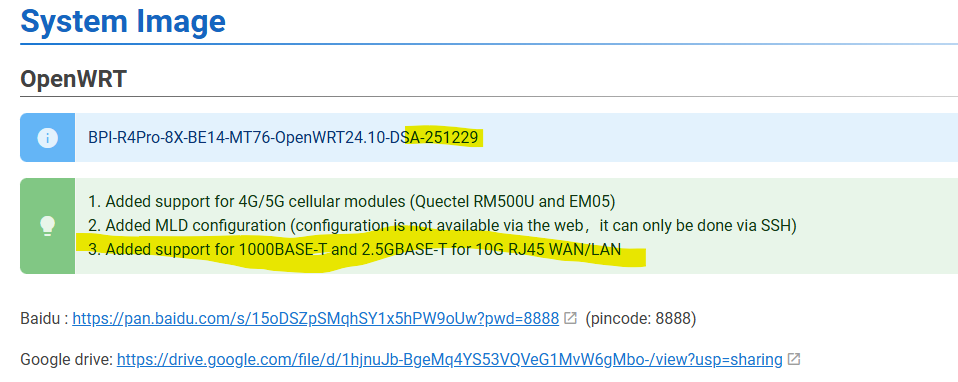
BPI 10g airoha wan PHY → 2,5g switch port → 2,5g truenas port.
root@OpenWrt:~# ethtool eth1
Settings for eth1:
        Supported ports: [ TP    MII ]
        Supported link modes:   100baseT/Full
                                1000baseT/Half 1000baseT/Full
                                10000baseT/Full
                                2500baseT/Full
                                5000baseT/Full
        Supported pause frame use: Symmetric Receive-only
        Supports auto-negotiation: Yes
        Supported FEC modes: Not reported
        Advertised link modes:  100baseT/Full
                                1000baseT/Half 1000baseT/Full
                                10000baseT/Full
                                2500baseT/Full
                                5000baseT/Full
        Advertised pause frame use: Symmetric Receive-only
        Advertised auto-negotiation: Yes
        Advertised FEC modes: Not reported
        Link partner advertised link modes:  10baseT/Half 10baseT/Full
                                             100baseT/Half 100baseT/Full
                                             1000baseT/Full
        Link partner advertised pause frame use: Symmetric Receive-only
        Link partner advertised auto-negotiation: Yes
        Link partner advertised FEC modes: Not reported
        Speed: 2500Mb/s
        Duplex: Full
        Auto-negotiation: on
        Port: Twisted Pair
        PHYAD: 1c
        Transceiver: external
        MDI-X: Unknown
        Current message level: 0x000000ff (255)
                               drv probe link timer ifdown ifup rx_err tx_err
        Link detected: yes
root@OpenWrt:~# iperf3 -c 10.10.1.20 -p 5201
Connecting to host 10.10.1.20, port 5201
[  5] local 10.10.1.3 port 48432 connected to 10.10.1.20 port 5201
[ ID] Interval           Transfer     Bitrate         Retr  Cwnd
[  5]   0.00-1.00   sec   284 MBytes  2.38 Gbits/sec    0    990 KBytes
[  5]   1.00-2.00   sec   280 MBytes  2.35 Gbits/sec    0    990 KBytes
[  5]   2.00-3.00   sec   280 MBytes  2.35 Gbits/sec    0   1.01 MBytes
[  5]   3.00-4.00   sec   281 MBytes  2.36 Gbits/sec    0   1.06 MBytes
[  5]   4.00-5.00   sec   281 MBytes  2.36 Gbits/sec    0   1.06 MBytes
[  5]   5.00-6.00   sec   280 MBytes  2.35 Gbits/sec    0   1.24 MBytes
[  5]   6.00-7.00   sec   280 MBytes  2.35 Gbits/sec    0   1.24 MBytes
[  5]   7.00-8.00   sec   280 MBytes  2.35 Gbits/sec    0   1.24 MBytes
[  5]   8.00-9.00   sec   282 MBytes  2.36 Gbits/sec    0   1.24 MBytes
[  5]   9.00-10.00  sec   280 MBytes  2.35 Gbits/sec    0   1.24 MBytes
- - - - - - - - - - - - - - - - - - - - - - - - -
[ ID] Interval           Transfer     Bitrate         Retr
[  5]   0.00-10.00  sec  2.74 GBytes  2.36 Gbits/sec    0             sender
[  5]   0.00-10.00  sec  2.74 GBytes  2.35 Gbits/sec                  receiver

iperf Done.
root@OpenWrt:~# iperf3 -c it1.speedtest.aruba.it -p 5201
Connecting to host it1.speedtest.aruba.it, port 5201
[  5] local 10.10.1.3 port 36154 connected to 31.14.130.68 port 5201
[ ID] Interval           Transfer     Bitrate         Retr  Cwnd
[  5]   0.00-1.00   sec  92.1 MBytes   772 Mbits/sec    0   3.77 MBytes
[  5]   1.00-2.00   sec   108 MBytes   909 Mbits/sec    0   3.77 MBytes
[  5]   2.00-3.00   sec   108 MBytes   909 Mbits/sec    0   3.77 MBytes
[  5]   3.00-4.00   sec   109 MBytes   913 Mbits/sec    0   3.77 MBytes
[  5]   4.00-5.00   sec   107 MBytes   894 Mbits/sec    1   2.69 MBytes
[  5]   5.00-6.00   sec   108 MBytes   905 Mbits/sec    0   2.93 MBytes
[  5]   6.00-7.00   sec   108 MBytes   906 Mbits/sec    0   3.13 MBytes
[  5]   7.00-8.00   sec   110 MBytes   920 Mbits/sec    0   3.29 MBytes
[  5]   8.00-9.00   sec   103 MBytes   863 Mbits/sec    1   2.42 MBytes
[  5]   9.00-10.00  sec  98.9 MBytes   829 Mbits/sec    0   2.55 MBytes
- - - - - - - - - - - - - - - - - - - - - - - - -
[ ID] Interval           Transfer     Bitrate         Retr
[  5]   0.00-10.00  sec  1.03 GBytes   882 Mbits/sec    2             sender
[  5]   0.00-10.03  sec  1.03 GBytes   879 Mbits/sec                  receiver

iperf Done.
tested the lan 10gbit phy and has same results. wondering if this “Added support for 1000BASE-T and 2.5GBASE-T for 10G RJ45 WAN/LAN” means inband management
@zuowei8 from which source is this image created? i’ve seen that in MTK-SDK there are much changes to phy driver (seems like completely new codebase)