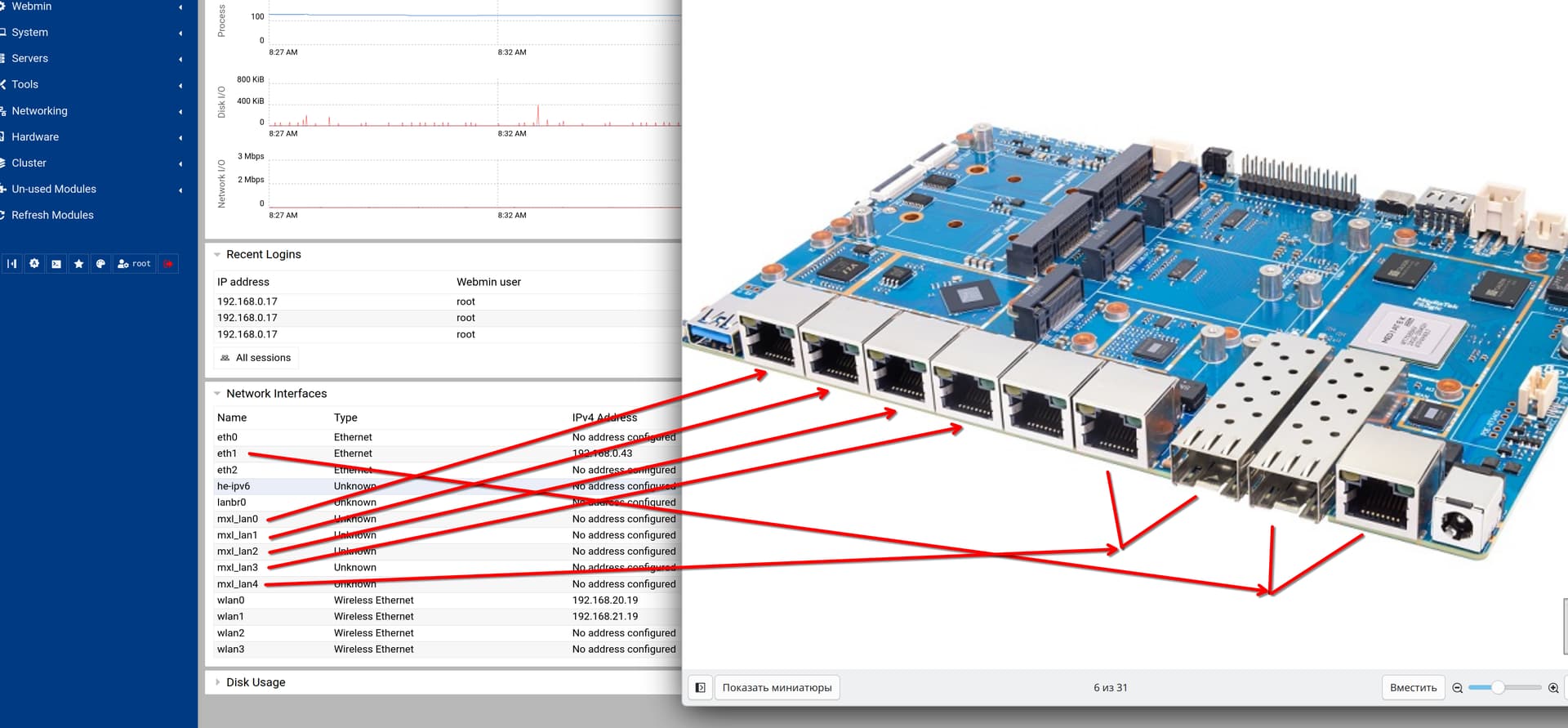
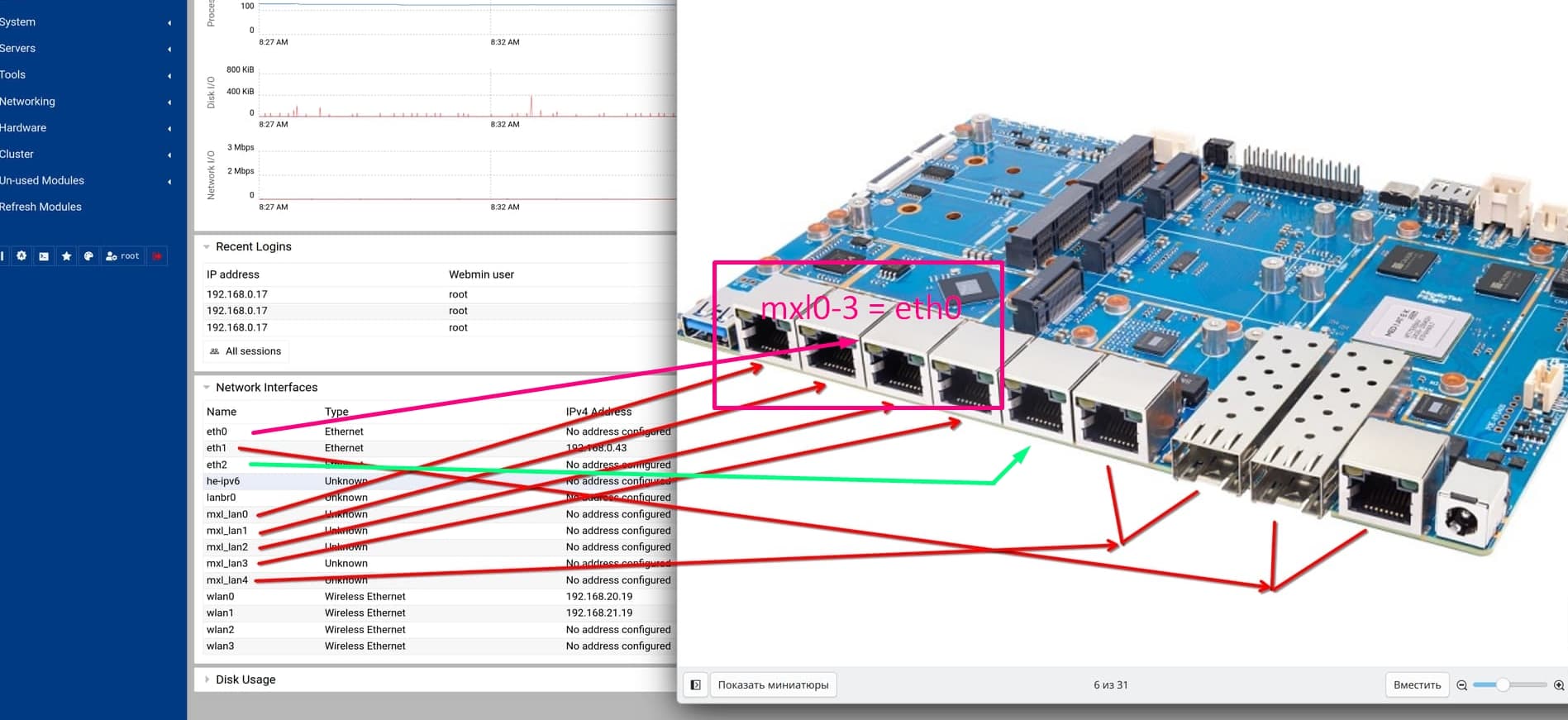
The naming scheme is very confusing, could you explain which port name corresponds to which physical/logic port? Or show it clearly on the diagram. It is more or less clear what mxl_lan is, but what exactly do the eth* interfaces correspond to?
Thx
The naming scheme is very confusing, could you explain which port name corresponds to which physical/logic port? Or show it clearly on the diagram. It is more or less clear what mxl_lan is, but what exactly do the eth* interfaces correspond to?
Thx
EthX are the MACs from SoC,eth0 is internal switch where on R4Pro only the mgmt port is exposed. 1 eth is for the mxl switch and one for wan combo.
https://wiki.fw-web.de/doku.php?id=en:bpi-r4pro:start#network
Yes,it is correct so far
No,mxl ports are eth2 you see it in the @eth2 when using ip a command.
The green one is the internal port in mainline named mgmt connected to eth0 mac.
See my table in my wiki. Have changed mxl port names in my 6.18 and 6.19 kernel and changed my wiki.
You can check this way, they are visible
> ip link
1: lo: <LOOPBACK,UP,LOWER_UP> mtu 65536 qdisc noqueue state UNKNOWN mode DEFAULT group default qlen 1000
    link/loopback 00:00:00:00:00:00 brd 00:00:00:00:00:00
2: sit0@NONE: <NOARP> mtu 1480 qdisc noop state DOWN mode DEFAULT group default qlen 1000
    link/sit 0.0.0.0 brd 0.0.0.0
3: eth0: <BROADCAST,MULTICAST,UP,LOWER_UP> mtu 1504 qdisc mq state UP mode DEFAULT group default qlen 1000
    link/ether 4e:4c:90:01:99:9a brd ff:ff:ff:ff:ff:ff
4: eth1: <BROADCAST,MULTICAST,UP,LOWER_UP> mtu 1500 qdisc mq state UP mode DEFAULT group default qlen 1000
    link/ether 76:fd:ff:2d:9e:75 brd ff:ff:ff:ff:ff:ff
5: eth2: <BROADCAST,MULTICAST,UP,LOWER_UP> mtu 1504 qdisc mq state UP mode DEFAULT group default qlen 1000
    link/ether 9a:a2:79:5e:97:3d brd ff:ff:ff:ff:ff:ff
6: mgmt@eth0: <BROADCAST,MULTICAST> mtu 1500 qdisc noop state DOWN mode DEFAULT group default qlen 1000
    link/ether 4e:4c:90:01:99:9a brd ff:ff:ff:ff:ff:ff
7: mxl_lan0@eth2: <BROADCAST,MULTICAST> mtu 1500 qdisc noop state DOWN mode DEFAULT group default qlen 1000
    link/ether 9a:a2:79:5e:97:3d brd ff:ff:ff:ff:ff:ff
8: mxl_lan1@eth2: <BROADCAST,MULTICAST> mtu 1500 qdisc noop state DOWN mode DEFAULT group default qlen 1000
    link/ether 9a:a2:79:5e:97:3d brd ff:ff:ff:ff:ff:ff
9: mxl_lan2@eth2: <BROADCAST,MULTICAST> mtu 1500 qdisc noop state DOWN mode DEFAULT group default qlen 1000
    link/ether 9a:a2:79:5e:97:3d brd ff:ff:ff:ff:ff:ff
10: mxl_lan3@eth2: <BROADCAST,MULTICAST> mtu 1500 qdisc noop state DOWN mode DEFAULT group default qlen 1000
    link/ether 9a:a2:79:5e:97:3d brd ff:ff:ff:ff:ff:ff
11: mxl_lan4@eth2: <NO-CARRIER,BROADCAST,MULTICAST,UP> mtu 1500 qdisc noqueue state DOWN mode DEFAULT group default qlen 1000
    link/ether 9a:a2:79:5e:97:3d brd ff:ff:ff:ff:ff:ff
12: lanbr0: <NO-CARRIER,BROADCAST,MULTICAST,UP> mtu 1500 qdisc noqueue state DOWN mode DEFAULT group default qlen 1000
    link/ether 2a:03:b9:16:9b:dc brd ff:ff:ff:ff:ff:ff
13: he-ipv6@lanbr0: <NOARP,UP,LOWER_UP> mtu 1480 qdisc noqueue state UNKNOWN mode DEFAULT group default qlen 1000
    link/sit 0.0.0.0 brd 0.0.0.0
14: wlan0: <BROADCAST,MULTICAST> mtu 1500 qdisc noop state DOWN mode DEFAULT group default qlen 1000
    link/ether 00:0a:52:0b:27:f6 brd ff:ff:ff:ff:ff:ff
15: wlan1: <BROADCAST,MULTICAST> mtu 1500 qdisc noop state DOWN mode DEFAULT group default qlen 1000
    link/ether 00:0a:52:0b:27:f6 brd ff:ff:ff:ff:ff:ff
16: wlan2: <BROADCAST,MULTICAST> mtu 1500 qdisc noqueue state DOWN mode DEFAULT group default qlen 1000
    link/ether 00:0a:52:0b:27:f6 brd ff:ff:ff:ff:ff:ff
17: wlan3: <BROADCAST,MULTICAST> mtu 1500 qdisc noop state DOWN mode DEFAULT group default qlen 1000
    link/ether 00:0a:52:0b:27:f7 brd ff:ff:ff:ff:ff:ff
Hello again, After some testing i think i came with the conclusion that the router has issues handling traffic going in/out at the same time on multiple ports too? (Possibly related to the terrible iperf speed issue) I noticed that if i send my friend a video or file on matrix my bpi seems to completely drop most traffic (That includes pings) Maybe this is also why DNS/DHCP has issues?
@frank-w Got any ideas? I tried to mitigate this by assigning IRQs to different cores to balance things out. I also tried to change the MTU or QoS, I think MTU did more harm than good so i might have to revert that. Here’s a list of stuff i do on my board:
echo 2 > /proc/irq/105/smp_affinity     # RX0
echo 2 > /proc/irq/106/smp_affinity     # RX1
echo 4 > /proc/irq/107/smp_affinity     # RX2
echo 8 > /proc/irq/108/smp_affinity     # RX3
echo e > /sys/class/net/eth0/queues/rx-0/rps_cpus
echo e > /sys/class/net/eth1/queues/rx-0/rps_cpus
echo e > /sys/class/net/eth2/queues/rx-0/rps_cpus
echo 32768 > /proc/sys/net/core/rps_sock_flow_entries
echo 8192 > /sys/class/net/eth0/queues/rx-0/rps_flow_cnt
echo 8192 > /sys/class/net/eth1/queues/rx-0/rps_flow_cnt
echo 8192 > /sys/class/net/eth2/queues/rx-0/rps_flow_cnt

ip link set eth0	mtu 2022
ip link set eth1	mtu 2022
ip link set mxl_lan4	mtu 1500
ip link set mgmt	mtu 2018
ip link set mxl_lan3	mtu 1500
ip link set mxl_lan2	mtu 1500
ip link set mxl_lan1	mtu 1500
ip link set mxl_lan0	mtu 1500
ip link set br-lan	mtu 2022
ip link set wwan0	mtu 1443
ip link set wlan0	mtu 2304

ethtool -K eth0 sg off
ethtool -K eth1 sg off
ethtool -K eth2 sg off

tc qdisc replace dev br-lan root fq_codel
Also i’m no networking expert so i might have missed something, Or set something to really awful values. Note: Setting scatter gather off was the most helpful thing here, Though i feel like that’s more of a “hack” than a proper fix.
When using rss please disable rps and you assign 2 rx to same cpu
Got it, Any other suggestions?
Setting MTU to 1500 on everything also seemed to help as stated earlier but i would really like to increase it, Bit limiting for my NAS 
On which port do you try jumbo frames? I only tried on mtk mac and switch. Not with mxl switch or aeonsemi phy.
The mtu values i provided earlier are the max values each interface supports (Excluding br-lan and wwan0) I noticed that i forgot to include eth2 (it also uses 2022 which is why i set br-lan to that)
But again i’m using 1500 now on all interfaces since changing the MTU causes the issues i described earlier to happen.
Hi @frank-w newbie question here, I flashed the old OpenWRT image on a SD-Card. Does [wed_task0] and [wed_task1] and mtk_ppe_dev_register_hook mean WED is working ?
5715     2 root     DW       0   0%   0% [wed_task1]
 5711     2 root     DW       0   0%   0% [wed_task0]
 9116     2 root     SW       0   0%   0% [ksmbd-br-lan]
 9228     2 root     SW       0   0%   0% [RtmpMlmeTask_02]
 8247     2 root     SW       0   0%   0% [BPCCCmdQTask_01]
root@OpenWrt:~# dmesg | grep -i "wed\|offload\|ppe\|dispatch\|mtk_wed"
[   48.584720] [email protected],tid_map_sanity() 1743: [0] unmapped_tid(0x0)
[   48.926307] mtk_ppe_dev_register_hook : ineterface ra0 register (1)
[   49.593554] mtk_soc_eth 15100000.ethernet eth0: TX vlan offload cannot be enabled when dsa is attached.
[   50.222742] mtk_ppe_dev_register_hook : ineterface apcli0 register (2)
[   50.428217] mtk_ppe_dev_unregister_hook : ineterface apcli0 set null (2)
[   52.024773] [email protected],tid_map_sanity() 1743: [1] unmapped_tid(0x0)
[   52.291561] mtk_ppe_dev_register_hook : ineterface rai0 register (2)
[   53.714438] mtk_ppe_dev_register_hook : ineterface apclii0 register (3)
[   54.012249] mtk_ppe_dev_unregister_hook : ineterface apclii0 set null (3)
[   55.838616] [email protected],tid_map_sanity() 1743: [2] unmapped_tid(0x0)
[   56.120941] mtk_ppe_dev_register_hook : ineterface rax0 register (3)
[   56.984896] mtk_ppe_dev_register_hook : ineterface apclix0 register (4)
[   57.212400] mtk_ppe_dev_unregister_hook : ineterface apclix0 set null (4)
root@OpenWrt:~# uname -a
Linux OpenWrt 5.4.271 #0 SMP Wed Jun 5 06:11:29 2024 aarch64 GNU/Linux
Wonder about r4pro image with kernel 5.4,thought it was 6.6.
No idea about wed as i had not done much tests with it…
Yes i’ve seen it already  but thanks for the ping.
But it looks like muxing itself is not yet part of this series yet.
Fair enough Frank, I was delightfully surprised these were active already myself. Hopefully they hurry up and update the wirelessreg.db / regulatory.db to reflect the ratified 6Ghz channels because It is still not updated from last year.
root@OpenWrt:~# dmesg | egrep -i 'dma|dma_mask|set DMA|DMA mask'
[ 7400.929895] warp_dev2 15010000.wed: Using 36bit DMA for streaming map
[ 7400.936328] warp_dev2 15010000.wed: Using 32bit DMA for coherent map
[ 7401.146797] warp_dev3 15010000.wed2: Using 36bit DMA for streaming map
[ 7401.153316] warp_dev3 15010000.wed2: Using 32bit DMA for coherent map
[ 7396.854516] wdma_dma_ctrl(): WDMA_GLO_CFG0=be275, txrx = 0
...
[ 7401.513063] wdma_dma_ctrl(): WDMA_GLO_CFG0=be27c, txrx = 3

root@OpenWrt:~# cat /proc/interrupts
129: 0 0 0 0 INTx 0 Edge -INTx mt7990-vec_data0
130: 0 0 0 0 INTx 0 Edge -INTx mt7991-vec_data0

root@OpenWrt:~# lsmod | grep -E "offload|flow"
nf_flow_table_hw 16384 1

root@OpenWrt:~# iptables -t filter -L FORWARD -v -n
...
 23 1408 FLOWOFFLOAD all -- * * 0.0.0.0/0 0.0.0.0/0 /* !fw3: Traffic offloading */ ctstate RELATED,ESTABLISHED FLOWOFFLOAD hw

root@OpenWrt:~# cat /proc/net/nf_conntrack | head -20
...
ipv4 2 tcp 6 src=192.168.1.156 dst=157.240.8.52 sport=64556 dport=443 ... [OFFLOAD] ...
...
ipv4 2 tcp 6 src=192.168.1.156 dst=157.240.8.1 sport=51658 dport=443 ... [OFFLOAD] ...

root@OpenWrt:~# ethtool -k eth0
rx-checksumming: on
tx-checksumming: on
...
scatter-gather: on
tcp-segmentation-offload: on
generic-segmentation-offload: on
generic-receive-offload: on
Where should it be updated? I do not update older posts when such information changes. My wiki should be up2date for this. But i remember that something took more time to be 4gb ready (afair ppe)
Good catch edited that out. Speaking of , do you have any examples of even better hardware offloading performance ?  Those were enabled out of the box maybe I could achive even better with good documentation.
If I recall correctly, PPE was fixed to work with 4 GB RAM by adding support for 36-bit addressing. WED was fixed later. I could be wrong though.