Hi. Is anyone successfully using the Patriot P300 m.2 drive on Banana Pi Bpi R3 and Openwrt at the moment? Thanks.
Working NVME SSD on Banana Pi r3 (BPi R3)
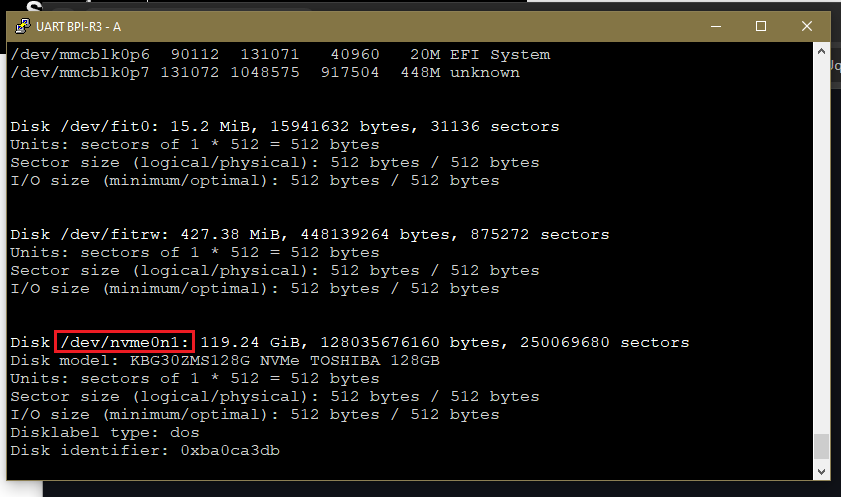
Disk Model: KBG302MS128G NMVe Toshiba 128GB
Driver Packages (as per jtxnn678): kmod-nvme

Procedure
-
Start with working OWRT on the BPiR3, Install SSD to M.2 Slot of the BPiR3, boot up.
-
Delete existing partitions, create new partitions, format partitions ext4 (block 2048), mount partitions
# Delete all partitions and create one new one. From terminal (ubuntu) also works from OWRT:
 fdisk -l             # List all devices, note dev/nvme0n1 partition of the SSD (listed at the end)
 fdisk /dev/nvme0n1   # Format USB drive
 m                    # help
 d                    # Delete partiion
 1             	     # Select partition X to delete
 p                    # Print partition table to verify deleted (might not need this)
 # Repeat for other partitions on USB
 n                    # Create a New Partition
 1                    # Assign Partition number to New Partition
 Enter                # Choose default value: p - primary (Extended is for legacy MBR w/ partitions > 4 on a disk)
 Enter                # Use Default sector for First Sector (ie. 2048)
 Enter                # Use Default Sector for Last Sector (Partition_size_MB)*(First Sector)=Last Sector (ie.Partition Size:10GB: 10,000*2048=20480000 (Last Sector 20480000))
 w                    # Write/commit all changes to disk
# Format USB as EXT4 format with mkfs
#   Syntax:  mkfs.ext4 [options] /dev/nvme0n1p1
#   [options]
#     -L 	# specifies the label for the partition
#     -m    # sets the reserved blocks percentage, which is 1 (1%) in this case
#     -b 	# specifies the block size, which we’ve set to 4096 bytes,

#  Syntax: (Formatting)

   fdisk -l       # find device name  See Screenshots above
   mkfs.ext4 -L EXT4 -m 1 -b 2048 /dev/nvme0n1p1
   mkfs.ext4 -L EXT4 -m 1 -b 2048 /dev/nvme0n1p2

# Now Mount  the nvme SSD for us
# Note: I created two partitions on my nvme, one to be used for logging and the other for future use.

   mkdir /mnt/nvme1
   mkdir /mnt/nvme2

   mount /dev/nvme0n1p1 /mnt/nvme1    # See screenshots above
# Response:
   [ 9060.486963] EXT4-fs (nvme0n1p1): mounted filesystem eabc402a-47a6-4ce3-aabd-49a0ad1d3752 r/w with ordered data mode. Quota mode: disabled.

   mount /dev/nvme0n1p2 /mnt/nvme2
# Response:
   [ 9070.658167] EXT4-fs (nvme0n1p2): mounted filesystem b6782965-07b7-4a2f-b46f-63a5cee1c7f7 r/w with ordered data mode. Quota mode: disabled.

    df -h    # verify partition(s) mounted  See screenshots above.

# How To - Unmount NVMe Partitions
    umount /dev/nvme0n1p1
    umount /dev/nvme01np2
    df -h    # verify partition(s) unmounted  See Screenshots
Hello  frank-w
Title:
BPi-R3 Mini: PCIe AER errors and kernel panic with Crucial P310 NVMe SSD
Labels:
bug, hardware, mediatek, pcie, nvme, r3-mini
 Issue Body
Hardware
· Board: Banana Pi R3 Mini · SoC: MediaTek MT7986 · NVMe: Crucial P310 2TB PCIe Gen4 (Micron/Crucial Technology Device 5426) · Boot Media: eMMC (primary), SPI NAND (secondary) · RAM: 2GB DDR4
Software
· Firmware: ImmortalWrt 24.10.4 (BananaWRT custom build) · U-Boot: 2024.10-ImmortalWrt-r33602-e717d133ed6d · Kernel: 6.6.110 · Build Date: Oct 27 2025
Problem Description
The Crucial P310 NVMe SSD is detected at the PCIe level but causes kernel panics due to PCIe AER errors when NVMe drivers load. The system works perfectly without NVMe modules, but crashes during NVMe initialization.
What Works 
· PCIe enumeration detects NVMe controller · Hardware is physically compatible · System boots and runs stable without NVMe modules · U-Boot recognizes PCIe topology
What Fails 
· Kernel panic when nvme/nvme-pci modules load · PCIe AER errors trigger system crashes · NVMe drive never becomes available to userspace
Critical Error Logs
PCIe Detection (Works):
[    2.637095] pci 0000:01:00.0: [c0a9:5426] type 00 class 0x010802
[    2.650087] pci 0000:01:00.0: 8.000 Gb/s available PCIe bandwidth, limited by 5.0 GT/s PCIe x2 link at 0000:00:00.0
NVMe Initialization (Starts then Fails):
[  553.270770] nvme 0000:01:00.0: assign IRQ: got 128
[  553.275801] nvme nvme0: pci function 0000:01:00.0
[  553.419853] nvme nvme0: allocated 64 MiB host memory buffer.
PCIe AER Errors (Cause Crash):
[  553.501807] pcieport 0000:00:00.0: AER: Corrected error message received from 0000:00:00.0
[  553.514692] pcieport 0000:00:00.0: PCIe Bus Error: severity=Corrected, type=Physical Layer, (Receiver ID)
[  553.532577] pcieport 0000:00:00.0:    [ 0] RxErr
[  553.550148] pcieport 0000:00:00.0: AER: Uncorrected (Fatal) error message received from 0000:00:00.0
[  553.566716] pcieport 0000:00:00.0:    [ 5] SDES                   (First)
[  553.592570] pcieport 0000:00:00.0:    [14] CmpltTO
[  553.607322] pcieport 0000:00:00.0: AER: broadcast error_detected message
[  553.624982] nvme nvme0: frozen state error detected, reset controller
Final Kernel Panic:
[  553.769402] Internal error: synchronous external abort: 0000000096000210 [#1] SMP
[  554.009534] Kernel panic - not syncing: synchronous external abort: Fatal exception
Debug Information
Current PCIe Status:
# lspci
00:00.0 PCI bridge: MEDIATEK Corp. Device 1f32 (rev 01)
01:00.0 Non-Volatile memory controller: Micron/Crucial Technology Device 5426 (rev 01)

# ls /dev/nvme*
ls: /dev/nvme*: No such file or directory

# cat /proc/cmdline
root=/dev/fit0 rootwait
NVMe Module Status:
# lsmod | grep nvme
(no output - modules not loaded to avoid crash)

# find /lib/modules -name "*nvme*"
/lib/modules/6.6.110/kernel/drivers/nvme/host/nvme.ko
/lib/modules/6.6.110/kernel/drivers/nvme/host/nvme-core.ko
Attempted Solutions
- Kernel Parameters:
· Result: System boots but NVMe drivers don’t auto-loadpci=noaer aer=off pcie_aspm=force - Manual Module Loading:
· Result: Immediate kernel panicmodprobe nvme nvme-pci - PCIe Link Management: · Tried various pcie_aspm.policy settings · No improvement in stability
Specific Questions for frank-w
- PCIe AER Configuration: How to properly disable AER for MT7986’s PCIe controller? The standard pci=noaer doesn’t seem sufficient.
- Gen4/Gen3 Compatibility: Are there known issues with Gen4 NVMe drives on the BPi-R3 Mini’s Gen3 controller? Should we force Gen3 mode?
- Device Tree Modifications: Are there specific DTS properties needed for stable PCIe operation with high-power NVMe drives?
- Power Management: Could this be a power delivery issue? The Crucial P310 is a high-performance drive - are there known power limitations on the R3 Mini’s M.2 slot?
- Kernel Configuration: Should NVMe support be compiled in rather than modular for this platform? Are there specific MT7986 PCIe patches needed?
- Error Recovery: The AER subsystem seems to trigger fatal errors on correctable issues - how can we make error recovery more robust?
- Hardware Workarounds: Are there known compatible NVMe models that work better with this board?
Additional Context
· The same Crucial P310 works perfectly in other x86 and ARM systems · BPi-R3 Mini PCIe link shows 8 Gb/s available (5.0 GT/s x2) as expected · U-Boot PCIe enumeration works correctly · Issue occurs specifically during Linux NVMe driver initialization
Supporting Files
If needed, I can provide:
· Complete dmesg log · U-Boot environment · Device tree source · Kernel config
 Why This Needs Expertise
· BPi-R3 Mini hardware specifics · MediaTek MT7986 PCIe implementation · OpenWrt kernel configuration for this platform · Device tree customization for stable operation
This appears to be a platform-specific issue requiring expertise in both the hardware design and the OpenWrt software stack for this particular board.
The core issue: PCIe link establishes but AER errors during NVMe initialization trigger fatal error recovery that crashes the system. Standard AER disable parameters don’t prevent the crashes.
This comprehensive issue provides all the technical details frank-w would need to understand and help solve the problem. It shows you’ve done substantial troubleshooting and narrows down the issue to specific PCIe/AER interactions on the BPi-R3 Mini platform.
Afaik gen3 driver means mtkv3 and not pciev3. I’m no pci expert but i remember similar issues with some v3 ssd. Seems really some features are missing (did not find aer in driver). If there is no way to disable aer in firmware i would define ssd as incompatible.
Try to boot something with a more recent kernel version. Who knows, there already may be a fix for your problem.
Hi guys,
I was checking the PCIe status on my BananaPi R3 Mini running Bananawrt, and here’s what I see:
lspci
00:00.0 PCI bridge: MEDIATEK Corp. Device 1f32 (rev 01) 01:00.0 Non-Volatile memory controller: Micron/Crucial Technology Device 5426 (rev 01)
ls /dev/nvme*
ls: /dev/nvme*: No such file or directory
cat /proc/cmdline
root=/dev/fit0 rootwait
The NVMe device shows up in lspci but no /dev/nvme* device nodes are present, so the system isn’t recognizing it for use.
Could you advise on the next steps to get the NVMe detected properly in Bananawrt? Do I need specific kernel modules, device tree changes, or a boot parameter adjustment?
Thanks in advance!
I guess nvme driver is missing or not loaded
Try
zgrep -i nvme /proc/config.gz
root@BananaWRT:~# [ 1261.715347] kmodloader: loading kernel modules from /etc/modules.d/* [ 1261.730488] nvme 0000:01:00.0: assign IRQ: got 128
[ 1261.735467] nvme nvme0: pci function 0000:01:00.0
[ 1261.740258] nvme 0000:01:00.0: enabling device (0000 → 0002)
[ 1261.745998] nvme 0000:01:00.0: enabling bus mastering
[ 1261.751129] mtk-pcie-gen3 11280000.pcie: msi#0x1 address_hi 0x0 address_lo 0x11280c00 data 1
[ 1261.759610] nvme 0000:01:00.0: save config 0x00: 0x5426c0a9
[ 1261.765166] nvme 0000:01:00.0: save config 0x04: 0x00100406
[ 1261.770729] nvme 0000:01:00.0: save config 0x08: 0x01080201
[ 1261.776283] nvme 0000:01:00.0: save config 0x0c: 0x00000000
[ 1261.781843] nvme 0000:01:00.0: save config 0x10: 0x20000004
[ 1261.787397] nvme 0000:01:00.0: save config 0x14: 0x00000000
[ 1261.792982] nvme 0000:01:00.0: save config 0x18: 0x00000000
[ 1261.798551] nvme 0000:01:00.0: save config 0x1c: 0x00000000
[ 1261.804119] nvme 0000:01:00.0: save config 0x20: 0x00000000
[ 1261.809690] nvme 0000:01:00.0: save config 0x24: 0x00000000
[ 1261.815260] nvme 0000:01:00.0: save config 0x28: 0x00000000
[ 1261.820832] nvme 0000:01:00.0: save config 0x2c: 0x2b00c0a9
[ 1261.826387] nvme 0000:01:00.0: save config 0x30: 0x00000000
[ 1261.831952] nvme 0000:01:00.0: save config 0x34: 0x00000080
[ 1261.837507] nvme 0000:01:00.0: save config 0x38: 0x00000000
[ 1261.843160] nvme 0000:01:00.0: save config 0x3c: 0x00000180
[ 1261.891782] hwmon hwmon4: temp1_input not attached to any thermal zone
[ 1261.898399] hwmon hwmon4: temp2_input not attached to any thermal zone
[ 1261.908157] nvme nvme0: allocated 64 MiB host memory buffer.
[ 1261.916494] mtk-pcie-gen3 11280000.pcie: msi#0x1 address_hi 0x0 address_lo 0x11280c00 data 1
[ 1261.924984] mtk-pcie-gen3 11280000.pcie: msi#0x2 address_hi 0x0 address_lo 0x11280c00 data 2
[ 1261.933495] mtk-pcie-gen3 11280000.pcie: msi#0x3 address_hi 0x0 address_lo 0x11280c00 data 3
[ 1261.941945] mtk-pcie-gen3 11280000.pcie: msi#0x4 address_hi 0x0 address_lo 0x11280c00 data 4
[ 1261.950386] mtk-pcie-gen3 11280000.pcie: msi#0x5 address_hi 0x0 address_lo 0x11280c00 data 5
[ 1261.961757] nvme nvme0: 4/0/0 default/read/poll queues
[ 1261.975854] nvme0n1: p1 p2 p3 p4
[ 1261.982820] kmodloader: done loading kernel modules from /etc/modules.d/*
[ 1262.095577] pcieport 0000:00:00.0: AER: Corrected error message received from 0000:00:00.0
[ 1262.103885] pcieport 0000:00:00.0: PCIe Bus Error: severity=Corrected, type=Physical Layer, (Receiver ID)
[ 1262.113488] pcieport 0000:00:00.0: device [14c3:1f32] error status/mask=00000001/00006000
[ 1262.121826] pcieport 0000:00:00.0: [ 0] RxErr
[ 1262.143925] pcieport 0000:00:00.0: AER: Uncorrected (Fatal) error message received from 0000:00:00.0
[ 1262.153099] pcieport 0000:00:00.0: PCIe Bus Error: severity=Uncorrected (Fatal), type=Transaction Layer, (Receiver ID)
[ 1262.163782] pcieport 0000:00:00.0: device [14c3:1f32] error status/mask=00000020/00400000
[ 1262.172118] pcieport 0000:00:00.0: [ 5] SDES (First)
[ 1262.178897] pcieport 0000:00:00.0: AER: broadcast error_detected message
[ 1262.185582] nvme nvme0: frozen state error detected, reset controller
[ 1262.327704] Internal error: synchronous external abort: 0000000096000210 [#1] SMP
[ 1262.335183] Modules linked in: nvme nvme_core pppoe ppp_async option nft_fib_inet nf_flow_table_inet wireguard usb_wwan rndis_host pppox ppp_mppe ppp_generic nft_reject_ipv6 nft_reject_ipv4 nft_reject_inet nft_reject nft_redir nft_quota nft_numgen nft_nat nft_masq nft_log nft_limit nft_hash nft_fullcone(O) nft_flow_offload nft_fib_ipv6 nft_fib_ipv4 nft_fib nft_ct nft_chain_nat nf_tables nf_nat_tftp nf_nat_snmp_basic nf_nat_sip nf_nat_pptp nf_nat_irc nf_nat_h323 nf_nat_ftp nf_nat_amanda nf_nat nf_flow_table nf_conntrack_tftp nf_conntrack_snmp nf_conntrack_sip nf_conntrack_sane nf_conntrack_pptp nf_conntrack_netlink nf_conntrack_netbios_ns nf_conntrack_irc nf_conntrack_h323 nf_conntrack_ftp nf_conntrack_broadcast nf_conntrack_amanda nf_conntrack mt7915e(O) mt76_connac_lib(O) mt76(O) mac80211(O) libchacha20poly1305 chacha_neon cfg80211(O) cdc_ether usbserial usbnet ums_usbat ums_sddr55 ums_sddr09 ums_karma ums_jumpshot ums_isd200 ums_freecom ums_datafab ums_cypress ums_alauda ts_kmp ts_fsm ts_bm slhc poly1305_neon
[ 1262.335345] nfnetlink nf_reject_ipv6 nf_reject_ipv4 nf_log_syslog nf_defrag_ipv6 nf_defrag_ipv4 macvlan libcurve25519_generic libcrc32c libchacha compat(O) cls_flower asn1_decoder act_vlan crypto_safexcel ntfs3 cls_bpf act_bpf sch_tbf sch_ingress sch_htb sch_hfsc em_u32 cls_u32 cls_route cls_matchall cls_fw cls_flow cls_basic act_skbedit act_mirred act_gact pwm_fan cryptodev(O) ip6_udp_tunnel udp_tunnel sit tunnel4 ip_tunnel nls_utf8 nls_iso8859_1 nls_cp437 crypto_user algif_skcipher algif_rng algif_hash algif_aead af_alg sha512_arm64 sha1_ce sha1_generic seqiv md5 geniv des_generic libdes authencesn authenc arc4 uas usb_storage leds_gpio xhci_plat_hcd xhci_pci xhci_mtk_hcd xhci_hcd gpio_button_hotplug(O) vfat fat exfat usbcore usb_common aquantia air_en8811h mii
[ 1262.492355] CPU: 0 PID: 672 Comm: irq/129-aerdrv Tainted: G M O 6.6.110 #0
[ 1262.500422] Hardware name: Bananapi BPi-R3 Mini (DT)
[ 1262.505368] pstate: 604000c5 (nZCv daIF +PAN -UAO -TCO -DIT -SSBS BTYPE=–)
[ 1262.512309] pc : pci_msi_mask_irq+0x48/0x84
[ 1262.516485] lr : mtk_pcie_msi_irq_mask+0x14/0x28
[ 1262.521087] sp : ffffffc082c43ab0
[ 1262.524384] x29: ffffffc082c43ab0 x28: 0000000000000000 x27: ffffffc08009da00
[ 1262.531501] x26: ffffffc082c43cfc x25: ffffff800ed50eac x24: 0000000000000000
[ 1262.538617] x23: 000000000000008c x22: ffffff800ed50f50 x21: ffffff800b043b00
[ 1262.545733] x20: ffffff800ed50e30 x19: ffffff800ed50e30 x18: 0000000000000000
[ 1262.552849] x17: 0000000000000000 x16: 0000000000000000 x15: 0000000000000000
[ 1262.559965] x14: 0000000000000000 x13: 00000000000003b1 x12: 0000000000000001
[ 1262.567080] x11: 000000000000008c x10: ffffffc080a94150 x9 : 1ffffff001da1c41
[ 1262.574195] x8 : ffffff800ed0e200 x7 : 000000000000008c x6 : ffffff800ed0e208
[ 1262.581312] x5 : 000000000000000c x4 : 0000000000000000 x3 : 000000000000004c
[ 1262.588427] x2 : 0000000000000001 x1 : ffffffc08134f000 x0 : ffffff8000af3180
[ 1262.595543] Call trace:
[ 1262.597975] pci_msi_mask_irq+0x48/0x84
[ 1262.601796] __irq_disable+0x80/0xb0
[ 1262.605360] irq_shutdown+0x90/0x94
[ 1262.608833] free_irq+0x2a0/0x2e0
[ 1262.612134] pci_free_irq+0x1c/0x30
[ 1262.615607] 0xffffffc079a5f610
[ 1262.618737] 0xffffffc079a61a44
[ 1262.621863] 0xffffffc079a61cd8
[ 1262.624989] report_error_detected+0xd4/0x224
[ 1262.629329] report_frozen_detected+0x14/0x1c
[ 1262.633668] __pci_walk_bus+0x54/0xd4
[ 1262.637319] pci_walk_bus+0x10/0x18
[ 1262.640794] pcie_do_recovery+0x1a8/0x310
[ 1262.644787] aer_process_err_devices+0x184/0x18c
[ 1262.649386] aer_isr+0x180/0x1a8
[ 1262.652599] irq_thread_fn+0x28/0x88
[ 1262.656159] irq_thread+0x110/0x1fc
[ 1262.659632] kthread+0xd8/0xdc
[ 1262.662673] ret_from_fork+0x10/0x20
[ 1262.666237] Code: 8b234021 d50332bf b9000022 f9402c01 (b9400021)
[ 1262.672309] —[ end trace 0000000000000000 ]—
[ 1262.682354] pstore: backend (ramoops) writing error (-28)
[ 1262.687737] Kernel panic - not syncing: synchronous external abort: Fatal exception
[ 1262.695369] SMP: stopping secondary CPUs
[ 1262.699278] Kernel Offset: disabled
[ 1262.702750] CPU features: 0x0,00000000,00000000,1000400b
[ 1262.708043] Memory Limit: none
[ 1262.716361] Rebooting in 3 seconds…
F0: 102B 0000 FA: 1040 0000 FA: 1040 0000 [0200] F9: 0000 0000 V0: 0000 0000 [0001] 00: 0000 0000 BP: 2400 0041 [0000] G0: 1190 0000 EC: 0000 0000 [1000] T0: 0000 0218 [010F] Jump to BL
NOTICE: BL2: v2.10.0 (release):ImmortalWrt v2024.01.17~bacca82a-3 (mt7986-spim-nand-ubi-ddr4)
NOTICE: BL2: Built : 14:10:17, Oct 27 2025
NOTICE: WDT: [40000000] Software reset (reboot)
NOTICE: WDT: disabled
NOTICE: CPU: MT7986 (2000MHz)
NOTICE: EMI: Using DDR4 settings
NOTICE: EMI: Detected DRAM size: 2048MB
NOTICE: EMI: complex R/W mem test passed
NOTICE: SPI_NAND parses attributes from parameter page.
NOTICE: SPI_NAND Detected ID 0xef
NOTICE: Page size 2048, Block size 131072, size 134217728
NOTICE: UBI: scanning [0x200000 - 0x8000000] …
NOTICE: UBI: scanning is finished
NOTICE: UBI: PEB size: 131072 bytes (128 KiB), LEB size: 126976 bytes
NOTICE: UBI: VID header offset: 2048 (aligned 2048), data offset: 4096
NOTICE: UBI: Volume fip (Id #2) size is 1139377 bytes
NOTICE: BL2: Booting BL31
NOTICE: BL31: v2.10.0 (release):ImmortalWrt v2024.01.17~bacca82a-3 (mt7986-spim-nand-ubi- ddr4)
NOTICE: BL31: Built : 14:10:17, Oct 27 2025
U-Boot 2024.10-ImmortalWrt-r33602-e717d133ed6d (Oct 27 2025 - 14:10:17 +0000)
CPU: MediaTek MT7986
Model: Bananapi BPi-R3 Mini
DRAM: 2 GiB
Core: 54 devices, 23 uclasses, devicetree: embed
MMC: mmc@11230000: 0
Loading Environment from UBI… spi-nand: spi_nand spi_nand@0: Winbond SPI NAND was found.
spi-nand: spi_nand spi_nand@0: 128 MiB, block size: 128 KiB, page size: 2048, OOB size: 64
Read 126976 bytes from volume ubootenv to 00000000bf7c1c00
Read 126976 bytes from volume ubootenv2 to 00000000bf7e0c40 OK
In: serial@11002000
Out: serial@11002000
Err: serial@11002000
reset button found
Loading Environment from UBI… UBI partition ‘ubi’ already selected
Read 126976 bytes from volume ubootenv to 00000000bf7c1c00
Read 126976 bytes from volume ubootenv2 to 00000000bf7e0c40 OK
Net: Read 147456 bytes from volume en8811h-fw to 00000000bfb5d350
MD32 firmware version: 24082302
eth0: ethernet@15100000
    ( ( ( OpenWrt ) ) )  [SPI-NAND]       U-Boot 2024.10-ImmortalWrt-r33602-e717d133ed6d (Oct 2
  1. Run default boot command.
  2. Boot system via TFTP.
  3. Boot production system from NAND.
  4. Boot recovery system from NAND.
  5. Load production system via TFTP then write to NAND.
  6. Load recovery system via TFTP then write to NAND.
  7. Load Airoha EN8811H firmware via TFTP then write to NAND.
  8. Load BL31+U-Boot FIP via TFTP then write to NAND.
  9. Load BL2 preloader via TFTP then write to NAND.
  a. Reboot.
  b. Reset all settings to factory defaults.
  0. Exit
Press UP/DOWN to move, ENTER to select, ESC to quit LED ‘blue:status’ not found (err=-19)
LED ‘blue:status’ not found (err=-19)
LED ‘blue:status’ not found (err=-19)
LED ‘blue:status’ not found (err=-19)
LED ‘blue:status’ not found (err=-19)
Using ethernet@15100000 device
TFTP from server 192.168.1.254; our IP address is 192.168.1.1
Filename ‘immortalwrt-mediatek-filogic-bananapi_bpi-r3-mini-initramfs-recovery.itb’.
Load address: 0x46000000
Loading: T T ################################################################# ################################################################# ################################################################# ################################################################# ################################################################# ################################################################# ################################################################# ################################################################# ################################################################# ################################################################# ################################################################# ################################################################# ################################################################# ################################################################# ################################################################# ################################################################# ################################################################# ################################################################# ################################################################# ################################################################# ################################################################# ################################################################# ################################################################# ################################################################# ################################################################# ################################################################# ################ 1.5 MiB/s done Bytes transferred = 25034752 (17e0000 hex)
Checking Image at 46000000 …
FIT image found
FIT description: ARM64 OpenWrt FIT (Flattened Image Tree)
Image 0 (kernel-1)

 Description:  ARM64 OpenWrt Linux-6.6.110

 Type:         Kernel Image

 Compression:  lzma compressed

 Data Start:   0x460000e8

 Data Size:    5685592 Bytes = 5.4 MiB

 Architecture: AArch64

 OS:           Linux

 Load Address: 0x44000000

 Entry Point:  0x44000000

 Hash algo:    crc32

 Hash value:   5214dfc8

 Hash algo:    sha1

 Hash value:   0ad606acae066ab61771e372e4fbe196faf21c48

Image 1 (initrd-1)

 Description:  ARM64 OpenWrt bananapi_bpi-r3-mini initrd

 Type:         RAMDisk Image

 Compression:  uncompressed

 Data Start:   0x4656c380

 Data Size:    19281820 Bytes = 18.4 MiB

 Architecture: AArch64

 OS:           Linux

 Load Address: unavailable

 Entry Point:  unavailable

 Hash algo:    crc32

 Hash value:   6fbef30e

 Hash algo:    sha1

 Hash value:   ca780acb164c3093aa50b0c4a5e0b34b2f293238

Image 2 (fdt-1)

 Description:  ARM64 OpenWrt bananapi_bpi-r3-mini device tree blob

 Type:         Flat Device Tree

 Compression:  uncompressed

 Data Start:   0x477cfc2c

 Data Size:    29378 Bytes = 28.7 KiB

 Architecture: AArch64

 Load Address: 0x43f00000

 Hash algo:    crc32

 Hash value:   6fd3d671

 Hash algo:    sha1

 Hash value:   4bc24d2d7042f6e98e00faca1ca6e54ea5c99db5

Default Configuration: 'config-mt7986a-bananapi-bpi-r3-mini'

Configuration 0 (config-mt7986a-bananapi-bpi-r3-mini)

 Description:  OpenWrt bananapi_bpi-r3-mini

 Kernel:       kernel-1

 Init Ramdisk: initrd-1

 FDT:          fdt-1
Checking hash(es) for FIT Image at 46000000 …
Hash(es) for Image 0 (kernel-1): crc32+ sha1+
Hash(es) for Image 1 (initrd-1): crc32+ sha1+
Hash(es) for Image 2 (fdt-1): crc32+ sha1+
Remove UBI volume rootfs_data (id 5)
Creating dynamic volume recovery of size 25034752
25034752 bytes written to volume recovery
Loading kernel from FIT Image at 46000000 …
Using ‘config-mt7986a-bananapi-bpi-r3-mini’ configuration
Trying ‘kernel-1’ kernel subimage
 Description:  ARM64 OpenWrt Linux-6.6.110

 Type:         Kernel Image

 Compression:  lzma compressed

 Data Start:   0x460000e8

 Data Size:    5685592 Bytes = 5.4 MiB

 Architecture: AArch64

 OS:           Linux

 Load Address: 0x44000000

 Entry Point:  0x44000000

 Hash algo:    crc32

 Hash value:   5214dfc8

 Hash algo:    sha1

 Hash value:   0ad606acae066ab61771e372e4fbe196faf21c48
Verifying Hash Integrity … crc32+ sha1+ OK
Loading ramdisk from FIT Image at 46000000 …
Using ‘config-mt7986a-bananapi-bpi-r3-mini’ configuration
Trying ‘initrd-1’ ramdisk subimage
 Description:  ARM64 OpenWrt bananapi_bpi-r3-mini initrd

 Type:         RAMDisk Image

 Compression:  uncompressed

 Data Start:   0x4656c380

 Data Size:    19281820 Bytes = 18.4 MiB

 Architecture: AArch64

 OS:           Linux

 Load Address: unavailable

 Entry Point:  unavailable

 Hash algo:    crc32

 Hash value:   6fbef30e

 Hash algo:    sha1

 Hash value:   ca780acb164c3093aa50b0c4a5e0b34b2f293238
Verifying Hash Integrity … crc32+ sha1+ OK
Loading fdt from FIT Image at 46000000 …
Using ‘config-mt7986a-bananapi-bpi-r3-mini’ configuration
Trying ‘fdt-1’ fdt subimage
 Description:  ARM64 OpenWrt bananapi_bpi-r3-mini device tree blob

 Type:         Flat Device Tree

 Compression:  uncompressed

 Data Start:   0x477cfc2c

 Data Size:    29378 Bytes = 28.7 KiB

 Architecture: AArch64

 Load Address: 0x43f00000

 Hash algo:    crc32

 Hash value:   6fd3d671

 Hash algo:    sha1

 Hash value:   4bc24d2d7042f6e98e00faca1ca6e54ea5c99db5
Verifying Hash Integrity … crc32+ sha1+ OK
Loading fdt from 0x477cfc2c to 0x43f00000
Booting using the fdt blob at 0x43f00000
Working FDT set to 43f00000
Uncompressing Kernel Image to 44000000
Loading Ramdisk to bd594000, end be7f779c … OK
Loading Device Tree to 00000000bd589000, end 00000000bd5932c1 … OK
Working FDT set to bd589000
Add ‘ramoops@42ff0000’ node failed: FDT_ERR_EXISTS
set /chosen/rootdisk to bootrom media: rootdisk-spim-nand (phandle 0x00000035)
Starting kernel …
[ 0.000000] Booting Linux on physical CPU 0x0000000000 [0x410fd034]
[ 0.000000] Linux version 6.6.110 ([email protected]) (aarch64-openwrt-linux-musl-gcc (OpenWrt GCC 13.3.0 r33602-e717d133ed6d) 13.3.0, GNU ld (GNU Binutils) 2.42) #0 SMP Mon Oct 27 14:10:17 2025
[ 0.000000] Machine model: Bananapi BPi-R3 Mini
[ 0.000000] OF: reserved mem: 0x0000000042ff0000…0x0000000042ffffff (64 KiB) map non-reusable ramoops@42ff0000
[ 0.000000] OF: reserved mem: 0x0000000043000000…0x000000004302ffff (192 KiB) nomap non-reusable secmon@43000000
[ 0.000000] OF: reserved mem: 0x000000004fc00000…0x000000004fcfffff (1024 KiB) nomap non-reusable wmcpu-reserved@4fc00000
[ 0.000000] OF: reserved mem: 0x000000004fd00000…0x000000004fd3ffff (256 KiB) nomap non-reusable wo-emi@4fd00000
[ 0.000000] OF: reserved mem: 0x000000004fd40000…0x000000004fd7ffff (256 KiB) nomap non-reusable wo-emi@4fd40000
[ 0.000000] OF: reserved mem: 0x000000004fd80000…0x000000004ffbffff (2304 KiB) nomap non-reusable wo-data@4fd80000
[ 0.000000] Zone ranges:
[ 0.000000] DMA [mem 0x0000000040000000-0x00000000bfffffff]
[ 0.000000] DMA32 empty
[ 0.000000] Normal empty
[ 0.000000] Movable zone start for each node
[ 0.000000] Early memory node ranges
[ 0.000000] node 0: [mem 0x0000000040000000-0x0000000042ffffff]
[ 0.000000] node 0: [mem 0x0000000043000000-0x000000004302ffff]
[ 0.000000] node 0: [mem 0x0000000043030000-0x000000004fbfffff]
[ 0.000000] node 0: [mem 0x000000004fc00000-0x000000004ffbffff]
[ 0.000000] node 0: [mem 0x000000004ffc0000-0x00000000bfffffff]
[ 0.000000] Initmem setup node 0 [mem 0x0000000040000000-0x00000000bfffffff]
[ 0.000000] psci: probing for conduit method from DT.
[ 0.000000] psci: PSCIv1.1 detected in firmware.
[ 0.000000] psci: Using standard PSCI v0.2 function IDs
[ 0.000000] psci: MIGRATE_INFO_TYPE not supported.
[ 0.000000] psci: SMC Calling Convention v1.4
[ 0.000000] percpu: Embedded 28 pages/cpu s74984 r8192 d31512 u114688
[ 0.000000] pcpu-alloc: s74984 r8192 d31512 u114688 alloc=28*4096
[ 0.000000] pcpu-alloc: [0] 0 [0] 1 [0] 2 [0] 3
[ 0.000000] Detected VIPT I-cache on CPU0
[ 0.000000] CPU features: detected: GIC system register CPU interface
[ 0.000000] CPU features: kernel page table isolation disabled by kernel configuration
[ 0.000000] alternatives: applying boot alternatives
[ 0.000000] Kernel command line: root=ubi.block=0,fit root=/dev/fit0 rootwait
[ 0.000000] Dentry cache hash table entries: 262144 (order: 9, 2097152 bytes, linear)
[ 0.000000] Inode-cache hash table entries: 131072 (order: 8, 1048576 bytes, linear)
[ 0.000000] Built 1 zonelists, mobility grouping on. Total pages: 516096
[ 0.000000] mem auto-init: stack:off, heap alloc:off, heap free:off
[ 0.000000] software IO TLB: SWIOTLB bounce buffer size adjusted to 2MB
[ 0.000000] software IO TLB: area num 4.
[ 0.000000] software IO TLB: mapped [mem 0x00000000bf659000-0x00000000bf859000] (2MB)
[ 0.000000] Memory: 2012332K/2097152K available (9920K kernel code, 1574K rwdata, 6824K rodata, 512K init, 317K bss, 84820K reserved, 0K cma-reserved)
[ 0.000000] SLUB: HWalign=64, Order=0-3, MinObjects=0, CPUs=4, Nodes=1
[ 0.000000] rcu: Hierarchical RCU implementation.
[ 0.000000] Tracing variant of Tasks RCU enabled.
[ 0.000000] rcu: RCU calculated value of scheduler-enlistment delay is 10 jiffies.
[ 0.000000] NR_IRQS: 64, nr_irqs: 64, preallocated irqs: 0
[ 0.000000] GICv3: GIC: Using split EOI/Deactivate mode
[ 0.000000] GICv3: 640 SPIs implemented
[ 0.000000] GICv3: 0 Extended SPIs implemented
[ 0.000000] Root IRQ handler: gic_handle_irq
[ 0.000000] GICv3: GICv3 features: 16 PPIs
[ 0.000000] GICv3: CPU0: found redistributor 0 region 0:0x000000000c080000
[ 0.000000] rcu: srcu_init: Setting srcu_struct sizes based on contention.
[ 0.000000] arch_timer: cp15 timer(s) running at 13.00MHz (phys).
[ 0.000000] clocksource: arch_sys_counter: mask: 0xffffffffffffff max_cycles: 0x2ff89eacb, max_idle_ns: 440795202429 ns
[ 0.000000] sched_clock: 56 bits at 13MHz, resolution 76ns, wraps every 4398046511101ns
[ 0.000250] Calibrating delay loop (skipped), value calculated using timer frequency… 26.00 BogoMIPS (lpj=130000)
[ 0.000258] pid_max: default: 32768 minimum: 301
[ 0.002249] Mount-cache hash table entries: 4096 (order: 3, 32768 bytes, linear)
[ 0.002261] Mountpoint-cache hash table entries: 4096 (order: 3, 32768 bytes, linear)
[ 0.003829] cacheinfo: Unable to detect cache hierarchy for CPU 0
[ 0.004219] RCU Tasks Trace: Setting shift to 2 and lim to 1 rcu_task_cb_adjust=1 rcu_task_cpu_ids=4.
[ 0.004327] rcu: Hierarchical SRCU implementation.
[ 0.004330] rcu: Max phase no-delay instances is 1000.
[ 0.004762] smp: Bringing up secondary CPUs …
[ 0.005037] Detected VIPT I-cache on CPU1
[ 0.005074] GICv3: CPU1: found redistributor 1 region 0:0x000000000c0a0000
[ 0.005104] CPU1: Booted secondary processor 0x0000000001 [0x410fd034]
[ 0.005417] Detected VIPT I-cache on CPU2
[ 0.005439] GICv3: CPU2: found redistributor 2 region 0:0x000000000c0c0000
[ 0.005451] CPU2: Booted secondary processor 0x0000000002 [0x410fd034]
[ 0.005722] Detected VIPT I-cache on CPU3
[ 0.005740] GICv3: CPU3: found redistributor 3 region 0:0x000000000c0e0000
[ 0.005751] CPU3: Booted secondary processor 0x0000000003 [0x410fd034]
[ 0.005779] smp: Brought up 1 node, 4 CPUs
[ 0.005782] SMP: Total of 4 processors activated.
[ 0.005785] CPU features: detected: 32-bit EL0 Support
[ 0.005787] CPU features: detected: CRC32 instructions
[ 0.005813] CPU features: emulated: Privileged Access Never (PAN) using TTBR0_EL1 switching
[ 0.005815] CPU: All CPU(s) started at EL2
[ 0.005817] alternatives: applying system-wide alternatives
[ 0.008987] clocksource: jiffies: mask: 0xffffffff max_cycles: 0xffffffff, max_idle_ns: 19112604462750000 ns
[ 0.009004] futex hash table entries: 1024 (order: 4, 65536 bytes, linear)
[ 0.009773] pinctrl core: initialized pinctrl subsystem
[ 0.010725] NET: Registered PF_NETLINK/PF_ROUTE protocol family
[ 0.010985] DMA: preallocated 256 KiB GFP_KERNEL pool for atomic allocations
[ 0.011024] DMA: preallocated 256 KiB GFP_KERNEL|GFP_DMA pool for atomic allocations
[ 0.011047] DMA: preallocated 256 KiB GFP_KERNEL|GFP_DMA32 pool for atomic allocations
[ 0.011352] thermal_sys: Registered thermal governor ‘fair_share’
[ 0.011355] thermal_sys: Registered thermal governor ‘bang_bang’ [ 0.011357] thermal_sys: Registered thermal governor ‘step_wise’
[ 0.011359] thermal_sys: Registered thermal governor ‘user_space’
[ 0.011412] hw-breakpoint: found 6 breakpoint and 4 watchpoint registers.
[ 0.011451] ASID allocator initialised with 65536 entries
[ 0.012228] pstore: Using crash dump compression: deflate
[ 0.012232] pstore: Registered ramoops as persistent store backend
[ 0.012234] ramoops: using 0x10000@0x42ff0000, ecc: 0
[ 0.013441] /soc/interrupt-controller@c000000: Fixed dependency cycle(s) with /soc/interrupt- controller@c000000
[ 0.019039] Modules: 27952 pages in range for non-PLT usage
[ 0.019048] Modules: 519472 pages in range for PLT usage
[ 0.020093] cryptd: max_cpu_qlen set to 1000
[ 0.020969] SCSI subsystem initialized
[ 0.021054] libata version 3.00 loaded.
[ 0.022265] clocksource: Switched to clocksource arch_sys_counter
[ 0.023982] NET: Registered PF_INET protocol family
[ 0.024107] IP idents hash table entries: 32768 (order: 6, 262144 bytes, linear)
[ 0.025684] tcp_listen_portaddr_hash hash table entries: 1024 (order: 2, 16384 bytes, linear)
[ 0.025704] Table-perturb hash table entries: 65536 (order: 6, 262144 bytes, linear)
[ 0.025711] TCP established hash table entries: 16384 (order: 5, 131072 bytes, linear)
[ 0.025780] TCP bind hash table entries: 16384 (order: 7, 524288 bytes, linear)
[ 0.026168] TCP: Hash tables configured (established 16384 bind 16384)
[ 0.026466] MPTCP token hash table entries: 2048 (order: 3, 49152 bytes, linear)
[ 0.026578] UDP hash table entries: 1024 (order: 3, 32768 bytes, linear)
[ 0.026605] UDP-Lite hash table entries: 1024 (order: 3, 32768 bytes, linear)
[ 0.026790] NET: Registered PF_UNIX/PF_LOCAL protocol family
[ 0.026807] NET: Registered PF_XDP protocol family
[ 0.026816] PCI: CLS 0 bytes, default 64
[ 0.026950] Unpacking initramfs…
[ 0.043619] workingset: timestamp_bits=46 max_order=19 bucket_order=0
[ 0.047020] squashfs: version 4.0 (2009/01/31) Phillip Lougher
[ 0.047030] jffs2: version 2.2 (NAND) (SUMMARY) (LZMA) (RTIME) (CMODE_PRIORITY) (c) 2001- 2006 Red Hat, Inc.
[ 0.085070] Block layer SCSI generic (bsg) driver version 0.4 loaded (major 251)
[ 0.086727] mtk-pcie-gen3 11280000.pcie: host bridge /soc/pcie@11280000 ranges:
[ 0.086746] mtk-pcie-gen3 11280000.pcie: Parsing ranges property…
[ 0.086755] mtk-pcie-gen3 11280000.pcie: MEM 0x0020000000…0x002fffffff → 0x0020000000
[ 0.086875] /soc/pcie@11280000: Failed to get clk index: 0 ret: -517
[ 0.086884] mtk-pcie-gen3 11280000.pcie: failed to get clocks
[ 0.089808] Serial: 8250/16550 driver, 16 ports, IRQ sharing enabled
[ 0.092291] printk: console [ttyS0] disabled
[ 0.112601] 11002000.serial: ttyS0 at MMIO 0x11002000 (irq = 116, base_baud = 2500000) is a ST16650V2
[ 0.112650] printk: console [ttyS0] enabled
[ 0.975187] 11003000.serial: ttyS1 at MMIO 0x11003000 (irq = 117, base_baud = 1625000) is a ST16650V2
[ 0.985217] mtk_rng 1020f000.rng: registered RNG driver
[ 0.993406] loop: module loaded
[ 0.998430] spi-nand spi0.0: Winbond SPI NAND was found.
[ 1.003759] spi-nand spi0.0: 128 MiB, block size: 128 KiB, page size: 2048, OOB size: 64
[ 3.693534] Freeing initrd memory: 18828K
[ 3.708711] 2 fixed-partitions partitions found on MTD device spi0.0
[ 3.715324] Creating 2 MTD partitions on “spi0.0”:
[ 3.720102] 0x000000000000-0x000000200000 : “bl2”
[ 3.726472] 0x000000200000-0x000008000000 : “ubi”
[ 3.816054] ubi0: default fastmap pool size: 50
[ 3.820594] ubi0: default fastmap WL pool size: 25
[ 3.825380] ubi0: attaching mtd1
[ 4.481000] ubi0: scanning is finished
[ 4.492896] ubi0: attached mtd1 (name “ubi”, size 126 MiB)
[ 4.498380] ubi0: PEB size: 131072 bytes (128 KiB), LEB size: 126976 bytes
[ 4.505243] ubi0: min./max. I/O unit sizes: 2048/2048, sub-page size 2048
[ 4.512009] ubi0: VID header offset: 2048 (aligned 2048), data offset: 4096
[ 4.518951] ubi0: good PEBs: 1008, bad PEBs: 0, corrupted PEBs: 0
[ 4.525027] ubi0: user volume: 6, internal volumes: 1, max. volumes count: 128
[ 4.532226] ubi0: max/mean erase counter: 2/0, WL threshold: 4096, image sequence number: 1761574217
[ 4.541335] ubi0: available PEBs: 520, total reserved PEBs: 488, PEBs reserved for bad PEB handling: 20
[ 4.550709] ubi0: background thread “ubi_bgt0d” started, PID 289
[ 4.551492] block ubiblock0_4: created from ubi0:4(fit)
[ 4.815151] mtk_soc_eth 15100000.ethernet eth0: mediatek frame engine at 0xffffffc086080000, irq 121
[ 4.824933] mtk_soc_eth 15100000.ethernet eth1: mediatek frame engine at 0xffffffc086080000, irq 121
[ 4.834647] i2c_dev: i2c /dev entries driver
[ 4.840980] mtk-wdt 1001c000.watchdog: Watchdog enabled (timeout=31 sec, nowayout=0)
[ 4.873139] NET: Registered PF_INET6 protocol family
[ 4.878699] Segment Routing with IPv6
[ 4.882403] In-situ OAM (IOAM) with IPv6
[ 4.886349] NET: Registered PF_PACKET protocol family
[ 4.891418] bridge: filtering via arp/ip/ip6tables is no longer available by default. Update your scripts to load br_netfilter if you need this.
[ 4.904477] 8021q: 802.1Q VLAN Support v1.8
[ 4.922004] mtk-pcie-gen3 11280000.pcie: host bridge /soc/pcie@11280000 ranges:
[ 4.929358] mtk-pcie-gen3 11280000.pcie: Parsing ranges property…
[ 4.935631] mtk-pcie-gen3 11280000.pcie: MEM 0x0020000000…0x002fffffff → 0x0020000000
[ 4.944101] debugfs: File ‘type’ in directory ‘phy-soc:[email protected]’ already present!
[ 4.952263] debugfs: File ‘efuse’ in directory ‘phy-soc:[email protected]’ already present!
[ 4.960503] debugfs: File ‘intr’ in directory ‘phy-soc:[email protected]’ already present!
[ 4.968663] debugfs: File ‘tx-imp’ in directory ‘phy-soc:[email protected]’ already present!
[ 4.976993] debugfs: File ‘rx-imp’ in directory ‘phy-soc:[email protected]’ already present!
[ 5.004681] mtk-msdc 11230000.mmc: Final PAD_DS_TUNE: 0x14414
[ 5.011589] mmc0: new HS400 MMC card at address 0001
[ 5.017345] mmcblk0: mmc0:0001 008GB0 7.28 GiB
[ 5.023564] mmcblk0boot0: mmc0:0001 008GB0 4.00 MiB
[ 5.029251] mmcblk0boot1: mmc0:0001 008GB0 4.00 MiB
[ 5.034539] mmcblk0rpmb: mmc0:0001 008GB0 4.00 MiB, chardev (249:0)
[ 5.322277] mtk-pcie-gen3 11280000.pcie: PCIe link down, current LTSSM state: detect.quiet (0x1)
[ 5.331080] mtk-pcie-gen3: probe of 11280000.pcie failed with error -110
[ 5.338940] FIT: Detected U-Boot 2024.10-ImmortalWrt-r33602-e717d133ed6d
[ 5.345645] FIT: Selected configuration: “config-mt7986a-bananapi-bpi-r3-mini” (OpenWrt bananapi_bpi-r3-mini)
[ 5.355545] FIT: kernel sub-image 0x00001000…0x007875e7 “kernel-1” (ARM64 OpenWrt Linux-6.6.110)
[ 5.365358] FIT: flat_dt sub-image 0x00788000…0x0078f2c1 “fdt-1” (ARM64 OpenWrt bananapi_bpi-r3-mini device tree blob)
[ 5.376989] FIT: filesystem sub-image 0x00790000…0x01c57fff “rootfs-1” (ARM64 OpenWrt bananapi_bpi-r3-mini rootfs)
[ 5.388347] block ubiblock0_4: mapped 1 uImage.FIT filesystem sub-image as /dev/fit0
[ 5.396322] clk: Disabling unused clocks
[ 5.400792] Freeing unused kernel memory: 512K
[ 5.405259] Run /init as init process
[ 5.408905] with arguments:
[ 5.411856] /init
[ 5.414119] with environment:
[ 5.417244] HOME=/
[ 5.419587] TERM=linux
[ 5.813575] init: Console is alive
[ 5.817076] init: - watchdog -
[ 5.827417] kmodloader: loading kernel modules from /etc/modules-boot.d/*
[ 5.835265] Kernel module BTF mismatch detected, BTF debug info may be unavailable for some modules
[ 8.036644] Airoha EN8811H mdio-bus:0e: MD32 firmware version: 24082302
[ 10.236243] Airoha EN8811H mdio-bus:0f: MD32 firmware version: 24082302
[ 10.252192] usbcore: registered new interface driver usbfs
[ 10.257729] usbcore: registered new interface driver hub
[ 10.263061] usbcore: registered new device driver usb
[ 10.271987] gpio_button_hotplug: loading out-of-tree module taints kernel.
[ 10.285190] xhci-mtk 11200000.usb: xHCI Host Controller
[ 10.290424] xhci-mtk 11200000.usb: new USB bus registered, assigned bus number 1
[ 10.300889] xhci-mtk 11200000.usb: hcc params 0x01403f99 hci version 0x110 quirks 0x0000000000200010
[ 10.310047] xhci-mtk 11200000.usb: irq 127, io mem 0x11200000
[ 10.315884] xhci-mtk 11200000.usb: xHCI Host Controller
[ 10.321097] xhci-mtk 11200000.usb: new USB bus registered, assigned bus number 2
[ 10.328490] xhci-mtk 11200000.usb: Host supports USB 3.2 Enhanced SuperSpeed
[ 10.335928] hub 1-0:1.0: USB hub found
[ 10.339686] hub 1-0:1.0: 2 ports detected
[ 10.343991] usb usb2: We don’t know the algorithms for LPM for this host, disabling LPM.
[ 10.352359] hub 2-0:1.0: USB hub found
[ 10.356121] hub 2-0:1.0: 1 port detected
[ 10.365093] usbcore: registered new interface driver usb-storage
[ 10.371946] usbcore: registered new interface driver uas
[ 10.377473] kmodloader: done loading kernel modules from /etc/modules-boot.d/*
[ 10.387392] init: - preinit -
[ 10.504786] mtk_soc_eth 15100000.ethernet eth0: PHY [mdio-bus:0e] driver [Airoha EN8811H] (irq=63)
[ 10.517160] mtk_soc_eth 15100000.ethernet eth0: configuring for phy/2500base-x link mode
[ 10.655263] mtk_soc_eth 15100000.ethernet eth0: Link is Up - 1Gbps/Full - flow control rx/tx
[ 10.802266] usb 1-1: new high-speed USB device number 2 using xhci-mtk
[ 10.852270] random: crng init done
Press the [f] key and hit [enter] to enter fails[ 10.994901] usb-storage 1-1:1.0: USB Mass Storage device detected afe mode Press [ 11.002619] scsi host0: usb-storage 1-1:1.0 the [1], [2], [3] or [4] key and hit [enter] to select the debug level
[ 12.052387] usb 2-1: new SuperSpeed USB device number 2 using xhci-mtk
[ 12.083093] scsi 0:0:0:0: Direct-Access USB SanDisk 3.2Gen1 1.00 PQ: 0 ANSI: 6
[ 12.084216] usb 2-1: LPM exit latency is zeroed, disabling LPM.
[ 12.098564] sd 0:0:0:0: [sda] 30031872 512-byte logical blocks: (15.4 GB/14.3 GiB)
[ 12.106987] sd 0:0:0:0: [sda] Write Protect is off
[ 12.111763] sd 0:0:0:0: [sda] Mode Sense: 43 00 00 00
[ 12.117141] sd 0:0:0:0: [sda] Write cache: disabled, read cache: enabled, doesn’t support DPO or FUA
[ 12.129801] sda: sda1
[ 12.132329] sd 0:0:0:0: [sda] Attached SCSI removable disk
[ 15.116564] procd: - early -
[ 15.119493] procd: - watchdog -
Failed to connect to ubus
[ 15.638274] procd: - watchdog -
[ 15.641552] procd: - ubus -
[ 15.696171] procd: - init - Please press Enter to activate this console.
[ 15.845011] kmodloader: loading kernel modules from /etc/modules.d/*
[ 15.857827] NET: Registered PF_ALG protocol family
[ 15.870189] sit: IPv6, IPv4 and MPLS over IPv4 tunneling driver
[ 15.879811] cryptodev: driver 1.13 loaded.
[ 15.886150] GACT probability on
[ 15.890001] Mirror/redirect action on
[ 15.897127] u32 classifier
[ 15.899834] input device check on
[ 15.903559] Actions configured
[ 15.914136] ntfs3: Enabled Linux POSIX ACLs support
[ 15.921054] crypto-safexcel 10320000.crypto: EIP97:230(0,1,4,4)- HIA:270(0,5,5),PE:150/433(alg:7fcdfc00)/0/0/0
[ 15.936928] Loading modules backported from Linux version v6.12.52-0-g2b2cbdcede38
[ 15.940113] urngd: v1.0.2 started.
[ 15.944499] Backport generated by backports.git v6.1.110-1-35-g410656ef
[ 15.960916] usbcore: registered new interface driver ums-alauda
[ 15.967705] usbcore: registered new interface driver ums-cypress
[ 15.974610] usbcore: registered new interface driver ums-datafab
[ 15.981477] usbcore: registered new interface driver ums-freecom
[ 15.988531] usbcore: registered new interface driver ums-isd200
[ 15.995293] usbcore: registered new interface driver ums-jumpshot
[ 16.002129] usbcore: registered new interface driver ums-karma
[ 16.008874] usbcore: registered new interface driver ums-sddr09
[ 16.015635] usbcore: registered new interface driver ums-sddr55
[ 16.022373] usbcore: registered new interface driver ums-usbat
[ 16.031193] usbcore: registered new interface driver usbserial_generic
[ 16.037769] usbserial: USB Serial support registered for generic
[ 16.044668] usbcore: registered new interface driver cdc_ether
[ 16.094466] mt798x-wmac 18000000.wifi: attaching wed device 0 version 2
[ 16.106451] platform 15010000.wed: MTK WED WO Firmware Version: DEV_000000, Build Time: 20221012175005 [ 16.115798] platform 15010000.wed: MTK WED WO Chip ID 00 Region 3
[ 16.632746] mt798x-wmac 18000000.wifi: HW/SW Version: 0x8a108a10, Build Time: 20240823160656a
[ 16.632746]
[ 16.650450] mt798x-wmac 18000000.wifi: WM Firmware Version: ____000000, Build Time: 20240823160721
[ 16.689765] mt798x-wmac 18000000.wifi: WA Firmware Version: DEV_000000, Build Time: 20240823160840
[ 16.795506] mt798x-wmac 18000000.wifi: registering led ‘mt76-phy0’
[ 16.843324] mt798x-wmac 18000000.wifi: registering led ‘mt76-phy1’
[ 16.907758] missing module BTF, cannot register kfuncs
[ 16.912907] missing module BTF, cannot register kfuncs
[ 16.929152] missing module BTF, cannot register kfuncs
[ 16.934320] missing module BTF, cannot register kfuncs
[ 16.959386] PPP generic driver version 2.4.2
[ 16.964575] PPP MPPE Compression module registered
[ 16.970138] NET: Registered PF_PPPOX protocol family
[ 16.976543] usbcore: registered new interface driver rndis_host
[ 16.985893] wireguard: WireGuard 1.0.0 loaded. See www.wireguard.com for information.
[ 16.993767] wireguard: Copyright (C) 2015-2019 Jason A. Donenfeld [email protected]. All
Rights Reserved.
[ 17.005451] usbcore: registered new interface driver option
[ 17.011071] usbserial: USB Serial support registered for GSM modem (1-port)
[ 17.018199] option 2-1:1.0: GSM modem (1-port) converter detected
[ 17.024514] usb 2-1: GSM modem (1-port) converter now attached to ttyUSB0
[ 17.031485] option 2-1:1.1: GSM modem (1-port) converter detected
[ 17.037767] usb 2-1: GSM modem (1-port) converter now attached to ttyUSB1
[ 17.044752] option 2-1:1.2: GSM modem (1-port) converter detected
[ 17.051053] usb 2-1: GSM modem (1-port) converter now attached to ttyUSB2
[ 17.058030] option 2-1:1.3: GSM modem (1-port) converter detected
[ 17.064310] usb 2-1: GSM modem (1-port) converter now attached to ttyUSB3
[ 17.072995] kmodloader: done loading kernel modules from /etc/modules.d/*
[ 20.335507] FAT-fs (sda1): Volume was not properly unmounted. Some data may be corrupt. Please run fsck.
[ 20.598175] bridger[2760]: memfd_create() called without MFD_EXEC or MFD_NOEXEC_SEAL set
[ 23.014500] mtk_soc_eth 15100000.ethernet eth0: Link is Down
[ 23.135527] mtk_soc_eth 15100000.ethernet eth0: PHY [mdio-bus:0e] driver [Airoha EN8811H] (irq=63)
[ 23.148572] mtk_soc_eth 15100000.ethernet eth0: configuring for phy/2500base-x link mode
[ 23.158047] br-lan: port 1(eth0) entered blocking state
[ 23.163344] br-lan: port 1(eth0) entered disabled state
[ 23.168603] mtk_soc_eth 15100000.ethernet eth0: entered allmulticast mode
[ 23.175642] mtk_soc_eth 15100000.ethernet eth0: entered promiscuous mode
[ 24.864362] br-lan: port 2(phy1-ap0) entered blocking state
[ 24.869944] br-lan: port 2(phy1-ap0) entered disabled state
[ 24.875647] mt798x-wmac 18000000.wifi phy1-ap0: entered allmulticast mode
[ 24.882693] mt798x-wmac 18000000.wifi phy1-ap0: entered promiscuous mode
[ 24.889561] br-lan: port 2(phy1-ap0) entered blocking state
[ 24.895182] br-lan: port 2(phy1-ap0) entered forwarding state
[ 24.970823] br-lan: port 3(phy0-ap0) entered blocking state
[ 24.976495] br-lan: port 3(phy0-ap0) entered disabled state
[ 24.982123] mt798x-wmac 18000000.wifi phy0-ap0: entered allmulticast mode
[ 24.989182] mt798x-wmac 18000000.wifi phy0-ap0: entered promiscuous mode
[ 24.996126] br-lan: port 3(phy0-ap0) entered blocking state
[ 25.001704] br-lan: port 3(phy0-ap0) entered forwarding state
[ 25.083035] br-lan: port 2(phy1-ap0) entered disabled state
[ 25.089342] br-lan: port 3(phy0-ap0) entered disabled state
[ 27.045279] mtk_soc_eth 15100000.ethernet eth0: Link is Up - 1Gbps/Full - flow control rx/tx
[ 27.045883] br-lan: port 1(eth0) entered blocking state
[ 27.058927] br-lan: port 1(eth0) entered forwarding state
[ 35.620207] br-lan: port 3(phy0-ap0) entered blocking state
[ 35.625795] br-lan: port 3(phy0-ap0) entered forwarding state
[BPi-R3 Mini] PCIe / NVMe causes AER fatal error and kernel panic on MT7986 (6.6.110)
Board: Banana Pi BPi-R3 Mini SoC: MediaTek MT7986 Boot medium: SPI-NAND (UBI) Firmware: ImmortalWrt 2024.01 Kernel: Linux 6.6.110 PCIe device: NVMe SSD (PCIe Gen3 x1 via onboard slot)
Problem Summary
When an NVMe device is detected on the PCIe bus, the system initially enumerates correctly, but shortly after:
- PCIe AER errors are reported (RxErr → SDES)
- The NVMe controller enters frozen state
- PCIe recovery triggers MSI IRQ teardown
- Kernel crashes with a synchronous external abort
- System reboots
This is 100% reproducible.
Observed Behavior
- PCIe link comes up and NVMe enumerates:
nvme 0000:01:00.0: enabling device
nvme nvme0: allocated 64 MiB host memory buffer
nvme nvme0: 4/0/0 default/read/poll queues
nvme0n1: p1 p2 p3 p4
- PCIe AER errors appear:
PCIe Bus Error: severity=Corrected, type=Physical Layer, RxErr
PCIe Bus Error: severity=Uncorrected (Fatal), type=Transaction Layer, SDES
- NVMe enters frozen state:
nvme nvme0: frozen state error detected, reset controller
- Kernel panic:
Internal error: synchronous external abort
pc : pci_msi_mask_irq
lr : mtk_pcie_msi_irq_mask
- System reboots via watchdog.
Key Call Trace
pci_msi_mask_irq
mtk_pcie_msi_irq_mask
free_irq
pci_free_irq
report_error_detected
pcie_do_recovery
aer_process_err_devices
This suggests MSI teardown during PCIe AER recovery is unsafe on MT7986.
Additional Notes
- PCIe later reports:
mtk-pcie-gen3: PCIe link down, LTSSM detect.quiet
probe failed with error -110
- This happens after successful enumeration.
- USB, Ethernet, Wi-Fi are stable.
- Issue is isolated to PCIe/NVMe path.
Hypotheses
One or more of the following may be true:
- MT7986 PCIe Gen3 controller bug during AER recovery
- MSI handling race in
mtk_pcie_msi_irq_mask() - PCIe link power management / ASPM instability
- NVMe HMB (Host Memory Buffer) triggering invalid DMA
- Missing or incorrect clock / reset handling for PCIe in DT
Questions for Maintainers
- Is PCIe AER officially supported on MT7986?
- Should AER be disabled on this platform?
- Are there known stable kernel versions for PCIe + NVMe on BPi-R3 Mini?
- Is there a recommended DT or kernel config for PCIe Gen3 reliability?
- Has anyone tested forcing Gen2 or disabling MSI / ASPM?
Where is the output of the above command?
If you are convinced this is the problem, you should ask the guys from immortalwrt?
1 Like
Could you please take a close look at this Google Drive folder?
https://drive.google.com/drive/folders/1lENckxpiZa5bdkPAA6FfbGx1IlLJqHql?usp=sharing
My BPI-R3 Mini has a PCIe/NVMe issue. The Crucial P310 2 TB SSD works after I manually initialize it with commands, but after a reboot or manual reset it isn’t detected automatically and I have to reinitialize it again.
Could you review the firmware, bootloader (BL2/FIP), Device Tree, and PCIe initialization to determine why the SSD isn’t being initialized automatically after reset? I suspect the issue is with PCIe bring-up or reset handling rather than the SSD itself.
Thank you!
Hi!
I’m a newbie on this and my SSD is with this issue too. How did you apply this patch? I build my custom openwrt, but this file is not found anywhere. I’m using OpenWRT 25.12 with kernel 6.18
Any help would be appreciated.
Thanks!
Hi!
How did you applied that patch? Im looking for that file, pcie-mediatek-gen3.c, and it is not anywhere, i´ve never tried to did this before. My custom is based on 25.12 with 6.18 kernel.
Please, any pointer would be great.
Thank you!
Afaik you do not need to patch pcie driver,only dts in uboot if you need nvme there. But patching in openwrt is a bit tricky.
Thanks, friend.
I already figured out and modified pcie-mediatek-gen3.c and worked great on cold boot, but i guess which is that process you said about dts in uboot? Maybe it is easier and faster.
Thank you!
What exactly have you changed? Driver should be already have r3 support,but it is not enabled in mainline for mt7986/88 in devicetree (maybe openwrt has this already).
Linux should work without changes.
Hi, friend.
I celebrated so early, it worked on the first boot, now that turned it off and plugged where it should be installed, it did not detect nvme anymore, only after reboot.
Any advice please?
Sorry for not being clear, i’m using BPI-R4.
Thank you
Ok,this thread is about R3…and it is still unclear what you have done and if you try to get nvme working in uboot or linux
Sorry for asking here for a R4. I’m trying to get working nvme on OpenWRT 25.12, and it is detected after warm boot so is needed to reboot. I applyed the patch that @RRKh61 shared in this thread, but it did not worked.
Thank you.