ok ,note it ,will check with our R&D
How are you getting any clarification? Have you learned anything?
1 Like
be1900 RF test :
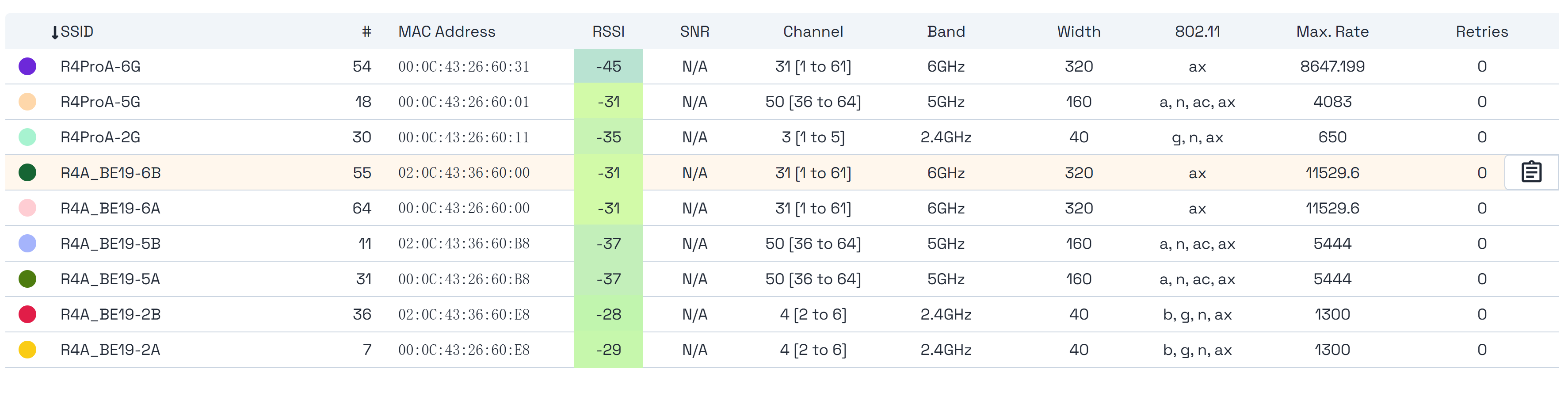
we have finished all hardware function test . The RSSI value of BE19 looks very good now. Next, it’s time to perform calibration and install a shielding case + heat sink.
4 Likes
Would you mind sharing the noise figures for clients connected to the BE19 as seen on the BE19 end? That was the root cause of range issues with the BE14.
Good to know the BE19 is getting EMI shielding!
@sinovoip RSSI without SNR values says nothing. If the clients are next to the router, the signal strength will be high, so the RSSI will be high, even when then SNR is also high.
Can you supply the SNR values and possibly also the distance between the client and router?
1 Like
can you maybe share some kind of roadmap. like, when exactly is calibration planned to begin and to finish? when is shielding case + heat sink expected? when is the first sale expected etc.?
Good evening @sinovoip bpi team leader, it also doesn’t show the WiFi 7 6G functionality.
At 320 Mbps, it clearly shows AX and not BE.
I see too many errors in that screenshot.
Regards
It’s a bit strange to show RSSI results without SNR and assuming there is no shielding on the card. And yes, why does AX show up when the value is 6G 320 MHz? It should be BE.
Sinovoip when do You plan to make this module available for sale?
Same question. When?
There usually is no exact date.
Why are you even considering buying it this early after release?
What has been shared so far is not sufficient evidence that BE19 fixes the problems people observed with BE14. A screenshot showing only RSSI does not validate range, stability, or RF quality.
-
RSSI without SNR/noise is meaningless High RSSI at short distance can still happen with a poor link (high retries, errors, MCS drops). The BE14 “range” reports look more like a noise / isolation / EMI issue than a simple “TX power” issue. Without SNR / noise floor (or at least serious proxies like retries/failed under load), no conclusion can be drawn.
-
Publish the minimum reproducible metrics (required) If you want the community to validate “BE19 fixes BE14”, you must provide at least:
Exact distance + obstacles (LOS / 1 wall / 2 walls; wall material: brick/concrete/drywall, etc.) Channel + bandwidth + TX power + regulatory domain/country (especially for 6 GHz) RSSI and SNR (or noise floor + RSSI) Actual PHY: Tx/Rx rates, MCS, NSS, EHT/HE mode, GI, retries, failed, packet error / loss Real throughput (iperf3 TCP and UDP) at 1 m / 5 m / 10 m / 1 wall / 2 walls Stability over time (30–60 min sustained load), temperature, and whether shielding/heatsink is installed Without these, results are anecdotal and not comparable.
- If you claim “6 GHz / 320 MHz”, why does it show AX instead of BE/EHT? That is a red flag. 6 GHz + 320 MHz is Wi‑Fi 7 (802.11be / EHT) territory. If the UI reports AX:
the client may not support EHT 320, EHT may not be enabled in driver/firmware/hostapd, the UI may be reporting incorrectly, or the test is not actually running at 320. Please clarify precisely:
whether EHT is enabled on the AP (driver + hostapd configuration), which client is used and whether it supports EHT 320 on 6 GHz, exact driver/firmware versions and the build tree used. 4) No “marketing screenshots”: we need repeatable results If there is no distance-based measurement table + the exact settings/logs/commands needed to reproduce it, then it is not evidence.
4 Likes
May I ask when it is expected to be available for sale?
Just a small note  :
:
If you had read the chat, you might have noticed that you’re not the first person who didn’t know that Banana Pi usually doesn’t publish specific release dates. 

Best regards
PS: Some people try again and again … 
1 Like
I’m more interested in the be19’s performance than the release date. Considering that the most detailed tests of this card, including signal-to-noise ratio, obstacles, and so on, haven’t been published yet, it makes me think the be19 is just as much garbage as the be14. I’m also interested in the release date because once it’s released, we’ll be able to evaluate the be19’s performance in real life. Conducting more detailed performance tests isn’t difficult, and if they’re not being shown, it means there’s something to hide.
2 Likes
The OpenWrt 25.12.3 release only proved to me that the BE14 is useless. It’s pure garbage. This card simply refuses to work with any OpenWrt 25, which tells me the community doesn’t care about this card. I’m really looking forward to the BE14 v2 or BE19 release to replace my current BE14. And I don’t need laptop WiFi cards like the MT7921 or MT7925 because they have limited functionality. I need a decent WiFi card with good performance and range. And it’s pointless to say that this is a development board and that operational stability isn’t guaranteed. At the time of purchase in 2024, there was no mention of a development board for the bpi-r4 or be14. This board only started to be widely distributed after complaints about problems with these devices started pouring in.
Many people’s misconception. OpenWrt’s slogan “wireless freedom” was never quite right to begin with. Vendors’ firmware (based on OpenWrt or not) always better tuned for wireless support & performance. The value of OpenWrt is its widespread support of many devices as “embedded systems” which some of them happen to have good working wireless drivers.
For your BE14, give a try to MediaTek’s firmware (which is based on recent OpenWrt releases): BPI-R4 OpenWrt Deploy System — 4GB/8GB, SD / eMMC / NVMe
I have to add one important point: The whole system is open source.
What you said is not wrong, but I think the reason is different:
It is because OpenWrt is open source.
More precisely, OpenWrt does not develop CPUs, Wi-Fi cards, or routers itself. It depends on hardware vendors, upstream Linux support, firmware availability, and community contributions. That is why support for new hardware can arrive late.
“Garbage” means that it does not work at all.
But you do not have a defective device, do you?
“… and if they’re not being shown, it means there’s something to hide.”
No, I would not go that far. But personally, I would not buy this board shortly after release.
I fully understand your anger, but choose your words carefully.
I understand the frustration, especially if the BE14 does not work reliably in your own setup. But I think the conclusion that “the community does not care about this card” is too simplistic.
The BE14 does not use a separate Banana Pi driver. On the open-source side, it uses the mt76 / mt7996 driver for MediaTek Wi-Fi 7 hardware.
The development history matters here. Generic MT7996 support was added to the open-source mt76 driver first, around 2022. That work came mainly from MediaTek engineers, especially Shayne Chen and other MediaTek contributors, and went through the Linux wireless / mt76 development process with maintainers such as Felix Fietkau involved.
The BE14 needed additional support because it uses the MT7996 2+3+3 variant. That BE14-specific work came later, around August/September 2024. Daniel Golle submitted the OpenWrt mt76 work for the 2+3+3 variant used by the BE14 / BE14000 module, with MediaTek involvement visible in the patch history.
So this was not simply a case of OpenWrt ignoring the card. BE14 support depended on several parts coming together: the open-source mt76 driver, MediaTek firmware, EEPROM data, device-tree integration, and OpenWrt packaging.
The hardware may still have real problems in practice, and I understand why you are angry if it does not work properly. Support arrived late and was complicated, but there was work from both MediaTek and the OpenWrt community.
The only reason I bought the R3 and R4 was that I wanted an all-in-one router with SFP. Unfortunately, the R3’s Wi-Fi coverage is limited compared to a commercial router.
But the past is the past, and times are changing. Turris, GL.iNet … and hopefully OpenWrt two.
In the end, you really have to think about what your actual needs are.